cheaptonersucks
-
Posts
251 -
Joined
-
Last visited
Content Type
Forums
News
20th
EduGeek EDIT Conference
Blogs
Everything posted by cheaptonersucks
-

Teacher has no spell check in O365
cheaptonersucks replied to cheaptonersucks's topic in Cloud Services
It is not affecting any other users at our school either. I have found so many odd issues with Windows 10 though that I never experienced with Windows 7! -
Teacher has no spell check in O365
cheaptonersucks replied to cheaptonersucks's topic in Cloud Services
I tried deleting the users profile, but it made no difference sadly. I am in a difficult position now as the school is closed for the summer holidays and I won’t see the user until September! -
Teacher has no spell check in O365
cheaptonersucks replied to cheaptonersucks's topic in Cloud Services
Hi, sadly not. I logged it with Microsoft and am currently trying everything that I have already tried! Have you had any progress? -
Hi All, The spell check has stopped working for one teacher in O365. I appreciate O365 doesn’t have any built in spell check and that the browsers carry out spell checking, but it has stopped working for her? We use Edge and Chrome and if I log in with the admin account spell checking works on the computer that it doesn’t work for the teacher?? I have checked the browser settings and the windows 10 spell check settings. It’s weird as spell checking works for me on the same computer as the teacher. She tested while logged in with the admin account on the same computer and spell checking doesn’t work for her?? Any ideas welcome! Thanks
-
Is it possible to move folders in Teams?
cheaptonersucks replied to cheaptonersucks's topic in Office Software
Thanks everyone, I wonder why you can’t just search for the Team that you want to move it to? -
Thanks, the exams officer said that the error mentioned the ‘Firewall’ but sadly I didn’t get to see the message. We find quite a lot of video conferencing apps don’t work through the Kcom firewall!!! We are an LEA school so cannot change the broadband! GoToWebinar has never worked here either, which lots of staff have had webinars through.
-
Hi All The exams officer couldn’t take part in a webinar that used Blackboard. I could only find this information on their website and 80 and 443 are open. Not sure if 2187 is open. https://blackboard.secure.force.com/apex/publickbarticleview?id=kA770000000CbBI Has anyone used Blackboard for webinars and if so what did you unblock to get it working please? Thanks in advance.
-
Hi All, Has anyone got a script to bulk create unified groups in O365 for all the classes for Teams? We are looking at creating groups for over 700 classes in Teams, so that the teaching staff can just use a group to add the students, to save them adding all of the students manually in September. Thanks
-
Is it possible to move folders in Teams?
cheaptonersucks replied to cheaptonersucks's topic in Office Software
Hi Synaesthesia, One of the assistant heads tried to move a Teams folder in Sharepoint, but not all of his Teams are available in the “move to” list? Just wondered if you know why that might be please? I wondered if you can only move folders to Teams that you are the owner of?? Thanks in advance. -
Is it possible to move folders in Teams?
cheaptonersucks replied to cheaptonersucks's topic in Office Software
Ah...ok. Thanks for letting me know. I was just confused, as to why it isn’t possible to move folders within Teams itself. -
Hi, does anyone know if it’s possible to move folders in Teams, as it only seems possible to move the individual contents of folders? It just seems daft if folders cannot be moved, as the teaching staff want to move/copy entire folders. Thanks
-
Thanks everyone, someone recommended Salamander, but the roll over option with SDS sounds interesting.
-
Hi We only setup Teams for the first time during the pandemic last August, and we are not sure what is the best way to ‘roll over’ all of the current Teams in September? We use SIMS for our MIS, and apparently the class codes stay the same (if that makes sense). Just wondered how other schools deal with the year groups all moving up, and of course the new Year 7’s. We did think about the teaching staff just deleting the students from their Teams, and then just adding the new students at the start of the academic year, but that might not be welcome! Thanks
-
Pygame installation blocked by proxy server
cheaptonersucks replied to cheaptonersucks's topic in Educational Software
Thanks to everyone for the suggestions. I will try offering replit.com initially, although I recall that the head of computing used to use this site some time ago. I don’t know why he stopped using it, but I will recommend it anyway. I don’t know why there isn’t a Python installer that has Pygame already packaged, although not having much knowledge of how add ons for Python work doesn’t help! Does anyone know exactly which version of Pygame I require for Python 3.7 please? -
Hello I have been asked to install Pygame by the head of computing. I have never installed Pygame previously so I looked online and it looked pretty straight forward. I entered the command pip install Pygame at the command prompt, as the tutorial advised but the installation failed. The error implied that the ‘tunnel connection failed: 407 Proxy Authorisation Required’. The installation obviously can’t authenticate with the school proxy server, but I do not know how to bypass this? I did look if there are any MSI’s for Pygame and there is a downloads page on the Pygame site, but it’s not apparent as to which download that I require? The version of Python installed in school is 3.7.4 if that’s any help? Just wondered if anyone knows of a way of installing the correct version of Pygame for Python 3.7.4 without using the command line as I can’t bypass the proxy? Thanks!
-
I created the shortcut that you mentioned dsmith8, but it didn’t update Teams when I ran it?? It’s almost like there is a policy or some permission preventing users from updating Teams in the tenant somewhere? Is there a policy setting that can prevent users from updating Teams in the tenant?
-
Thanks dsmith8, I created a shortcut like you mentioned, but it didn’t update Teams? Is there a way of restricting users from updating Teams in the Tenant somewhere, as this is what it seems like??
-
Thanks dsmith8 that’s a relief as I normally get so much negativity if I mention the school still use roaming profiles.
-
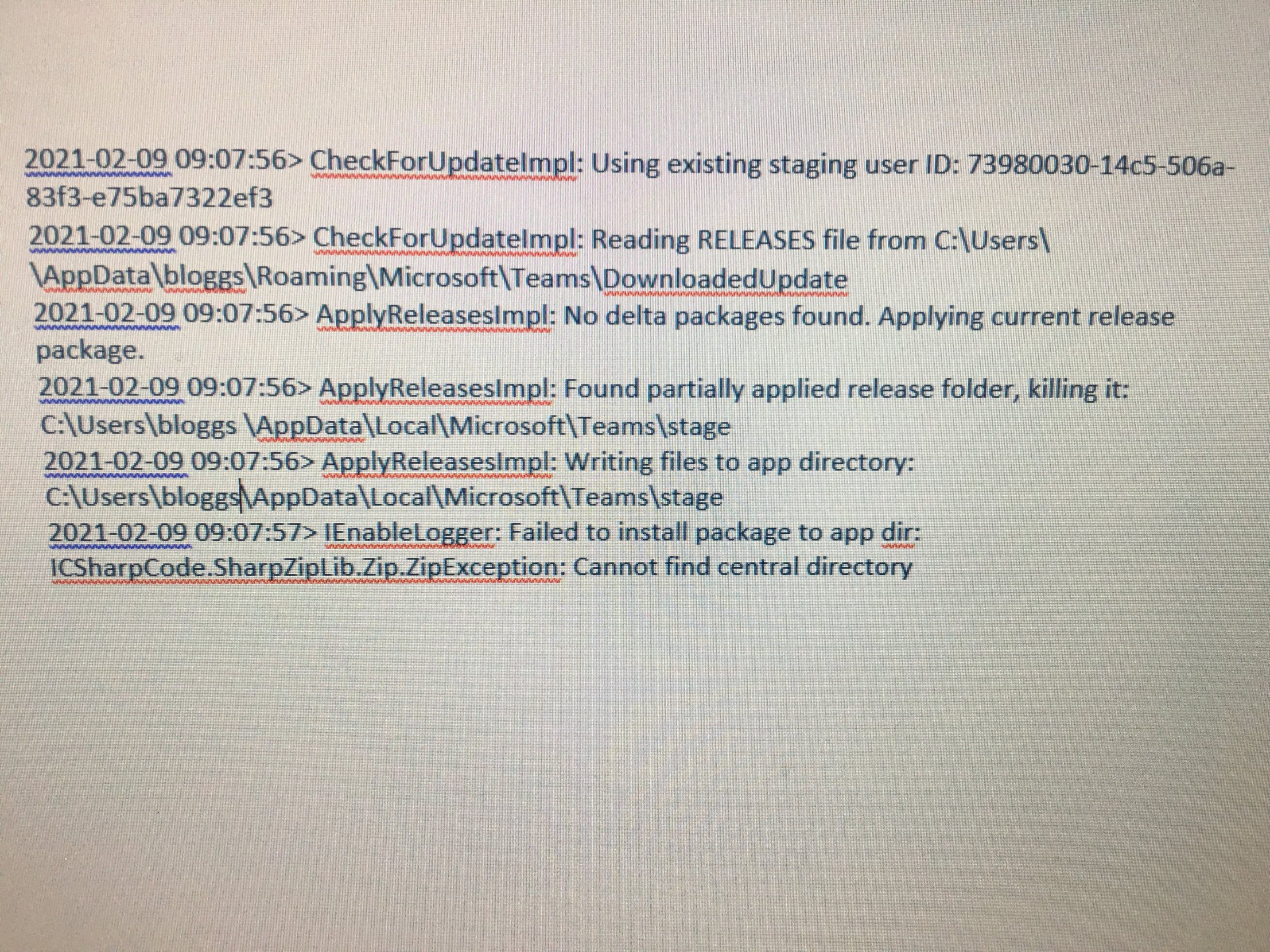
Thanks smarties11, I just checked my download folder and there are no update packages in there for Teams? I don’t think that Teams is getting the update packages, as I checked the ‘squirrel’ log for Teams on my machine and it’s ‘reading the releases file’ but then reporting that ‘No delta packages found’??

-
Thanks dsmith8, I will try creating a shortcut like you mentioned. I was starting to wonder that it might be due to the fact that we are still using roaming profiles.
-
Thanks 3s-gtech. We don’t use AppLocker or SRP, but I will check the path you mentioned is writable. We do still use roaming profiles, so I did wonder if that is what is causing this issue!
-
What can I do to the updater resolve the issue?
-
Thanks, could that be what is causing the problem then?
-
Thanks for explaining that, as I have only heard of Applocker. Sorry to sound like a newb, but this separate program to Teams that you refer to as the updater, is that part of O365? Can we access it? That makes sense regarding the standard shortcut referencing the updater first. As far as I am aware PDQ that we use to deploy software installs software as if it had been installed on the local machine. But I stand corrected if that’s not the case. As staff cannot update Teams inside or outside of school, I assumed that it’s a permissions or policy of some sort that’s causing these issues. Where is this updater located please?
-
Thanks for replying. The Network manager uses PDQ to download and deploy software such as the Teams client. Sorry to ask as I am not that familiar with Teams, but what do you mean by allowed? Is there a permission setting in Teams where you can allow or disallow updating and viewing which version is installed? It’s not filtering as staff cannot view the version or update at home either. Sorry, not sure what SRP is but we are not running AppLocker in school.