cheaptonersucks
-
Posts
251 -
Joined
-
Last visited
Content Type
Forums
News
20th
EduGeek EDIT Conference
Blogs
Everything posted by cheaptonersucks
-
Thanks Mark182! I wasn't aware that SIMS sync's to one drive! 😂 I have never seen any staff copying any files to one drive. Sorry if I am getting the wrong end of the stick! 😂
-
Hi Sally, Thank you so much for posting a link to an article. Unfortunately, although I am a school IT Technician I do not have a login to access the customer support portal. I have attempted to register but am not aware of the registration code. Is there a way that you can post the article or at least any potential solutions on here?
-
Hi, Does anyone know what the SIMS error code 1361-1202-1600 'SIMS Processes Document Management' threw an exception means and if there is a fix for it please?

-
Sorry for the delay in replying. I am not importing any calendar, just creating a new calendar that will need to be populated so that I can be shared with all staff.
-
The SIMS calendar seems to be importing into Outlook for other staff. Just wondered what I need to check?
-
Hi, I sadly don't have much info at the moment, just that the SIMS calendar is not importing into Outlook calendar for two staff. What could I look at without more info, as I am not familiar with SIMS calendar export import issues? Thanks
-
Hi I created a shared calendar about 15 years ago in on prem exchange and can't remember how I did it. I seem to recall that I created a shared mailbox then added a calendar to the shared mailbox. I just need to create a shared calendar in M365 so that all staff can see a shared calendar and only two or three people having permissions to edit the calendar. I just want users to be able to see the new shared calendar under 'My calendar' within Outlook 365 and also using the outlook desktop client. Thanks!
-

PowerShell Script for deleting user profiles
cheaptonersucks replied to cheaptonersucks's topic in Scripts
Thanks Chazzy2501. the IT manager said that he has tried to use GPO for deleting profiles but he said that there were issues. I am not sure exactly what didn't work fully though. I know what you mean about massive profiles. I saw a Y8 profile a while ago which was just over 10GB!!!! 😱 -
PowerShell Script for deleting user profiles
cheaptonersucks replied to cheaptonersucks's topic in Scripts
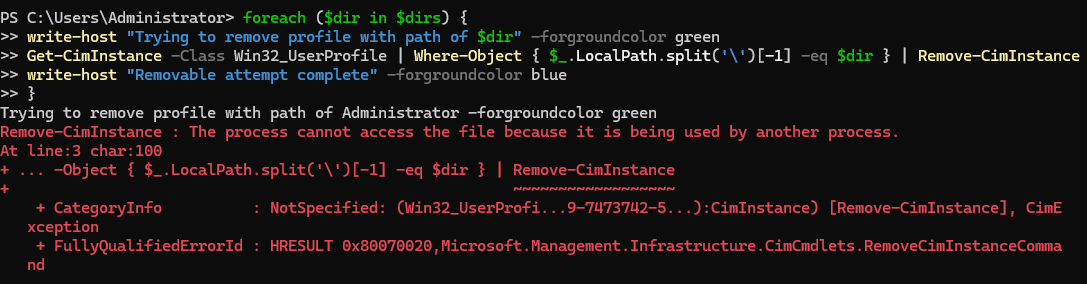
Every PowerShell user deletion script that I have ever tried to run error's with red text!! 🤣 What am I doing wrong!? I always reboot the machine and run the scrips as Admin. I just tried running your PS script Machy and here is s screen shot of the errors after I ran it. It's driving me nuts as every PS script that I run outputs red text which I assume are errors? I just need a PS script that deletes all traces of the user profile including registry entries and user profile folder on the c drive... That don't error with red text! 😂
-
PowerShell Script for deleting user profiles
cheaptonersucks replied to cheaptonersucks's topic in Scripts
Thanks for your responses! Bit snowed under as I am the only IT tech in large secondary, so apologies for the delay in replying! I am pretty new to PowerShell and every script I have tested so far, I get red output when I run them!? 🤣 -
Hi, Since migrating from windows 7 to 10 and now 11 we have noticed that local profile sizes seem to have increased! More precisely the size of user profiles on student machines seem to have increased compared to windows 7. We often seem to be deleting profiles to obtain some space on the C drive! I have edited the attached PowerShell script which deletes the user profiles from the C drive and from the profile list within the advanced tab in system properties. I just don't know why the output when the script is running displays the first line that the user profile is being deleted and then the following line displays 'WARNING: Failed to delete user profile for' then displays the users name?? The IT Manager has tried using the GPO that deletes user profiles but he said that it didn't work fully. He has also tested Delprof2 but it apparently didn't fully remove the profiles. thanks in advance! 😁 Use Profile Deletion Script.ps
-
How to block an individual email address in M365 tenant?
cheaptonersucks replied to cheaptonersucks's topic in Cloud Services
I thought that I could only block domains with mail flow rules but I noticed that it is possible to block individual email addresses. Which is what I need to do. -
How to block an individual email address in M365 tenant?
cheaptonersucks replied to cheaptonersucks's topic in Cloud Services
Thanks guys, I will create a mail flow rule and just add the specific email address. -
How to block an individual email address in M365 tenant?
cheaptonersucks replied to cheaptonersucks's topic in Cloud Services
Thanks, does your way guarantee that the email doesn't get through? -
How to block an individual email address in M365 tenant?
cheaptonersucks replied to cheaptonersucks's topic in Cloud Services
Thanks DalekSec, is there a way to block an individual email, maybe in mail flow? -
Hi, I have found how to block an entire domain but how do I block an individual email address (Gmail) and not the entire domain in the M365 tenant please? Thanks! ☺️
-
Broken SIMS report (won't open in word)
cheaptonersucks replied to cheaptonersucks's topic in MIS Systems
Thanks 3s-gtech!! I will have a look at that web link. -
Broken SIMS report (won't open in word)
cheaptonersucks replied to cheaptonersucks's topic in MIS Systems
I can find 'Line: 15402' in an XML validator but the columns are not listed so how do I find 'Column 146779'? -
Broken SIMS report (won't open in word)
cheaptonersucks replied to cheaptonersucks's topic in MIS Systems
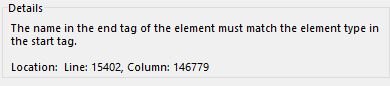
Thanks for replying bknaggs. Its a report that's only been generated very recently. I tried opening the report in Word 2016 but it still won't open sadly. I have also tried Word 365. When I attempt to open the SIMS report in word 2016, the error shown in the uploaded image.
-
Broken SIMS report (won't open in word)
cheaptonersucks replied to cheaptonersucks's topic in MIS Systems
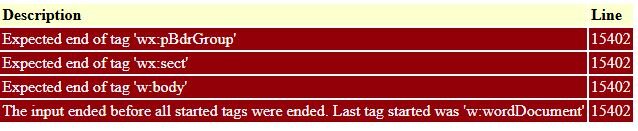
This is the first one that is highlighted as missing 'end tags' but I have searched through all and there are starting and ending tags. It is odd that there are 35 though!
-
Broken SIMS report (won't open in word)
cheaptonersucks replied to cheaptonersucks's topic in MIS Systems
Is there any software that will show me where to add the missing 'end' tags so that I can just add them? I have looked though the XML but cannot see any missing end tags!! It's driving me crazy!! -
Broken SIMS report (won't open in word)
cheaptonersucks replied to cheaptonersucks's topic in MIS Systems
Thank you for responding so quickly 3s-gtech. It's a very large report and I would really like to show you the XML report but it contains sensitive data. Is there any way that I could send or upload it confidentially? -
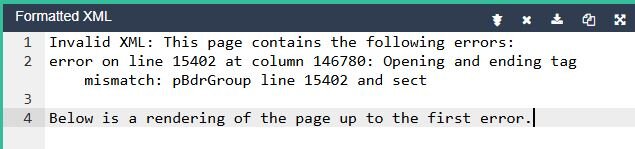
Hi, I have been asked to look at a SIMS XML report that is broken! I have opened the SIMS report in Dreamweaver and have validated the XML file and according to DW there are some 'expected end of tags'! I have checked the lines where apparently the closing tags are missing as highlighted by DW but the relevant closing tags seem to be there?? I am not that familiar with broken SIMS reports and wondered if anyone can shed some light as the closing tags are there?? The opening and closing tags are in the same case. It's driving me nuts as I have looked at the XML file so many times and I can't see any missing 'ending' tags!!! 🤪 This is the output from Dreamweaver I also pasted the report into an online XML validator and this was the output. Thanks for any advice!
-
Thank you, I will have a look at that script. I saw a Year 7 profile the other day which was 9GB!! This was never an issue with windows 7!
-
Yes psydii I have seen Year 8 students with 7-10GB profiles since we migrated to windows 10! Microsoft have clearly designed windows 10 so that it stuffs as much as possible inside user profiles! may I ask how you clean up profiles? I have tried various powershell scripts but none of the ones that I have found delete all traces of the local user profile from registry or the user folder on the C drive. Do you or anyone else have a script that does all of that?