NB9457
-
Posts
1,082 -
Joined
-
Last visited
Content Type
Forums
News
20th
EduGeek EDIT Conference
Blogs
Everything posted by NB9457
-
How are you upgrading your DC? In place upgrade is not recommended, whereas adding a secondary DC, then transferring roles to this is the cleanest and easiest way and should give no grief. Should never really be a need to start again.
-

Irn Bru panic as fans stockpile before recipe change
NB9457 replied to DalekSec's topic in General Chat
I liked Virgin Cola -
Touchscreen Monitor to replace Promethean boards
NB9457 replied to HCC's topic in AV and Multimedia Related
Used the BenQ boards in the past, seem solid enough, had one break and they fixed it relatively trouble free. Some good discounts can be had too if you buy a few. https://rocheav.co.uk/rp653 With the Android comment, I can't really see how it'd affect the functionality of anything, just don't use that feature? -
How best to set wallpaper for log in screen on Windows 10?
NB9457 replied to talksr's topic in Windows 10
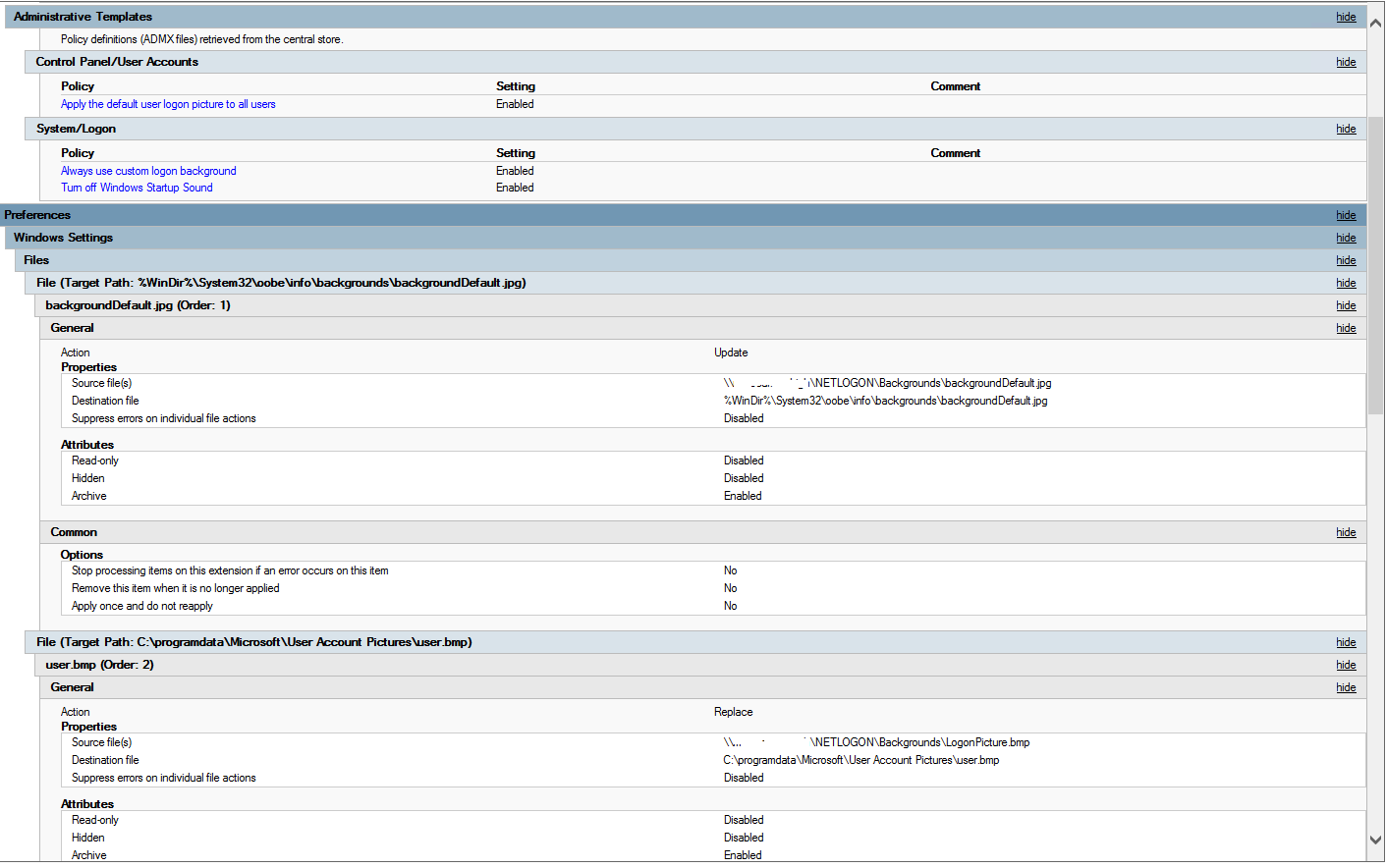
Our Win7 background policy is as below. Think it worked on 10 when I tested it, though I don't fully remember! Edit: This is for the user profile pic and logon background.
-
Have at look at this using WoL https://www.howtogeek.com/192642/how-to-remotely-turn-on-your-pc-over-the-internet/
-
Dead spot top left of brand new smartboard, resolution issue.
NB9457 replied to bmlodge's topic in Windows 10
The EB-x20 is natively 4:3 (XGA) Have you ran the SMART diagnostic tools? We had a similar issue and it turns out one of the cameras was dud. Just curiosity too, how come you're fitting new IWBs as opposed to touchscreens? -
Thirdst*
-
Another for Papercut. Their education pricing is really good too.
-
How much free storage is there on the host? Could it be this when it's creating snapshots?
-
Well, is 4 hour really necessary? We can live with next day, again, given the costs savings and the minimal impact of losing one host. You'd have to fail-over some services anyway regardless, so whether they stay running on a different host for 4 or 24 hours doesn't seem a huge problem. Back in the days of tin servers, I get the 4 hour things, but the beauty of VMs is, for me, in this environment with a good plan, you can just throw them here there and everywhere on any spare tin you have if you need to.
-
Plus the cost savings too, it does become harder to justify a SAN aha. Be interesting to know what you go with though, keep us posted! Are there any brands you've been looking at in particular with regards to servers?
-
Windows Server not seeing all of the TB disk
NB9457 replied to 2ilent8cho's topic in Windows Server 2008 R2
I was going to suggest that, misread the original post where he said 'like this one', I thought it was that one, which supports 6TB! haha Yeah, as Norphy said, it'll most likely be the dock, I've had the same issue in the past. -
Windows Server not seeing all of the TB disk
NB9457 replied to 2ilent8cho's topic in Windows Server 2008 R2
Tried using diskpart to delete the partitions, clean, then try again from scratch? -
Windows Server not seeing all of the TB disk
NB9457 replied to 2ilent8cho's topic in Windows Server 2008 R2
How is the drive connected? -
Think at Broadberyy, 2x8 Core, 128GB RAM, redundant PSU and 8x960GB SSDs comes in at around £6600. Personally compared with the big names, it seems a decent price.
-
Depends whether we choose to supply our own drives. Kingston DC400 960GB drives are around £280exVAT each. If we went with the drives from the system builder, it puts us almost bang on £20k. We are currently looking at Broadberry as a supplier If refurbs aren't an issue, you could get drives for £6700 and servers for about £5000 and that would be an amazingly fast and cost effective solution.
-
It's still in planning stages yet, but most of it worked out. We are intending to use DPM for VM backup, it's cheap, used it before and it's pretty good to be honest. VEEAM is extremely good, if you can afford it, I'd recommend it. RAID we are looking at 8x960GB Enterprise Grade SSDs (either Samsung or Kingston). I was thinking RAID10 because I'm old school but RAID5 could well be an option. As I said, we would re-purpose an old server to replica file services and SIMS, these are pretty much the core components to us and as long as these stay running, as far as staff are concerned, so is the network. So if a host had Student shares, WSUS, Classroom management, SCCM, Printers and Catering on and it failed, the Student Shares would be replicated, so flick a switch and it'll just appear as a hiccup. Then as we are using a VM infrastructure, we go to DPM, prioritise what needs to come back first, so maybe Catering then Printers, we simply copy the VHDs to another host and spin them up. As the VHDs for these services are no more than 60/80GB it takes only a few minutes to transfer the VHDs across the network. Broken host is then fixed within a day, services begin to get restored to it when it's back online (reverse replication and copy VHDs back onto it) and within 24-48hrs we are fully recovered and all staff will have noticed is maybe a few minute blip on the student shares and maybe 20 minutes without printers. When you work out the money saved, the minor impact if a host fails and the likeliness of it even happening, it's something worth doing, especially seeing as you're not only simplifying the network, but getting better speeds due to faster storage etc. To be honest, it's more about having a good disaster plan then having the latest and greatest. We plan for every eventuality and what action we'd take in a given scenario, whether it be a fire or a drive failure. Heck, before I started, the place I'm at lost the SAN, as unlikely and as apparently redundant they are, it happened. Happened to a Uni in London too, lost pretty much everything.
-
I've been looking at SANs too again. I think it's going to end up being 3 beefy hosts, local storage and local VMs with an old server acting as a replica for file/core services. It's come to the point now where I don't think our SAN is necessary. For well under £20k, I'm looking at 3 hosts, minimum 128GB RAM each, 2x8 Core Xeons and 8x960GB SSDs each. Then carefully split all roles across the three and as mentioned, a replica and a VM backup system, that's a pretty good level of redundancy, more simplicity and much more speed given the SSD based storage. Scenario: We lose a host, we fail back the file services that server was hosting to the replica, if it had a DC on it, there's another anyway. WSUS, SCCM, Antivirus Control, Foldr, things like that we can live without temporarily and these services being offline won't impact the end user. We have a VM backup, beefy hosts, if there's any VM it was hosting we need, we spin it up on another host. Couple of minutes downtime perhaps whilst we fail back services? Cost wise I think it's something the school can live with as we will probably save £10k by not having a SAN and touch wood, I've not had a server actually die on me yet and in the event it does happen, we have a plan. I suppose, it's more of case of give the school the choice, costs, impacts and how the system works and the pros and cons of each and the potential impact in a disaster scenario. At the end of the day, it's impossible to guarantee 100% uptime.
-
Anyone ever used AVPartsmaster for installs
NB9457 replied to DavR's topic in AV and Multimedia Related
DIY? It's pretty easy to do most of the time -
Clash - Lock The Taskbar, is a personal favourite
-
It's a tough one. Now Chromebooks have the Android store, if you get a touch screen, it's a bit of both worlds. The one thing I will add for iPads is for the very young ones, they're common place in the home, so a lot of the little ones will already know how to use them, plus there's no logging in, you can get robust cases for when they get dropped, teachers know how to use them, they'll probably take a little less time to start a lesson with. How many are you looking to deploy? I'd maybe look at a few iPads and Chromebooks, as the higher year (maybe Y4, Y5 and Y6) will be using them more for word processing and more computer like tasks I'd have thought, so Chromebooks would be beneficial here, whereas iPads can be much more engaging for tots and although you can get the same or similar apps for android, personally it seems the Apple Apps just work a lot better (I mean, the logic is there are a lot less devices the apps have to work on!).
-
It's really easy once you know how. https://mizitechinfo.wordpress.com/2013/08/19/step-by-step-installing-configuring-wsus-in-server-2012-r2/ Plus Google is easy too
-
What info does gpresult give?
-
Do you have the 'Wait for network at logon' GPO applied for all PCs?
-
Don't Buy Sony VPL DX120/121/122/220/221 Projectors
NB9457 replied to waltflanagan's topic in Bad Experiences
Personal favourite are Epson, but Hitachi have some deals you honestly can't say no to, to the point where I went with them over Epson. So far, I'm pretty happy.