-
Posts
30 -
Joined
-
Last visited
Content Type
Forums
News
20th
EduGeek EDIT Conference
Blogs
Everything posted by defrostie
-
Thanks @DarkMaster - I've now seen that ESS have posted a note about it on their support page - https://customer.support-ess.com/csm?id=kb_article_view&sysparm_article=KB0054951 Looks like our SIMS clients got ahead of themsleves, which is why they've issued a new patch to prevent it happening for others.
-
Suffolk CC: "Errors relating to the early years panel, ie error 3140 as attached.The fileset is expecting a value of 0 to 15 in an area where the school is not expected to put a value if the child is not using extended or expanded hours for nursery. Thus, generating an error, we have spoken with ESS and they are now working on a replacement fileset 2702. As of yet, we are unable to provide a timeline for the release of this replacement fileset."
-
Thanks @Planehazza, I think you might be right that the patch has applied on the clients, but not the database. I'll have to take a look tonight and re-push the update.
-
Strange one I've not seen before, if anyone can shed any light on it we'd be grateful! Tried doing a dummy run of the Summer 2024 CENSUS. SIMS is on version 7.216.22.2 (includes Patch 2) and fileset is 2701. When choosing 'New' we are getting error: Cannot find table 12

-
We bought a class set of these over the summer. Excellent laptops, well built and easy to repair (not that we've need to... yet). Only issue we had was when imaging them through PXE. Had some weird driver issues, but I'm hoping this was because they are pretty new devices. There has already been one set of new drivers since we did it, so it might not be a problem now.
-
Just checking, but the policy needs to be 'Disabled' not 'Enabled':
-
Problem sorted for me at least - I tried installing SOLUS3 database on a SQL Server 2016 installation, rather than on 2019, and it worked. Didn't realise SOLUS3 (3.12.59.5) isn't yet compatible with SQL Server 2019 yet.
-
Thank you @FishCustard and co! It was indeed a permissions issue on the file beginning '1728ba'. All now working correctly... Just in time for the census. Much appreciated
-
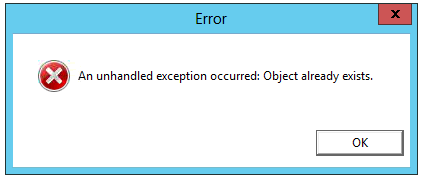
I am having some trouble with SOLUS 3 throwing the following error: "Object already exists". The first time I encountered this was when I was trying to deploy the latest SIMS update (above image), but after investigating, the error message comes up in a number of other places in within SOLUS (below image). Such as just clicking on 'Configure Workstations' or trying to edit the database targets. Unfortunately, this is a school I have only recently started supporting and I haven't come across this error anywhere else! Any suggestions would be appreciated.
-
Yeah, I've had the blutack one before! I'm thinking there must be a fault on the motherboard.
-
Nope, no cable (not the original nor an identical one) will charge or power the laptop. The laptop works fine just using battery power (battery charged up in a different laptop).
-
This is a strange one. Issue: Power cable does not seem to be sending any power to the laptop. So it doesn't charge the battery, nor does it allow the laptop to be powered on with the battery removed. To confirm all this, I have used identical batteries and power cables, with the same thing happening. The laptop is fully operationally and works fine with a charged up battery (I charged the battery using another laptop). The 'charge/power' LED indicator light on the front also doesn't light up... Which backs up the theory that there is no power being received by the laptop. I have swapped the power jack, which connects from the charger to the motherboard. I was 99% certain that this would fix the issue, but needless to say it hasn't. Has anyone ever come across a similar issue? The laptop is a Toshiba Sat Pro R50.
-

[sims] FMSConnect.ini reverting back to old SQL Server
defrostie replied to defrostie's topic in MIS Systems
Thank you @Arthur and @mavhc for your suggestions regarding VirtualStore. I couldn't see any VirtualStore folders on this particular machine, but it seems to have helped @mrwoberts, which is good. I think the issue is now solved. The user has been able to log in successfully, but I'm not completely satisfied that it is 100% sorted. After diving into the computers program files it turned out that the user had two separate instances of FMS installed. One in 'Program Files' and the other in 'Program Files (x86)'. After changing both the 'FMSConnect.ini' files and making sure that Solus3 is set to 'Overwrite' and not 'Update' the .ini config files, things are now working. I am not sure whether it was the Solus3 change or making sure both .ini files were set correctly that cured it, but at least it is working for the time being. Thank you all for your help with this - I hope that this will stick and not revert back like what was happening before! -
[sims] FMSConnect.ini reverting back to old SQL Server
defrostie replied to defrostie's topic in MIS Systems
The FMSConnect.ini file that is in G\SOLUS3\UpdateRepository is correct and doesn't change. SOLUS3 3 is set to 'Update' the clients based on the info in that file. When I checked the file on the local machine, it has the correct details in the C\Program Files (x86)\SIMS\FMSSQL initially, but after attempting to sign in to FMS it will revert back to the previous SQL Server 2008 details. There must be an auto-config file or something doing this... Can't work this one out. -
I have just performed an upgrade from SQL Server 2008 to SQL Server 2014. It went relatively smoothly. SIMS is working correctly, but FMS is not. I have set in Solus3 for the Connect.ini and FMSConnect.ini files to point to the new SERVER\SIMS2014 database instance, but FMS keeps changing the FMSConnect.ini as soon as you try and sign in. On one of the machines I have even manually changed the FMSConnect.ini file to point to the new SQL Server, but it will change back as soon as you try and log into FMS, giving this error: "Invalid user ID/Password or Database Name". Is there an additional step I was supposed to take for FMS? As the SIMS Connect.ini is working fine.
-
Thank you for this @denzal2k4! I have just started working with a new school. First job was the Summer upgrade... FMS upgraded fine, SIMS kept giving me the “Tolerance not met” error. After checking their SQL version, they are still running 2008. Now I need to explore how to upgrade from 2008, as it is something I’ve not had to do before! Any advice?
-
I work across a number of Primary Schools, each with a different volume licencing agreements. Are there any technical differences between an ISO downloaded from School A's VLSC to an ISO downloaded from School B's VLSC? The reason I ask, is that I'd like to create a USB with the latest Windows 10 build and want to know whether I need to make a different USB for each school. Of course, I will be using the correct licence keys for each different school. But I don't want to be in the situation where a MAK or KMS key doesn't activate because it isn't using the correct school's ISO. Any insights on this would be appreciated!
-
Smart Notebook and Sassoon Primary font
defrostie replied to gavins38's topic in Educational Software
Sassoon Primary will work in Notebook BUT it will not be joined. It will just display the regular non-joined Sassoon. Joined I think only works in Word, when ‘Contextual Alternatives’ is enabled. -
@InspireICT Did you try the above? I had this issue at a Suffolk school using the LEA's proxy broadband. The above method allows you to put in the proxy details BEFORE setting up the iPad. See here for more info - https://support.apple.com/en-gb/HT202693
-
Office 365 for EDU not automatically being verified
defrostie replied to snagrat's topic in Cloud Services
Hi @snagrat, how did you resolve this? Like yourself, I have set up a number of Office 365 for Edu tenants for schools and not had this issue. They were all back when we had the old Admin Portal, is that the issue? The '.sch.uk' domain name has been verified, but we are still on the trial version. -
Thanks @speckytecky. That's exactly what I've just done - They got back to me, by phone, within a hour. Impressive. It was an Exchange Admin setting that had been changed following an update. This was the solution: In Office 365 > Exchange Admin Center, navigate to 'Permissions' and then 'Outlook Web App policies'. Edit the default policy (OwaMailboxPolicy-Default) and select 'Features'. In this section there is a 'More Options...' button. Within here the item that needs to be be ticked is 'Inbox Rules'. Once this is ticked, all users will be able to create rules through Office 365 - Hopefully this is useful to someone else that might be having a similar problem.
- 3 replies
-
- 2
-

-
- create rule
- (and 3 more)
-
Within the Office 365 Web App for Mail there is an option to create mailbox rules e.g. mark email from ? as read and move to ? folder. When I chose the option 'Create Rule' from the menu, it displays "The option you chose isn't available". Is there an Admin setting I've turned off? Or just a bug? I have tried other users within the organisation, and the same thing happens.
-
Apple School Manager - Unable to set up VPP
defrostie replied to defrostie's topic in Cloud Services
I have logged onto Apple School Manager this morning... And it is working!
-
Apple School Manager - Unable to set up VPP
defrostie replied to defrostie's topic in Cloud Services
Ended up ringing Apple this afternoon... After a 45 minute phone call and speaking to 4 different people, the only answer I got was that there is an issue with the website (which we already knew) and he asked me to send a screenshot! How did you get on? I read in another thread, you'd been on the phone to them also. -
What are you using the .bat file for? You should be able to do what you require, all through the GPO. Have you run 'rsop.msc' to see whether the GPO is applying successfully?