-
Posts
2,107 -
Joined
-
Last visited
Content Type
Forums
News
20th
EduGeek EDIT Conference
Blogs
Everything posted by Jaan
-
Anybody having issues with sage over the past few days just showing a splash screen and closing?
-
 Update: As suspected, the contractors that we're assigned the task of installing the optical cable, decided to patch it in before were removed that existing aggregated copper links. The new switches that went in at the same time, also didn't have rstp enabled.
 -
Yeah we had a 3rd party wiring some CCTV.... recon it will be that.... yay
-
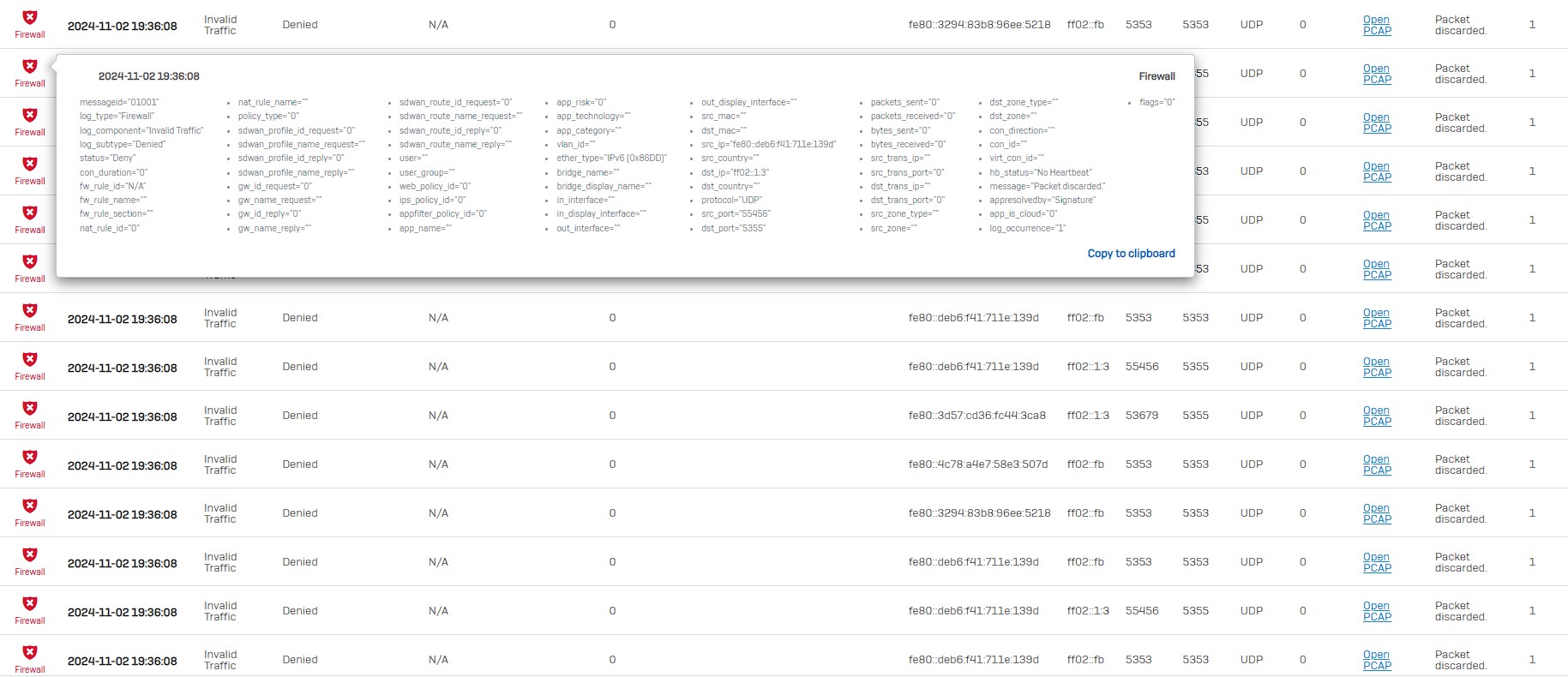
Hi all, Started to have this issue the last day in the office 30mins before i left for the weekend. Network became slow and things disconnecting. Basically our network has been going very slow and i have lots of this in the firewall..... like non stop. Am i right to believe fe80: is internally originated? We have had some 3rd party work on the site. any ideas? We don't have any ipv6 scopes defined in dhcp on the XGS or have any ipv6 addresses on any of our interfaces. What's the best cause of action here to find the issue? I'm able to view my firewall via central just fine, and can see and access logs and settings. VPN and RDP is a no go as i keep getting disconnected. It's like a ddos attack. thoughts? can't wait for monday!

-
Thats easy! it will be PoE++++
-
Hi all, I just discovered that canva can integrate into digital signage with "apps". Anybody doing this? Which (free preferably) app are you using. Our display are internet enabled and we use Google if that makes any difference. We currently use Google slides on our displays. Cheers
-
We have PDQ here.... and we have the option to use Impero also.
-
Windows 11 Gpo settings and REG settings that might be useful
Jaan replied to Jaan's topic in Windows 11
i've been deleting profiles to make sure. Something is testing me lol -
We use a 3 nodes s2d cluster with local storage with a ssd cache layer. We then use Veeam to back it all up. All managed with Microsoft cluster manager and hyper-v
-
Windows 11 Gpo settings and REG settings that might be useful
Jaan replied to Jaan's topic in Windows 11
Yeah, i must have a conflicting GPO somewhere -
Windows 11 Gpo settings and REG settings that might be useful
Jaan replied to Jaan's topic in Windows 11
hmmm... i removed my start menu redirection, any pinning of the taskbar and allowed right click on the start menu....... i still can't right click the start menu...... even logged in as a local admin -
Windows 11 Gpo settings and REG settings that might be useful
Jaan replied to Jaan's topic in Windows 11
@jthompson Do you have a redirected start menu? cheers -
yeah it's on all our machines
-
Canva and Affinity are free now to education
-
I've just sent this to our staff: Hi everyone, I wanted to inform you that Microsoft is discontinuing Publisher in the upcoming Office 2024 release. As an alternative, we encourage you to explore Canva and Affinity, which are readily available to both staff and students. These tools offer versatile features and can be used to create various types of content. If you have any teaching resources currently stored in Publisher, now might be a good time to migrate them to a different platform. We anticipate transitioning to the next version of Office for September 2025. Any remaining Publisher formatted documents will become unusable. Regards IT Support
-
Windows 11 Gpo settings and REG settings that might be useful
Jaan replied to Jaan's topic in Windows 11
I'm gonna needs a coffee and a day away from this before i even attempt to get my head around that!...... it shouldn't be this difficult. -
Windows 11 Gpo settings and REG settings that might be useful
Jaan replied to Jaan's topic in Windows 11
I thought that maybe i had to add a custom start menu layout as documented here: https://learn.microsoft.com/en-us/windows/configuration/start/layout?tabs=intune-10%2Cintune-11&pivots=windows-11 However it suggests that the pins defined in the file are always reapplied at login, removing any pins the user has applied; User experience After the settings are applied, sign in to the device. The Start layout that you configured is applied to the Start menu. When you configure the Start layout with policy settings, you overwrite the entire layout. Users can change the order of the pinned elements, pin, or unpin items. When a user signs in again, the Start layout specified in the policy setting is reapplied, without retaining any user changes. EDIT: think i'd be happy with this section just showing recently opened apps and docs..... but i can't seem to get that working also: i'm at this point at the mo:
-
Windows 11 Gpo settings and REG settings that might be useful
Jaan replied to Jaan's topic in Windows 11
if you remove the .xml from pining the taskbar, are you then able to pin to the start menu? i've not been able to test this just yet -
Windows 11 Gpo settings and REG settings that might be useful
Jaan replied to Jaan's topic in Windows 11
LOL i'm just looking at this as i type! -
Windows 11 Gpo settings and REG settings that might be useful
Jaan replied to Jaan's topic in Windows 11
Just checking sysprep...... 11 is auto enabling bitlocker on my test machine. As such it can't complete sysprep and gives an error referencing bitlocker being enabled.: running this to disable & decrypt bitlocker ; manage-bde -off C: will allow you to run and finalise sysprep -
Windows 11 Gpo settings and REG settings that might be useful
Jaan replied to Jaan's topic in Windows 11
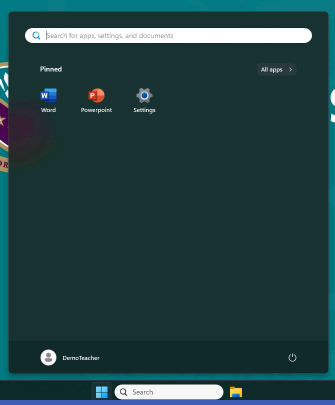
figured this out. I getting different behaviour between 10 ltsc and 11 ltsc with regards to this GPO. On 10 you can't right click the taskbar but can right click a program you have open and click "pin" in 11 it doesn't even allow right click and "pin" this presents another issue, where users can right the start button: all this is locked out via GPO, however i'd like to tidy it up and simply to just "desktop" & " Shutdown or sign out" I sed to do this in W10 with this method: https://learn.microsoft.com/en-us/archive/msdn-technet-forums/a6bfa211-f5fe-461d-8e09-f6ef3adb8b17 this doesn't work in 11, anybody already had a play in this area that could give me some pointers? Cheers
-
How do I do a Veeam physical to virtual restore
Jaan replied to Jaan's topic in How do you do....it?
Thanks for the reply and PMs guys. I asked Veeam AI in the control panel. it said do a "Instant Recovery" to my Standalone Hyper-v host which worked fine. cheers -
Just doing some test restores....... for the life of me i can't remember how to restore my physical DC to a virtual...... i've done this before..... but i can't find the option in the GUI... has something changed? Its managed by the server not a client based agent. Cheers
-
I have a rover 400 for sale if you want shut of the Jags
-
This then never just neat water water as it start to grow mould and causes issues. Always just screenwash