-
Posts
2,107 -
Joined
-
Last visited
Content Type
Forums
News
20th
EduGeek EDIT Conference
Blogs
Everything posted by Jaan
-
 Are you able to log onto the switch and view logs to config when the switches go down its due to STP? FYI i now have RSTP enabled on our edge switches and not on our core. However we have Core/Aggregation/Access switch layers with the Core and Aggregation Switches being L3 capable. So we just have RSTP enabled on our L2 edge switches. If you're running a collapsed core (as per the diagram above) and as @FN-GM says, you can run STP on both as the "core". *EDIT if you feel its STP from one of the edges, unplugging it from the core would help identify the problematic edge. Then disconnect each port on the edge until issues goes away...... if you don't have access to logs or have the luxury of the brief down time that is *EDIT2: do you disable/unpatch unused network sockets that are user facing?
 -
The lastest version? I fell foul to this; /forums/windows-11/237229-systray-icon-overflow-gpo.html
-
thanks for this. do you just pull info from the MIS? Bromcom Sims? or are able to pull info from two sources. Eg, we're already setup to sync our users to paxton from AD, but we have pics missing. so if we could sync the pictures from say Bromcom using the email addresses as the identifier, that would be great. Do you know if they have a demo/trial etc thanks for the info
-
Web browsers changing URLs in one room only
Jaan replied to Jaan's topic in Internet Related/Filtering/Firewall
Update on this.... it was that we had a proxy defined for student computers (but so does the whole site) removing the proxy restored functionally. Moving away from proxy and going to DPI instead (sophos XG) -
so open paxton (after the cards are designed) and salamandersoft to pull student data from Bromcom? We already use a Ad sync tool to get the students details into paxton, but this doesn't have pictures.
-
Anybody know of this? I mean via api rather than .csv import.... Cheers all have a great weekend/holiday
-
We sandwich the switch with a patch panel top and bottom. This pic has two switches but its kind like two singles really. Colours are device/vlans types Fiber Patch Switch Patch Patch Switch Patch These switch are location in a central IT room, there's 2 more IT rooms either side of it. So 3 IT rooms and the teacher PCs and printers. Students blue Staff Green Printers Red AP Yellow

-
I can confirm that we are now getting Affinity free here after our previous licensing expired.
-
This of any help? https://help.pdq.com/hc/en-us/articles/360043185052-The-network-path-was-not-found
-
so this isn't an issue on non ltsc versions? We're a Google site and have no need for all the MS features, and messing around with removing the bloat... That being said, LTSC 2021 is our last 10 image as we are going to 11 soon so will look at the non ltsc then
-
Hi all, Not sure whats different here. On our 1809 LTSC PCs (which we're updating) the start menu searching works great. We have redirected start menus, and users can only seach for things that are redirected. Anything that does show up that isn't on the redirected start menu (like VPN for example) just take to to settings/control panel that has most items removed. 1809 looks like this when searching for "internet options" On the other hand, the 2021 LTSC we're moving to shows "internet options" if you search for it and allows access; I can't get to internet options on 1809 ltsc but can on 2021 ltsc. 1809 also doesn't show results for "cmd" where as 2021 ltsc does, but its disabled by another policy. Why is the start menu searching different? Have i missed something? policies are the same for both PCs NB: i need to find the policy to stop access to internet options now also, it wasn't an issue in 1809! cheers
-
Web browsers changing URLs in one room only
Jaan replied to Jaan's topic in Internet Related/Filtering/Firewall
Update on this. I re-imaged a pc and it worked fine, we deployed our post re-image software package to it and the issue presented itself again. Rolled back the software one by one and determined the problematic software is Contentkeeper. If i remove it from the computers they work fine......... The real confusing thing is, theoretically this should be affecting our whole site...... but it isn't. it just one room! I have booked a support ticket with Contentkeeper this morning. i'll keep you posted. -
Web browsers changing URLs in one room only
Jaan replied to Jaan's topic in Internet Related/Filtering/Firewall
Logging on as an Admin i also get the errors. Disabling SSL has no affect also here's another screenshot
-
Web browsers changing URLs in one room only
Jaan replied to Jaan's topic in Internet Related/Filtering/Firewall
another update: From a student log in, they have to sign into Google before they can use the Browser.... Our SSL certs are all in place and valid. Deleting the certs and re-adding has no affect. IDK feeling cute, might do a quick ssl inspection toggle....Delete a local profile as a test and go to the shop for an Monster energy drink...
-
Web browsers changing URLs in one room only
Jaan replied to Jaan's topic in Internet Related/Filtering/Firewall
I created a custom rule for a specific domain so it would bypassy all our filters. Just get a this website can not be found as the URL seems to be rewritten. Wired, Yep dumped our test machine into the same OU as the affected room. Its fine, no issues. This room shares the switch with the it suite next door which are un affected...... i'm also thinking software, Impero has no policies enforce on this machines. Something else i just discovered; If a user already has a local profile on the machine, they are unaffected, if the they onto a machine they haven't logged into before.... they get the errors! We use local profiles with redirection. -
This has me stumped. We have an IT suite that when you enter a URL into the address bar and hit enter, we get a this page doesn't exist, or a block page by our web filters saying its block as "none category" The example i'll use is Google. This is allowed to all on our site, so it was odd that our filters said none category. Upon further inspection, the logs show the query is actually "www.Google.comhttp//google.com" this is the same for any URL query on these machines. its always "www.Domain.comhttp//domain.com" I can ping domains via cmd fine, all ip address/gw/dns ips are correct. I've tried different browsers..... any ideas? only one room affected, checked GPOs and classroom management software (impero).... totally odd. EDIT: SOPHOS XG, Web Filter, via proxy with https decode. totally stumped
-
that's a very good point, in which case check here in the Google admin panel: https://apps.google.com/supportwidget/articlehome?hl=en&article_url=https%3A%2F%2Fsupport.google.com%2Fa%2Fanswer%2F6212415%3Fhl%3Den&assistant_id=generic-unu&product_context=6212415&product_name=UnuFlow&trigger_context=a
-
Its a GPO then, find the gpo that controls this then try changing this:
-
Sorry, my mind went straight here LOL If its of any use, i went down the AMD ryzen route and i'm really really happy with it
-
We've started to get this recently, no idea why. everything looks fine on the webfilter/Firewall side. Google status is green. Just wanted to know if anybody else is having this issue? We have SOPHOS FW and endpoint Cheers
-
You know the drill lol. Personally i use Adobe to do this. However the school doesn't have adobe anymore. I know there's lots of options both paid and free, Just wanted to know what you guys are using from a "Free for edu", "OpenSource" standpoint, where you've had decent results from the conversion. I'm trying to push for adobe again, however it costs the same to get the full suite that it does just the PDF editor! cheers
-
The one zabbix has listed is for version 18 and way out of date, some of the elements dont work. Like "Firmware Version" and "Memory Utilisation"etc We have a XG 430 on version 20, although i can find the MIBs from sophos it goes waaaay over my head! Just wanted to know if anybody already has a template for the XG a could..... you know have Cheers
-
@Deanuk don't suppose you could share the grafana dashboard layouts with me could you? Thanks
-
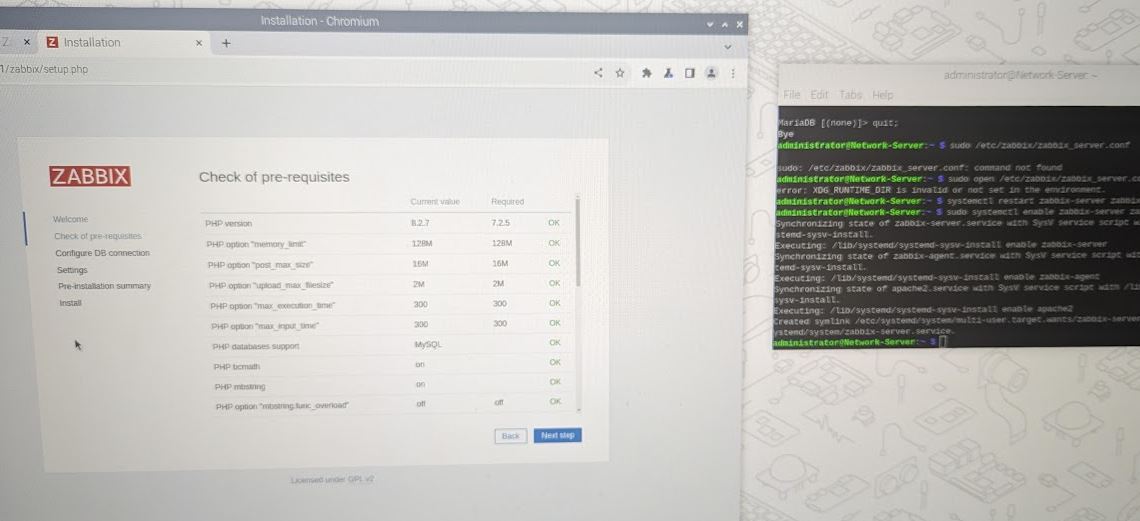
Well that was an effort! so did you just type: systemctl start mariadb after apt install zabbix-server-mysql zabbix-frontend-php zabbix-apache-conf zabbix-sql-scripts zabbix-agent as you followed the guide? thank for all your help!
-
Finally...... did; sudo apt install mariadb-server just before; zcat /usr/share/zabbix-sql-scripts/mysql/server.sql.gz | mysql --default-character-set=utf8mb4 -uzabbix -p zabbix from the guide i posted above