


kennysarmy
-
Posts
6,514 -
Joined
Content Type
Forums
News
20th
EduGeek EDIT Conference
Blogs
Everything posted by kennysarmy
-
Logged in OK - but took over 30 seconds to display the dashboard.
-

Sophos Phish Training emails being quarantined by Office 365 :(
kennysarmy replied to kennysarmy's topic in Cloud Services
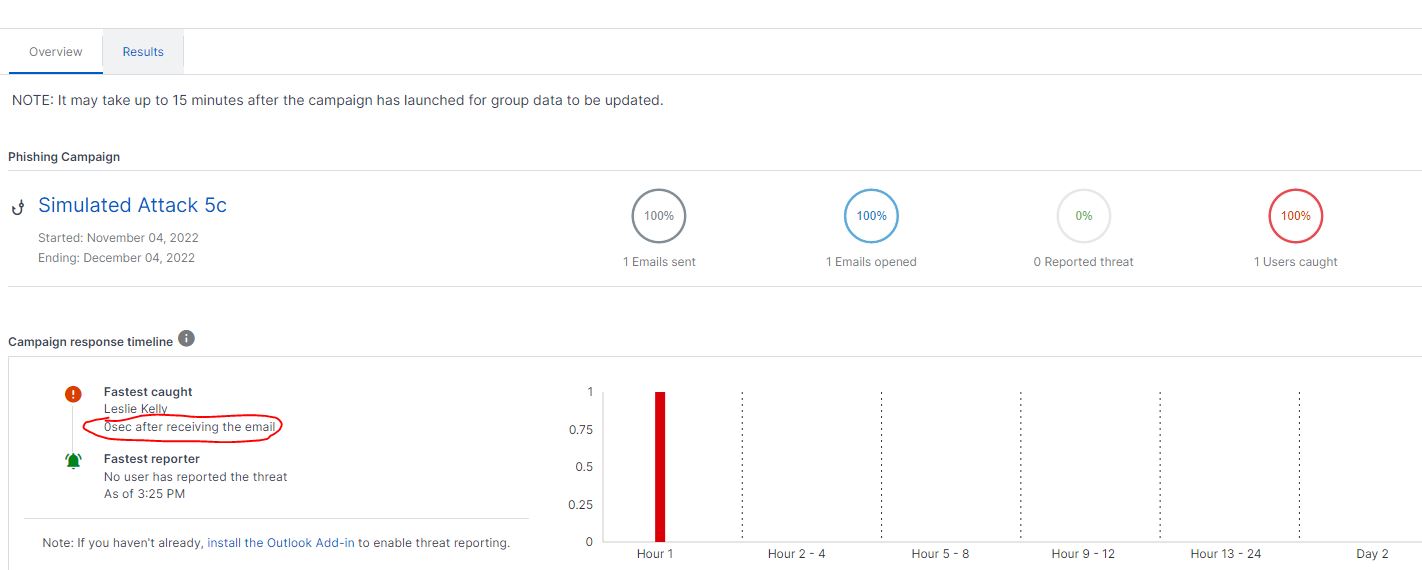
Was working well last year but my recent simulated attacks are not working because as soon as the email lands it's triggering something with Sophos to make it look like the user is clicking the link in the email. Any ideas what could be causing this? The test user hadn't even logged in to Office 365 and he was "caught"
-
We used KHIPU Networks Limited last year. I have a contact there if you need it PM me.
-
Recommend me an HDMI 2-port splitter please...
kennysarmy replied to kennysarmy's topic in AV and Multimedia Related
The supplier of the splitters has advised the following: · The computers power management settings are not related to the “no activity” password or re log on requirements. Both are set independently of each other. · When a HDMI switch is used with computers that power off the HDMI or are Energy Star compliant, this can lead to an unrecognised HDMI state and the “HOT PLUG” re start negotiation not be triggered in the switch. This does not mean that the switch is faulty. In this kind of usage situation, the customer needs to adjust the computers power management settings so that the display time out is e.g never or 10+ hours etc. Critically:- Computers Power management settings are not designed to accommodate HDMI switches and never have been. When the computers HDMI connection is direct between a “Energy star” compliant computer monitor it should then work. Is this right? Cheers -
Recommend me an HDMI 2-port splitter please...
kennysarmy replied to kennysarmy's topic in AV and Multimedia Related
Thanks - but no way we'd be able to spend £189 on a splitter across 60 rooms -
We have deployed 31 no. HDMI splitters in the summer, all seemed to be working fine. The splitters split the HDMI to Viewsonic IFP's and an iiyama monitor in the classrooms. Eight users are reporting an issue whereby "sometimes" when they lock the screen and return several minutes later to wake the screen up they see this! I'd like to rule out the splitter as the issue by purchasing a few different models...
-
Is this possible? grammar check, thesaurus, punctuation check all disabled, and spellchecker enabled. Thanks
-
Thanks, so mandatory profile is now the only option?
-
When I "Copy" out the Default Profile the AppData folder does not contain anything other than the "Roaming" folder - there is no Local or LocalLow :/ Does this matter?
-
This guide: https://community.spiceworks.com/how_to/132493-create-a-windows-10-enterprise-domain-default-profile Does nt' mention anything about editing the registry or deleting folders, which this guide does: https://katystech.blog/windows/windows-10-and-super-fast-logon-times
-
Hi, I ended up downloading the example one from this YouTube video. that one seems to work I'm following that video and some guides which all seem to have their own take on what to do :/
-
Setuperr.log states 2022-09-26 13:12:34, Error [0x0f0043] SYSPRP WinMain:The sysprep dialog box returned FALSE 2022-09-26 13:19:13, Error [sysprep.exe] UnattendFindAnswerFile: Unable to deserialize explicitly provided unattend file [c:\unattend.xml]; status = 0x800705b9, hrResult = 0x0. 2022-09-26 13:19:13, Error [0x0f009e] SYSPRP SysprepSearchForUnattend: Failed while searching for unattend file; hr = 0x800705b9 2022-09-26 13:19:13, Error [0x0f00a5] SYSPRP WinMain:Encountered error while searching for unattend file; hr = 0x800705b9
-
Trying to follow his guide but at the point of running sysprep it keeps failing with a fatal error! Anyone any ideas if this could just be something stupid I've done.
-
[ms office - o365] Random issues with Shared Computer Activation!
kennysarmy replied to kennysarmy's topic in Office Software
Still being plagued by this Especially bad if we remove all local profiles using a script we have. Can anyone share their methods for freeing up hard disk space taken by local profiles to see if there is something "off" with our script. -
Issues here at both our schools. But what can you do?
-
Our kids are apparently still going out for a house rounders comp. on Monday (Cheltenham) - madness?
-
Performance OK. Support seems to have dipped dramatically. I've a HIGH priority call that's almost been open a week without resolution and I'm having to chase. I have other calls open that only seem to get progressed if I push via their chat tool or phone them up (which can often mean staying on hold for 20 minutes)
-
We also used to replace EVERYTHING after 5 years. I'd say now we run about 15% of 900 computers out of warranty but we still try to keep the rest in warranty.
-
[ms office - o365] Random issues with Shared Computer Activation!
kennysarmy replied to kennysarmy's topic in Office Software
Issue was occurring on PC's without AB Tutor and also we don't have any logging policies as far as I'm aware... -
[ms office - o365] Random issues with Shared Computer Activation!
kennysarmy replied to kennysarmy's topic in Office Software
Update. We've created a new GPO - called "C - SCLCacheOverrideDirectory" As a test we applied this to our Library OU. When I check the registry remotely the value of the "SCLCacheOverrideDirectory" gets changed to the name of each machine in the library, eg. In the \\fp4\d$\O365Tokens folder I can now see being created folders for each library computer: MS have reported this is expected behaviour. As the license token is being provisioned on a device basis. As confirmed with my team there wouldn't be any implications with this. From my hypothesis it would seem each individual license token is added to the same token file which would change or increase the token file information. We can verify this by opening and confirming the license token information before adding another user and confirm the token details changes when another user is activated on that device. If you can run a test to verify the license token information changes / increases with additional user on the device and give us a feedback. Once we've run without issue in the Library we will roll out the GPO to the rest of the computers on site.
-
[ms office - o365] Random issues with Shared Computer Activation!
kennysarmy replied to kennysarmy's topic in Office Software
We also have ABTUTOR. But, sadly we are seeing the same issue on computers where we have not installed it We do set our on-site Smoothwall box as our proxy, but they've assured me nothing is being blocked WRT Microsoft activation. I've a call lined up with MS tomorrow to look at this further. -
Confused. What would prevent a student at school attempting to "support" another student at home and thus bring up their unfiltered PC for them to see?
-
Would Quick Assist allow someone off site to share their screen with a student? and potentially allow the student to see unfiltered internet content?
-
As thread title really : How do you remotely support Windows desktops across a trust if you can't get to site? Any good products with educational discounts?
-
Would anyone know how to edit this so it only returns results from active accounts (not including disabled which it currently does) Get-ADUser -filter * -properties passwordlastset, passwordneverexpires | sort-object name | select-object Name, passwordlastset, passwordneverexpires | Export-csv -path c:\temp\user-password-info-20211022.csv Thanks.


.png.fb19b52ea3d016b56bcd804d2dcd9ce2.png)
.png.5121d88c0fffd3281befc8e0d24c2035.png)