Sylv3r
-
Posts
4,151 -
Joined
Content Type
Forums
News
20th
EduGeek EDIT Conference
Blogs
Everything posted by Sylv3r
-
PaperCut Hive here too - 22 schools I think all using it including two secondaries. Some features not available as compared as to PaperCut MF - but the schools haven't really missed them.
-
I've bought both weeks ago - haven't had the time to read either yet, but looking forward to it when I eventually get the time. Well done.
-
It's already a pain, that they keep changing / adding things but very little in the way of communication for technical changes - but if there's a survey to be sent they are on the ball and staff are inundated !
-
 We've done it - 48 schools into one single O365 tenancy. Some schools decided they were happy to start again with fresh inboxes, others wanted their previous mail moving over. We used CodeTwo in the beginning for a small number of schools, but in the end just exported and imported the PST's and used the sharepoint migration manager to move their documents from local servers up onto OneDrive. For those schools who were previously with LA's, they downloaded the PST's for us (as they obviously weren't going to give us GA access to their tenancy) then we uploaded them. Now we've got all school data up into the cloud it was one of the first things we did when schools joined our trust and it's massively helped with regards to communication / sharing documents / online meetings etc and it's probably one of the best things we have done.
 -
Arbor : "This content has been blocked because it does not comply..."
Sylv3r replied to Starbug1's topic in MIS Systems
I spotted something similar today with Arbor and our Lightspeed block page. It was just a pop-up window that showed the block message - Arbor itself once the pop-up was closed continued to work as normal. -
LightSpeed Classroom Management
Sylv3r replied to BucksITguy's topic in Network and Classroom Management
We had similar issues with the Lightspeed Filter not pulling in the members when we were synching teams. We use locker to automate the process, and I just took it it was something that locker was doing specifically with the teams to make Lightspeed not show the members - we have similar issues with PaperCut hive not bringing the members in. It looks like if we use Microsoft groups, then these populate fine for both.- 1 reply
-
- 1
-

-
We generally go with their DOB - then they have go via the route you mention to reset their password. Obviously if they don't, then at least the password isn't just a generic password that everybody has.
-
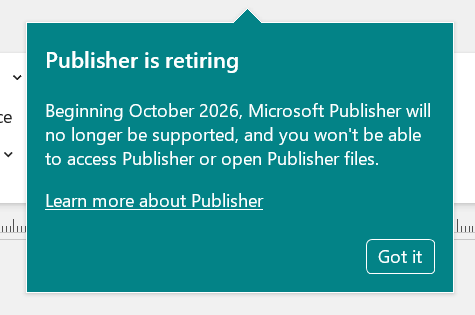
I think it's still there for us, but there was a ticket from one user this morning asking if Publisher was going with this image that appeared when opening Publisher - clearly missed the memo's we've been sending for at least 18 months !

-
For 47 schools, the number of small desktops required will soon add up - plus powering them and backing them up etc.
-
Because where possible we are trying to go 100% without the need for a local server - especially in the primaries.
-
Cloud - we use Meraki.
-
We are using the API available and a third-party to backup our switch and AP config.
-
I guess either pre-logging the accounts on (with no ability to reset passwords) so the students don't know the details to access from home or resetting the password at the end of each exam period and kicking out any logged on sessions should suffice. Haven't tried it - but Conditonal Access policy on the exam accounts stopping access externally will also work - but that doesn't stop the students logging in, within school during another lesson or break or lunchtime.
-
What are people classing as 3-2-1 for serverless / cloud only schools. We've moved around 25 of our primaries to serverless - but if we need to have local backups in school pulling their O365 data then it kinda defeats the object of moving everything to the cloud!
-
I've looked at several products but really struggling to find a solution that supports InTune without requiring a server and client. Most appear to need a server program too with the fix generally being to spin up a virtual machine in Azure to run it....
-
It would be investigated as if the devices were in school during the day by the HT / DSL, the staff are signing the AUP off as this is a work device which is filtered and monitored and any mis-use etc may possibly result against our code of conduct policy etc.
-
VEO sports recording and DPA
Sylv3r replied to TechMonkey's topic in Data Protection & Information Handling
I know of it, but we don't have any in our schools to fully know the pro's and con's but I imagine the benefit they like is that it automatically tracks the ball in a football match - rather than someone manually moving the camera. -
We had this issue and have added the fix to SENSO. As a thought - Does anybody now know, as an example if a student started to write a threatening email or suicidal thoughts in an email - whether as this has now been excluded will not pick up within the SENSO logging?
-
All of our staff devices whether in school or at home are filtered and monitored as per our Staff AUP. They are treated exactly the same - as are any student devices loaned out.
-
DfE Standards / Minimum Requirements
Sylv3r replied to UnknownSoundman's topic in AV and Multimedia Related
I couldn't see it mentioned in the document Steve21 provided, but we were told 75" as a stipulation for the classrooms. -
We aren't currently doing anything with it i.e. looking at reports etc. But I understand that Lightspeed filtering now has this functionality.
-
Our 5 secondaries all moved over for September and yes, we used Nova-T for the timetable and imported into SIMS initially, then that transferred over fine as part of the Arbor data migration. However, if you just need to make minor timetable tweaks then you will be able to do that within Arbor itself from the go live i.e. room / staffing changes, however if you are wanting to make major timetable changes, you will need to create everything again in Timetabler etc. I know Timetabler is now part of the Arbor family, so there may be better integration and data may flow both ways then there was a few years ago.
-
We've moved all our departmental shares to either MS Teams or Sharepoint so don't have anything local anymore, but to answer your other questions: Do you allow staff to create folders at the root of the shared drive, or is that locked down? It's not locked down as such, but staff shouldn't be creating anything in the root Do you enforce a standard folder structure (e.g. by department like Science, English, Maths), or let departments/staff organise things themselves? There would have been a folder per subject initially, now it's a sharepoint site / team per subject Who typically manages the content and structure within departments – IT, HoDs, or someone else? I would say it's a departmental effort, however overall responsibilities lies with the HOD How are you handling permissions – open access within departments, or more granular (read/write/restricted areas)? Only the staff in each department can view the department resources, supply staff can see all departments. Have you found a good balance between keeping things tidy vs giving staff flexibility? I wouldn't think it's tidy, but it does appear to work and departments just get on with it now. It required a bit of training initially to explain that OneDrive belongs to you and the Team / Sharepoint is the department collaboration area. We had initially too many sharing folders from within their personal OneDrive areas.
-
Quickly get it processed and installed before they change their mind.
-
How many SARs and FOI requests do you get?
Sylv3r replied to enjay's topic in Data Protection & Information Handling
As a trust of 48 schools, we probably on average have either one SAR or FOI a week. The week before a school holiday for some strange reason always seems to produce more.