Sylv3r
-
Posts
4,155 -
Joined
3 Followers


About Sylv3r

-
I think ours always just added a comment box in word, and the students replied back to the feedback there.
-
Either we've been lucky, or there's something on our setups that SENSO appears to play better with the some of the negative experiences that others have had. Has it been perfect on v2 over the last 12 months - probably not, but I don't think we saw any major issues that we hadn't seen in v1 either. We've got it installed over 47 schools - a mixture of fully intuned, and others with local servers and after a quick check we've had 3 SENSO tickets on our helpdesk since we returned in September - and that hasn't been around issues with the product just rooms that haven't had the installer setup and rolled out too by mistake but that's been caused by us as an IT Team rather than the product.
-
I remember the option for the teacher to provide feedback but not to allow students to comment on the feedback. I've just had a look and the teacher feedback option is still there.
-
We moved from V1 to V2 early and have used it since last September - 2025. Barring a couple of very minor issues - I don't think we really missed anything in v1 that wasn't available in v2 and we used the full enterprise package with the safeguarding modules etc on both.
-
PaperCut Hive here too - 22 schools I think all using it including two secondaries. Some features not available as compared as to PaperCut MF - but the schools haven't really missed them.
-
I've bought both weeks ago - haven't had the time to read either yet, but looking forward to it when I eventually get the time. Well done.
-
It's already a pain, that they keep changing / adding things but very little in the way of communication for technical changes - but if there's a survey to be sent they are on the ball and staff are inundated !
-
 We've done it - 48 schools into one single O365 tenancy. Some schools decided they were happy to start again with fresh inboxes, others wanted their previous mail moving over. We used CodeTwo in the beginning for a small number of schools, but in the end just exported and imported the PST's and used the sharepoint migration manager to move their documents from local servers up onto OneDrive. For those schools who were previously with LA's, they downloaded the PST's for us (as they obviously weren't going to give us GA access to their tenancy) then we uploaded them. Now we've got all school data up into the cloud it was one of the first things we did when schools joined our trust and it's massively helped with regards to communication / sharing documents / online meetings etc and it's probably one of the best things we have done.
 -
Arbor : "This content has been blocked because it does not comply..."
Sylv3r replied to Starbug1's topic in MIS Systems
I spotted something similar today with Arbor and our Lightspeed block page. It was just a pop-up window that showed the block message - Arbor itself once the pop-up was closed continued to work as normal. -
LightSpeed Classroom Management
Sylv3r replied to BucksITguy's topic in Network and Classroom Management
We had similar issues with the Lightspeed Filter not pulling in the members when we were synching teams. We use locker to automate the process, and I just took it it was something that locker was doing specifically with the teams to make Lightspeed not show the members - we have similar issues with PaperCut hive not bringing the members in. It looks like if we use Microsoft groups, then these populate fine for both.- 1 reply
-
- 1
-

-
We generally go with their DOB - then they have go via the route you mention to reset their password. Obviously if they don't, then at least the password isn't just a generic password that everybody has.
-
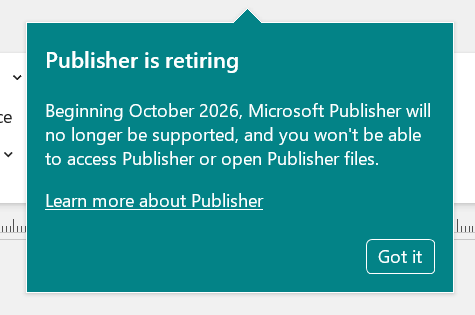
I think it's still there for us, but there was a ticket from one user this morning asking if Publisher was going with this image that appeared when opening Publisher - clearly missed the memo's we've been sending for at least 18 months !

-
For 47 schools, the number of small desktops required will soon add up - plus powering them and backing them up etc.
-
Because where possible we are trying to go 100% without the need for a local server - especially in the primaries.
-
Cloud - we use Meraki.