Starbug1
-
Posts
70 -
Joined
About Starbug1

-
Hi all Does anyone here use both CPOMS and Arbor, and if so, what do you do about trainee teachers (ITTs)? Nowadays ITTs need access to many systems (for us that includes Flick Learning, CPOMS, ClassCharts, Google, Microsoft, iAM Compliant and potentially more!) and the burden on IT support staff is ever-increasing. It's made worse for us by the fact that we don't have them on Arbor, which creates additional workload and complications. I am not sure of the exact reasons they are not on Arbor, but I'm told something along the lines that only employees can be on Arbor and that if we add ITTs, it would skew statistics such as our stated number of employees; I'm not in a position to disagree on that, so we've tried our best to add the ITTs to various systems manually. There is no problem with, say, ClassCharts, as we can add additional users on top of those who have synced from Arbor. However, we don't know how to get CPOMS to work. My colleagues and I in our IT support team have no access to CPOMS (other than the most basic account possible, to create concerns; we can't even see anything we have created, other than very briefly) and therefore our Safeguarding team are the only ones with admin access to CPOMS. They have told me that CPOMS only seems to work with users who are synced from Arbor. They can create additional users, but once the overnight sync takes place, those users are immediately suspended. So, we seem to be stuck in a loop; I am told we can't add them in Arbor as there is apparently no provision for trainee teachers in Arbor (is that correct, does anyone know?) but if they aren't in Arbor, they can't be in CPOMS? I suspect that there may be some sort of workaround; if anyone has any suggestions, we would be very grateful. Just to add that CPOMS is an "approved app" in our "Partner Apps (API Users)" list, so there is no third party sync tool involved (i.e. we are not using Wonde, GroupCall etc for this particular sync) Many thanks in advance!
-

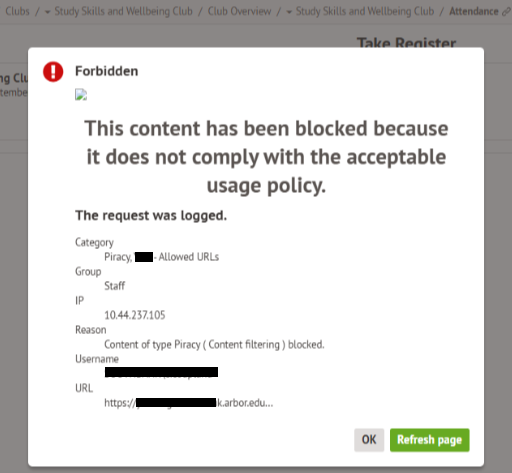
Arbor : "This content has been blocked because it does not comply..."
Starbug1 replied to Starbug1's topic in MIS Systems
Thanks all. We added our own Arbor domain URL to our Smoothwall 'always allow' whitelist; Arbor also asked us to add cdn.ravenjs.com to the whitelist. We've not had any issues since then. -
Is anyone else getting block pages on Arbor today, or had them previously? The error says the content "has been blocked because it does not comply with the acceptable usage policy"; see screenshot above. It looks like a Smoothwall issue, but it is generated within Arbor!

-
Does anyone use the site thirdspacelearning.com? This appears to be an AI powered site for "one to one" support, and has various onerous technical requirements, which seem to be difficult to meet, as we are struggling to get it to work reliably. I understand students cannot proceed if they do not have a microphone connected, and access granted for the site to use the microphone within their browser. Sometimes students get stuck on the microphone aspect, while other times they are stuck on blank/loading screens, and there have also been reports of poor performance. It could be a filtering issue, but we have whitelisted all the sites they have requested. If anyone has any experiences, tips etc, it would be great to hear from you. Many thanks in advance.
-
We use Wonde to sync classes, but is there a way for a teacher to create a custom Google Classroom, e.g. for an entire yeargroup, or for students who attend a particular club/activity, to forcibly add students to their own custom group? At present, they can only add students in a way that the student doesn't have to accept the invitation, but they want the students to be forcibly added, without the student having to accept (or being able to decline) the invitation. I found this https://www.quora.com/How-do-I-join-a-Google-classroom-without-the-code post which suggested that "Schools using Google Workspace for Education can auto-enroll students via their roster", but I can't find that option; am I right in thinking this may require "Google Workspace for Eduction Plus" or "Standard", which is the paid version, and not the "Fundamentals" option, which is the free one we have. I understand this could be done with GAM, but we're reluctant to go down that road. Many thanks in advance if anyone can help answer this.
-
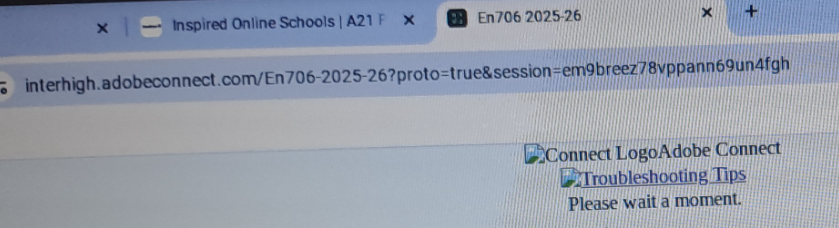
Does anyone here use "Academy21"? Apparently we have a student using it for off-site learning. The student doesn't come into school, so we don't see them and don't see any errors first-hand. The first I heard of this site was when that student was unable to login; I was given a screenshot showing that Academy21 uses a URL beginning with "interhigh" that was blocked. I managed to get a full list of domains to allow, which included "interhigh.adobeconnect.com", "adobeconnect.com", "interhigh-my.sharepoint.com" and various others, which I whitelisted, and this enabled the student to login. Now they are logged in, but are stuck on joining a class, with a screen showing the following: "Connect LogoAdobe Connect. Troubleshooting Tips. Please wait a moment" I also asked if we could have a test account, so that we could login to the website as a student ourselves, and see what happens and get to the bottom of it, but that didn't happen, so it's very difficult for us to help. I emailed the Academy21 support address, which I did get a response from last time, but they are not responding to us, so I am wondering if someone here may have some experience with this and be able to point us in the right direction? I don't know anything about how/why this provider was chosen, and didn't know anything about it until I was told there was a problem, but if anyone is in a position where they are able to influence if any school uses this platform, based on my experience so far, I would advise against it! Many thanks in advance to anyone who can help us!
-
Thanks all, very useful to know.
-
Does anyone have any suggestions for privacy screens? Either monitors that have this built-in, or something that goes in front of an existing display screen, which will have the effect of only allowing someone who is directly facing the screen to be able to easily read what is displayed. The request I had was for two "monitor privacy screen protectors", however when I search for this, I find a bewildering array of options, many of which aren't rated particularly highly. Many thanks in advance for any suggestions!
-
Hi Yes that worked, thanks!
-
Our DT department use Tinkercad (https://www.tinkercad.com/) and we can access the site, however pupils are unable to create designs; staff can create things such as: However when pupils login, they just get a loading screen like this: I used https://get.webgl.org/ to check if WebGL is working and yes it is. The issue occurs when pupils are logged into the computers, but there is no problem when pupils are logged into Chromebooks! has anyone experienced this?
-
Boxford CAD/CAM Design Tools Network Install
Starbug1 replied to BKGarry's topic in Educational Software
I have the exact same issue! @BKGarry did you ever get a solution to this? Has anyone else had this problem and found a solution? Many thanks in advance -
We only had 1 user reporting it; I got the same error, so immediately reported it and asked on here, however however as soon as I did that, it has started working! So must have been a very temporary glitch.
-
Anyone else get errors such as "This page isn't working" "HTTP ERROR 500" when accessing Arbor, or is it just us?
-
Has anyone here migrated from SIMS to another system e.g. Arbor, Bromcom etc, and been unable to access SIMS, and also unable to access the helpdesk? The error I get is that "we have been unable to confirm that you are eligible to use this software...": We don't want to actively use SIMS now that we use an alternative provider, however we recently received a subject access request for data that we believe is in SIMS but not transferred to the new MIS. Does anyone know how to resolve this? I can log in to the SIMS portal but there is no way to log a ticket and the page contains various errors e.g. "An unexpected issue occurred. Refer to product documentation or contact support for more information"; I guess my login permissions are reduced because we are no longer licensed @SIMS_Customer_Support are you able to offer any assistance?
-
We are experiencing major problems with Smarttech MX interactive screens at our school. On some occasions the screen shuts down randomly, on other occasions the screen becomes responsive and you have to restart to get it to work. Smarttech refuse to come out and see us, and tell us to re-format the devices, which isn't helpful. Other schools within our Trust were going to get the same type of screens, but that's on hold now, as we have no solution in sight. Does anyone else have this problem? Does anyone have any method of getting Smart to actually come on site, and see the problems for themselves and actually come up with a solution?