OverWorked
-
Posts
1,374 -
Joined
Content Type
Forums
News
20th
EduGeek EDIT Conference
Blogs
Everything posted by OverWorked
-

Who uses what proxy server inside their network?
OverWorked replied to DCS's topic in Internet Related/Filtering/Firewall
One here. Smoothwall SG. Just signed up for three year contract - it's that good. -
Done some reading. It looks like the logon screen timeout is by design and can't be changed. It's to save resources, although the client immediately reconnecting defeats this. It's similar to the way in XP, when a user presses ctrl+alt+del, the logon screen appears for a fixed time then goes. I get it now.
-
Hello, I have a few TCs and I'm trying to encourage the staff to use them more. When there's no-one logged on from the client, the servers disconnects after 30 seconds. I've configured the TC to reconnect after 1 second. This is disconcerting for the users. How do I get the logon screen to stay visible for as long as possible? (Server 2008 R2). I want the TC to look like a normal PC. This should be simple! Thanks.
-
Hyper-V drivers and performance for XP
OverWorked replied to OverWorked's topic in Thin Client and Virtual Machines
After less than an hour, I've installed 7 in a fraction of the time it did for XP. You're right. The Win 7 performance under Hyper-V is much better than XP. -
Hyper-V drivers and performance for XP
OverWorked replied to OverWorked's topic in Thin Client and Virtual Machines
Thanks. The XP performance is still not great. I'll try Win7 instead. I just wanted a low-power http and ftp server for our digital signage, not VDI. -
Hyper-V drivers and performance for XP
OverWorked replied to OverWorked's topic in Thin Client and Virtual Machines
Found it - Hyper-V Integration Services. It's in the guest console - Action/Insert Integration Services Setup Disk. I was looking in the Hyper-V Manager. -
Hyper-V drivers and performance for XP
OverWorked posted a topic in Thin Client and Virtual Machines
Is there any procedure for installing Hyper-V drivers for an XP client? Equivalent to the VM Tools in VMware Server? I've got a Hyper-V Server 2008 R2 host. It runs a Server 2008 R2 guest very well. I've just added an XP guest and it's really slow. There's also a couple of driver missing in the device manager - video and other device. I think it's a driver issue - but how do I install the drivers? -
new files kept locally and not written to shares
OverWorked replied to OverWorked's topic in Windows 7
Some progress... I got them access to the sync center by moving the desktop machine to an OU set up for laptops with offline files. The main difference that I can see is that the machine is now getting the GP setting Allow or Disallow use of the Offline Files feature: Enabled Users can now access the sync center and resolve the conflicts. (These are conflicts that shouldn't be happening in the first place). -
I got them access to the sync center by moving the desktop machine to an OU set up for laptops with offline files. The main difference that I can see is that the machine is now getting the GP setting Allow or Disallow use of the Offline Files feature: Enabled Users can now access the sync center and resolve the conflicts. (These are conflicts that shouldn't be happening in the first place). Since posting, I've noticed that the user is a member of the local admins group, so this doesn't help the original query. Sorry!
-
Ric_, did you get a solution to this? I'm having a problem on desktops with offline files disabled by GP. See my thread. I have one user who uses both XP and Win7 desktops machines. She is getting sync problems - conflicts are causing files not to sync. Files are staying in the Win7 cache until the user resolves them. Except they can't resolve them as they can't access the sync center. All our desktops have offline files disabled by GP. Despite this the Win7 machine insists on using offline files. Any suggestions? Thanks.
-
new files kept locally and not written to shares
OverWorked replied to OverWorked's topic in Windows 7
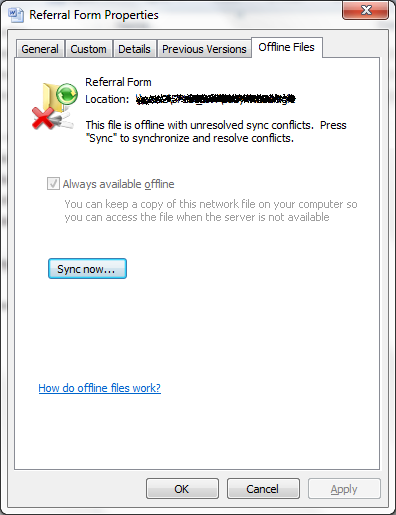
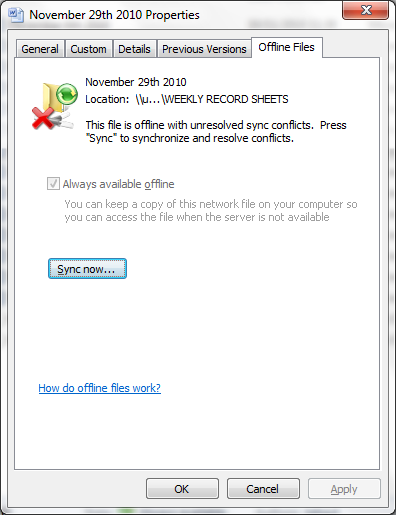
Right, I'm getting somewhere with this. The files aren't syncing because of conflicts. The properties of the affected file shows the sync error, pressing 'sync now' provides another dialog asking them how they want to resolve the conflict. The user can then resolve it. The problem is that the users aren't getting any warning, presumably because offline files is disabled in GP. I'm not going to enable offline files because that will cause massive network traffic every hour as users log in and out, as well slow down the machines during login. Another thing is that users cannot access the sync center. It shows in the taskbar has having conflicts, but whenever the user click it they get "This operation has been cancelled due to restrictions in effect on this computer". This will be becasue of another GP setting done for good reason for restricting XP - but which one? I need to find a way of either:- a) Stopping Windows 7 using offline files completely. or less satifactorily, b) giving the user some warning what conflicts happen so they can resolve them, and allowing them to access the sync center. Any ideas?
-
It does. Thanks for that. I have two screens - it hadn't occurred to me to add a hdd then make one of them a server with XP. That sounds like a good idea.
-
What's the difference between MagicInfo Pro and MagicInfo-i ? Which is better? The Samsung documention is as clear as mud. I'm just getting started with the 2 Samsung screens here. I bought them not knowing they came with software. I was planning to use either Showpoint or Xibo. I can't find a way of stoppinng the MagicInfo setup program from running at startup. So I'm stuck with it until I uninstall it. I wanted to give it a chance before scrapping it. I'm not impressed with it so far.
-
17 There are 20 Fluid Ounces in a Pint (if you're british)
-
MagicInfo screens... worth the extra money?
OverWorked replied to gshaw's topic in AV and Multimedia Related
Today I mounted our Samsung MagicInfo screen. I'm finding my way round it, and have tried installing Showpoint just to get it running. Every time I reboot it, it resets back to the original settings and anything I've installed is gone. Is this some feature of XP embedded? It's like the HDD reimages itself at boot. What's going on? -
Thanks. I'll try updating the JRE. We have a quite old version installed.
-
Another teacher has tried to get on it this morning. The website is completely down. At least the staff aren't blaming me.
-
Anyone else having trouble with this? I've just spent half an hour trying to get a teacher connected to a live training event on this. Spoke to their tech support, and the vague help I got was that they could not connect through a proxy, and needed admin rights. Tried again, and found that, yes, it would only work if I gave the user admin rights and bypassed the Smoothwall proxy. I had to do *both* of these. Anyone found an easy way to get this working? Or know what the problem is? More teachers will be using this soon, so I need to get this sorted soonish. Thanks.
-
Does anyone recommend 123-reg? I'm a private customer of theirs, but I don't do much with my website. They offer one-click installation of Joomla. Has anyone tried it?
-
new files kept locally and not written to shares
OverWorked replied to OverWorked's topic in Windows 7
Thanks. It seems like the two MS KB articles may be the answer (I hope). Neither of them exactly describes the scenario I had (but then I don't know how it happened), but they're close enough to look like they might fix it. If it happens again, I'll apply the hotfixes. I'm wary of just doing them anyway as the problem has only happened once and they might break something else. KB 977397 is included in the W7 SP1 RC. The other isn't (yet). It looks like SP1 is likely to fix these, so I'll wait for that to be released via WSUS. -
new files kept locally and not written to shares
OverWorked replied to OverWorked's topic in Windows 7
@marekbrad: Thanks. I'll bear that in mind. This folder isn't in a library, it's just a mapped drive. The file hadn't synchronised and was being kept offline. This is despite the offline files feature being disabled in GP for that machine. Attached is the properties for one of the files affected. Clicking sync copied it to the server. I imagine there was some network problem when the file was saved and it was just kept offline with no warning. I need to stop this happening again, or at least get W7 to give the user some warning Thanks.
-
Please help! We have a problem where documents saved on a Windows 7 machine are not being written to the server share. A user has just come to me. She is logged on with her account on two machines - one windows 7 and the other XP. On the W7 machine she's created 2 new files and saved them to the share she has full access to - they appear in the share and she can access them. The share is a mapped drive set by GP Preferences. Walked over to the XP machine and the new files are not in the share. The files aren't on the server either. I seems to me that they're only cached on the W7 machine's drive. What is going on? Is this some new W7 feature where it just keeps files locally instead of writing them to the share they're supposed to be on? Thanks.
-
The report mentions "the trade body representing many of the country's computer repair shops". I didn't know there was one. What is it called?
-
I'm steadily moving from VMWare Server to Hyper-V (in the short time since my original post above). I've only used the free products, and am more impressed with Hyper-V. VMware Server hasn't had any major upgrades for a long time, or any minor ones for a while either. It looks like VMware have lost interest in it and slowed development.
-
Thanks to you both. It looks like the RSAT will do what I need. It's not worth paying for, for us, at the moment.