HodgeHi
-
Posts
2,226 -
Joined
-
Last visited
Content Type
Forums
News
20th
EduGeek EDIT Conference
Blogs
Everything posted by HodgeHi
-
I don't think that would work either. If I remember correctly I tried something similar with another share. It doesn't use any variables for the username. You may be able edit the plist and place a variable in it instead of the name but I'm not sure what variable you would need to use. $1 returns the username I think as does @%1 or something like that. Take a look at the ManagedClient preferences. You will need to add them to WGM like before. This file has quite a few items in. It may even help you get to where you need to be. Failing all of this though, if I remember right you just want access to the home dir for Word docs. If you have are AD integrated, then the users should have SSO for the AD shares. If the AD server that holds their home dirs is listed in the sidebar then just get them to click this server and their home share should mount automatically allowing them just to browse to their home dir. Also, I assume that you have clicked on the down arrow next to the save as box. This brings up a bigger window allowing you to choose more areas to save into and the sidebar options. PS. The ManagedClient preferences can be found in the /System/Library/Core Services/ folder.
-
Check out the video tutorials on the apple website
-
Did you try updating the apple bootcamp after the bootcamp installation? You can use the Apple software updater to do this.
-
After reading your initial post again. Did you proper gate the permission changes down the rest of the folders? To do this you click on the sprocket with the down arrow next to it in the get info pane and click apply to enclosed items.
-
I haven't tried this but... Go to System Prefs and then Users. Unlock the preference if you need to. Right Click on the Account2 and then click advanced options. You should have the option to choose a new user home dir. Now make sure that you have a 2nd admin account in case this fluffs up and that you fast user switching enabled. Go to the terminal and type: sudo chown -R account2 /Users/Account1 Next issue sudo chmod -R 700 /Users/Account1 This should give you access to that user home dir. Now see if you can start Outlook 2011. This is all theoretical and you should have a backup in case it doesn't work.
-
Yeah. That's lion server for you It's the only reason I have not upgraded to OS X 10.7 as it's just not accessible. It is a very restrictive version of the OS. When you compare screen for screen, the tools you have are really limited and pointless. You may need to resort back to the server preferences application and set up for shares in that. I don't have any Lion Servers here to guide you. Sorry, but you may be on your own from here on out unless someone else can help. I have only played with 10.7 server a few times at home but never bothered setting up the services properly. Wait til you need to work with the web service *shudder* From this PDF... This is obviously for Home Profiles as stated. The process may be similar for other shares.
-
Everything should be int he package. The deploy studio icon is present in the System prefs so it has been installed. If you hold down cmd+shift+U and access the Utilities Folder directly, is the deploy studio folder inside this?
-
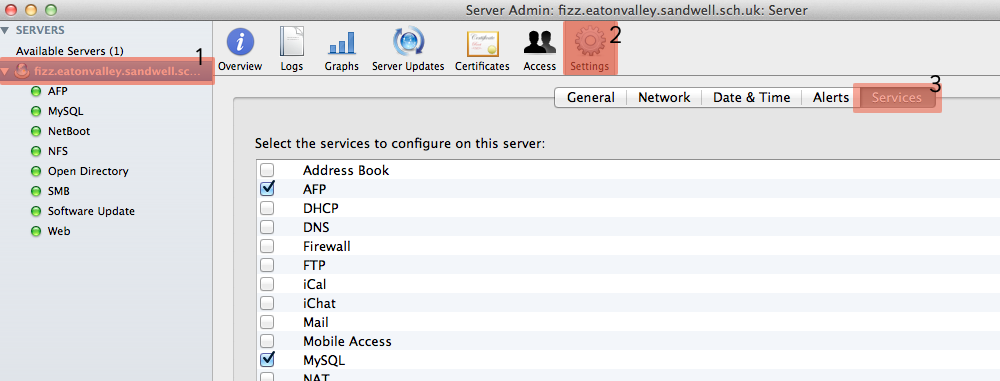
I am working on a 10.6.8 server with Server admin 10.7 on the client. Lion Server may be different as some of the services had their access removed. I can't remember if the sharing services were removed. However... Click 1, Click on the server name in the list of servers. Click 2, Click on the settings icon. Click 3, Click on the services tab. This should bring up a a list of services available for use. Clicking on the tick box and then Save at the bottom right, adds it to the list of services under the server name on the left. Next click on the service name and then click start towards the bottom of the Server Admin window.

-
I have the newly released macbook pros (Thunderbolt) which should have come with lion (free upgrade) which had snow leopard on so it can take them. You could use deploy studio to image the mac mini (fully patched) and then deploy to the Macbook.
-
Hi all, Just wondering if someone could help me out. I have a projector where the lens door won't close. It almost closes but then just drops back down suddenly. The projector then struggles to move the door. Has anyone had this issue and know how to fix it? Is it a simple fix or send off to be fixed kind of job? Hope someone can help. Thanks.
-
Yep ARD is the best one I have found for Mac management so far. Also with regards to the keyboard shortcut. It may not be much of a shortcut but you can place the keyboard language options in the menu bar near the clock. The users just click on the icon and choose the language they want to switch to. Just go to System Preferences, Language and Text, Input Sources and click any of the languages that you want displayed. As soon as you click a 2nd language the icon appears near the clock. You could also tick the option 'Show input menu in Menu Bar'. Alternatively, you may find something in the Universal Access preferences or you may be able to create a custom keyboard shortcut in the keyboard shortcuts menu under Keyboard in system preferences.
-
Have you got any of the sharing services active? Either SMB or AFP will need to running to allow for sharing out folders.
-
If you are using the OS X Server to dish out your shares for the home dirs (like I do) then you can set them so they use both SMB and AFP protocols. I can do this since OS X Server handles the share points for the home dirs. If you hold yours on the Windows servers then this cannot be done unless you install a third party AFP service. The sidebar prefs aren't in WGM by default. You have to add them using the Details part. This allows you to add additional plist files to the system preferences which in turn allows you to manage more items and software using WGM. The plist file you need for the sidebars is com.appple.sidebarlists.plist There is a thread somewhere in the mac forum where tony rocco goes through how to use this sidebar plist file to lock down the sidebar. I must say I found it a bit limited when I first tried it but I haven't had chance to look at it again since reading the thread.
-
You don't need to be logged in as root user to configure Deploy Studio. In fact I don't think yo need to be logged in as Root user for anything? I configured mine and most other things using the standard local admin account. When you install Deploy Studio and start the wizard to configure deploy studio if the service isn't running it will ask you to either start the service or ignore it. If you chose to ignore the start service then can go into the system prefs and deploy studio will be at the bottom in the "Other" section click the icon and then click start. If you haven't configured the service and/ or not specified a share point for the images to be stored in it will say something like no repository available or something like that. Download and read the deploy studio admin guide. It really is quite simple to follow. No other guide IMO is worth typing up since the original is fine as easy to follow.
-
This only becomes available once you click the share button at the top to share the folder selected. Hope this helps
-
Do you need to change the protocol to AFP instead of SMB? If so... dsconfigad -protocol afp
-
I have the Home Dirs served up straight from the XServe RAID via AFp for macs and SMB for windows with the My Documents redirected into the Documents folder in the Mac profile. They use Documents instead of My Documents. Just makes things a little more seamless for the end-user. So the answer to your question is we use both but depending on what platform you log into depends what protocol you use I haven't run into any major issues with this setup so far. But then we don't have any DFS shares or anything above the basic configuration for home dirs /shares apart from where they are located, and that the OS X Server serves up the info through SMB/AFP. All our shares are done in this way. Edit. The macs use the Home Profile path found in AD, and have them mount using the AFP protocol.
-
I'm not too sure with Logic but i tend to use AFP shares for all of my shares for mac clients. The only issue I have run into so far is iMovie but then that just doesn't play over a network anyway. You could give it a bash and see I've just listed the way to create a share using Server Admin in a thread probably right below this one. Should be the same except you probably don't want the auto mount option and would need to edit the permissions. Edit: This thread.
-
Also don't forget that you can use ARD to push out the plist file. Specify the full path in ARD as /Library/Application Support/ Copy the plasq folder into this location. You may need to fix permissions on this file too after copying. I have run into problems before with this.
-
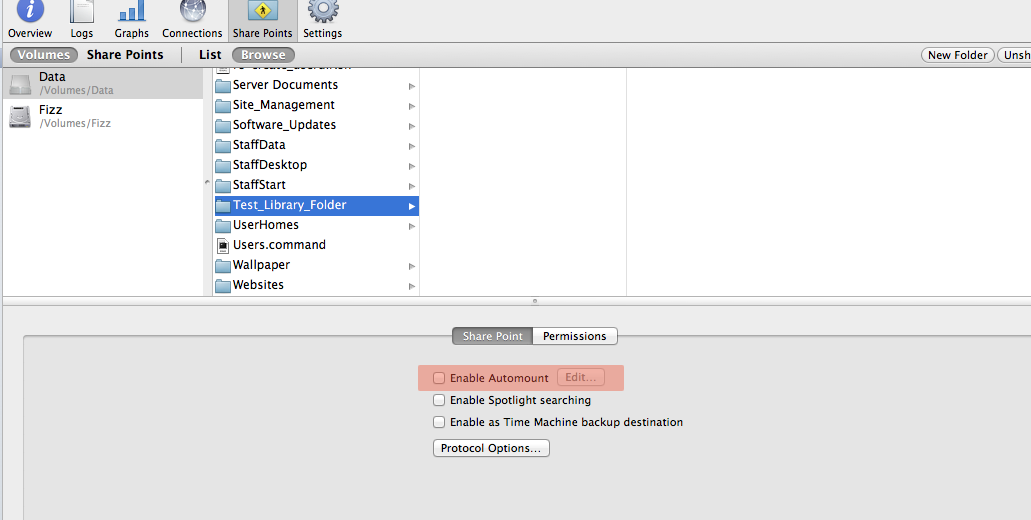
My version of Server admin is 10.7. Open Server admin and then click on AFP. Click on Share Points. Browse to the folder that you wish to share out. Click the share button In the bottom pane click, click on share point Tick enable Automount. A drop down window will appear. Choose the shared Library Folder option. Enter the Directory Admin Username and Password. Click Save. I'm not too sure of the folder structure after this. You may need to experiment a little. Also I may have given you info you already knew. If so please ignore this post completely
-
Also any changes you wish to make to the Directory Util you can do so using ARD and the unix tool to send the dsconfigad command followed by the option you wish to change. EG using dsconfigad -localhome disable should disable the local home option. This command... dsconfigad -useuncpath enable should enable the use of the UNC profile path set in AD Users and Computers.
-
You can also bind to directories using ARD and the unix command... #Ad Bind Script # Host-specific parameters # computerid should be set dynamically, this value must be machine-specific # This value may be restricted to 19 characters! The only error you'll receive upon entering # an invalid computer id is to the effect of not having appropriate privileges to perform the requested operation #computerid=`/sbin/ifconfig en0 | awk '/ether/ { gsub(":", ""); print $2 }'` # MAC Address #computerid=`hostname` #computerid=`/usr/sbin/scutil --get LocalHostName | cut -c 1-19` # Assure that this will produce unique names! computerid=`/usr/sbin/scutil --get LocalHostName` # Standard parameters domain="your.domain.com" # fully qualified DNS name of Active Directory Domain udn="admin username" # username of a privileged network user e.g. domain admin password="password" # password of a privileged network user e.g. domain admin ou="OU=Your_OU,DC=Fully,DC=Qualified,DC=Domain,DC=Name" # Distinguished name of container for the computer # Advanced options alldomains="enable" # 'enable' or 'disable' automatic multi-domain authentication localhome="disable" # 'enable' or 'disable' force home directory to local drive protocol="afp" # 'afp' or 'smb' change how home is mounted from server mobile="disable" # 'enable' or 'disable' mobile account support for offline logon mobileconfirm="disable" # 'enable' or 'disable' warn the user that a mobile acct will be created useuncpath="enable" # 'enable' or 'disable' use AD SMBHome attribute to determine the home dir user_shell="/bin/bash" # e.g., /bin/bash or "none" preferred="-nopreferred" # Use the specified server for all Directory lookups and authentication # (e.g. "-nopreferred" or "-preferred ad.server.edu") admingroups="" # These comma-separated AD groups may administer the machine (e.g. "" or "APPLE\mac admins") packetsign="allow" # allow | disable | require packetencrypt="allow" # allow | disable | require passinterval="0" # number of days namespace="domain" # forest | domain ### End of configuration # Activate the AD plugin defaults write /Library/Preferences/DirectoryService/DirectoryService "Active Directory" "Active" plutil -convert xml1 /Library/Preferences/DirectoryService/DirectoryService.plist # Bind to AD dsconfigad -f -a $computerid -domain $domain -u $udn -p "$password" -ou "$ou" # Configure advanced AD plugin options if [ "$admingroups" = "" ]; then dsconfigad -nogroups else dsconfigad -groups "$admingroups" fi dsconfigad -alldomains $alldomains -localhome $localhome -protocol $protocol \ -mobile $mobile -mobileconfirm $mobileconfirm -useuncpath $useuncpath \ -shell $user_shell $preferred -packetsign $packetsign -packetencrypt $packetencrypt \ -passinterval $passinterval -namespace $namespace # Restart DirectoryService (necessary to reload AD plugin activation settings) killall DirectoryService defaults write /Library/Preferences/DirectoryService/SearchNodeConfig "Search Node Custom Path Array" -array "/Active Directory/All Domains" defaults write /Library/Preferences/DirectoryService/SearchNodeConfig "Search Policy" -int 3 plutil -convert xml1 /Library/Preferences/DirectoryService/SearchNodeConfig.plist killall DirectoryService Runs as Root User. Just tweak it for your network.
-
Just A FYI, you can also image two partitions using a single workflow. Just add the 2 partitions to the workflow, so once it has captured one it will start the next one.
-
1. Print to PDF. If you ever want to create a PDF from anything, just click print and then save as PDF button. 2. System Preferences. This is your control panel. The Energy Preference is where you tell OS X to stop dimming the screen every 10 seconds 3. cmd+shift+ 1 - 4. Depending on the number you choose will give you a different option of capturing the screen. Num 4 gives you crosshairs for screen selections. Can also use Image Capture 4. Holding down the C key will boot form CD (although Lion doesn't have one ) 5. Holding down D key will boot into the Diagnostic mode where you can check hardware. 6. You can right-click the user in the list of users in system preferences to bring up an advanced option. This allows you to change the shortname, move user dir etc. 7. Lion doesn't come with Flash player. Download it at your own risk! 8. Lion doesn't come with java installed. Also needs downloading. If anything requires Java you will be prompted to download it and it will go off to Apple's servers. 9. Most common printer drivers are updated from Apple's software update. 10. Download remote desktop for mac to allow connection to your PC or even a VNC and use screen sharing. Just a few simple ones. You could check out the Macrumors forum for detailed comparison of Aperture vs Lightroom.
-
Windows 8 Secure boot - Blocking hardware and software like nobodies business
HodgeHi replied to X-13's topic in General Chat
How will this affect the upgrade path from Windows 7 to Windows 8? Would this mean that you would need new hardware to support the new security? If so then I can hardly see companies and schools going out a buying all new kit just to install an upgrade. Doesn't make sense. If indeed this is the case then MS should take this opportunity to eradicate support for old technology in their latest OS.