TwistedHelixis
-
Posts
3,401 -
Joined
-
Last visited
Content Type
Forums
News
20th
EduGeek EDIT Conference
Blogs
Everything posted by TwistedHelixis
-
Can I remove the 'Trusted Device' request from our iPads
TwistedHelixis replied to TwistedHelixis's topic in Mac
Just checked and they have all been setup under the same user. -
Can I remove the 'Trusted Device' request from our iPads
TwistedHelixis replied to TwistedHelixis's topic in Mac
Hi, I don't have device management listed in General and cant seem to find it anywhere. This is a iPad mini 4 -
Can I remove the 'Trusted Device' request from our iPads
TwistedHelixis replied to TwistedHelixis's topic in Mac
Perfect thanks, I'll give that a go later -
Can I remove the 'Trusted Device' request from our iPads
TwistedHelixis replied to TwistedHelixis's topic in Mac
Agreed, but how do I un-manage them from AC2, I am finding Apple config software really clunky and not very logical in its design. -
Sever 2012 > 2016 In place upgrade problem
TwistedHelixis replied to thimon's topic in Windows Server 2016
Sorry cant find the info:0( I would do a search for your issue but as migrating to windows 10, it will probably list a load more info. -
Sever 2012 > 2016 In place upgrade problem
TwistedHelixis replied to thimon's topic in Windows Server 2016
I had this problem when upgrading from windows 8.1 to 10. I cant for the life of me remember what I needed to do to fix the issue, but I will hunt through my docs -
All working fine, thanks :0)
-
Going from Server 2012r2 to 2019 and in-place upgrade
TwistedHelixis replied to TwistedHelixis's topic in Windows Server 2019
This is the issue I have at the primary school today. They are on 2012r2, don't have much money, and want to just jump to server 2019. I am now in the position of needing to install server 2016 on their only server and then do it all again when Crapita support 2019. It's not only the cost but the time that annoys me. -
Thanks, Will let the script run later and see how it does.
-
Yep that worked. Thanks :0)
-
Hello, I have been using the above code at each of my schools and it has been working great. I have just taken over a new school where the backup data is much larger so I can only fit 1 backup on the USB drive each night and not the 3 that the code currently does. What do I need to change in the code so it only copies 1 backup file to the USB and then deletes this the next night before copying the next backup. BTW if I had to guess its something to do with the -Skip 2 section. Thanks for your time, again
-
Can I remove the 'Trusted Device' request from our iPads
TwistedHelixis replied to TwistedHelixis's topic in Mac
Also just found this that supports Android, Chromebooks and iPads - https://www.mobileguardian.com/products/schools/ -
2012 R2 DNS problem - intermittent failures
TwistedHelixis replied to dayzd's topic in Windows Server 2012
Not very technical answer this, but when I had a very odd issue with no errors in the logs, I turned off one of the DNS servers as soon as an issue was reported, I then noticed that turning off one of them fixed the issue. I then re installed DNS on that server and had no issues. I know there are probably better ways of working it out, but that worked for me :0) -
Can I remove the 'Trusted Device' request from our iPads
TwistedHelixis replied to TwistedHelixis's topic in Mac
Just had a chat with the IT coordinator and he would like the 4 teacher tablets to be non managed. Any advice how I would make these un-managed devices? -
Thanks, i'll try that later :0)
-
Our Local Authority. I have already contacted them and they are telling me to keep trying :0( EDIT - they said the MS activation server sometimes does not respond and to keep entering the key until it does respond
-
BTW its a MAK key we have purchased
-
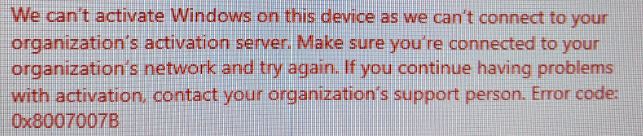
Nope. That is my next issue, it will not register. I have the following errors I was really looking forward to server 2019, not so much now. Cheers for your time and help

-
Can I remove the 'Trusted Device' request from our iPads
TwistedHelixis replied to TwistedHelixis's topic in Mac
OK, so they are trying to install the apps from the iPad itself not from AC2. The IT coordinator would like to be able to install any apps that are needed. Should he be logging in to AC2 and installing them from there? This is such a small primary school, is there any point in having the tablets managed? Its not like its going to take long to rebuild one from scratch if needed, they only have a couple of apps installed, the school only has 4 classes. Are there any free MDM systems or very cheap you can recommended? -
Sorry but I am very new to the world of iPads. Taken over a very small school (5 teachers) that also have 15 iPads. One of the things that the IT coordinator has mentioned is that when he tries to install an app it comes up with a Trusted device message. The school also have a mac mini and the config software installed. I will be at the school later but have a couple of questions. Would the mac mini be the trusted device, do the iPads ask for permission from the mac mini before installing any apps? If the mac mini is the trusted device, how can I disable this feature, so the teachers can install the apps they need.
-
Just un boxed a nice new server, slapped server 2019 standard (GUI), first thing I wanted to do was install all the updates but it says 'some settings are managed by your organization' What is going on?
-
Moving emails from Office 365 (Outlook online) to Gmail
TwistedHelixis replied to TwistedHelixis's topic in Cloud Services
Just found out some very handy info. Not only could I re run the migration multiple times but after the migration has completed, provided I do not click 'Stop Migration' it will still migrate any new emails that arrive in the old account. Just about to test this and see if it does continue to migrate emails UPDATE - Perhaps I needed to leave it longer but nothing auto migrated. I then noticed you can select an account and you get a play button display, which kicks of the migration again, but even doing this did not migrate the new emails. Finally I removed the user accounts and added them back, clicked on migrate and the newest emails did migrate. This does make very thing much simpler, especially as I do not control when the MX records can get switched, I will be at the mercy of our local authority. So these are my steps in case anyone is in the same boat. Create users in G Suite Migrate emails from Office 365 to G Suite Ask LA to switch MX records Re run the migration service to pick up any new emails that might have arrived while I was waiting for the LA to switch the MX records. I am not going to do any of this until our next half term (end of May) -
Moving emails from Office 365 (Outlook online) to Gmail
TwistedHelixis replied to TwistedHelixis's topic in Cloud Services
Think I will just do option 1, it seems simpler -
Moving emails from Office 365 (Outlook online) to Gmail
TwistedHelixis replied to TwistedHelixis's topic in Cloud Services
second domain -
Moving emails from Office 365 (Outlook online) to Gmail
TwistedHelixis replied to TwistedHelixis's topic in Cloud Services
Just found out that our LA have not switched the MX records yet due to a mix up there end. I think this might be a blessing as it gives me a bit more time. One question that I probably should have thought first. If I switch the MX records from Office 365 to G Suite, can I still use the G Suite Migration service to migrate old emails from Office 365 if the routing has been removed, does the Migration service need the MX address to move the emails? So with this option (1) Switch MX records - all email now going to G Suite Use G Suite Migration Service to migrate old emails I could always do this the other way round. We currently have a second domain attached to our G Suite(it was initially setup by a governor and was a org.uk domain). Recently I added the schools sch.uk domain as a primary and made the org.uk domain a second domain. The org.uk domain can still receive emails so could I attach the second domain to all my users in the primary domain? So with this option (2) All users currently setup under primary domain also get setup under second domain (so they can receive emails) Migrate old emails to G suite Setup forwarding in Office 365 so any new emails get forwarded to G suite but using the second domain as that has a valid MX record. Switch the MX records from Office 365 to G suite What do you all think?