TheRobins
-
Posts
403 -
Joined
Content Type
Forums
News
20th
EduGeek EDIT Conference
Blogs
Everything posted by TheRobins
-
Afternoon all. After trawling docs.microsoft I cannot find any reference to this. We did have thumbnail images in our AD which was taken from SIMS. However it has become an issue with the little darlings snipping staff photos and using them for their own means. I have scrubbed the thumbnail images from our AD, and this has followed up to Azure, staff who use Outlook online can no longer see any staff photo's. However Teams still displays the image. I have set the policy site wide to disable anyone from changing their pictures in in Teams for obvious reasons. However the only guidance is for staff to have the ability to add their own photo's, and then blank them. Does anyone know of a policy or powershell script to automate this, or remove them completly? Thanks.
-

Powerpoint 2016 - Crashing and altering screen settings.
TheRobins replied to TheRobins's topic in Office Software
Nope, I have given up to be fair. I am now waiting to see what Office 2019 does in this regard, they may have re-written it. I have started installing Clevertouch boards now and they come with HDMI Return which I am testing and is working well, for those users without these boards I am leaving very basic crib sheets on the desks advising staff how to reset the screen modes, they seem content with this so far. As you say its not every time, just randomly which is really annoying and difficult to fault find. I will also keep an eye out on the forums to see if anything comes about this issue. -
Powerpoint 2016 - Crashing and altering screen settings.
TheRobins replied to TheRobins's topic in Office Software
Out of interest what is the spec / model of machine in use. Ours are HP desktops and issue still exists, even with the latest firmware and drivers. It only seems to be happening on our CTouch 65inch panel, and not our other mix of hardware. Both HP and CTouch are adament it isnt their issue. I have even replaced the cable kit to rule out cabling issues. Our CTouch has also been swapped out due to another issue. My next fix is going to be a HDMI splitter, However it needs to have audio passthrough for PC's (cheap amazon ones do not get seen by the PC, so cannot pass audio as driver cannot be set) Staff at the moment are just using the Intel control panel when the screen goes, which is randomly when they exit a powerpoint. I have even seen it happen on a certain powerpoint presentation. Fix the issue and run it again and it wont happen. Since issue started there has been plenty of Office 2016 updates and Windows 10 1709 Education monthly patches but nothing seems to fix it. -
Chris, I had an issue where by our visualisers and also cameras connected via USB wouldn't work at all. Turns out it was down to the fact I had disabled the camera app in Group Policy on the devices. Enable camera and it works again, Computer Config> Windows Settings > Admin Templates > Windows Components > Camera Worth a shot, fixed it for me. I am now using app locker to block the camera app for students on a user level so that they cannot use webcams on laptops, however staff can use as normal.
-
I have used many in my time but have seriously found my haven with https://www.academyict.com/ HP mainly but can get other units, No one has touched their pricing for me. What makes the difference though is their ability to strike some cracking deals especially with Cashback on older machines, Just had a batch of laptops that come out at £180 each with 3 years on-site after cashback, cannot grumble.
-
At least I am not losing the plot anyway. Never had any issues with power on these devices, I have 30+ and they all work seamlessly as you would expect from HP/Intel hardware. I have just got one unit at the moment with a faulty DVD-RW drive. What I can see happening is the unit switching off the HDMI output and forcing display properties to be Output on monitor 1 only. If you then change it back to duplicate it will switch back however there is no pattern to this, It just does it when it like. I am tempted to go back to HP again but bypass their first line oversea's support and try and get someone who can actually understand what is happening here,
-
Morning all, I am about to throw most of these machines out of the window even though they are only 10 months old. I am having issues with these when using dual display. At the moment the current configuration is VGA to a Samsung 21inch Monitor and then HDMI to the classroom display, be that a mixture of devices such as CTouch and SMART panels, and Epson HDMI projectors. The computers are then set to duplicate display to enable both screens to show the same content. The machines are running Windows 10 Education 64bit (1709) with updates. Machines have all had their BIOS updated as of May and all drivers are the very latest I can find. Staff will be using the machine and randomly, without warning the HDMI source will disconnect and the machine will default to single display mode being VGA. I have reported these issue to HP and they agreed to look into it with us as we have a large number of these devices, however all they could muster was to constantly ask me to run their Diagnostic tools and then wait two weeks to ask me to run it again. Just putting the feelers out there to see if anyone else has had this issue. Its not PowerPoint as I have changed the projection settings and staff report it happens just sat blank on the desktop. I have even had AV engineer replace all of the cabling as I did wonder if that was the cause. However as this is happen across different AV installs and hardware I can rule that one out, as well as showing that this issue does not occur on some of our older Acer AIO's Thanks,
-
I have just rolled it out on to my Windows 10 Edu - 1709 image and during the install it came with the XNA framework, works a treat.
-
I have just had an email off our local broadband consortium "Superfast Worcestershire" Superfast Worcestershire - Countywide Fibre Broadband They advised that local SME's can apply for up to £3000 in vouchers towards getting 1Gb fibre into their premises. Not had a chance to read the T+C's but this could be of interest to school's looking at Broadband very soon. Link Below https://gigabitvoucher.culture.gov.uk
-
Powerpoint 2016 - Crashing and altering screen settings.
TheRobins replied to TheRobins's topic in Office Software
It was my bad all along, I had it enabled in 2013 but forgot when we upgraded to 2016. Sadly it still has the odd hissy fit and just yesterday I witnessed someone come out of a Powerpoint in presentation mode and it threw the screens out of sync, but no where near as bad as before. I am going to wait until I fully deploy Windows 10 before investigating further. Thanks for the reminder, -
Powerpoint 2016 - Crashing and altering screen settings.
TheRobins posted a topic in Office Software
I am finally throwing out the begging hat after weeks of issues that I just cannot get to the bottom of. All of my desktops are current HP 280 G2's running Win 7 x64, using built in core i3 intel displays. My configuration is a VGA Monitor and then HDMI to the 65" Touch Screen Display. I am getting near daily calls to the room where the computer has lost the "duplicate display" setting and switched to display on this screen only. I had hear of this issue before with PowerPoint, however at the time of questioning the users they didn't know when it happened it just did. After weeks of watching the device and questioning staff more it always seems to be happening just after closing PowerPoint presentation or during the middle of one, when PowerPoint will crash and return to single display mode. With this in mind group policy has always been set so that PowerPoint does not use presenter mode, just the good old fashioned dual display. I have worked closely with the screen manufacturer and they suggested another little registry tweak as listed below, https://answers.microsoft.com/en-us/msoffice/forum/msoffice_powerpoint-mso_winother-mso_2013_release/powerpoint-2013-changes-display-setup/3ca470a0-d896-4577-b724-a360b6bf1c4e?auth=1 Even after this has been applied it is still occurring. I have replaced the machine with any identical 280G2 unit, re-imaged numerous times, Tried updated Intel and also the default Microsoft Intel display drivers, all to no avail. The screen has been swapped out due to an unrelated dead pixel issue and I have replaced the whole cable run to the screen, including the AV break out box. I now also have a Level 2 call with HP but that was over a week a go so now one seems in any hurry to help fix the issue. Just to see has anyone else experience similar or have any tips/tricks to get rid of this annoying nightmare of an issue. -
Meraki MDM Alternative for Android Tablets
TheRobins replied to TheRobins's topic in Mobile Devices & Tablets
iOS only at this moment, looks like that is their main market. However looks good. -
Meraki MDM Alternative for Android Tablets
TheRobins replied to TheRobins's topic in Mobile Devices & Tablets
We are an O365 school so not really an option, Now going to look at InTune as an option. Thanks. -
Good Morning, Starting to look out for a MDM to manage just 10 Samsung galaxy tabs which are being sent home to help PP students with accessing some of our resources to help them. I am a little uncomfortable with them just being handed out so would like to use a MDM. I used Meraki many years ago with iPads when it was free so hence my first port of call. If I am honest its a little to high in price for what I want to do Managed Wifi Credentials Lock down access to settings Geolocation Lock down apps I wonder what else there is for android out in the market, most I have found are iOS which is slightly annoying.
-
Meru/Fortinet with HP Chromebooks G3/G4/G5 (connectivity issues)
TheRobins replied to Bruce123's topic in Wireless Networks
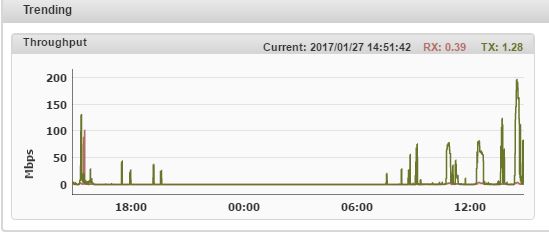
Can I just say thank you ever so much. I have been plodding along with some issues here and there and continuing on the single channel environment which in the large and for AC devices works fine. I have now applied your recommendations as suggested and what a difference. Luckily I am in a large but very rural school with 25 AP's spread around 700 users so neighbouring AP's is not an issue, in fact our Rouge AP detection has 2 BT Home hubs that are seen from the top floor of our main building which is near 200ft off the floor so I have full use of the spectrum. By splitting across Ch1,6,11 on 2.4ghz, setting to 40Mhz channel spacing and dropping EIRP to 14 it has made the world of difference. I would sometimes get G/N laptops that would just lose connection and not regain by just getting confused with the single channel environment. Also throughput has massively improved. This attached screen shot just shows a comparison of our G/N devices. Even without chromebooks I am really happy with the improvements to our system since this change has been made. We are running a MC1550 Controller with AP832e's as AP's. Also running fortinet firmware of 8.0.5.0 Once again thanks for your advice.
-
When you mention safeguarding, I have compared the 2 products and cannot see any real difference to be fair, both offer the same functionality. Would it be possible to set up a remote demo? I am quite time limited as this is a half-term project Thanks.
-
Hi Al, I did see your product at BETT last year, not going this year as too expensive to travel. I have had some refreshed pricing from your team so will be looking into this, I must admit I am still leaning towards LANSchool but will have a look over the next few days.
-
Morning all, Bit of a decision coming up. I have been using NetOPsVision and Policy Central for a while but they are no longer fit for purpose and will be phased out over half term. I have had a demo of LANSchool and must say I was very impressed with the product and it fitted our needs. I have seen NetSupport mentioned a few times on here, just wondering if its worth looking at as a product and whether it would offer anything different to LANSchool itself? I have had a demonstration of Impero and to be honest wasn't that impressed especially when the pricing came in. Impero did too much for me such as print management which I get via PapercutMF and it didn't enjoy the product as a whole. Looking at comments recently on here looks as if there are quite a few unhappy with it and I wouldn't want to invest in a product with that much negativity at this moment in time. I suppose the question is do I stick with what instantly stood out and made me say yes, or do I go out and try to convince myself out of the purchase.
-
Meru/Fortinet with HP Chromebooks G3/G4/G5 (connectivity issues)
TheRobins replied to Bruce123's topic in Wireless Networks
Hi Bruce I must admit, it took a few weeks to get to this stage, but it did work. If you can see 50 Ap's from some AP's you have far to many. I am quite experience with rf and it doesn't matter how good your software is, if you ap can hear even 4 - 5 other AP's it is going to impact. A post I made well back last year could be a good starting point to do some monitoring of the actual station information. I have attached at the bottom of this message. Its just worth having that window open for a day and looking at any AP handoff's and see if there is a lot of switching going on. I cannot remember off hand but you can also narrow down the station log to a certain MAC address, maybe pick one of your Chrome books and watch it over a day or two when its in use. I must admit maximum number of devices I have in use are about 130, average of about 60. This is spread over 25 well spaced AP832e's. I did have issues in our hall area where 6 AP's were all equal distance in signal terms to the AP in the hall which was high up on the roof. I have disconnected that now for 6 months and I have never had any other issues in the Hall with dropouts at all. That AP is waiting to be moved when some new classrooms are built soon. I think sadly that the Fortinet support don't tend to look at your network setup as it is. RF is a wonderful technology to learn, but it never sticks to the rule book at all. When these companies who sell the kit do their survey's they do make me laugh. I take their survey and knock off half the AP's suggested, not had many issues since The 7260 is the problem chip here. I must admit I have had 30 new Lenovo laptop's with the Intel 3 AC series chip and they are much better with the hand off issues. Since making the driver changes on our 30 7260 laptops I have not had any complaints. As you mentioned I don't think you will be able to modify these settings on the chromebook. Looking at a quick google search they tend to use older Linux drivers from Intel, whether google will let you have access to these settings is another matter. Login into an SSH session the running the following. Station log > enable Code: Meru-Controller(15)# Meru-Controller(15)# Meru-Controller(15)# station-log Interactive Per-Station Event Logging Shell (enter "help" for help) By default logging is Disabled (enter "enable" to Enable logging) station-log> enable Logging enabled station-log> What you will see is the devices on your network as the communicate with the controller and as it hands it around ap's similar to below Code: 2015-May- 7 13:37:11.677882 | e8:de:27:1d:68:c7 | 802.11 State | handoff RSSI (-65 -66) RSSI (-61 -62) 2015-May- 7 13:37:17.682556 | e8:de:27:1d:68:c7 | 802.11 State | handoff RSSI (-66 -61) RSSI (-59 -59) 2015-May- 7 13:38:08.279700 | 20:68:9d:e0:61:03 | Station Assign | assigned to 2015-May- 7 13:38:08.280160 | 20:68:9d:e0:61:03 | Station Assign | Reassigning from (rssi=-75) to (rssi=-39) 2015-May- 7 13:38:08.280164 | 20:68:9d:e0:61:03 | Station Assign | Assign Removed From 2015-May- 7 13:38:08.280319 | 20:68:9d:e0:61:03 | Station Assign | assigned to 2015-May- 7 13:39:20.781974 | 80:19:34:a4:c8:8d | 802.11 State | handoff RSSI (-80 -76) RSSI (-74 -75) You can see that as the signal of a device gets weaker, it will switch it to the new AP and report the signal strength back. Usually the numbers are very close as the system tries to balance the load, or as people move laptops, even walk in front of a laptop can give 10-20 Db of attenuation. With the intel roaming aggressiveness I expect you to be seeing some -256 ie RSSI (-70 -256) or (-256 -256) -
Meru/Fortinet with HP Chromebooks G3/G4/G5 (connectivity issues)
TheRobins replied to Bruce123's topic in Wireless Networks
Hi Bruce, Feel your pain here. I have had issues with Intel chips on Meru especially older chips. I must admit since upgrading firmware on the controller and AP's to 8.0.5.0 Fortinet branded I have not had any issues. Must admit I only have 6 Chromebooks here. My main issue was with laptops, but as you have been advised you can change all settings easily via windows drivers. There were also very good with modifying some of my RF settings, turning down the aggressiveness of the roaming on their AP's along with slightly reducing the power on a large block of AP's, which would help null out those weak distant signals your Chromebooks may be picking up. I wonder if you are using them in large groups at the same time? -
Unfortunately not, we using NetOpsVision which allows singular control but not mass, The IT club geeks will be more than willing i'm sure.
-
I had disabled on access scanning on the file server (tend to run this on file servers) and didn't make much of a difference. I will try with pupil machines, trying to find a class willing to give me 5 minutes and having them all click on a file isn't easy. Ill see if one of the lunchtime clubs will do it for me. I must admit when I was RDP onto the file server when this issue occurred it also didn't want to let me access those documents directly, which was strange. At that point however I could access any other folder or file easily. Time to ask staff for some of their time, wish me luck.
-
I have been using Burconix network tools with great success for 2 years. Burconix Network Management Tools It connects into SIMS and generates accounts for all staff and students. I love some of the features, end of years and start of year procedures take 5 minutes to complete, I have lovely spreadsheet with all new details on ready to give to students/staff on their first day. Some of the great things I use -Password Manager, allows staff to change pupil passwords easily. -MIS Sync Photos. Takes Photos from SIMS and sync's this to AD, meaning when using Password manager they can see the picture of who they are resetting just to bypass and cheeky ones trying to access each others accounts -CSV file creator. It will run a mass of reports using the user's details. I found this very handy when updating Show My Homework to work as single sign on and need to pass them a CSV with usernames and emails, took me 20 seconds to create. -File Connector. Installs a small program on my file server used for student home drives and manages permissions, also deletes all files when students are removed. Can also move all documents seamlessly if I have to change their OU for some reason. There are many more to list I use, simple things such as legal name change for a student which happens now and again, the software will make all these changes without any quibbles, Sounds like a sales pitch but I wouldn't suggest if it wasn't that good. Attached are some screen shots of the user template function. Does what it says on the tin and lets me customise how they are configured, one of the more important tools is the group membership. Not so much for students here, but for staff I can just add of the Office 365 mail security groups into these are not worry about setting up their email membership unless they require specific permissions. Pricing is very fair as well, after looking at many systems wanting four figures for something I use once or twice a month this stood out, so glad I did it too.
-
Sorry 7 64Bit
-
Morning All, Been having an issue for a while with Office 2013 regarding opening of files from network shares. Class of 30 in one of the ICT suites wants to open the same document to read/look at, first 1 or 2 open very quickly then everyone else comes to a grinding halt. Obviously this could be an issue caused by locking of the files. I have advised the IT teachers if they plan on using word documents such as this, save them as template files to make life easier and save anyone saving accidentally. Sadly this hasn't stopped the issue. I recently added new PC's to one room and naturally upgraded to 2016. Issues still occur. This happens for all office applications including access. Other files such as PDF's and other software we use does not suffer any issues at all, pinpointing office as the possible cause. Not much documentation around this issue as far as I can see. Specs on the network, File Server - Server 2012R2 as a VM, 10GB backbone to Host server and 10GB to SAN. VM has a 10GB backbone to core switch in IT Block, Switches in IT Rooms are fed by 4GB of teamed ethernet to HP1910 48 port switches. PC's are latest Core i3's with SSD's and 1Gb Lan. We do run Sophos but i'm not one for disabling file scanning, never had a virus in 9 years and do not want one. I am sure there must simple GPO fix for this one, sadly not found it yet. Thanks all,