Norphy
-
Posts
8,349 -
Joined
-
Last visited
Content Type
Forums
News
20th
EduGeek EDIT Conference
Blogs
Everything posted by Norphy
-
If the switches all support it, enable MVRP. With that on, any created VLAN gets automatically propagated to your other switches and the vlan is automatically tagged on the uplink ports. Makes life a lot easier.
-

Can I use standard SATA drive in PowerEdge server?
Norphy replied to TwistedHelixis's topic in Hardware
With newer ones or with a SAN, you may be locked to Dell firmware drives, but with one that age you’ll be fine. Assuming your storage controller can address 8tb drives anyway, and I’d be surprised if it couldn’t. -
Coronavirus: General discussion (see opening post for rules)
Norphy replied to Dos_Box's topic in General Chat
Weren't Russia the first to approve a COVID 19 vaccine? -
Not ready for everyone? Clearly. Not ready? Debatable. There are plenty of people who never attach external screens to laptops, or for whom one screen will be enough. It’s an annoying limitation, for sure, but clearly not enough of a a showstopper to stop Apple from doing it. Anyway, early adopters always end up getting the sharp end of the stick and Apple products are no exception. First gen MacBook Air? Stupid port placement and 1.8” HDD. First gen Intel MacBooks and iMacs? Core CPUs, no x64 support. First iPod? Mac and FireWire only. First iPhone? No app support, no copy and paste, no MMS. Apple Silicon powered computers will get there, and most likely quickly too.
-
Click Taken from a 114B.
-
Aruba across all our sites. We have a Mobility Master, four Mobility Controllers and around 340 access points. Two of the sites have Instant clusters but will those will be joined to the controllers, once the WAN connections to those sites have been upgraded. It works very well indeed, it's been excellent.
-
Apple have their own refurb store (https://www.apple.com/uk/shop/refurbished/ipad) but stock is a real crapshoot.
-
Do you have any left which you haven't unboxed, reimaged or taken through the OOBE yet? If so, there is a PowerShell command you can use to extract all of the installed drivers on it. You can then copy those to a USB storage device and go from there. To put the laptop into audit mode, press CTRL+SHIFT+F3 on the first OOBE screen. The laptop will reboot itself to a Windows desktop. Create a folder in the root of the C: Drive called Drivers. Then run the following command from an elevated PowerShell prompt: Export-WindowsDriver -Online -Destination C:\DRIVERS\ You can then copy those drivers to a USB stick, or import them into SCCM/MDT/WDS/whatever
-
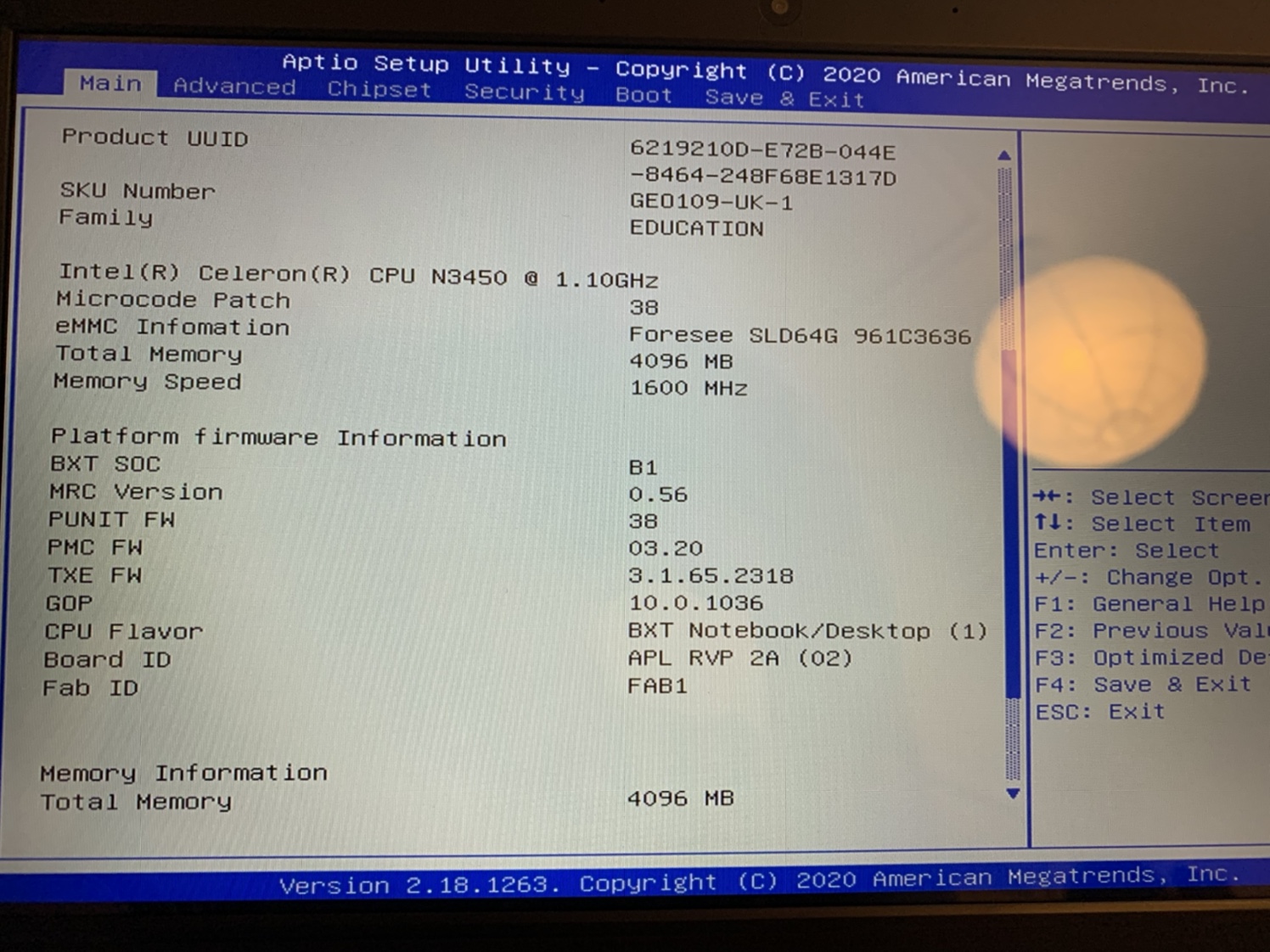
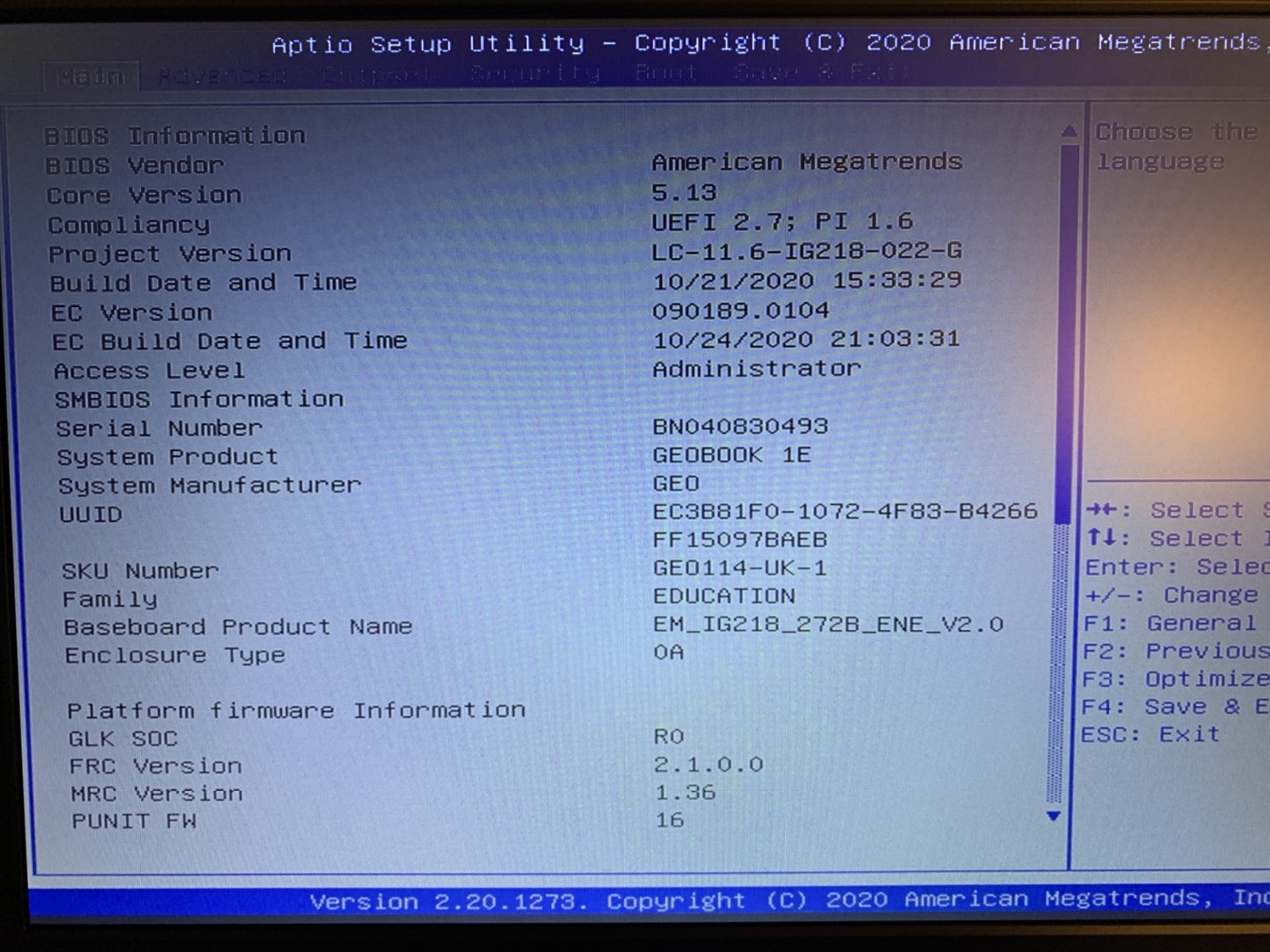
OK, I've actually got two different models. Both are Geobook 1E but I have GEO114 and GEO109 laptops. The GEO109 can be netbooted, I've got one done and my colleague at the school has as well. The GEO114 can't be. I've compared the two's BIOS settings and there are a lot of settings in the GEO109 which aren't in the GEO114 but everything that looks relevant to USB and networking is set identically on both and I still can't get the 114s to detect a NIC in their EFIs. Looks like we're going to have to boot these from USB to get them to build from SCCM or MDT.
-
Well now. Different hardware revisions. Different BIOS versions. The older one PXE boots, the newer one doesn’t

-
OK, well, I've just picked up three of these pieces of crap bundles of joy from one of my schools because they were having such fun with them, they just had to share. Gits. Anyway. Two of them have matt screens. The third has a glossy screen. All of them would boot from a USB stick but one of them would only boot from the USB A port on the left. The firmware on one of them has actually detected the USB NIC I plugged into it and has offered to PXE boot from it, the other two haven't. I haven't tried to take it up on its offer because I'm at home and I don't have a PXE server handy but, at the very least, it does try to boot from PXE but fails immediately. I'm digging further, to see if I can see any more differences.
-
Fair enough, but bear in mind that goes both ways. You can't assume that Unifi (or any other product) is going to perfect for everyone. I don't want you to think that I'm against Ubquiti. We have some of their wireless bridges in our organisation and they work well.
-
Coronavirus: General discussion (see opening post for rules)
Norphy replied to Dos_Box's topic in General Chat
All of London is T2 but Kent is T3. I find that somewhat surprising. -
It may be less efficient, but in my experience it's easier to manage, easier to keep secure and, frankly, more reliable. It does add a point of failure which isn't ideal but there are ways around that. It also allows some interesting features, such as Remote Access Points, which can be used to transmit your SSIDs to remote locations and tunnel back to your on-site controller, connecting your remote users to your corporate LAN as they would be in the office, completely negating the need for a VPN client on a device. Useful for home workers and branch offices. To paraphrase what I said at the beginning of the thread, there isn't a right or wrong answer here. My organisation wants the features that a controller based wireless network gets us, so that's why we went with one. Other orgs don't and that's fine. There may be other reasons to choose a different vendor such as Mist, Meraki or Aerohive over Ubiquiti as well; Mist's AI technology is extremely impressive and would be something that's useful to have. Meraki's UI is excellent. Aerohive... OK, I'm struggling with that one, the Aerohive network I used to manage sucked donkey balls and I was happy to get rid of it. On the other hand, Ubquiti may well do exactly what the person needs and that's fine as well
-
Well, for a start, can a Unifi AP be set to tunnel all of the traffic on a SSID back to its controller, rather than breaking out on its edge switch? My research suggests not but I accept I might be wrong. You might not find that kind of functionality useful but others do.
-
Dang. If the 2.5" equivalent was the same price, I probably would have got that. My laptop has got both NVMe and SATA storage and I could do with something a bit faster and bigger on the SATA port.
-
Good grief. If suggesting someone does their research before they spend thousands of pounds on a system warrants an eyeroll in your world, so be it. Personally I'd prefer to do that than solely take the word of someone I don't know on an internet forum.
-
Be wary of people who tell you it's perfect without knowing what exactly it is that you need. Do your research beforehand, work out what you need and determine if the kit that you've identified can actually do it. Speak to some vendors like Switch Shop, European Electronique, Circle IT, Net Ctrl, Redway Networks, Stone and others and ask them for advice and recommendations. The last thing you want to do is to spend ££££ on new wireless kit and then find out it misses that crucial feature you wanted. That applies to everything, not just Ubiquiti. Not saying that Ubiquiti isn't any good or that it's not suitable for you or that it lacks the features that you need, just saying to make sure first. Their stuff is undeniably cheaper than other enterprise level kit but that doesn't mean that it's cheap; it could end up being an expensive mistake to buy it without doing your research first.
-
Are there firmware versions between the one you’re running and the one you’re trying to install? Might be worth installing that first, as an intermediary step?
-
I can't take the story even remotely seriously after Mitchell and Webb's version...
-
Anybody using LAPS? i have a question about the fat client UI
Norphy replied to Jaan's topic in Learning Network Manager
We use LAPS and we have this as a frontend to it: https://int64software.com/overlaps/ It's rather good. -
The above would probably work, but I question the usefulness of the exercise. All that will happen is that either the student will turn off WiFi, or that the device will revert to SMS instead.
-
It's a trade off in some respects. The hardware is as good as the tier 1 suppliers like Aruba et all, but the support isn't as strong. With Aruba at least, I've got someone on the other end of the phone that I can shout at if there's a problem. There's a certification path for their portfolio if you're interested in that sort of thing. HPE/Aruba, Ruckus, Cisco/Meraki, Juniper, Extreme et al have strong relationships with suppliers and resellers and there are more people who know about them With Ubquiti, at best you're dealing with a third party for support, posting on support forums, or you're on your own. That may or may not matter to you, there isn't a right or wrong answer here.
-
Vodaphone Free Data for Schools
Norphy replied to TMBS's topic in Internet Related/Filtering/Firewall
Having a quick look at Amazon, the dongles seem to be the same price as hotspots. I miss Expansys, they were good for this sort of thing. -
Firefox 83 introduces HTTPS-Only Mode
Norphy replied to 6Foot2's topic in Internet Related/Filtering/Firewall
There will be an extra prompt, but it's not going to say "LOL NO HTTPS, NO TIES, NO SERVICE"