Jawloms
-
Posts
3,338 -
Joined
Content Type
Forums
News
20th
EduGeek EDIT Conference
Blogs
Everything posted by Jawloms
-
Got handed this. Their dog chewed it. Could I do anything with it?

-
Speak to @Net-Ctrl. Very good company.
-
Thanks to @HPlum78 for some PM help which has now got me in
-
And nevermind cos it seems fine now despite me not doing anything.
-
Both my DCs are 2016. If I type repadmin /showrepl on server1, all is reported fine. If I type the same on server2 I get this; Repadmin: running command /showrepl against full DC localhost $forest\$server2 DSA Options: IS_GC Site Options: (none) DSA object GUID: 3a6d114b-bc91-42dc-9dd3-cadf6a7ffe6f DSA invocationID: 3ab03030-fae1-425a-b3e1-8a5af947d737 ==== INBOUND NEIGHBORS ====================================== DC=$domain,DC=internal $forest\$server1 via RPC DSA object GUID: f9e4a4d6-4b18-4c76-8964-967fb7bb99c5 Last attempt @ 2019-11-15 10:27:33 was successful. CN=Configuration,DC=$domain,DC=internal $forest\$server1 via RPC DSA object GUID: f9e4a4d6-4b18-4c76-8964-967fb7bb99c5 Last attempt @ 2019-11-15 10:18:56 was successful. CN=Schema,CN=Configuration,DC=$domain,DC=internal $forest\$server1 via RPC DSA object GUID: f9e4a4d6-4b18-4c76-8964-967fb7bb99c5 Last attempt @ 2019-11-15 09:51:56 failed, result 1722 (0x6ba): The RPC server is unavailable. 1 consecutive failure(s). Last success @ 2019-11-15 08:49:50. DC=DomainDnsZones,DC=$domain,DC=internal $forest\$server1 via RPC DSA object GUID: f9e4a4d6-4b18-4c76-8964-967fb7bb99c5 Last attempt @ 2019-11-15 10:24:24 was successful. DC=ForestDnsZones,DC=$domain,DC=internal $forest\$server1 via RPC DSA object GUID: f9e4a4d6-4b18-4c76-8964-967fb7bb99c5 Last attempt @ 2019-11-15 09:50:32 failed, result 1256 (0x4e8): The remote system is not available. For information about network troubleshooting, see Windows Help. 1 consecutive failure(s). Last success @ 2019-11-15 08:49:50. Source: $forest\$server1 ******* 1 CONSECUTIVE FAILURES since 2019-11-15 08:49:50 Last error: 1256 (0x4e8): The remote system is not available. For information about network troubleshooting, see Windows Help. Did some Googling and found a Technet article (here) which said to replicate just the bit with the problem so I did by doing "repadmin /replicate $server1 $server2 CN=Schema,CN=Configuration,DC=$domain,DC=internal" and "repadmin /replicate $server1 $server2 dc=ForestDnsZones,DC=$domain,DC=internal" and both worked fine. Tried the same commands but switched the source and destination servers and all was still fine. So do I have a problem or not, and if so, where/what is it? Stuart
-
We use LTSC and have no issue with it other than the photo viewer is disabled by default. It's a registry key to turn it back on though, doesn't even need installing. Keeps things so much simpler.
-
Found that in Chrome the kids can click the microphone to perform voice searches on Google. We don't want to outright block the mic as they may need to record their voices locally, but I don't want them being sent off to Google. Anyone know how to block it please? Stuart
-
I have 2x 2016 DCs and 2016 Forest level. I'll install a new rollup.
-
This seems to be by design. It's to do with version numbers. If I type "Get-ExchangeServer *" on the old server it lists both.
-
Server is on SP3 Update Rollup 21, which is May '18 so should be up-to-date enough. Perhaps I'll try and apply the latest and see if it makes a difference. If not, I may well just wipe the server and start again, the only problem there I assume is if it has entered any info into my existing setup will it like it if suddenly it isn't there anymore and is replaced with another, albeit with the same name? I'm guessing potentially not.... Just tried "Get-ExchangeServer" on new and old servers. New server lists both, old server only lists itself. "Get-Mailbox -Arbitration" lists the system, federated and migration mailboxes correctly on both servers so there's obviously some connection in there.....
-
Strangely, if I type incorrect details in to the login page, it tells me they're wrong so it must be doing something! It's just correct details where I then get the error 500.
-
I assumed that on the 2010 server that if I wanted to move a mailbox it would offer the new server as a destination and it doesn't. Also in the EMC under "Server Configuration" it only lists the 2010 box. I can get to the Exchange Management Shell on the 2016 server.
-
Anyone got any thoughts please?
-
I have Exchange 2010 SP3 running quite happily. I have installed a new server 2016. The 2010 server doesn't appear to know the new one exists. I assume there's something I'm supposed to do to make it aware? I also can't log in to the EAC on the new server, it just presents me with an Error 500. From Googling I'm wondering if it's because there are no accounts on the new server, but that shouldn't matter I'd have thought if they could see each other? Please help! Thank you Stuart
-
Boooooo!
-
 I think they mean the hobby/art/whatever of collecting coins is dying out, not the actual physical coin itself.
 -
Just curious if anyone is prepared to admit how much their school prints? We have around 675 kids, 100 staff, and according to Papercut we average around 155,000 pages per month. High School, no 6th form. Stuart
-
Shaun the Sheep - Farmageddon. Exactly as you'd expect, loved it!
-
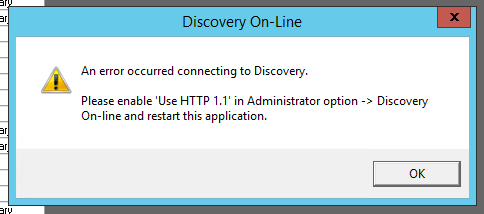
When we open Eclipse 2 now, we get the attached error message. Any idea why please? Stuart
-
Looks like we have a winner! I've removed a NIC from the team, given it an IP, set up a virtual switch, assigned that to one of the VMs in question and all seems well now. Never had that before! Thanks @sted, and to everyone else for your input.
-
I have 4 physical servers all running Hyper-V on Server 2016. Everything is fine except for 1 virtual machine on one host, and one virtual machine on another host. If I run a constant ping, they either respond in 1ms, or timeout. Nothing in between. Probably about 75% success rate. If I move the VM to a different host, the problem moves. It's only come on in the last couple of days. Both are running Server 2012 R2. One is a file server and one is my Sophos Enterprise server. Both can be pinged fine from their respective host with no packet loss. All hosts and all other VMs on the same hosts, and everything else on the network appears to be working as it should, it's just these two virtual machines. They haven't recently done Windows Updates. Pinging from the servers has the same results -> they can ping their host with no problem, but anything else results in random packet loss. Answers on a postcard....? Stuart
-
Hiya, If a computer is shutdown remotely using the shutdown command but it has pending updates, will it apply those updates on it's way down? I Googled "does the shutdown command prevent updates?" and literally every result is "How to shutdown Windows without applying the updates" which is kind of the opposite of what I'm after. I want to make sure that if a computer has pending updates, it does them even if I send a shutdown command to it. Thank you Stuart
-
Strange how different people's experiences can be. I have been with Plusnet for years as I think their customer support is brilliant. Always been polite and helped quickly. I like that you can get a fixed IP address for a one off £5. Recommended numerous people to join who are all also very happy. I did come away from them once when I saw a deal with EE getting £125 cashback through quidco. Absolutely awful experience with them. Couldn't wait to get back to Plusnet which I did as soon as I could and am now very happy again. Wouldn't come away from them no matter anyone else was offering.
-
Couldn't you update the description instead?
-
Block MS logins except ours
Jawloms replied to Jawloms's topic in Internet Related/Filtering/Firewall
Netsweeper