mullet_man
-
Posts
2,035 -
Joined
-
Last visited
Content Type
Forums
News
20th
EduGeek EDIT Conference
Blogs
Everything posted by mullet_man
-

Microsoft releases Office 2019 for Windows and Mac
mullet_man replied to Zoom7000's topic in Office Software
Cheers - I'll give it ago. I've been toying with Office 2019 or O365 but I think 2019 might be the least hassle approach. -
@MartinT likes to live life in the fast lane haha :-)
-
Microsoft releases Office 2019 for Windows and Mac
mullet_man replied to Zoom7000's topic in Office Software
Does the uninstall flag in the XML uninstall x32 and then install x64 bit versions? Or do I need to go x32 to x32? -
Microsoft releases Office 2019 for Windows and Mac
mullet_man replied to Zoom7000's topic in Office Software
I've always deployed out x32 as I though Microsoft recommended that? Should we be deploying out x64 now? -
[ms office - 2016] Office 365 Click to Run: Device based activation
mullet_man replied to KevinB's topic in Office Software
Am not sure what is best - I might push out O365 for staff on their laptops and keep with 2019 for students. There's a few things on here which we could possibly run into - how many is too many activations? https://docs.microsoft.com/en-us/deployoffice/overview-of-shared-computer-activation-for-office-365-proplus And this is typical MS "If you don't use single sign-on, you should consider using roaming profiles and include the %localappdata%\Microsoft\Office\16.0\Licensing folder as part of the roaming profile." I thought roaming profiles were not supported anymore? Am feeling O365 might cause me lots more issues. -
Damn!! Luckily we don't push it out via WSUS, we use SCCM. Very surprised MS haven't pulled it yet.
-
[ms office - 2016] Office 365 Click to Run: Device based activation
mullet_man replied to KevinB's topic in Office Software
Is shared computer activation the same as device based activation then? As I've installed O365 on 3 machines as a test and it hasn't complained about activating, and it isn't showing up as a install on the users O365 installs. If I run a report in O365 on activation it does show up as TRUE under Activated On Shared Computer I don't have any extra licenses applied in O365 just A1 and ProPlus, but Microsoft said they were adding our tenancy/domain to the Education Plus licenses. Am not sure if am good to deploy it out to more devices that all!?! -
I'd be careful installing the latest update I saw a tweet referencing a reddit post about upgrading to the latest version deleted all their documents/pictures/user profile, just completely gone. Just a word of warning to anyone who is planning on deploying it make sure you do it on a few test machines and have back ups in place.
-
I think same for me, I can see Enterprise but not Education 1809. Although didn't they make the editions one download and you pick the edition when you install? So will downloading Enterprise allow me to choose Education?
-
Microsoft releases Office 2019 for Windows and Mac
mullet_man replied to Zoom7000's topic in Office Software
I don't have Office 2019 too. I did do Office 365 as a test, where do you see if it's activated? I have it installed and it seems to be good? -
Microsoft releases Office 2019 for Windows and Mac
mullet_man replied to Zoom7000's topic in Office Software
Am confused!? I thought it was free? -
[ms office - 2016] Office 365 Click to Run: Device based activation
mullet_man replied to KevinB's topic in Office Software
They've added our domain onto the list - that was quick and painless. -
[ms office - 2016] Office 365 Click to Run: Device based activation
mullet_man replied to KevinB's topic in Office Software
I've just emailed and got a response back pretty quick, they want our agreement and might need some extra verification as not every school is automatically eligible. I'll keep you posted on my progress -
Microsoft releases Office 2019 for Windows and Mac
mullet_man replied to Zoom7000's topic in Office Software
It looks like you need to use a web form to request rather than emailing now. https://www.microsoft.com/Licensing/servicecenter/Help/Contact.aspx -
Microsoft releases Office 2019 for Windows and Mac
mullet_man replied to Zoom7000's topic in Office Software
I've just emailed for the KMS keys to be added. I've also emailed a different address I got from another thread about the Office 365 licenses, it looks like others have had a bit a wait to get these sorted. -
Microsoft releases Office 2019 for Windows and Mac
mullet_man replied to Zoom7000's topic in Office Software
Thanks! I wasn't part of the original tenancy set up so it wasn't added back then. -
[ms office - 2016] Office 365 Click to Run: Device based activation
mullet_man replied to KevinB's topic in Office Software
Thanks. -
Microsoft releases Office 2019 for Windows and Mac
mullet_man replied to Zoom7000's topic in Office Software
I thought the O365 A1 licenses were free? Or am I wrong in thinking that? -
Microsoft releases Office 2019 for Windows and Mac
mullet_man replied to Zoom7000's topic in Office Software
Ive decided am going to investigate Office 365 instead of deploying 2019, ill need to sort out my licensing but I might as well as am would need to contact MS to ask for the KMS keys to be added so might as well start the ball rolling to get the A1 Plus licenses needed for O365. -
[ms office - 2016] Office 365 Click to Run: Device based activation
mullet_man replied to KevinB's topic in Office Software
Do A1 Plus licences replace having to get ProPlus licenses? We have the normal A1 licenses but then get our reseller to add ProPlus for faculty and student as well. This allows them to download office at home. -
Microsoft releases Office 2019 for Windows and Mac
mullet_man replied to Zoom7000's topic in Office Software
I just get this, am going to leave it running overnight and see if it's downloaded anything in the morning.
-
Microsoft releases Office 2019 for Windows and Mac
mullet_man replied to Zoom7000's topic in Office Software
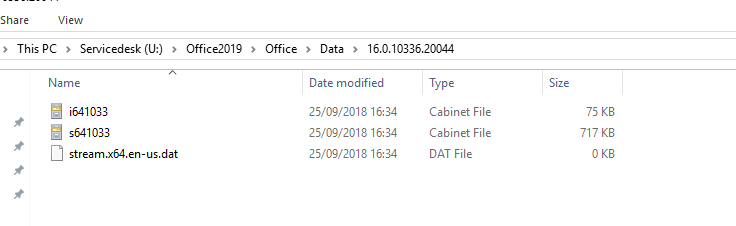
Thanks - mines mostly the same expect for the excluding apps bit. It seems to creating the Office\Data folder and then 16.0.10336.20044 and puts in 3 files and then does nothing else. Does it take a while to download? -
Microsoft releases Office 2019 for Windows and Mac
mullet_man replied to Zoom7000's topic in Office Software
haha! - saying that I can't even work the XML file to download to my PC. -
Microsoft releases Office 2019 for Windows and Mac
mullet_man replied to Zoom7000's topic in Office Software
Thanks yeah this is just for my PC at the minute. -
Microsoft releases Office 2019 for Windows and Mac
mullet_man replied to Zoom7000's topic in Office Software
Mines doing something but doesn't seem to be downloading anything - - - Updated - - - I suspected I might have to request it, not sure why as well. As a MAK key could easily be compromised and shared out?