Koldov
-
Posts
5,084 -
Joined
-
Last visited
Content Type
Forums
News
20th
EduGeek EDIT Conference
Blogs
Everything posted by Koldov
-
Yes, looking at our latest bill we appear to be in credit at the moment, won't take long for to be swallowed up when the new tariff rates hit... In other news, the OH complained about being (and I quote) 'a bit nippy' last night... 'Oh, really' I said... 'I feel OK'... Then I saw her hand move towards the radiator... 'HAVE YOU SWITCHED THE HEATING OFF?'...
-
 We have our first ever actual laptop going home with a child soon. I am proposing as it is something we have never done and unlikely to do regularly (previous devices were iPads during lockdown and had Meraki restrictions + LGfL 'Home Protect' app) to do the following: Domain Join (once logged on as a child, then cached credentials should keep all GPO restrictions etc. The device can be brought back to school once a month to refresh/ update) Meraki (MDM - not for restrictions on Windows laptops, but as a 'where has this laptop gone' provision) Sophos (this includes a web filter, can be set fairly strictly and is managed) I don't think we can justify buying a platform such as Securly for one child, but do you think the above would fulfil our obligations?
 -
I'm in a bit of a quandary as my energy supplier hasn't updated my tariff... I finished my last fixed rate deal at the end of January and in February I was expecting to go onto the standard variable tariff and for my account to reflect this. When it didn't change I made the effort to point this out to their customer service and asked what was happening and why hadn't it changed to the standard variable tariff (what those rates were and why hadn't they informed me etc.) but they weren't really interested. They suggested it may change when I enter my next meter readings, which I duly did at the end of February but it still charged me at the January fixed rate... So, you can see my dilemma...
-
How easy is it to Geoblock? Is there anywhere that lists a countries range of IP addresses? Wouldn't it cause multiple issues like this? Don't most hackers use VPN or do the Russia/Chinese state sponsered ones not even care if you know where they are?
-
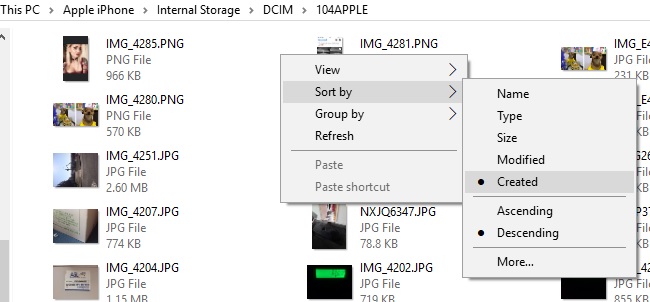
Unfortunately, screenshots, Whatsapp pictures and all sorts end up in the 'Camera Roll' folder on my iPhone for some reason... so I cannot take credit for all of those photos... Including the Chihuahua who is having a birthday party!

-
I'm guessing 'paper late jam' is similar error to a 'misfeed' or 'paper not fed'...? They may not be worn as such, but maybe smooth/hard or covered in dust...? I think back in the day they used to have something as a printer rubber roller restorer, but these days they just replace ours.
-
Possibly, as I don't have the Customise option either.
-
Removing the trees and therefore leaving the fence open to the elements/extreme weather/storm/wind and therefore causing the problem... and he replaced the original fence...? Which now has blown down panels...? Seems like he is creating his own prosecution, not defence... On an 'annoying thing' tangent, relevant to this and not quite annoying enough to go in that thread... First proper warmish sunny day yesterday and when I got home the neighbours had all their windows open and were playing loud cra.... I mean rap music... sigh, I like Winter....
-
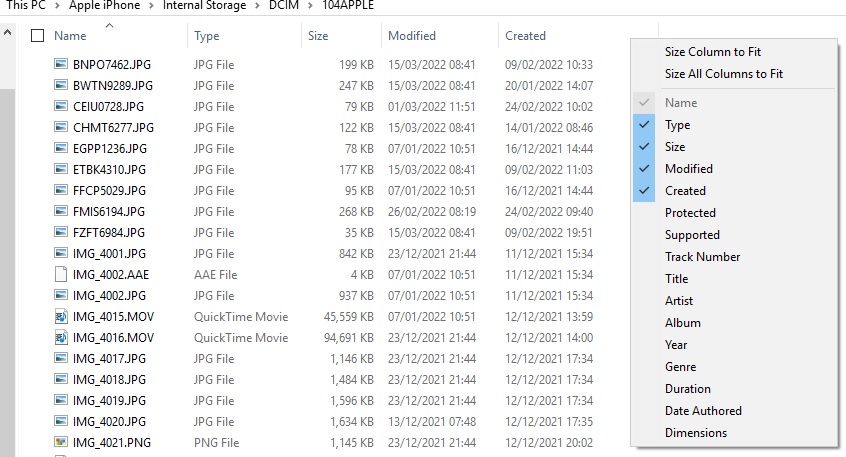
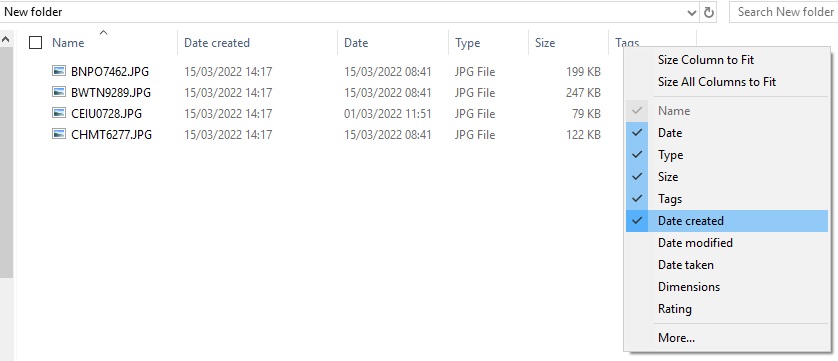
Unfortunately, it seems that Windows has a 'helpful' feature that automatically chooses the available columns based on the content of the folder. Looking at my iPhone DCIM folder, it includes a few .MOV files and Windows has decided it is some sort of multimedia folder and has (helpfully) limited the columns to the following choices: Move only some of the photo .JPG files into another folder and voila... There may be some reg magic you can do to stop this.... I haven't bothered trying as it's never been an issue. YMMV.
-
Not sure if there is a way around this if the only option is to modify the 'share' permissions as it is only a folder on a share (and it was created with unique 'non-inherited' permissions due to it being 'sensitive')... Currently it looks like this (folder 4 is the problem) : Server SRV-01 Drive E:\ Share STAFF_SHARE$ - Share Permissions = Everyone Folder 1 MATHS - Inheriting Folder 2 ENGLISH - Inheriting Folder 3 SCIENCE - Inheriting Folder 4 PERFORMANCE MANAGEMENT - not inheriting/permissions set on folder manually - sub-folders inheriting from this Folder 5 GEOGRAPHY - Inheriting Folder 6 HISTORY - Inheriting etc... I have asked the Headteacher to modify their workflow, so as not to include any step of directly copying or moving a file from one network drive/share to another through 'Finder' on the Mac and will have to wait and see if that works...
-
Just checked on mine and 'Modified' brings all sorts of randomness too... I usually choose 'Created'.
-
Just to add... I have come across a couple of posts on other forums that seem to be the exact issue! Unfortunately the fix doesn't seem to apply to my situation... So far I have found it appears to be a well-known (and quite old issue with Mac OSX) transferring file to a Windows server. “I have a share on a Windows machine that acts as a server. We have several people on Macs that need to create/modify files on this machine. When one of these people creates or copies a file to the share the file acquires a Windows account with a name like this: S-1-5-88-3-33216 This account has no permissions and seems to mess with all the other permissions on the file. The end result is that users can't see the file until I remove this account manually from the file permissions. Has anyone seen this before?” ‘You can get around this by removing "Full Control" for "Everyone" at the share level (and possibly the NTFS level) and changing it to "Modify".’ answered Apr 10, 2013 at 20:23 Also, this: “We have one other mac running 10.13.3 that does not have the issue. All other OSX machines are running 10.12. Problem: When copy and pasting between folders on a network drive, the folder becomes unreadable to all but the user who created it. This obviously creates a lot of problems for that user. The fileserver is windows 2012 server. I was able to reproduce on the other mac with 10.13.3 now. Exact steps are 1) take a network file, on a network drive 2) make a folder on another network drive and copy it there. 3) then select that file that you copied, make another folder on the second drive, and then copy it there. the permissions get set to "everyone no access" and then I can’t even view the file in the preview window. The folder permissions on the parent folder are correct. So it has something to do with copying files between two network folders. I noticed that there is a weird SID on the files I can’t read, specifically S-1-5-88-3-33216 . So on a lark i decided to look it up and found this article which says that this was a problem with share permissions in OSX 10.8 So I start playing around with permissions and lo and behold, if I remove the Folder -> Share -> everyone -> Full control (from just the share permissions, not the security tab) it appears that this problem is solved! or at least worked around. So the solution seems to be to remove the full control on the everyone group on the windows share dialog. I am going to test with the user and make sure, but I can’t make the broken file anymore. The everyone FULL CONTROL on the security tab seems to not matter, as with it set the files are not broken.” Mar 29, 2018 11:54 AM Unfortunately we do not have the 'Everyone' permission set on the folder (only on the very root of the main share and I'm wary of removing or altering this)...
-
TL;DR - The Headteacher uses a Mac... transferring files to a folder on Windows server share does not inherit the correct permissions. We have a Performance Management folder on a Windows 2012R2 server. The Headteacher has been putting files into these folders for a couple of years with no issues. The SLT have full control on all folders (inherited from the top folder, with Authenticated Users having Read access) and then the individuals have full control on their own sub-folders (also Access Control is enforced). Today I have been informed that teachers now cannot see the files the Headteacher is putting in there, although this appears to have only just started happening and files from Windows pick up the permissions correctly... also it appears that older files are OK and files modified today are not. Looking at the permissions, the files usually pick up these permissions: SYSTEM - FULL TEACHER - FULL SLT 1 - FULL SLT 2 - FULL SLT 3 - FULL HEAD - FULL DOMAIN ADMINS - FULL SCHOOL ADMIN - FULL Now the new files are picking up these permissions: SYSTEM - FULL SLT 1 - FULL HEAD - FULL SCHOOL ADMIN - FULL ACCOUNT UNKNOWN (S-1-5-88-33216) - NONE That last one has obviously done the damage and from my research appears to be the SID used for MAC > WINDOWS. Is it some issue with the way the Headteacher is moving a file or editing the file, or something that isn't correct in the permissions (as it has been OK up until now)?
-
Thing is, I'm not sure how thoroughly I can test the devices if I'm honest... recently I'd fired up a couple of VM's, but as I didn't make a full separate network for them (so I could issue the updates to them from our WSUS), they aren't DCs and don't have Hyper V machines running on them (as they're Hyper Vs themselves). So for the last couple of issues... completely pointless going to all that effort... EDIT: I have the same issues with backups, everyone says test your backups fully - but how with one physical DC with a few other roles including SIMS/Print Server/DNS/File Storage etc. (yes, I know it's probably not MS recommended/supported) on site am I supposed to test restore a full DC in a production environment...?
-
Previously I hadn't had any major issues that I can recall, maybe some minor ones that just get forgotten about in the 'mists of time' and general multitude of things that need to be dealt with on a daily basis... and I had even set our WSUS to automatically approve everything, lulled into a false sense of security. Until last October onwards and Print Nightmare (oh and we also caught the boot loop too). If you have been fortunate enough not to have been affected, the I.T. gods have truly been smiling upon you. But since then I have decided to wait a while before deploying any new update... EDIT: I asked something similar: http://www.edugeek.net/forums/windows-server-2012/226748-march-updates.html The only issue is that of the various roles/features each of us is using and possibly the amount of different versions of OS. As it shows in the Mega thread on Reddit, things quickly become lost and the same question is asked/answered multiple times. Sometimes the issue only affects a particular client/server version, or maybe just Office/Exchange/DCs/Print Servers/Hyper Vs... and then it becomes difficult trying to get the information you need quickly (I gave up after the first page on Reddit).
-
I only did a light google skim so I'm not sure this has any relevance if A3 is available? https://docs.microsoft.com/en-us/partner-center/upgrade-windows-to-education Seems like it will be a fair bit of effort though... Edit: The spec on the Lenovo web page wouldn't be too bad: Processor Up to Intel® Celeron® quad-core N4100 Operating System Windows 10 Pro Display 11.6" HD TN antiglare (1366 x 768) Memory Up to 4GB Storage Up to 128GB eMMC & M.2 SSD Shame the made for DfE ones look like glorified web browsers...
-
What was on it before? Seems like the sort of spec for a Chromebook... did they really send those out with Windows 10 on them? Is that even a thing... do many schools not have MS licensing? What servers do they run? Are they just using embedded/license stickers/OEM for clients? Personally I think that is going to painful for a full fat Windows.
-
well, I've kept the old shell... so one day maybe!
-
Great job! I had a similar idea myself recently and almost talked myself into trying it... unfortunately it was an HP250G6 (so plastic shell) and I don't have a pop rivet gun so it would have been small bolts which probably wouldn't have worked anyway! Ended up buying the screen shell & top part of the base (which includes the keyboard). Ridiculous that the parts that gets most force exerted on it (hinges) screw into inserts mounted in a couple of mm thick plastic...
-
Black? Underground... maybe armoured... where does it come from (can you trace its origin - or as far as you can see). Similar to this: https://mcldatasolutions.co.uk/om3-swa-armoured-fibre-cable EDIT: 3-08-lt-swa-ix-bk-nc = OM3 8 core...?
-
https://cleerlinefiber.com/2020/04/24/identifying-installed-fiber-optic-cables/ https://rfindustries.com/fiber-optic-cable-types-multimode-and-single-mode/#:~:text=Types%20of%20Multimode%20Fiber%20Cable%20and%20Specifications https://beyondtech.us/blogs/beyond-blog/fiber-optic-color-standard#:~:text=Here%E2%80%99s%20a%20guide%20to%20identifying%20cables%20according%20to%20their%20jacket%20colors%3A https://www.thefoa.org/tech/ColCodes.htm#:~:text=When%20the%20print%20on%20the%20outer%20jacket%20of%20premises%20cable%20is%20used%20to%20identify%20the%20types%20and%20classifications%20of%20the%20fiber%2C%20the%20nomenclature%20of%20Table%203%20is%20preferred%20for%20the%20various%20fiber%20types.%20Distinctive%20print%20characters%20for%20other%20fiber%20types%20may%20be%20considered%20for%20addition%20to%20Table%203%20at%20some%20future%20date.
-
Well, we got our last HP laptops this morning (HP 245 G8 Notebook). Yes they're small, yes they feel very plastic, no I don't think they will last long with our children... Does anyone know what I should be doing here (it comes with the F.64 Rev.A bios)?
-
Just putting the feelers out for any info on the latest CU... good/bad? If anyone has been feeling brave... 2022-03 Security Monthly Quality Rollup for Windows Server 2012 R2 for x64-based Systems (KB5011564) Still feel like this topic should be some sort of sticky given the recent train wreck Windows updates have been.