Koldov
-
Posts
5,084 -
Joined
-
Last visited
Content Type
Forums
News
20th
EduGeek EDIT Conference
Blogs
Everything posted by Koldov
-
Will it be though? It already seems like there is a 'preferred' mitigation in place. "The preferred mitigation for this issue is to manually map certificates to a machine account in Active Directory. For instructions, see Certificate mapping." https://support.microsoft.com/en-us/topic/may-10-2022-kb5013952-os-build-14393-5125-0bb9f7e6-0360-4162-8eab-108e28d3a090#:~:text=Known%20issues%20in%20this%20update Is this not like 'Print Nightmare' then, where they've made the change and that's just how it is now... or is it definitely an bug/error that they will 'fix'...?
-
Ah, don't worry then it won't be that (we are with the 'Dark Side')...
-
Do you have 'Creative Cloud Desktop'? On ours I can see it is not compatible with our version of Win 10...

-
FTFY....
-
Have you got the correct 32-bit (x86) or 64-bit (x64) version? Or is your Office installation is Click-to-Run or MSI-based (as it sounds like the 'Install Updates' options is only for Click-To-Run so MSI updates wouldn't work)? If it is Click-To-Run is automatic updating enabled? https://docs.microsoft.com/en-us/office365/troubleshoot/updates/automatic-updates
-
How did you get SOLUS to 3.12.59.5...? I had a similar situation a while ago, but I couldn't even get the latest SOLUS to update (through SOLUS - because it had the wrong URL) although it showed in the list of updates, there was a version to download that seemed to set it straight. http://www.edugeek.net/forums/mis-systems/227389-sims-spring-2022-error-solus-update-new-url.html
-

[sims] IE11 desktop application retires in 1 month on June 15, 2022
Koldov replied to Koldov's topic in MIS Systems
Funnily enough we have HIK for our CCTV and didn't have any issues connecting to it with Chrome (that might be a lie as I seem to remember downloading a 'Local Service Components/Web Components.exe' file when we first got the system)... It was just this part that made me wonder if somehow they intend to strip out IE from the operating system (or just disable it) though as I've seen that there are still a few core components of some software that leverages IE: This means that the IE11 desktop application will no longer be supported and will be progressively redirected to Microsoft Edge over the following months, and ultimately disabled via Windows Update, to help ensure a smooth retirement. -
Thanks, may have fixed it though... added in the red part on a hunch that is what is creating the folders and it seems to have worked OK. function Add-FileDetails { param( [Parameter(ValueFromPipeline=$true)] $fileobject, $hash = @{Artists = 13; Album = 14; Year = 15; Genre = 16; Title = 21; Length = 27; Bitrate = 28} ) begin { $shell = New-Object -COMObject Shell.Application } process { if ($_.PSIsContainer -eq $false) { $folder = Split-Path $fileobject.FullName $file = Split-Path $fileobject.FullName -Leaf $shellfolder = $shell.Namespace($folder) $shellfile = $shellfolder.ParseName($file) #Write-Progress 'Adding Properties' $fileobject.FullName $hash.Keys | ForEach-Object { $property = $_ $value = $shellfolder.GetDetailsOf($shellfile, $hash.$property) if ($value -as [Double]) { $value = [Double]$value } $fileobject | Add-Member NoteProperty "Extended_$property" $value -force } } $fileobject } } clear $flist = Get-Childitem -Path "F:\test" | Add-FileDetails foreach ($file in $flist) { $targ_dir = $file.DirectoryName + "\" + $file.Extended_Artists [b][color="#FF0000"]+ "\" + $file.Extended_Album[/color][/b] if (!(Test-Path $targ_dir)) { New-Item $targ_dir -type directory } if ( $file.Attributes -ne "Directory" ) { Move-Item $file.FullName $targ_dir } }
-
Sorry for the necro... but I came across this thread (good old EDUGEEK) on a Google search for just such a thing, as I'm downsizing my home PC setup and don't need computers all around the house. Most of the other PS scripts require some sort of module downloading or blogs/forum posts (like this one) that suggest installing some other software (Picard/Media Monkey), but I'd rather not. The above script almost got me there (put them in 'Artist' folders but not 'Album' folders within those), but I'm not a Powershell guy so I'm not exactly sure why... So I'm hoping to consolidate all the various DATA/STORAGE hard drives and moving all my music onto one disk, just copying it all across for now. Eventually I know I'm going to have to go through it and things like the iTunes backup just has a massive folder with thousands of tracks. Most have full ID3 tags (but at the least have Artist & Album and that's all I'm interested in), some have strange track names (#?@! Yourself - Steve Vai) that I can deal with manually I guess. But at the minimum I'd like it to create 'Artist' folders and within that 'Album' folders and have all the tracks moved to the relevant folders.
-
Ha Ha! Yeah I almost did but realised and deleted it before I posted...
-
Thank you! I hope not, I really thought it had potential and it wasn't ever fully realised in one season... I was always waiting for just that little bit more to be revealed but it never happened (possibly that's the point but I'll be disappointed if it never happens).
-
[sims] IE11 desktop application retires in 1 month on June 15, 2022
Koldov posted a topic in MIS Systems
Not really sure where to post this as I'm sure it affects more than just MIS... There are still odd posts popping up with everything from MIS and Microsoft Office to CCTV as still needing IE11 either for core functionality or just as the only browser the software will work with. With the reminder email dropping yesterday, I wondered if everybody has found ways of these pieces of software using alternate browsers. I'm not sure if SIMS still actually requires it for anything, but it's the only thing here that might cause issues if it does.... -
Quite pleased about this, I thought last season ended well with just the right amount of future possibilities (enough to go forward if feasible) but also with a lot of loose ends tied up if it had to end. Definitely a new 'chapter' now, so much so that it could be a completely separate entity (with a small recap of how they got there).
-
Bit confused when I saw this because of the thread title prefix [Movie Trailer] Was just about to say "Ooooh there's a film of this too?" after saying in the 'what TV shows are you watching thread' that this could have been a film...
-
Thanks, yes all very plausible (and probably likely)... She's actually shut down her laptop now so unlikely to find anything else... It's just she seemed very insistent it had my name on and it was asking about a download, so I wanted to rule out any sort of Google 'message/pop-up' as being impossible first and 'err on the side of caution' before I wrote it off as the usual (just my luck if I did that and it was something more serious). I do have the default Chrome notification policy set as 'Do not allow' but with an exception for... [*.]Google.com for Google stuff, maybe that is a bit too open...?
-
Strange one this! I just had a teacher ask me if I sent her a message on 'Google' this morning... apparently something popped-up in the bottom right hand corner of her screen asking about if she had 'downloaded something or other'... Unfortunately, this isn't the most technical/I.T. literate user and explanations are usually quite lacking in detail and flustered, so I'm unsure if it was actually Google or some other sort of pop-up... but she was 'on Google' at the time.... The thing is it apparently had my name on it, but I don't use the Google account with my name and just checked in 'Google Admin > Reporting > Audit and investigation' and I haven't signed on with that account since February! It might have been an email pop-up, but she doesn't use Outlook just OWA (not sure if that pops up a message for new email in Windows 10 or not)... Unfortunately she was in a SATs exam and had a timer on Google, so just quickly closed the message. Is there anyway to send any type of message like this through Google and how can I check if one was sent?
-
Had similar back in the day when I first started... Needed to RMA a server drive to DELL and after delivering the new one they said the old one would be collected within a day or so (cue my panic to get it wiped)! Couldn't work out why it wouldn't even get recognised on my PC... It was too early on in my career to think about trying to put it back in the server and attach it to the SAS backplane. Not that I would even now, can't see anyone would be very interested in what was on there (if you can even read one disk of a RAID array once removed). EDIT: I even cut pieces out of the SATA connectors in my PC...
-
Inherited Network, How do I change the setup to meet our needs
Koldov replied to JAB1a's topic in Wired Networks
So are you saying the VOIP phones network route to the internet via an unfiltered connection? And the Curriculum network routes to a filter/firewall somewhere that blocks ports and IPs? Therefore possibly the 'easiest' way to achieve this was on two separate networks via 2 separate switches? -
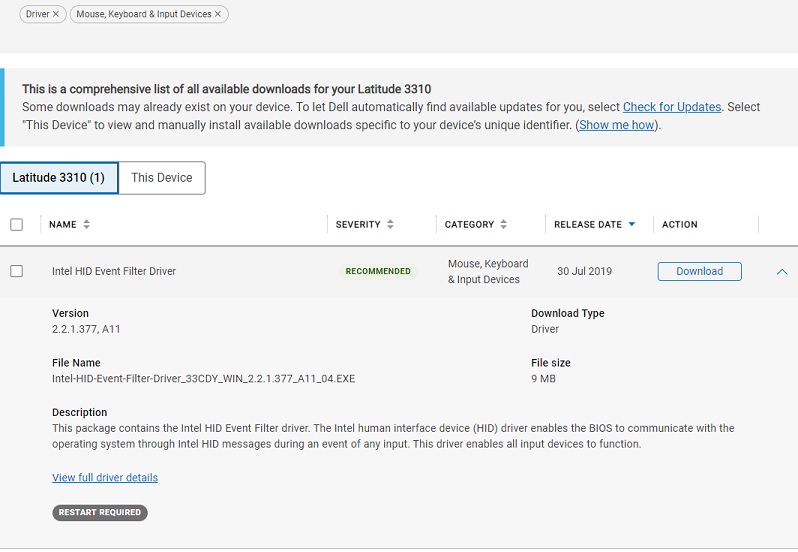
Did you try this one? https://www.dell.com/support/home/en-uk/product-support/product/latitude-13-3310-laptop/drivers Download type: Driver Category: Mouse, Keyboard& Input Devices
-
Just out of interest, could you try this in your XML...? '' http://www.edugeek.net/forums/office-software/227339-deploying-office-2019-a-2.html#post1949731
-
Computer Naming in admin areas and offices
Koldov replied to kennysarmy's topic in How do you do....it?
We have a printer in the the Assistant Head's room... I have named it ASS-HEAD... But on-topic for the OP we just have descriptive names: Office reception REC-PC1 Finance FIN-PC1 ICT Suite ICT-01 Family Workers FAM-PC1 For laptops they are all given the school initials, a model number and unique number that is recorded on a spreadsheet: XYZ-HP840G3-29 XYZ-HP250G6-03 XYZ-HP255G7-21 EDIT: Just to add that it wouldn't matter if we had the purchase date of the equipment as it probably won't get refreshed/replaced until it dies.... -
Disappointed with Moon Knight if I'm honest... Watchable, but felt a little too 'teen' for me in some parts (with occasional blood splatters) and a 'Dick Van Dyke' type of feeling in others (I really was expecting a 'cor blimey guvner' at some points) and Ethan Hawke not even remotely menacing, I think I was looking for something darker all round... Picard has taken an unexpected turn recently and I'm interested to see how it turns out considering the implications! But yes, Picard himself has passed his prime (if he ever had one /controversial) and just seems to stand about getting in the way and looking off into the distance whilst reminiscing mostly.... having said that he plays a doddery old man very well... another series that seems to have jeopardy for its own sake to fill out the episode.
-
I think I've heard just the opposite from my OH actually... Watch Blade Runner 2049 (2h 43m) or Dune (2h 35m) with me? No chance.... Binge watch most of a season of Bridgerton in one day? Oh well it's a lazy Sunday... why not... where's my blanket and snacks...? Maybe it's just the film choice...? I think we've all watched a few films that could have done with being expanded into a series (especially where you can tell they've skipped massive parts of the plot/character development to fit it in to a movie) and a few series with episodes where nothing really seems to happen (and the plot gets ridiculous, or completely pointless things happen because they need to stretch it out to fill out the season) and it could have all been condensed into a film. Watching 'Outer Range' on Amazon Prime at the moment and although the suspense is building and I'm intrigued to find out what is going on, it's a bit slow and there's a lot of filler so it probably could've (should've) been a movie...
-
How did you get the client drivers and did they match the server? There was a mention of print drivers must match on both server and client (especially for 'Point and Print') I presume you are still using V3 drivers? Not sure how that would affect IP/printing directly to the printer though... So are you saying you don't need the Privacy regedit at all?
-
That's just where the Microsoft link in the post from @Chockster (and others) says to put it. https://support.microsoft.com/en-us/topic/managing-deployment-of-printer-rpc-binding-changes-for-cve-2021-1678-kb4599464-12a69652-30b9-3d61-d9f7-7201623a8b25#:~:text=Step%202%3A%20Enable%20Enforcement%20mode The first REGEDIT is for the 'RestrictDriverInstallationToAdministrators' (Software\Policies\Microsoft\Windows NT\Printers\PointAndPrint) The second REGEDIT is for the 'RpcAuthnLevelPrivacyEnabled' (SYSTEM\CurrentControlSet\Control\Print)