kennysarmy
-
Posts
6,514 -
Joined
Content Type
Forums
News
20th
EduGeek EDIT Conference
Blogs
Everything posted by kennysarmy
-
 It could be an issue with my WSUS... I'm looking in to if any updates required have been released to the test device.
 -
Same issue with the Enterprise MSI
-
I'm testing a new Windows 10 build. It's fully patched using WSUS - there are no more updates to install! When I go online to download and install the latest version of Edge it downloads the installed and when I run it I get the following message: "Microsoft Edge works best with the latest Windows Update" It appears I'm not the only one: But I'm unable to find a solution. Anyone any ideas?
-
Yes, that was the issue!!! Staff have now been given guidance not to admit anyone from the lobby!
-
About to test rolling out Office 365 Apps to some laptops. I've used the Office Customisation Tool to create the XML file. Be grateful if anyone can give it the once over to make sure I've not made any obvious mistakes or omissions. I presume "" is the correct version for schools?
-
Our information is also coming from AD so I'd be interested in what you may have locked down that I've missed that is allowing the students to be able to change their display names. Any help appeciated.
-
Teams Question: can you prevent students changing their display name? Unfortunately we've had reports of students causing disruption in our testing today.
-
This? So I'm good to go trying to deploy Shared Computer Activation for Office 365?

-
I have this
-
Sorry if this question is quite basic, but; I have the following showing when I log in to my Microsoft 365 admin center under Billing -> Your Products! O365 ProPlus for Faculty EA - volume licensing & O365 ProPlus for Students EA - volume licensing But when I logon to Azure Active Directory admin center under Licences -> All products : there is no listing for O365 ProPlus for Faculty or O365 ProPlus for Students so I cannot see how to assign the licences to users? My list shows: Microsoft 365 Apps for Faculty Microsoft 365 Apps for Students Office 365 A1 for faculty & Office 365 A1 for students How should I proceed if I want to roll out Office 365 to some laptops and ensure "Shared Computer Activation" is working? Currently I have Office 2016 installed on school computers. Any help or links to further reading appreciated. Regards K
-
I think these were accounts that were in the AD group but did not have TEAMS licences or were not part of O365. I've now since created staff policies and moved where necessary everyone off the Global policies where we felt there was a need to differentiate between staff and students.
-
From my experience most will end up at home and you'll never see them....
-
Well it did n't take as long as I thought, but it's returned with 73 errors. Anyone know how I troubleshoot this further?
-
All seems to be OK. I guess I now just wait.
-
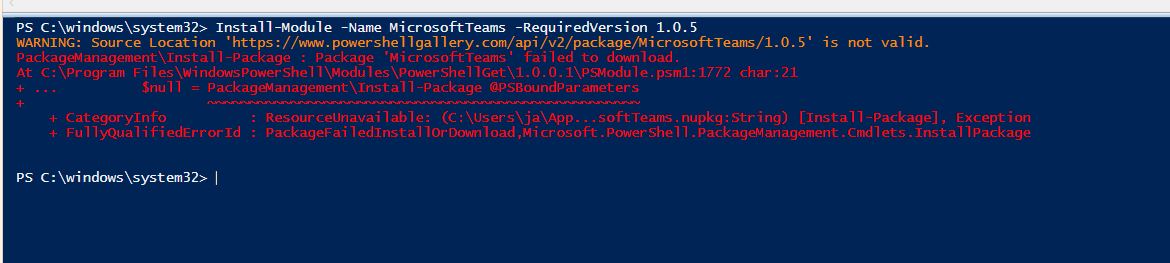
Is there anything I need to have installed to get the Get-CSOnlineUser command to be recognised? PS C:\windows\system32> Get-CSOnlineUser Get-CSOnlineUser : The term 'Get-CSOnlineUser' is not recognized as the name of a cmdlet, function, script file, or operable program. Check the spelling of the name, or if a path was included, verify that the path is correct and try again. At line:1 char:1 + Get-CSOnlineUser + ~~~~~~~~~~~~~~~~ + CategoryInfo : ObjectNotFound: (Get-CSOnlineUser:String) [], CommandNotFoundException + FullyQualifiedErrorId : CommandNotFoundException PS C:\windows\system32>
-
[system.Net.ServicePointManager]::SecurityProtocol = [system.Net.SecurityProtocolType]::Tls12; Had to run this command...
-
I tried to update MS TEAMS powershell version.
-
I've now had chance to try the script you kindly posted but unfortunately I get this error! New-CsBatchPolicyAssignmentOperation : The term 'New-CsBatchPolicyAssignmentOperation' is not recognized as the name of a cmdlet, function, script file, or operable program. Check the spelling of the name, or if a path was included, verify that the path is correct and try again. At line:5 char:1 + New-CsBatchPolicyAssignmentOperation -PolicyType TeamsMessagingPolicy ... + ~~~~~~~~~~~~~~~~~~~~~~~~~~~~~~~~~~~~ + CategoryInfo : ObjectNotFound: (New-CsBatchPolicyAssignmentOperation:String) [], CommandNotFoundException + FullyQualifiedErrorId : CommandNotFoundException I replaced "GROUPNAME" with "PupilsTeams" and confirmed this group is in AzureAD. I replaced "POLICYNAME" with "Education_SecondaryStudent" the standard one shown in TEAMS Admin. Any thoughts?
-
Thanks, I will test this tomorrow - my brain is frazzled for the rest of the day!
-
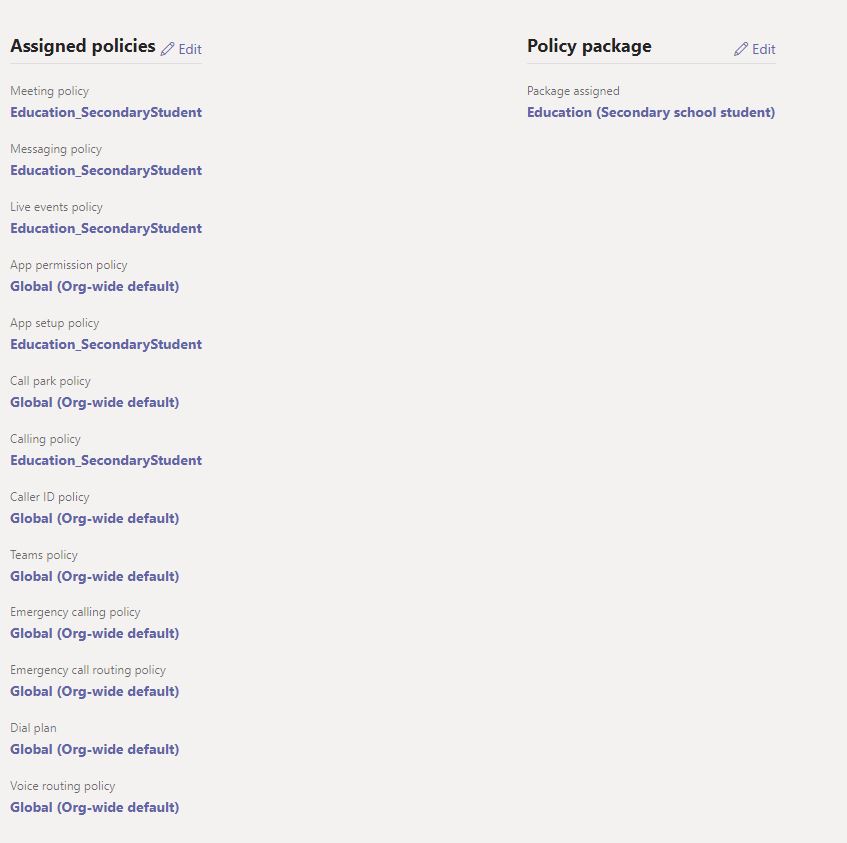
Can anyone share their powershell code with me as I need to push the Education (Secondary school student) package (policies) to all my students. I've edited the Education (Secondary school student) policies with a member of SMT and we've tested with a test student everything is how we want it. The polices for the test student look like this: And I want all my students to look the same as currently they are all on Global (Org-wide default) - currently this is fine as I've not given any students apart from the test student a Teams licence. Thanks.
-
O365 - Students using Teams & SharePoint - Locking features down?
kennysarmy replied to AvaFX's topic in Cloud Services
Hi Are you able to easily edit the in-built Education Secondary Student policies? -
Yes we have our own academy licence. Which is why I don't know why the LEA SIMS team would have sent me this: Good Morning, If you want to keep your SIMS database for reference / archive you will need to purchase a licence. As an academy you will need to liaise with Capita via [email protected] to arrange the migration of any data and to cancel your active licence. Regards,
-
Thanks. Are the LEA correct in that we need to buy a licence to keep our old SIMS Server running?
-
I also had this back from our local LEA SIMS Support office. If you want to keep your SIMS database for reference / archive you will need to purchase a licence. As an academy you will need to liaise with Capita via [email protected] to arrange the migration of any data and to cancel your active licence.
-
I thought they said they'd only go to students within a 5 year leaving period...I'll confirm.