Jobos
-
Posts
2,386 -
Joined
-
Last visited
Content Type
Forums
News
20th
EduGeek EDIT Conference
Blogs
Everything posted by Jobos
-
That's the part I'm not sure off and I would hate Veeam to go off and restore the server from last weeks back up.
-
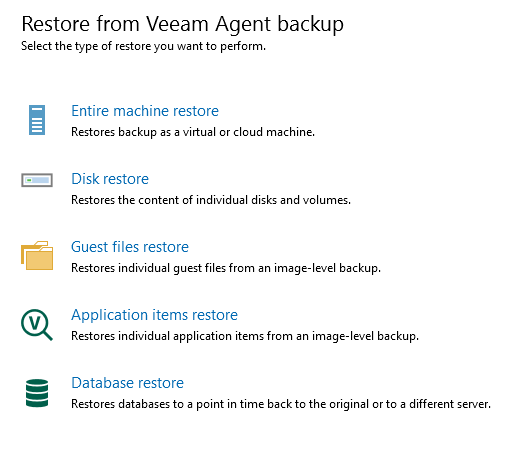
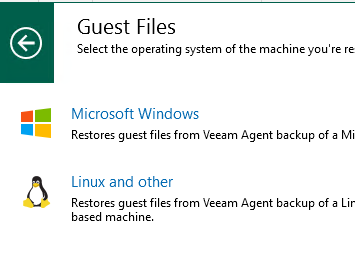
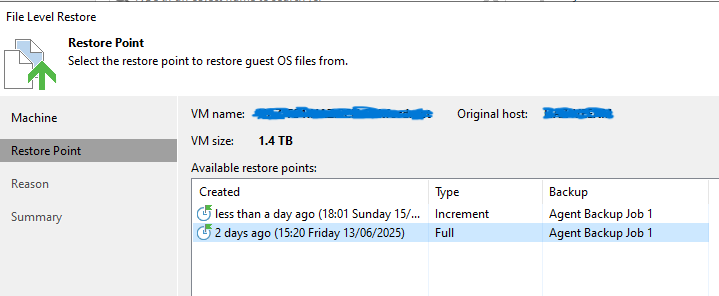
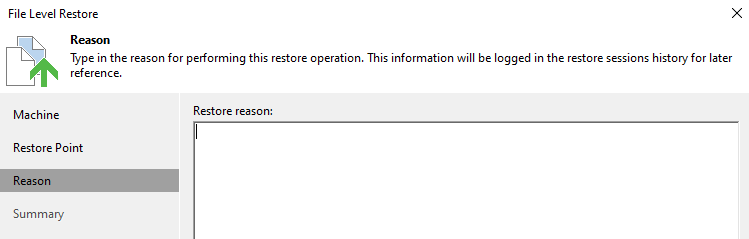
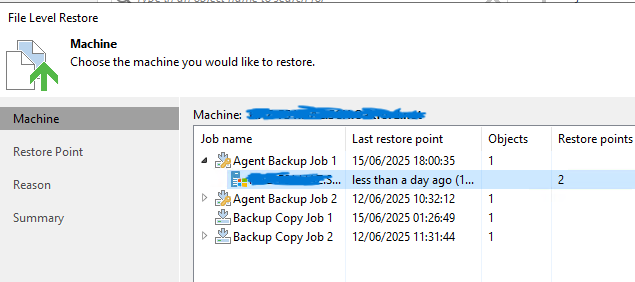
So I made new jobs but this time selected OS Volume and Veeam has been running since Friday afternoon. The backup to the local Veeam server has completed but the copy job from Veeam server to cloud is still running although at 92% now. Next is to try a file restore so I select guest files restore. Microsoft Windows Select the weekend job. Select full restore point Then I get here and I don't see a way to select any file and I'm concerned if I go further the whole server will get restored.

-
@Koldov Thanks, I have started that running so should be finished by Monday at which time I will test.
-
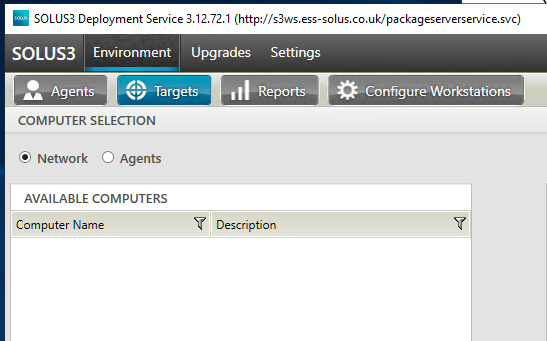
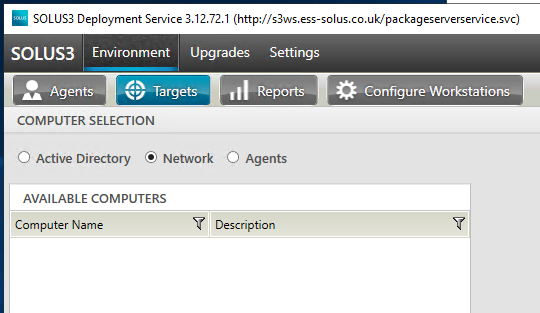
No. Server is at 192.168.x.x and computers are 10.2..x.x but I have a clue as to why I can't find any computers and that is when I first opened Solus3 and followed the steps above the active directory button was missing. Here 2 captures taken 2 hours apart and I didn't do anything to Solous3 in that time but notice the active directory button has now appeared and I can browse to the correct OU and pushout Sims. I'm not saying it takes 2 hours for the button to appear but it wasn't there 5 minutes after the first capture Of course it would be good to have Solus3 working to full capacity but if I could get the AD button working without needing to wait that would be great too.
-
Yes, most likely is although the servers are with the MSP running on a Linux host which we do not have access to
-
So I'm tiring to install SIMS on a new machine so in Solous3 I open Environment / Targets / Add / select SIMS/ Choose Clients. Solous3 says Browsing for Computers but nothing is listed under available computers. I have dropped the firewall on both the SIMS server and desktop but still Solous3 is blank. The server and desktop have been restarted. Apart for the required ports to be open what else is needed? Thanks.
-
Thanks for the help everyone but still not able to find the option to just restore a few files as it seems only to give me the option to restore the complete VM. It could be the type of backup I using and as said earlier there is a file backup option in Veeam but sadly that is only uses local storage and not cloud. Veeam is a beast and with backups being such an important thing I don't want to chance making a mistake so I've decided to go with Backup Assist that I've had running for the past 3 weeks. Backup Assist is really good at what it does and just works. The MSP backs up the VMs anyway so I don't need to worry about full restores but they are charging £1800 for file backups and that only gives us 1TB for 28 days restore capability so really over priced for what it is. For a fraction of cost I can backup using grandfather, father, son and have immediate access to the restores.
-
That's really what I'm doing. Backing up to the veeam server then copying that backup to the cloud. The problem starts when I do a test restore as all I want is to restore few files and not the complete server.
-
Yes that's the one I mean, it syncs SIMS to ParentPay.
-
I'm running a trial of Veeam together with Peasoup's 2TB cloud offering but something is not quite right or more likely I am doing something wrong. Veeam is running on a local standalone VM and at this time there are 2 backup jobs running. The first job is a full backup of the Windows fileserver (entire computer) and storage is the second disk on the VM. The job appears to be running well although very slow as the file server is a remote server with the MSP. The second job is a copy job saving to the cloud and again it appears to be running well. I started trialling Veeam using a file backup job and that working well too. I could select folders to backup and restoring them was easy but there was no way I could find to copy the job to Peasoup's cloud, only to the local storage so that's when I disabled the file backup and made a new full backup job and backup copy job. When I try to run a individual file and folder restore I don't get the option as it only shows the file backup job that was saving to the local VM (now disabled) but I want to restore from the cloud or the full local backup job as they are the latest jobs. I could restore the complete server but that's not what I want. Any advice?
-
Is that the link to download SchoolComms? If so yes please, I've asked Parentpay but still waiting for a response.
-
Prefect, thanks. Net2 now starts in 4 seconds.
-
What ports on the Net2 server need to be open to allow a client machine to connect to the Net2 server? Looking on the web I am getting different information and so far I have open ports 3128, 6474-6476, 8025, 9999, 10001, 30718, 61416, 61616 but it not 100% correct as when running the Net2 client on a workstation there is a spinning wheel for 40 second before the console opens but with the server firewall down the console opens immediately.
-
And it was enabled by default on the other two MFDs they fitted today.
-
Well what can I say apart from I owe you a pint and the copier guys owe you a keg! You were spot on and the copier engineers said it must be in the new firmware as they have not seen that setting before.
-
Yes can ping the MFD and port 50003 is open when tested with power shell
-
The MSP manages the host and we only have access to the client which is why I said we are looking for a file backup. The MSP backs up the VM but doesn’t keep it long something like a week if memory serves me right. In my last school everything was in house and that was so much easier as we kept the VM backups for 3 weeks but also had a file backup using Backup Assist and that kept files for the year. Did I mention the MSP charges £1800 for 28 days of file backup which is why we want the file backup in house.
-
Peasoup are very helpful and have given us a 6 month trial of 2TB cloud storage plus Veeam licensing. It my first time using Veeam and it takes some getting used to but we only need a simple file backup and so far I’ve not figured out how to run a file backup job and save to the cloud. Backing up a complete VM saves to the cloud without problems but we just need the file backup. We also have a trial of Backup Assist and great for file backups so I’m leaning towards Backup Assist.
-
This is the closest thing I’ve seen to explaining the strange behaviour and might well be this, thanks for pointing it out.
-
Yes we started changing IPs to see if it made any difference. I know it shouldn’t but by this time we were getting desperate! The network is a /22 and the . 1 address is an old server due to be removed. There are many odd things in this network hence the problems today. Strange I can open the printer web interface using desktops but not using servers and it can’t be the way GP is setup either as using a standalone server it doesn’t open. It’s completely not logical. With the servers I tried 2019 and 2022. Both versions refused to open the printer web interface.
-
TLS 1.2 and 1.3 There is more to this than just the Papercut error as so far I have, On my desktop, installed the printer as local IP printer and it prints fine. From my desktop I can open the printer web interface fine and can open the printer interface from other machines in school but when I try from other servers, so far I've tried domain and non domain servers I just get a blank page. On one server I have Wireshark so have attached the capture
-
I'm told the MFD does not have any sort of firewall and we can use powershell from the server the MFD to check the port is open using Test-NetConnection xx.x.xxx.65 -port 50003 ComputerName : xx.x.xxx.65 RemoteAddress : xx.x.xxx.65 RemotePort : 50003 InterfaceAlias : Ethernet SourceAddress : x.x.xxx.218 TcpTestSucceeded : True
-
Yes tried another IP, still the same. Java was updated over Easter. If we do java -version we get openjdk version "17.0.15" 2025-04-15 LTS OpenJDK Runtime Environment Corretto-17.0.15.6.1 (build 17.0.15+6-LTS) OpenJDK 64-Bit Server VM Corretto-17.0.15.6.1 (build 17.0.15+6-LTS, mixed mode, sharing) That looks fine to me.
-
We can ping the printer fine. The engineers are here trying to fit the printers but keep receiving the same error. The old printers worked fine and they say they have set them to use the previous printers IP address.
-
Now copiers are being fitted but we cannot deploy Papercut MF to the copiers. The error is We have disabled the firewall on the Papercut server but we still get the error. Any ideas?