Jobos
-
Posts
2,386 -
Joined
-
Last visited
Content Type
Forums
News
20th
EduGeek EDIT Conference
Blogs
Everything posted by Jobos
-
Thanks, I’ll try that tomorrow. Let me put it another way… the scan tool listed a broken link and gave the url of the page with the broken link on. We can open the page easily and it has the current header and footer. The problem is we have never seen that page before and it not on the menus so puzzled how the tool found it. The logically explanation is there is another page linking to the mystery page but for the life of us it’s playing hard to find. You could probably leave the mystery page alone but its a privacy policy page that is very outdated as not been updated since 2021 by the old HT so the new HT is concerned someone will come across it and find the outdated info. I should add there is a new privacy page under a different name that the HT updates and is linked from the menu.
-
Did that before posting and it just gives the page with the broken link on.
-
No it’s not there
-
I don't normally work on the school website as the HT likes updating it but the HT asked if I could run a scan to check for any broken links which I did using https://www.brokenlinkcheck.com/. A few broken links were found but one is on a page the HT has never seen before and between us we are unable to find the page on the backend. The output from the broken link checker only lists the page the broken link is on and not the referring page. The website is hosted by Webanywhere but unlike Joomla that I am familiar with Webanywhere doesn't have a list of articles or at least none I can see. What we are after is a tool that will scan our website and tell us what page is opening the page were the broken link is found, if that makes sense!
-
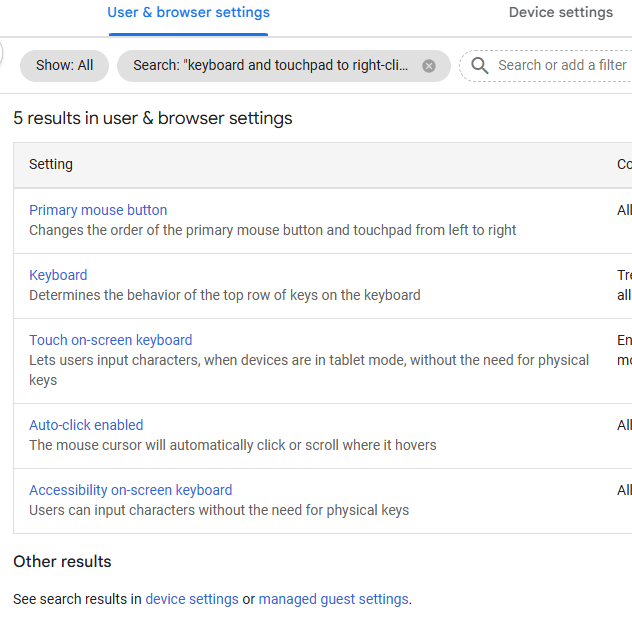
Thanks. At the start of your snip is says from 2026 so this must be new information and this setting has not yet reached us as running the search as per snip doesn't show the correct setting.

-
When I do that I get a notification saying the keyboard shortcut is off and giving the option to edit shortcut. Clicking edit opens setting on the touchpad page and under use 'use touchpad and keyboard to right click' is set to disabled. I need a way to enable this from the admin page.
-
We have the same MDT version as you but our ADK is much older 10.1.19041 but that being said it works fine with 24H2.
-
I've been asked if I could enable the right click function on our Chromebooks. The Chromebook setup was completed by the MSP before I started but searching through the admin console I am unable to find anything to change regarding the right click function. Google tells me tapping using two fingers is the same as a right click but before I admit defeat is there a way to get the right click working using the mousepad with just one finger much like on Windows machines?
-
Thanks for the reply and now have it working… the sequence master was down
-
Thanks, I'll try that.
-

Cable testing hardware - what you got - what did it cost.
Jobos replied to Jaan's topic in Wired Networks
Ditto. Seem to work ok and already paid for itself. -
Unifi Guest Network Landing Page Not Redirecting
Jobos replied to Jobos's topic in Wireless Networks
I see Unifi have released version 10.0.160 https://community.ui.com/releases/ce7adc5c-4b42-49d3-8447-971992c0bced has anyone tried it yet and did it resolve the captive portal issue? -
I’m having trouble with a Zero88 lightning desk and wondering if someone could offer advice? So I have programmed the desk with the required light configuration and in editing mode I can change through the different sequences and it works fine but when in playback mode the sequences are not there. I have the sequence light flashing to show the sequence is running. Fade time set to 1 second and sequence speed set to manual and from what I understand I just need to press the sequence button to advance to the next sequence but when I press it nothing happens. Any advice?
-
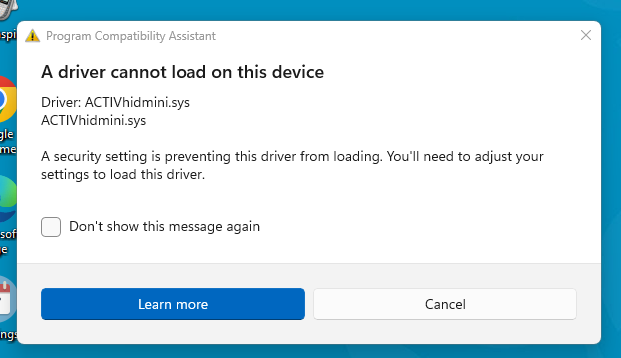
In device manager on my PC it says under audio inputs and outputs headphones (Synaptics HD Audio) and it is version 10.0.26100.1 then again under sound, video and game controllers it is says Synaptics HD Audio but a newer driver 10.0.100.3624 as in the end I was trying all sorts to get it working.
-
Funny enough I just turned it off and on again and touch started working. Should have done that before bothering anyone, but thanks anyway.
-
Been called to look at an Optoma touch screen where the touch has stopped working but they are unable to say the last time touch worked as it had been temperamental at best. I've been here a year and this is the first report of any faults. I don't know anything about the Optoma screen but when I connect the USB cable a get the normal Windows bleep so at least that part works and device manager shows another mouse has connected but touch is not responding. The rest of the school uses Clevertouch and they don't need extra software or drivers so I assume the Optoma screens are the same. Any tips? The model is a 3861RK 86" IFP
-
I think the Scotch will come in very handy when he thinks about what he has lost!
-
Managed to get the first one off. It took a lot of heat and force with a metal tool but it came off in the end. I'll wait to get the strips before I remove the other one.
-
Yes it is definitely screwed in to the hinges and I am following this guide to strip it down. The screen removal starts at 1:27
-
Thanks for the advice. I don't have any alcohol at the moment but looks like I will need to order some.
-
A teacher has brought in her laptop that has a smashed screen but although I have replaced many laptop screens before I haven't replaced one that need the mounting brackets removing from the old screen and refitting on the new. Getting the brackets off the old screen is becoming a challenge and I am struggling to remove the brackets without bending them. I have tried heating it with a hairdryer and even when hot to the touch it is still stuck fast. Any advice? In the images below the screen on the blue plastic is the new one.
-
I've been asked to setup Duolingo so as a test I logged on Duolingo as a teacher and have imported the class from Google Classroom. That part worked fine but as this is a primary and students do not have email they are not receiving their logon details that Duolingo sends them. How can the teacher find out their students logon credentials and what URL would the student use?
-
Help/suggestions for lockdown phone app solution
Jobos replied to ITea's topic in How do you do....it?
It looks good, what sort of price is teamSOS? We have had prices from CoSafe at £1600 and Netsupport Notify £100 although to be fair CoSafe looks far more advance than Notify. -
Help/suggestions for lockdown phone app solution
Jobos replied to ITea's topic in How do you do....it?
@ITea what did you decide to use in the end? We are looking at Netsupport Notify but it lacks an Android mobile console so the head is not happy. -
Thanks, although we would fall under the 8 SC bracket so no price increase.