stevenwba
-
Posts
323 -
Joined
-
Last visited
Content Type
Forums
News
20th
EduGeek EDIT Conference
Blogs
Everything posted by stevenwba
-
thanks for that mate, looking at it, it is setup right, it was just a matter off looking in the right place, looks like smb and afp are always on with lion, and then you select on a share by share basis which one, or both to use
-
If there is a local profile for account 1 can you not just rename account 2, to account 1. if you can create a local account with the same user that was connected to the domain, and then copy and paste all settings over.
-
Yeah it is directly in there, wonder why i didn't show up from accessing from the dock?
-
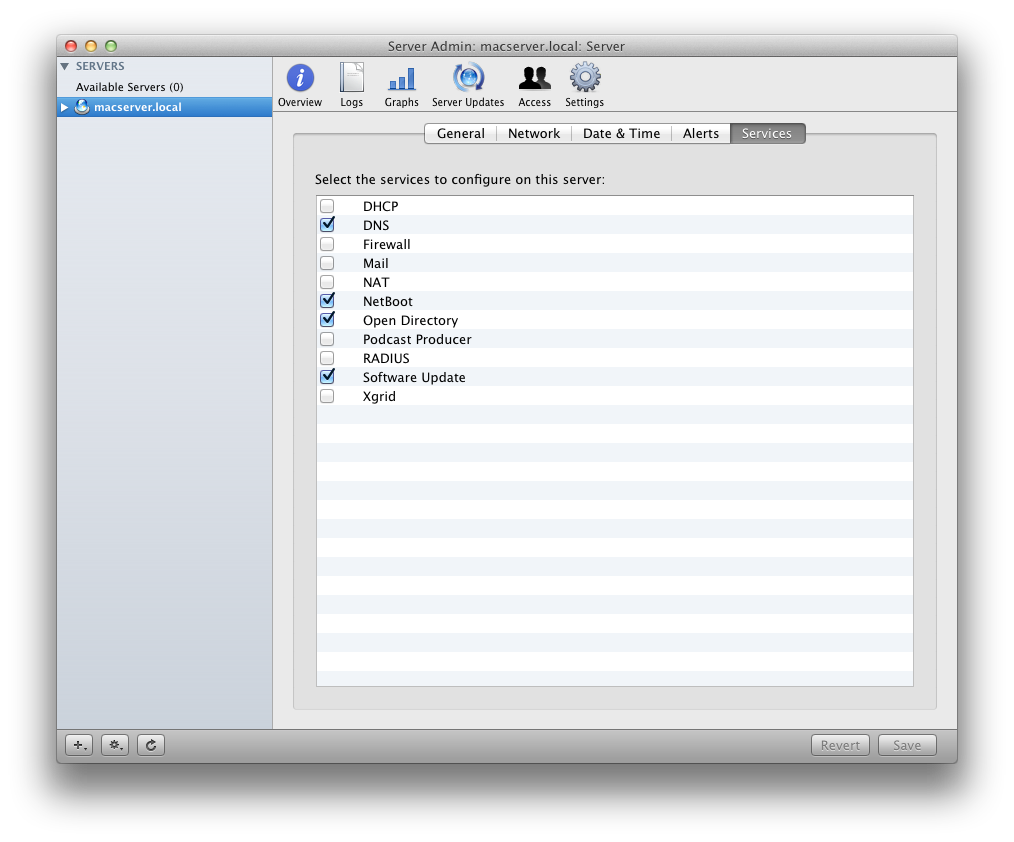
its great to know this isn't me, as here is what i have for services on my lion server (nowhere near as much as you guys!)

-
the only place deloystudio is located is in system preferences, so i cant follow their userguide anymore because its saying load deploystudio admin in applications/utilities and its not there, i have installed the software a few times now, and nothing is showing up. Everything i need is included in the package downloaded from their website right?
-
How do i enable either smb or afp service? cant find anything searching
-
 its £55 in the app store
 -
i didn't think you could?
-
seriously dude, that would be a lot funnier if it wasn't just me that done that! your spot on lmao edit, so now I've got over my incredible stupid moment, how do i actually go about creating workflows etc, because i should have the application in utilities but deploy studio isn't there
-
We have our home dir on windows shares so i guess theres not much we can do. So do you have windows home dir and mac home dir, and keep all work on mac separate from work created on windows?
-
no i haven't. after having a look on apples website and google i couldn't find much about enabling them, in server admin, its not in the list to enable
-
Heres where ive got to, I have been reading to user guide; Download and install DS Enable NetBoot Enable DS Launch DS Launch Assistent Click setup a DS Server Enter details <<< unable to enter password or username Ill add a screenshot, im doing what the guide says but obv im missing something here
-
Right, i am now at the point of setting up deploystudio! Although i cant even get started because, when i click setup deploystudio server, the next screen i can setup the url and username and password to use to set it up, i leave the url with what deploystudio gives me, which is http://macserver.local:60080 but the username box is grayed out with the username deploystudioadmin, so i created that user account, and the password is not grayed out, so i can enter that, so entered the password for the deploystudioadmin account, And the continue button is still grayed out!!! this is probably something basic, i need to start a service or something, but i cant even get pasted the start screen lol!
-
But when i comes to apps, im not sure how it works, as for a school, you only want 1 apple id, but if this 1 license 1 product, how would we go about getting 100 x the app we want for example, until apple finds a solution for education, the only way is to sync that 1 purchased apps to all your devices, or not have any apps at all.
-
If the printing presents save as a file, then yes, you can roll them out, never tried it myself. Setting as a default might take running something command line, just checked to see what options are available on the mac server for doing this, and there arent any.
-
I was also looking for the pref to control the sidebar, and hide network and computers etc Hopefully hodge will come and rescue us (:
-
you can use this to setup configuration for any iOS device iPhone Configuration Utility 3.3 for Windows its available for mac and windows as for licensing, I've been involved in a number of threads here, but its still very unclear read here;http://www.edugeek.net/forums/licensing-questions/83352-apple-ipads-managing-appstore.html#post737416 and here http://www.edugeek.net/forums/mac/83465-apple-leadership-event-19th-october-questions-please.html
-
what looks like one of the best bits of software I've seen for a long time, thanks for sharing the link
-
Right i was doing it through file sharing in server and not server admin, but i have don't that share points button at the top, so i guess i haven't got something else setup? how did you get that share points there?
-
right I've created a share of this folder /Library/Application Support/plasq/Licenses but this is not the file path that comic life needs as it requires Networtk/Library/Application Support/plasq/Licenses, on the server hd it won't allow me to create a folder called network as it says there is already one with this name; Hodge, I got as far as these steps. Tick enable Automount. A drop down window will appear. Choose the shared Library Folder option. Enter the Directory Admin Username and Password. Click Save. but there was no option to click enable automount
-
do i just create the folder structure in there? /Network/Library/Application Support/plasq/Licenses
-
Hi, im sure this has been answered elsewhere but i couldnt find it searching, but i want to setup a network library, so anything in there, replicates to the same folder on all the macs bound to the server (thats how i believe it works anyway lol) But im looking around the server, in services etc, but cant find anything to do with setting up a network library or resource sharing. Ive installed comic life on all the macs, and simply want the registration plist file to live on the server, and register all the copies of comic life. i contacted comic life and they said to install it here when you have the network library setup /Network/Library/Application Support/plasq/Licenses But thats where i get stuck, so any help would be greatly appreciated!
-
did they supply it on disc, or give you redeem codes for itunes?
-
Hi, I still haven't purchased ARD due to trying to get something setup for buying from the app store, orginally we were going to find someone who would allow us to buy them using purchase order, but we have now decided to link our school apple id to our purchase card. Just wondered how everyone else was doing this? Reckon apple will every give schools a more suitable way of purchasing, especially if, lets say you had 100 ipads and wanted to buy the same app for all of them, i know theres another thread for asking questions at the west midlands leadership summit, and this must be, for the time, the most annoying issue using osx/iOS devices in school.
-
cc4 needed in a primary school
stevenwba replied to crazytechnician's topic in Network and Classroom Management
are you talking in terms of the RMMC?