Finch7
-
Posts
90 -
Joined
-
Last visited
Content Type
Forums
News
20th
EduGeek EDIT Conference
Blogs
Everything posted by Finch7
-
1Gb as standard and 4Gb for Heavy users (Head, business manager, heads pa ect) All teachers have laptops so can keep their videos ect on that. Some use portable HDDs too. We do have quite a bloated common area too but it's used to give access to materials for students. We have a Virtual pigeon hole where students can save work for submission and not viewable by other students. However some staff use this area as a dumping ground. Every summer both areas are cleared out. Basically I create new ones for the new academic year and for half a term allow read only access to the old areas so they can copy across what they need. This helps reduce bloat.
-
Best browser for students with Mandatory profiles
Finch7 replied to Gibbo's topic in Internet Related/Filtering/Firewall
like this, I double checked the policies and found a way.
-
Best browser for students with Mandatory profiles
Finch7 replied to Gibbo's topic in Internet Related/Filtering/Firewall
Got them installed and it's not an option I've come across in admin templates\google (both comp or user) It could very well be an unintuitive name if some one who has it blocked wants to point it out. thanks. -
Best browser for students with Mandatory profiles
Finch7 replied to Gibbo's topic in Internet Related/Filtering/Firewall
How have you guys stopped access to chrome://flags ? -
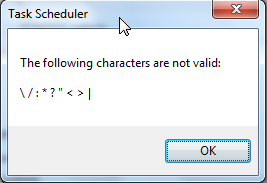
Thanks but you may want to hold off. the ":" character is not allowed in names. When you create the task through gpo it doesn't care to inform you that nor does any of the reams of documents I ploughed through. It's only just now when I tried recreating the job again manually, to the exact detail including name it tells me. Thanks for your efforts people.
-
Yep tried that (and again just now to double check) and numerous other permutations. I really don't think it's syntax related any more. Especially as I can manually create the same job with the same syntax and run it successfully.
-
No I started this thread in the hope of solving the GPP issue not to work around it. I have work arounds already. GPP could effectively replace all scripts and that would be useful but need to work out this issue, which as I mentioned I also encountered with the printer part of GPP.
-
Problem is the task is not creating in the first place. To answer your question though, I set this up manually (exact same settings including run as user) and it works fine. What I need is for the task to be setup automatically.
-
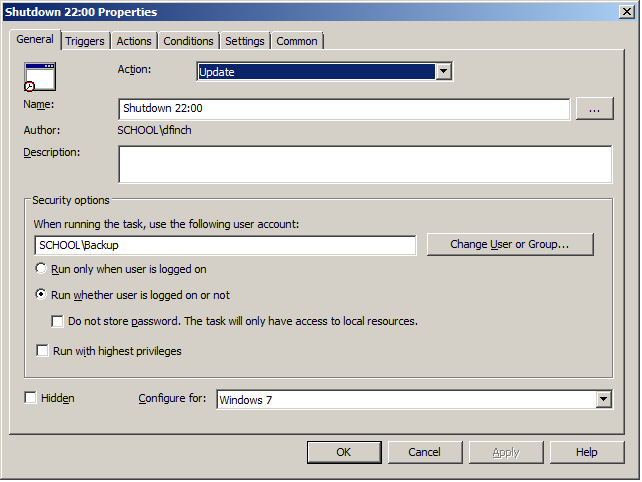
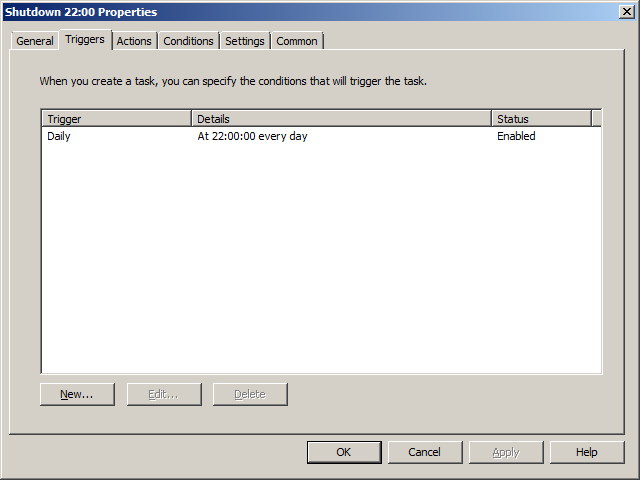
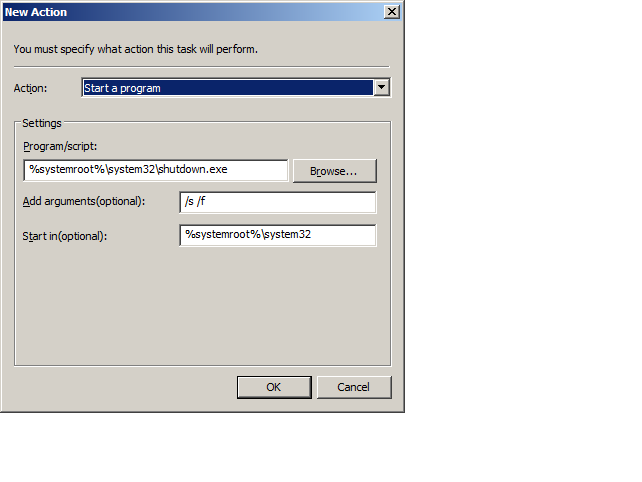
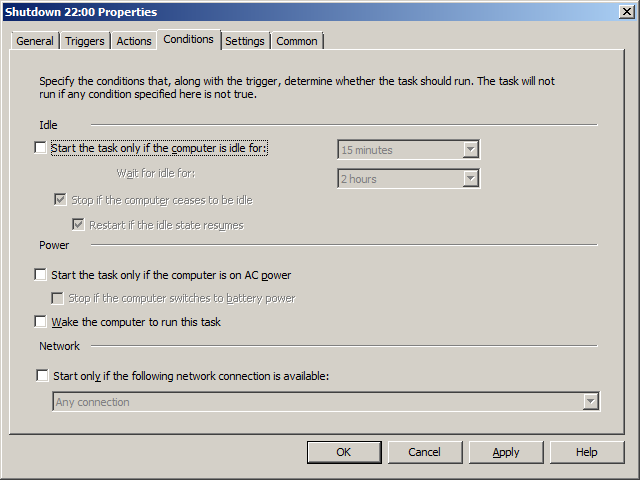
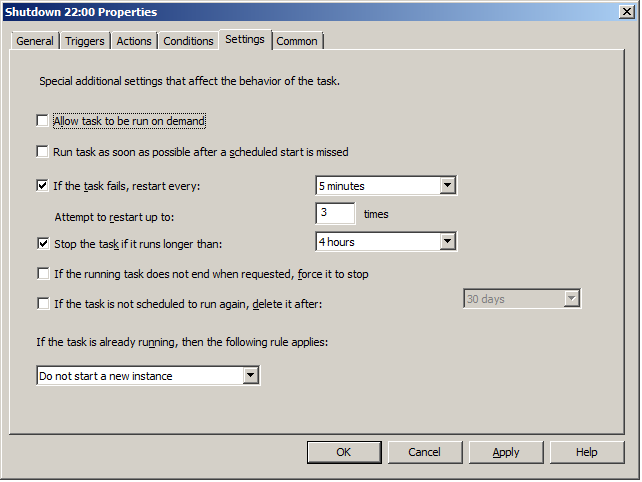
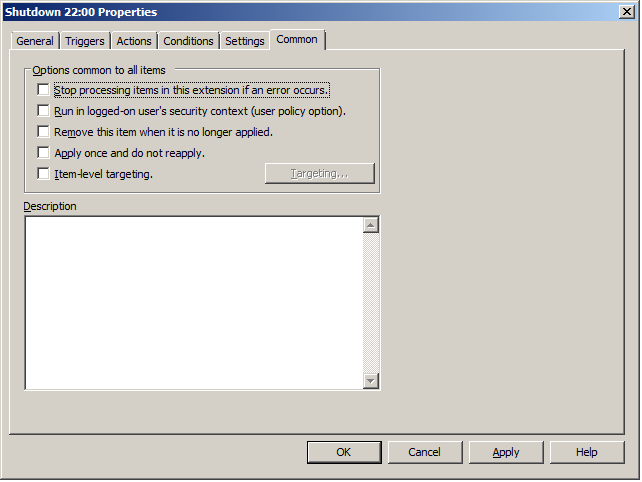
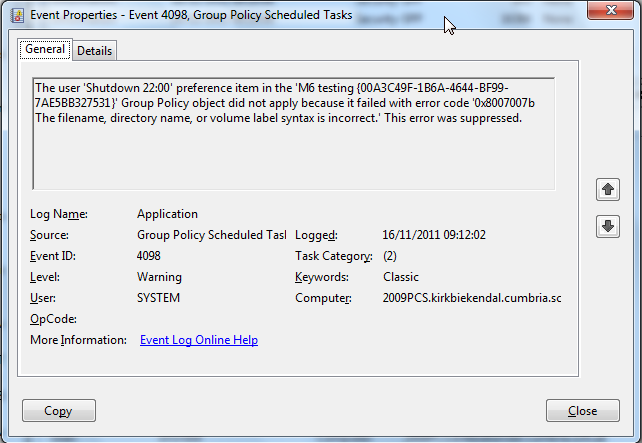
Ok so I'm trying to deploy a scheduled task but having some difficulty. It's basically to shut down PCs at night. Here are some screen grabs of the preference settings. If some one who has this working and can spot any anomaly that'd be great. The error message reported in Event viewer.. "The user 'Shutdown 22:00' preference item in the 'M6 testing {00A3C49F-1B6A-4644-BF99-7AE5BB327531}' Group Policy object did not apply because it failed with error code '0x8007007b The filename, directory name, or volume label syntax is incorrect.' This error was suppressed." --- I've tried changing a lot of the syntax of the Action, removing the variables, Just can't seem to get the scheduled task created. The path there does point to shutdown.exe on the client and I've also manually created the task and it ran with no problems. I've also pulled this out of all other OUs so the only policies applying are the "M6 Testing" and default domain policy (a very Spartan policy) Tried as a computer and user preference Only been logging on as a domain Admin during testing. I've encountered this error while trying to get printers deployed via GPP too and never got a solution (had to stick with scripts for now). Currently some GPP do apply, like start menus, registry settings and shortcuts all currently in use in the live environment. All clients are windows 7 which I assume then GPP CSE are installed by default and running ok, I've not explored this but I'm starting to think that might be something to look at, not sure if CSE is needed for all the preferences or just some of them (the ones I'm having trouble with maybe?) I also enabled gpp scheduled task logging (computer policy system/group policies/logging) Here is the log. There's actually 3 tasks that should be created. SOLVED Would be nice if that pop up appeared when creating scheduled tasks in GPO. Thanks for the help
-
Group Policy Preferences - Scheduled Tasks
Finch7 replied to cookie_monster's topic in Windows Server 2008
Windows 7 and yep tried the suggestions here. I've encountered the exact same error message before using the printer section of gpp. Didn't solve it that time either. So not entirely sure it's syntax related. New thread started here.. http://www.edugeek.net/forums/windows-server-2008-r2/85664-gpp-deploying-scheduled-tasks.html#post754450 -
Group Policy Preferences - Scheduled Tasks
Finch7 replied to cookie_monster's topic in Windows Server 2008
What was the fix? I've just had the same error message pop up trying to deploy a scheduled task. 0x8007007b: The filename, directory name, or volume label syntax is incorrect. -
Youtube and Internet Access
Finch7 replied to soapyfish's topic in Internet Related/Filtering/Firewall
What stops kids safesharing inappropriate stuff? -
I just setup WDS on 2008R2 after enjoying many years of RIS. I get the same UI trouble however I just installed the AD tools on our WDS server and they aren't throwing up the error. Just testing now to see if our test client gets named correctly and joins the domain. I find it odd that the only 3 results in google are all yours asking the same question in 3 different places. No other reference.
-
Did you resolve the UI issue?
-
Had 3 D500 and 3 D505s do this in the last two days. Very suspect so many in so little time.
-
Just to add this all worked smoothly and will be expanding to other subjects later in the year.
-
\\server\CA$ share permissions: Domain admins: Full Control SYSTEM: Full control Controlled Assessment (group): Full control --So no share permission access for any one other than those in controlled assesment NTFS permission: Controlled Assesment (group): Read only this folder only (admins and system): full control CA$ is the top level which then splits into subject areas. I create the subject area folders. \\server\CA$\Business studies NTFS permissions: (admins + System): Full control Creator Owner: Full control on subfolders and files only Controlled assessment business studies (group): Create Folders/Append Data on this Folder only. So a business studies student in the controlled assessment can create a folder in "\\server\CA$\business studies" and as "creator owner" gains full control of that folder. They have no read permissions on the parent folder and although permissions are inherited there are no read permissions to pass down to other folders. -------- Yes. We actually add the students to a group based on their class. So 10A BS and when that class is sitting the business studies controlled assessment we add 10A BS to the Controlled assessment business studies group. As the controlled assessment business studies group is also a member of the exam lock down and internet access removed groups they automatically get those restrictions. After the assessment the class is removed from the assessment group. However absent students or students not sitting the assessment then need to be taken out so they don't get locked down. (The class idea is optional you could just add and remove students individually)
-
Yes it is and yes they are. All our workstations are XP, I have a GPO that effects them all that applies workstation settings that are common to them all. In this instance I used this group policy to merge the .reg file through a log on script. I do use loopback feature quite a lot. This way the drive doesn't even install when they plug it in so no sneaky workarounds I might have missed. You can limit it to Organisational Units so if you set up a OU with all the PCs for that room in it and create a group policy for it you can apply all the settings to that room only. I did indeed test it on one PC in its own OU initially with it's own policy. I blocked access to network shares via share permissions so I didn't need to remove anything really. It's just to tidy it up. It was simpler this way than trying to stop all the network drives mapping.
-
To disable (XP clients only, for other O/S you need to change first line) Windows Registry Editor Version 5.00 [HKEY_LOCAL_MACHINE\SYSTEM\CurrentControlSet\Services\USBSTOR] "Start"=dword:00000004 To enable (XP clients only, for other O/S you need to change first line) Windows Registry Editor Version 5.00 [HKEY_LOCAL_MACHINE\SYSTEM\CurrentControlSet\Services\USBSTOR] "Start"=dword:00000003 ------------ Copy into note pad and save as .reg For the file to merge successfully with the registry, students need write permission to that key, we assigned it manually but there could be an easier way. In theory it's possible to use this in a .adm file and control it though a gpo however I didn't get it working in time, might look into this at a later date.
-
http://www.edugeek.net/forums/how-do-you-do/46115-controlled-assesment.html#post422742 That's how we are doing it.
-
Ok, I was asked to set up a controlled assessment environment meeting the following requirements... Coursework in exam conditions. * No Internet. * No Home Drive. * No network resources. * No pen drives Students will need: * A log on * An area to save work where after the assessment they can no longer access. * To be able to gain access again to the same area in a following session. * No access to say geography controlled assessment work when sitting a maths controlled assessment (for example). ----------------- Here's what I did... Set up an AD group called "exam lock down" This group has denied share permission to all network shares. Set up an AD group called "Controlled Assessment" This group is used to allow access to areas. Set up an AD group for the subject in question (Business studies) called "controlled assessment business studies" Set up an AD group for classes (so students sitting the assessment) Created a new hidden share on our file server \\server\CA$ within that a business Studies folder. Share permissions on this only allow access to members of "Controlled assessment" AD group. Created a new GPO applied to all school XP workstations. This is a subject specific GPO "Controlled assessment business studies" This GPO runs a logon script which 1) creates a new folder \\server\CA$\Business studies\%username% 2) Maps T: to that folder 3) deletes all other network drives (doesn't always work but share permission denies access if they still see them) 4) removes context menus 5) Merges a .reg file which disables USB drives (This requires editing registry of workstation to allow permission to a specific key for students, done manually but will be changed on our master images and rolled out with next deployment) Reg file hosted in a read only share accessible only to controlled assessment group. To reverse the effect of 5) there is a log on script to merge settings that enable it again for all users on all work stations. So now when a controlled assessment is on. My self or technician adds the correct class to the correct Controlled assessment group and the students log on as normal but in a controlled environment. At the end of the session they need to be removed from the controlled assessment group to receive regular access. By adding the students back to the same group they receive the same mapped drive and hence access to the same work. An additional useful tool to help supervise this is VNC installed on all desktops (free desktop viewer utility) and another free utility for shadowing the whole room at once. Meaning the teacher can sit at the console and watch whats happening on their desktops. The students don't know they are being watched nor can close the VNC service. --------- It's still early days and a few things I'd like to improve... * This will result in a lot of GPOs but at least no masses of accounts, one per subject *The redirection of my documents to T: didn't work but I'm sure this can be solved. (double clicking my documents in the controlled assessment throws an error trying to connect to their normal home drive) ------------------- I guess if this helps leave some Thanks. I'm more interested in questions and potential exploits. The first session just ran without a hitch. Students aren't dismissed until an ICT support staff deactivates the controlled environment.
-
just curious.
-
[ms office - xp] Disabling spell checker in Word??????
Finch7 replied to rusty155's topic in Office Software
far superior idea and works well. -
Now I've never used ghost this way before, but when ris comes across a machine with all zeros it looks at the mac address. Maybe ghost does the same.
-
Well if the school has a colour photocopier any way then why not. We do that here and have a hplj 4650. I dread to think how oftern the toner in the printer would need replacing without the photocopier. As photocopying is charged to departments and toner comes out of a different budget I'm happy