David44
-
Posts
451 -
Joined
-
Last visited
Content Type
Forums
News
20th
EduGeek EDIT Conference
Blogs
Everything posted by David44
-
SIMS ID was down this morning (again). This would have been the cause of the sign in issues on various ESS products. A single point of failure takes the lot down.

-
instead of using brand names, think about it in a different way. Is there a legitimate reason for your school to install a CCTV camera that is not controlled by the school and share the pictures with a foreign company?
-
ESS have a secret list of email addresses that they don't even attempt to send emails to. Short term solution, raise a ticket with your SSU and they will ask ESS to remove the email address from the list. Mid-term solution, don't use Intouch. Long term solution, don't use any ESS products.
-
I've finally achieved a maths grade C!
David44 replied to RedwayNetworks_Calum's topic in General Chat
I did an adult evening Maths class and took the GCSE a few years ago when I was in my late 30s, all at the school I work at, I got a C grade. Strange experience but it was free for staff (I might have had to pay for the exam) and I'll take all the CPD I can get. It was interesting to see the school from another angle too. -
Our SEND department want to allow select students to listen to music and/or noise (white noise etc.) to see if it helps them concentrate in class. As you can imagine, there are many technical and legal considerations around this. We have an IT Department of course, but no legal department so the whole lot has come the way of IT. The music would be of the students choice (pre-chosen and approved, about 5 tracks each, not just whatever they happen to want to listen to on the day), they could then listen to any of their chosen and approved tracks when a teacher allows it during a lesson, when doing written work for example. Their choice is likely to be something from the hit parade, so we can't just give them random royalty free music. Each student has a Chromebook so that would be how they listen to the music. They would be listening via headphones. I wonder if anyone has done something similar and how you achieved it both technically and legally. We have had a look at Sound Track Your Brand (https://www.soundtrackyourbrand.com/music-for-schools/) but that doesn't seem to quite fit with our needs. I'd be interested in hearing from anyone who does use it for something similar to what we have planned. The school has a PRS license but as the students would be using headphones, I am not sure how relevant that is anyway. I wonder if we just asked the parents to purchase tracks from Amazon or similar (and reimbursed them) and the MP3 files (I assume that is what you get when you purchase music) were then put on the students school Google Drive where only they would have access to them, would that be legally sound? The music would be being purchased and used for personal use only, albeit on a school device. The Chromebook would just be acting as an MP3 player essentially. Any thoughts, advice and experiences appreciated. David.
-
Is there any MIS for secondary schools that comes close to SIMS
David44 replied to JamesParker's topic in MIS Systems
Is a product that causes some extra work but mostly works good enough? Is asking users not to take laptops home three days a year an acceptable request? -
Surprised there is so much love for Solus here. Surely using a deployment tool that is only able to deploy one piece of software (and not very well from what I have read over the years) is not worth the effort. Much better to deploy SIMS via whatever method you use to deploy all other software. Why treat it differently, SIMS is already messy enough without adding another layer of ESS to it. For what it's worth, we deploy SIMS like this... SIMSInfrastructureSetup.exe /S {QuietMode} {SIMSWorkstation} {FMSWorkstation}SIMSApplicationSetup.exe /S {QuietMode} {NoServerApps} [sIMSDotNetDirectory]="C:\Program Files\SIMS\SIMS .net" [sIMSDirectory]="S:\SIMS"SIMSManualSetup.exe /S {QuietMode} {NoServerManuals} [sIMSDotNetDirectory]="C:\Program Files\SIMS\SIMS .net" [sIMSDirectory]="S:\SIMS"SIMSAMPARKSetup.exe /S {QuietMode} [sIMSDotNetDirectory]="C:\Program Files\SIMS\SIMS .net" [sIMSDirectory]="S:\SIMS" It installs SIMS in c:\ptogram files, it should probably be c:\program files (x86) nowadays but we have been doing it this way for so long that that wasn't a thing when we started. It doesn't cause any issues. We then run a batch file that copies sims.ini to the Windows directory and LessonMonitor.ini and connect.ini to the C:\Program Files\SIMS\SIMS .net directory. Finally, we run simsload.exe as part of the Windows login script. This checks for updates and runs them if there are any or silently quits if there aren't any. This seems to work reasonably well. Most issues are solved by deleting simsload.ini and running simsload.exe again to reinstall all the SIMS components again. Which is something you can do instantly and not have to wait for a deployment tool to decide to start or not.
-
[android] Android Go - Does it support Google work profiles?
David44 replied to Jaan's topic in Mobile Devices & Tablets
It's difficult to find anything from Google that says in simple terms that Android Go does not support Work Profiles but that is the conclusion we have come to. You may notice when you try to set up a work profile, it downloads 'Google Apps Device Policy' rather than 'Android Device Policy'. 'Google Apps Device Policy' is no longer supported (https://workspaceupdates.googleblog.com/2020/10/google-apps-device-policy-upgrade-android.html.html) so this may have worked at one time but now doesn't. -
[sims] User gets same output regardless of the report that is run
David44 replied to Seb1780's topic in MIS Systems
What kind of output does the report generate? A CSV file, an Office document? Does the user have a My SIMS Documents directory in their home drive? Does deleting/renaming that make a difference? -
I don't think there is much in it from a security point of view but an invitation system is always going to be less secure than just allowing parents to register themselves. In reality, the invitation is just a unique code that identifies the parent to the system. This is usually part of the URL so it's transparent to the parent anyway. Essentially each parent gets a unique URL one way or another. In the invitation scenario, the school sends out an invitation to all parents each with a unique URL/code, you now have hundreds of valid codes out there all at once which the parents may not be ready to use. Potentially, if you assume that MIS data is never 100% correct, some of those codes may have been sent to email addresses that don't belong to parents. These codes are usually valid for days, if not months. In the self registration scenario, the school simply tell parents to go to a URL, enter their email address and the system will send them the unique URL. This is slightly more secure because you only have codes being sent to valid email addresses and only being sent when the parent is ready to use the system which in turn means the codes only need to be valid for a shorter time, days, if not hours or minutes. In both scenarios, you'd probably want an extra layer of security anyway. The parent needing to enter one of their children's date of birth for example. I'd like to see a system that after the parent has signed in for the first time, makes them add each of their children (by entering their name and date of birth, perhaps). The school could then be alerted if a parent didn't add one of the children linked to them in the MIS. Maybe this is a sign that the parent is linked to that child in error? As I say, I don't think invitation based systems are totally insecure, just ever so slightly less secure then a self registration system. I don't think there is much in it. I think the other benefits of a self registration system over an invitation system are more relevant. Less work/jumping through hoops for both the parent and the school are always going to win out for me.
-
I've no experience of https://www.parentapps.co.uk/ but looking at their website it sounds like the school needs to issue an invitation to each parent before they can sign up. It also sounds like the invitations expire. Think of all the unnecessary work this will create for the school and frustration it will cause parents. Ideally, a parent system will allow parents to sign up when they want to, whether that be 3am on the morning of their child's first day in school or 6 months after their child first starts at school. Any system that relies on the parent signing up quickly and/or the school being open and someone being available to send a [new] invitation doesn't sound like it has been thought through properly. As I say, I have no experience of this particular system but I have used SIMS Student, SIMS Parent and Pay360 which all suffer from the invitation issue (and so many other issues). I have also used EduLink One which doesn't use invitations, meaning parents can sign up 24/7 with no involvement from the school.
-
Thanks. I will be needing a new phone after Christmas and I was going to make sure it was an Android One phone but hadn't actually started looking yet. It looks like it is officially still a thing but, as you say, no new phones have been added. What has replaced Android One? How does one purchase a phone and know that updates are going to be provided for a sensible length of time now?
-
This is the correct answer or look at Android One (https://www.android.com/intl/en_uk/one/) for phones that have at least two years of updates (and then make sure you are not purchasing one that was released 2 years ago).
-
We made Dyslexic Browser (https://chrome.google.com/webstore/detail/dyslexic-browser/gflobokeglbgdhdelipppigfncpnfgbh) available to our Chromebook users recently. It's a Chrome extension. This was at the request of one (adult) user and as far as I know, they are the only user to install it but it seems to work. It probably does more than you need though but once the user has set up the colour, they just press 'o' to toggle it on or off so they can ignore the other options if they wish.
-
IF this is going to be an IT solution, it needs to be targeted. If people see a message, pop-up or email, twice everyday they will become trained to ignore it, especially when the majority of the time they don't need to take any action (I assume most teachers won't have a student who has a detention in their class before any given break). IF this is going to be an IT solution then only the teachers who are teaching students with a detention should see the message. That's IF an IT solution is appropriate.
-
The domain transactionssimsagora.co.uk expires tomorrow (Saturday, 3rd December 2022). I don't know if Pay360 still uses this domain but it did this time last year. I only know that because ESS let the domain expire then and it caused Pay360 to stop working. Seems that nothing changes at ESS. https://www.nominet.uk/lookup/?query=transactionssimsagora.co.uk It will be interesting if/when it does stop working and ESS resolve it by paying for the domain again, how they phrase that on their service status page. I can't remember what they said last year but they didn't admit to letting the domain expire. TRansactIOnSSImSagOra.co.uk? What is T Ransact I On SS I'm Sag Ora anyway?
-
- 1
-

-
I have just had another look at this today. In our case we were applying the Group Policy setting 'Set a default association configuration file' to two objects (All Stations and a Windows 10 PC object in our case. The Windows 10 PC object was one we created ourselves so this won't be the exact issue in your case, even if you use CC4). Now, XML files opened from SIMS are opened in Office XML Handler which in turn passes it to Word, I assume based on the line The line in our XML file that the [/font]'Set a default association configuration file' points to is below BTW...
-
Yes, I'm sure it's possible to flash them but all I am getting from Iris Biostore is that they want to charge us £185 for each new cable, even though as you say it should just be a case of changing the software on the old ones. My ticket asking about this was passed on to their Sales department. I can understand they want to make a sale rather than let us reconfigure the existing hardware but that's just greedy.
-
To package an MSI in RM CC4, create a new folder put the MSI and any other files that are needed as part of the installation in to it, transform files or similar. Optionally, create a readme.txt file in the same directory with any details you think relevant to the package. This will appear in the readme tab when you later check the package properties. Optionally, create a folder called shortcuts and copy any shortcuts that point to the software you are installing in to this folder. In RMMC, go to File>Import> Package and select 'Community Connect 3 Package' (this is correct, choose CC3 and not CC4, even though you are using CC4. The RMMC hasn't had any major update in years). Click on 'Show package properties after importing' and then click on Browse and browse to the MSI in the directory that you created earlier. When the package properties appear, change anything relevant such as the name of the package, command line options and which OSes it is compatible with etc. Click on Ok, you should now have a package. You might actually have two packages because it creates the package when you import it and then creates a new package when you make any changes to the properties. You can delete the first one it created by going to Software> Packages & Products> All Packages in RMMC and right-clicking on it and selecting 'Remove from Network'. People have mentioned needing an .ini file. This is not the case when the package is created from an .msi file. If you were installing from a .exe or .cmd etc. then you'd need to include an .ini file too.
-
Mistakes happen but it's good to see a write up of the issue and the solution. Wish some companies (ESS) were forced to do this every time they mess up.
-
Yes, we have this issue. No, we have not found a solution yet. We use RM CC4 and they have an article about how to change the default file associations https://support.rm.com/TechnicalArticle.asp?cref=TEC4120188 It isn't a CC4 solution, it basically boils down to use the 'Set a default association configuration file' group policy setting. I have had a quick look at this but on a test PC, it didn't work and rather than change the program associated with XML files it reset a few other defaults such as web shortcuts which suddenly wanted to open in IE too. It's on my list of things to look at again.
-
We don't use it yet as we are stuck paying ESS for Intouch at the moment but EduLink One supports GOV.UK Notify https://www.overnetdata.com/how-to-integrate-gov-uk-notify-with-edulink-one/
-
We use SIMS and also use EduLink One. It's pretty easy for parents to sign in to, the school have very little involvement. The parents just go to http://www.edulinkone.com, click on reset password, enter their email address and they get an email that allows them to set their password. The students sign in to it too to see homework etc. The students use Google accounts to sign in in our case. Only real issue we have come across is if two parents, a Mother and a Father say, use the same email address ([email protected]) then one of them has to change so they each have a unique email address. We have used SIMS Parent in the past, it's as bad as you imagine and then some. Poorly thought out 'invitation' system that means the school have to 'invite' parents individually to use the system. It would be a terrible system even if it did work but it doesn't work half the time anyway. ESS offer no support to the end user and most error messages say "Contact the school" so you will be inundated with queries that you are powerless to do anything about. But don't take my word for it. Look at the reviews for it. https://play.google.com/store/apps/details?id=uk.co.capita.sims.mobile.parentapp https://apps.apple.com/gb/app/sims-parent/id1106452691
-
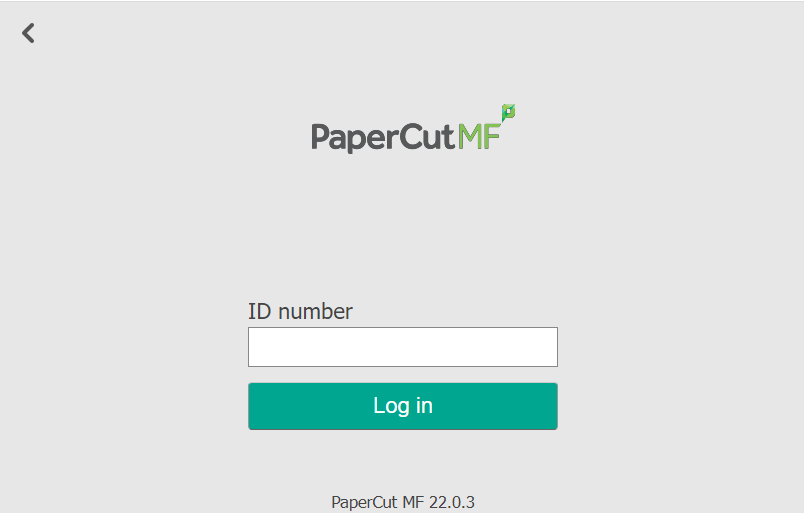
Sorry, I should have said. We have already tried that too. I suspect the box that is inline on the cable between the ID Point and the MFP changes what ends up at the MFP. As the boxes on ours are labelled Sharp, I suspect the boxes change the output from the ID Point in to something that Sharp devices expect (seemingly plain text and a carriage return) whereas if we paid Biostore for a cable with a box labelled Toshiba then it would convert it in to something that the Toshibas expects, which may well be something that the Toshiba device sees as a swipe card as you suggest. I did open one of the boxes up, it just contains a couple of off the shelf hobby boards (a MAX232 and a StartUSB for PIC). The other thought I had was that because the Papercut embedded frontend is just a web page with a form and a single text input field, if we could either edit that page so that the text field starts off with focus or we replace the Papercut page with another page that we created that has a form that submits back to Papercut then this would work. We did successfully do the later of those options, we created a basic HTML page with a text input that has focus as soon as the page is loaded, when it received the ID number and a carriage return from the ID Point, it submits that to Papercut and the user is signed in to the MFP. It worked quite well but unfortunately, Papecut kept overwriting the Homepage setting in the MFP with it's own. That raises two new questions, does anyone know how to change the Papercut page, it's the one at http://print-sercver:9191/device-web/toshiba/32057/home or does anyone know how to point the Toshiba to a different page without Papercut overwriting it?
-
Hi, We have embedded Papercut running on Toshiba MFPs. We also have Biostore ID Points/Fingerprint readers. We would like users to be able to use the ID Points to sign in to the MFPs This is all set up to work as we previously ran a similar set up with Sharp MFPs for a number of years. The ID Points just act as USB keyboards, when the user scans their finger, their details are looked up in the Biostore database and their primary Papercut Card/Identity Number followed by a carriage return is sent to the MFP as if it had been typed in (tested by connecting the ID Point to a PC with Notepad open) and they are signed in. Great! However, it's not quite working. This is the screen that is shown on the copier. The above process only works if the ID number field has focus and despite being the only field, it doesn't start off with focus. Users need to tap this filed on the MFP and then scan their finger. We would like users to simply be able to scan their fingerprint and be signed in without having to touch the MFP screen. I should mention that the Biostore ID Points have a plastic box half way along the USB cable that is labelled Sharp. The suggestion from our copier supplier is to purchase new ID Points (or cables and boxes at least) configured for use with Toshiba copiers from Biostore. These cost £50+ each and we have 7 MFPs so it's a cost that I'd like to avoid. Does anyone use Papercut, Toshiba MFPs and Biostore? What are you doing differently to us? If you plug your ID Point in to a PC, what is the ID Point sending when someone signs in? Thanks.