DJ-1701
-
Posts
7,556 -
Joined
Content Type
Forums
News
20th
EduGeek EDIT Conference
Blogs
Everything posted by DJ-1701
-
Happy New Year!!!
-
One of the best scenes from the Christmas episode... and also...
-
Have you noticed that people seem to be getting ready for Christmas earlier and earlier? It's crazy... I mean I have seen quite a few places with their decorations up 364 days before Christmas!
-
Merry Christmas! Hope you all have a wonderful day.
-
That setting is only to block the Microsoft Windows Update site, it doesn't disable WSUS. The setting can be found here in Group Policy. Administrative Templates --> Windows Components --> Windows Update --> Remove Access To Use All Windows Update Features
-
Ah, but do they whip any llama's donkey?
-
Not Configured (for all of them).
-
Which is the same error you had a few months ago, and then earlier in the year. :S http://www.edugeek.net/forums/windows-10/181736-windows-10-update-error-0x8024500c-2.html#post1614394 Did you ever work out what that was?
-
Well the database should stay intact if you just uninstall.
-
You might have to right click on WsusPool and select 'Recycle…'. I take it the Application Pools -> WSUSPool, Sites -> Default Web Site and Sites -> WSUS Administration are all in a started state?
-
Open up IIS on the Server, and check that the Application Pool WsusPool is started, also check the Advanced Settings for it. Ensure that Private Memory Limit is over 1000000, for example I have 4GB (4000000) to cover the more massive Windows 10 updates. Also check that the Default Website and WSUS Administration have started.
-
Out of interest... when you go to http://WSUS-Server-Name-Here:8530/ do you get a 404 or no webpage at all, or an 403 Access Denied? The access denied should be correct.
-
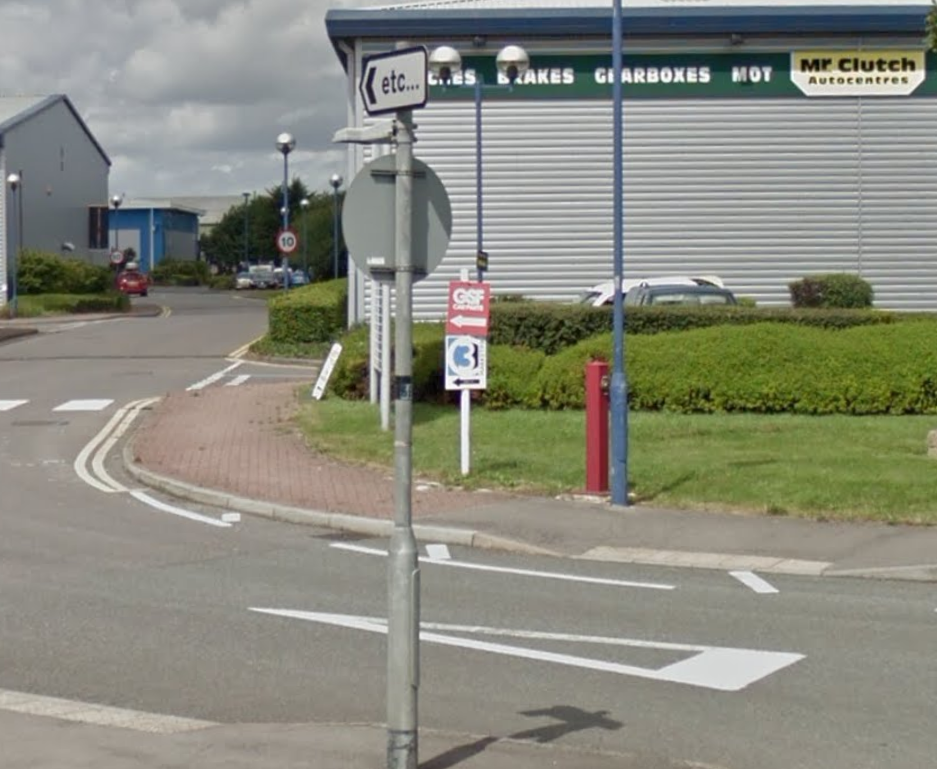
Taken from Google, as they have got around to replacing the sign this year. Appears to suggest the sign maker can't be bothered... In fact that should read ETC in capitals or the actual name it's pointing towards... the 'Equality Trade Centre'...

-
Thanks very much, I will be looking forward to seeing this in WSUS.
-
Awwwww, such a lovely classic.
-
Not really, no. The closest you could get would be by the taskbar, but that could be covered by applications and as I said before it 'will place it on top of the taskbar... until someone clicks on the Taskbar, in which case the Taskbar will be on top (as it has an always on top setting too), but you should see it transparently through the taskbar.' You could try the code below though and see if it will work the way you want it too. #NoTrayIcon $DisplayName = RegRead("HKLM64\SOFTWARE\Microsoft\Windows\CurrentVersion\Authentication\LogonUI", "LastLoggedOnDisplayName")$WidthFromRight = 600 $HeightFromBottom = 40 $XPos = [i]@[/i]DeskTopWidth - $WidthFromRight $YPos = [i]@[/i]DeskTopHeight - $HeightFromBottom ;Libraries and Variables to Include #include ;Create text window. SplashTextOn("User", $DisplayName, 200, 40, $XPos, $YPos, 1, "", 10) while ProcessExists ( "explorer.exe" ) ; keeps window open while windows shell is running. wend SplashOff()
-
If you are using mandatory or roaming profiles, it may be worth settings those settings in the default NTUser.man / NTUser.dat, but the way that Internet Explorer settings are meant to be done these days via GPO is below. Proxy settings should be controlled via Group Policy, placed in User Configuration -> Preferences -> Internet Settings Before you do anything, read this https://msitpros.com/?p=1014 which explains how to enable and disable sections in a Group Policy Preference window. Create a new Internet Explorer 10 policy and configure to your liking and click OK. Depending on your update level, the GPP may not be set to apply on Internet Explorer above version 10, so to check that it will apply to version 11... Go to User Configuration -> Policies -> Windows Settings -> Scripts (Logon/Logoff) -> Logon Click Show Files... and navigate up from Logon to the grandparent folder 'User'. Go in to Preferences -> Internet Settings and edit the InternetSettings.xml file in Notepad. Find the part where it states: max=" Ensure this number is 99.0.0.0 (if not, change and save it). As Chrome is by default set to use the same settings as Internet Explorer, this should be set automatically.
- 11 replies
-
- 1
-

-
- authentication
- group policy
- (and 2 more)
-
Ah, for me the account that I refer to has a description of: Account created by Microsoft Azure Active Directory Connect with installation identifier [iD] running on computer [sERVER] configured to synchronize to tenant [AltMailDomain].onmicrosoft.com. This account must have directory replication permissions in the local Active Directory and write permission on certain attributes to enable Hybrid Deployment. Similar enough as I don't have an AAD_[iD] account, cheers.
-
Just to make sure I am dotting i's and crossing t's (and not the other way around ). It is the account that's listed here that needs to be updated, correct?
-
Hmmm, that should be fine then... I used @sparkeh's guide after setting up a new 2012 R2 VM. http://www.edugeek.net/blogs/sparkeh/2253-directaccess-server-2012r2-windows-10-education-nat.html I didn't think so, but can't be possitive. Have been toying with looking at it myself, but haven't had the time yet.
-
Out of interest, do you have anything else installed on that server? I remember having issues using port 443 with another bit of software as I had port 80 used for WSUS. Found out that if 80 was used for IIS, then 443 was automatically reserved for it. It may be worth pointing out that Always On VPN is now the way Microsoft are nudging people to go.
-
Just remember to pay @Rob_D the monthly license fee for his original code.
-
Just a silly question... has the printer has had AirPrint, ePrint and Bluetooth disabled?
-
I guess your running this on 64-Bit then? This should work on 64-Bit. $DisplayName = RegRead("HKLM64\SOFTWARE\Microsoft\Windows\CurrentVersion\Authentication\LogonUI", "LastLoggedOnDisplayName")
-
Quick! To the EduCopter... Seriously though, £££ is what's making me umm and err as well.