Marci
-
Posts
1,299 -
Joined
-
Last visited
Content Type
Forums
News
20th
EduGeek EDIT Conference
Blogs
Everything posted by Marci
-
Open www.mychildatschool.com in a new tab, flip back to Bromcom tab, try again (temporary workaround posted to https://community.bromcomcloud.com/ )

-
That reminds me... KS3 schools getting the data for their new KS2 cohort have all the same issues and more... Source School Invalid, Destination School Invalid, and also Year of result is wrong. Solution is as per 2 posts up... http://www.edugeek.net/forums/mis-systems/228588-sims-cant-import-ks2-data.html#post1960472 ...but then do a find/replace for 2020 with 2022 (or whatever year content you'd prefer) before reimporting. (If it makes life easier, run it all thru an XML Beautifier to get it formatted with indents / linebreaks) The naming of the file looks only to be essential for specific MIS (ie: ones that scan a CTF-In folder - Bromcom couldn't care less about the structure of the filename for instance). And... if as a KS3/4 school you haven't received details to login to PrimaryAssessmentGateway, then head to PAG website and do a forgot password request and enter the headteacher's email address (using same address as listed in GetInfoAboutSchools profile via DfE Sign-in - if that doesn't rock up, find who your main approver in DfE Sign-In is and use their address). Headteacher can then login and set you up as a user. From there it's just like using K2S / GIAP - copy/paste a list of UPNs in to download data (then do the above before importing). If you have access to multiple KS3 schools' accounts (or just the one, but not the right one), you can still retrieve all the data you need as long as using my method above to replace the header with one containing correct data for your school. You don't have to be logged in as the KS3 school the data is necessarily for.
-
205 altogether I seem to recall... https://schoolsweek.co.uk/bromcom-to-supply-mis-finance-software-for-200-west-sussex-maintained-schools/
-
Yep, had all the header errors etc. Simple solution to those for us (Bromcom) was to do an Internal Transfer CTF export for a single student, swap DataQualifier from OTH to KS2 within that file, remove entire CTFpupilData container and replace with the one from the STA-supplied file, and reimport. Workaround varies from MIS to MIS depending how that MIS parses incoming CTFs.
-
Yep, as per Seb1780 above… can see it in our own data, alongside many on FB groups reporting the same.
-
Just double check the data imported by the CTF vs data available via CSV... many are reporting the CTFs generated by PrimaryAssessmentGateway also contain incorrect results for majority of students, and are awaiting a fix from Capita / STA.
-
Modules > Assessment > Assessment Sheets > User Access > change to Head of Department > Refresh. 90% of the time this comes as a result of HoDs only ever using Bromcom Teacher Dashboard / Frontpage to access assessment sheets. I'm constantly having to remind our CTLs etc that they need to use the route above to see everything they want to see.
-

Embedding a PowerPoint into WordPress with transitions
Marci replied to COday08's topic in Cloud Services
Export or ScreenCapture the Powerpoint to video, embed the Video in Wordpress. -
https://vision.bromcom.com/odata for multiyear API. Needs your vision MatID and api key from a vision user account with access rights to the school in question. https://cloudmis.bromcom.com/nucleus/odata is current academic year only, as you’ve found. Haul a full backup of it via Excel at end of august each year to build your own multi year dataset without Vision, or make an incremental refresh dataset storing to CSV in OneDrive / to SQL via PowerBI service.
-
If Preferred Name is populated on the student record, Bromcom uses this thru-out the system, else legal name is shown.
-
Coronavirus: General discussion (see opening post for rules)
Marci replied to Dos_Box's topic in General Chat
Also https://www.turning-point.co.uk/find-a-service.html#/ - Self-referral & GP-referral, they do remote appointments & therapy - helped me a great deal a few years ago. -
Serves no electrical purpose - just physical support. Forget about it.
-
o_O Thy'll be getting a nerf bullet to the back of the head... altho you're technically correct. I wouldn't call me a PowerBI expert either.
-
[bromcom] To anybody already using this. is this 100% "web-based" in a browser?
Marci replied to Jaan's topic in MIS Systems
It's a Webapp that runs entirely in a standard browser on any device. -
Aye... ditto. Very rare that any FE colleges get in touch with us... s'usually only students who have chosen to go to another school's 6th form provision for which we get requests. In the document I linked there are also instructions of what to do if you don't know their destination (upload to Lost Pupil Database via S2S, and then colleges can collect from there as-and-when required, or request extracts from the full NPD via LA).
-
If destination needs something, they (should) ask for it once the student has officially started with them... ie: turned up and registered on first timetabled day of autumn term (enrolment alone isn't enough for us - plenty enrol somewhere but then never actually turn up). Requests before that point get told to get back in touch after that point, but it is also stressed that the request must be made thru S2S / LA Secure Transfer facility. Technically, there's nothing that they _actually_ need that they can't get online from LRS when it comes to performance measures (eg: calculating prev KS4 points etc for L3VA / target setting). Regardless of all that, bear in mind pg10 (2.1.8) thru pg19 (at least) of https://assets.publishing.service.gov.uk/government/uploads/system/uploads/attachment_data/file/815570/CTF_19_guide_v-1-0.pdf
-
Missing protocol is perfectly normal - just means any scripts are loaded with the same protocol used to request the page and avoids errors relating to mixed mode content.
-
https://www.mapdevelopers.com/ would be able to code up a solution for you if you're not able to write your own in PHP / Javascript using Google Maps APIs (fairly straightforward _if_ you know PHP & JS).
-
Think you're getting Ethnicity confused with Nationality & Country of Birth. Ethnicity is still collected for census purposes. Nationality & Country of Birth were introduced briefly then dropped again. From pg29 of the 2019-20 Census Technical Guidance - https://assets.publishing.service.gov.uk/government/uploads/system/uploads/attachment_data/file/796583/2019-20_School_Census_Business_and_Technical_Specification_Version_1.2.pdf
-
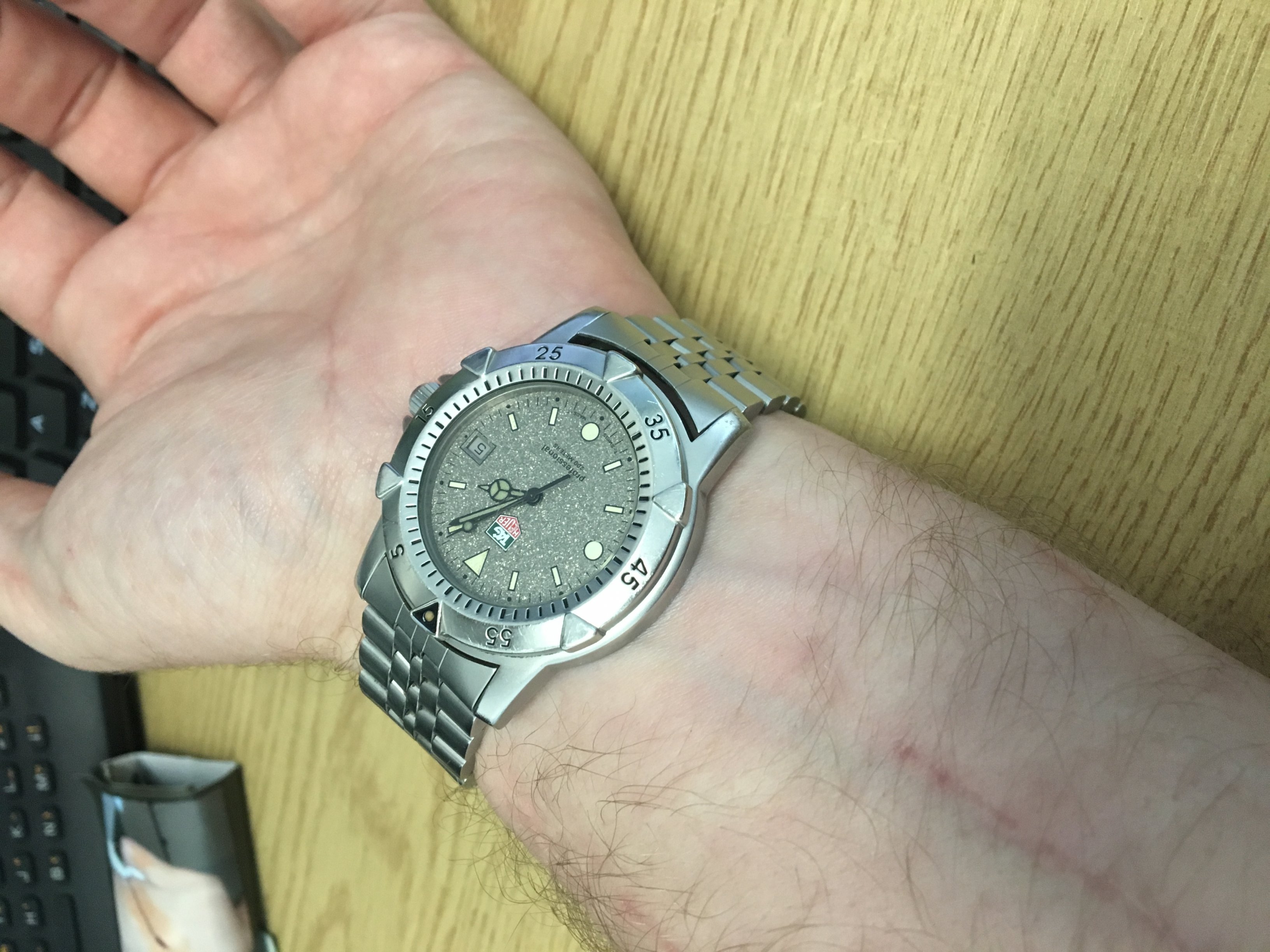
Wasn't a watch I chose / bought... just kinda landed on my wrist when I happened to be in need, and has stuck with me ever since.
-
Tag Heur 1500 series WD1211 BA0610 (Granite). Practically bullet proof. Tells the time. Quartz movement. S'about it...! *shrug*
-
Sounds like you've lost the local recovery partition, so all it will do is head to Internet Recovery by default. Can you post the output of diskutil list run from terminal? Also... ...is that a typo and should say 10.14.5, or are you _actually_ installing OSX Tiger?
-
Re: Permissions... see Filesystem Hierarchy Standard - 5.13 /var/run : Run-time variable data The /var/run/mysqld folder will always be removed and recreated at boot when MySQLd starts by design, and will be recreated with it's designed/intended permissions. You're chasing your tail trying to work your way around that... What's the output of: sudo /etc/init.d/mysql start && sudo /etc/init.d/mysql status ...? You can also try firing MySQL in safe mode whilst tailing /var/log/syslog... usually gives more verbosity to any error messages. sudo /usr/bin/mysqld_safe --user=mysql --skip-grant-tables tail -f /var/log/syslog
-
Tap the 'i' button to the right of the autocomplete prompt for the address in question, scroll down, tap 'Remove from Recents', then check the Contacts app and search for the malformed email address and remove it from any contacts if found. See Remove Unwanted Email Suggestions from Mail on iPhone & iPad
-
Footer is centered by default in Aardvark as it's a full-width responsive layout... issue looks like the page or footer container is too small (narrow), so it thinks the page width is from left hand edge of screen to the right hand edge of "College Website", rather than the full width of the browser's viewport - which means the way it is at the moment _IS_ centered based on the width that the footer thinks it is (black box outline in image below). First place to look - the default css for .container-fluid has possibly been overwritten (max-width attribute changed), or a CSS class has been removed from the container div in the template source, or footer in the css no longer has display:block assigned and has been given a hard-coded width, or .row-fluid has had it's default 100% width reduced... or everything's been moved into the first "span4" div of the footer template... (for instance)