Marci
-
Posts
1,299 -
Joined
-
Last visited
Content Type
Forums
News
20th
EduGeek EDIT Conference
Blogs
Everything posted by Marci
-
Basically - you can't. This IS all driven by HR contracts & roles area. Defining them as Classroom Teacher would have (invalid) impacts on Workforce Census etc.
-
At a guess, do a GET on UserDefinedFieldInstanceOptions first...

-

To remove students from pre-admission groups in Bromcom
Marci replied to CarterUSM's topic in MIS Systems
I'd say from your screenshots that you're seeing the warning / confirmation that this will admit more than the planned intake because the max intake of the year group is set to 100, and you already have 191 kids in it, not because you're doing anything wrong: Setting the planned intake is part of the process when creating an admissions group. So, when working on the 9-2022 group, you will see this warning. If the group you choose has a lower already-admitted figure than max set for that group, then you won't see the warning / confirmation. The button labels on the confirmation are entirely UNintuitive. Click cancel to ignore warning & proceed, click proceed to cancel. -
You can sign up (for free) for the Bromcom Partner API, which contains a personphotos endpoint with a base64 code per person matched on PersonID (generic for StaffID, StudentID, ContactID etc) which can be appended to the end of a URL to get to their photo. Once you have that, you can use cUrl etc to knock up a batch command to download them all into a folder, or use the URLs direct in PowerBI to add photos into reports.
-
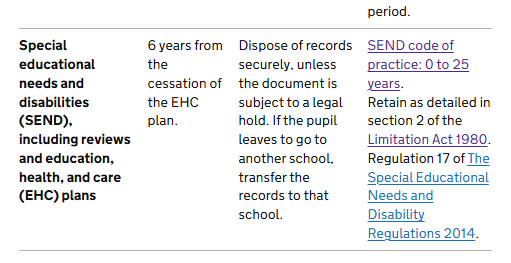
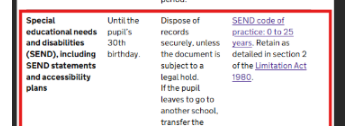
Now that looks more like what I was expecting it to say way back when I originally stumbled over it... rather than a fixed age of 30. Now: Before the disappearance:
-
Yarp... Classes, with extensive use of the Groups subdomain that you'll find there, which contains the Staff and Student associations... be prepared for a lot of tree diving.
-
Aside: last night was first night since Feb HT that I didn't have a single failure...
-
PS: For us, that means setting refreshes up so they take place in a 90min window from half-past the hour onwards, on even hours only. (Our vision sync is every 2 hrs and takes between 12 & 20 minutes)
-
Livefeeds have been randomly throwing 500 Server Errors or 502 Bad Gateway since Feb half-term for many (separately to those caused by last weekend’s _x0020 fix), with the error being thrown whilst refreshing in BI service online… so v.unlikely it’s an on-site filter issue… I’ve been shuffling schedules so as not to clash with Vision syncs / other reports refreshing which seems to have alleviated it in most cases, and suggests it’s a serverside load issue. (Plus we have all BC endpoints etc whitelisted on our filters anyways)
-
Look at the meta headers in source… that gives the *actual* generated updated dates rather than the person-typed ones visible on the page.
-
Nope - from my email sent items where I’d quoted and screenshotted it to our DPO.
-
A whole section has gone from the page... 22nd January, it had a subsection called "Create a Retention Schedule" with detailed guidance...
-
[bromcom] Getting Data from Bromcom to Power Apps
Marci replied to mitchell1981's topic in MIS Systems
And if you don’t have access to the Vision (MAT) endpoint, then you’ll need a quick report to surface the info as a live feed, then use that report’s live feed url with your CloudMIS endpoint auth credentials and the Get Data > From Web connector. -
[bromcom] Getting Data from Bromcom to Power Apps
Marci replied to mitchell1981's topic in MIS Systems
You need the PersonEmails table from the Vision endpoint, merged onto the Students table on SchoolStudentId -
Our LA have been extracting all our attendance daily via Groupcall into their own MIS since May last year (completely separate to the DfE extracting via Wonde).
-
That's been around for a while, hence Bromcom's audit log of EVERY change of a mark, from / to & reason and by whom, in the backend, exposed thru the built-in audit reports, which I can confirm DO go back at least 6 years. (We were audited on our ability to recall *all* register amendments over a year ago). https://cloudmis.bromcom.com/Nucleus/Registration/REGRegisterAuditReport.aspx Every MIS should have that baked in in the background to meet statutory obligation.
-
View your school education data (VYED) - DfE login required
Marci replied to Ditto's topic in General Chat
Bromcom et alle wrote in their own integrations to upload direct, however, DfE disregarded data submitted by this method and only process data submitted via Wonde. All schools in UK should have received a permission request from DfE within their Wonde control panel about a year ago (if not more). It operates on a 7-day-overwrite cycle, so for marks in there to be vaguely accurate, attendance teams must be correcting attendance marks within 6 days of the original intended date of attendance. Once that 7 days has passed, those marks stick. It was previously labelled as an experimental dataset, but this year changed to official-under-development, working towards becoming an Official tagged dataset within EES - https://explore-education-statistics.service.gov.uk/find-statistics/pupil-attendance-in-schools/2025-week-7 In meantime, the usual 3-term absence statistics are still the only *actual* official statistical attendance release, derived solely from Census returns. I suspect that will continue to be the case due to the unworkable 7-day-overwrite on this service. CSV outputs of the collated dataset are available for reintegration back into own reporting (eg: hauling into PowerBI) for a running national weekly average current-year attendance comparator, lagged by a few weeks, via the EES GitHub Repo at https://github.com/dfe-analytical-services/attendance-data-dashboard/tree/main/data -
Livefeed and ThirdParty Read Only endpoints all had issues overnight. Workaround has been put in place pending a proper fix.
-
Aye that rings a bell
-
I presume so... no idea how BC run / provision SMTP for customers, but I don't think they use MS for it.
-
@cnewstead - Wait til MS limit bulk-email sending later in the year... https://www.theregister.com/2024/04/16/microsoft_external_recipient_limit/
-
Likewise. You only need to switch if your roles have differing priorities, and you're being stopped from fulfilling a task by a higher priority role removing access... in which case you'd switch to the relevant role that would grant that access. If all roles have same priority they're applied in a merge-whatever's-granted kinda way.
-
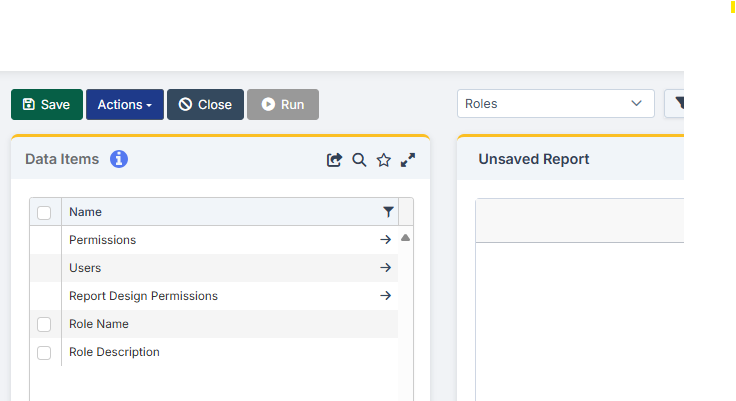
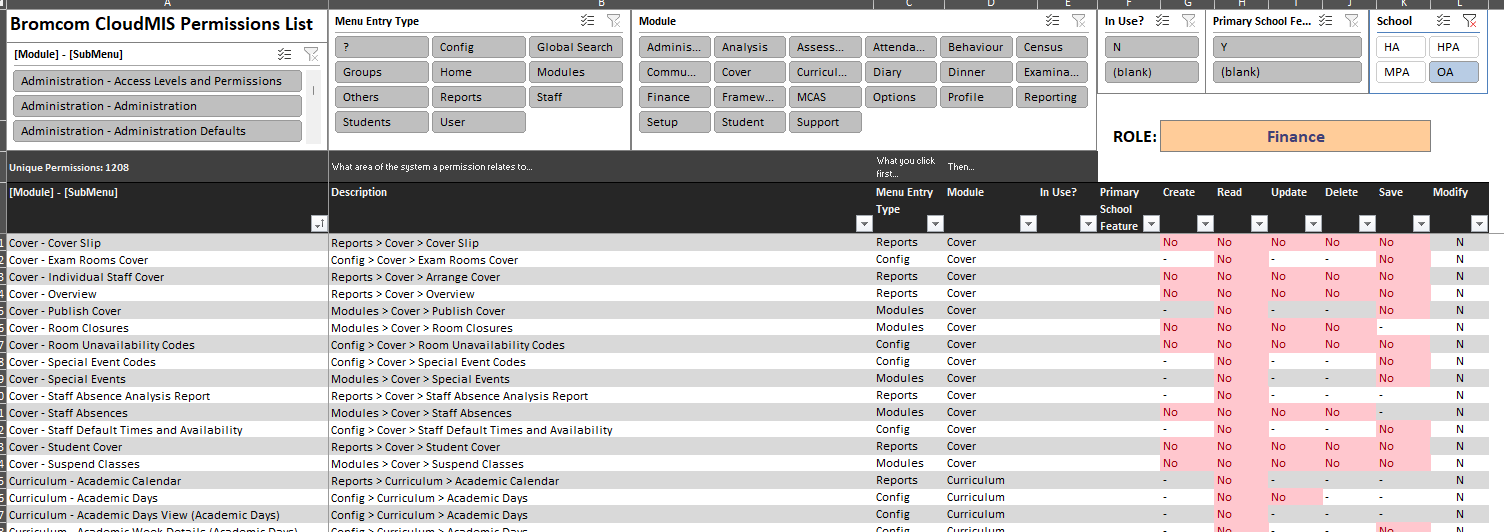
Edited to add screenshot above. Done in house. Report is just the entirety of the "Roles" subdomain in QuickReports, brought into Excel via Data > Get Data > From Web via Livefeed URL, futzed with in Excel.
-
I have a quickreport that brings in the Roles domain and spits it out to Excel, and can therefore filter it's output to a specific permission, find all the roles that set that permission, and all the staff who have that role.
-
I don't think it can... not without doing a full rollback. Only support helpdesk could answer for certain. Tis a pain that permissions on roles etc don't allow you to lock staff who can edit a group from being able to delete memberships. Really needs to be able to restrict folk to managing start and end dates / adding new only.... no delete of memberships, no end-dating the group itself etc.