Rob_D
-
Posts
3,124 -
Joined
-
Last visited
Content Type
Forums
News
20th
EduGeek EDIT Conference
Blogs
Everything posted by Rob_D
-

Which UniFi access point should I get? Also layout question.
Rob_D replied to TwistedHelixis's topic in Hardware
Definitely go one AP per classroom if you've got student 1:1 devices. I believe the Unifi APs can auto-negotiate if you've got a controller installed somewhere. For a deployment of your size, it might be worth looking at Aruba instant-on. When I looked they were a bit cheaper than the Unifi PROs for a similar spec. -
I'd install a VGA splitter (https://www.amazon.co.uk/dp/B005H3I38G/) on the output to the middle monitor and then a VGA>HDMI (https://www.amazon.co.uk/dp/B07K14NR8P) converter to go into the TV. Total cost £15-£20. I've use VGA splitters and VGA>HDMI adapters separately without any issues, but never tired to combine them before.
-
We use parent pay. It works okay most of the time, and does support paying for, trips, books, uniform, ect. If you've got SIMS then it should link up great as they're the same parent company now, and I'm pretty sure it will link to cunninghams for catering.
-
Great news to hear the Lazarus project has been renewed, really enjoyed the first series. Started watching Amazon's The Peripheral this weekend, good so far and I'm interested to see where it goes.
-
I believe Wonde supports SIMS writeback if the client apps need it. According to the support rep I was speaking to this morning, "Wonde syncs every 2-4 hours so we are constantly updating throughout the day, applications however sync at different times." So Wonde will sync from sims to their database periodically through the day, and then the apps will sync from from Wonde on their own schedule.
-
Coronavirus: General discussion (see opening post for rules)
Rob_D replied to Dos_Box's topic in General Chat
With the autumn update I'll be on 4. For my mum, the autumn update will be her fifth (a seemingly small group of people got a 4th jab at the beginning of the year). -
Account locked out from AD without a reason why
Rob_D replied to MEvansLA's topic in Windows Server 2019
Sorry, we just bug staff to check their mobile devices -
Account locked out from AD without a reason why
Rob_D replied to MEvansLA's topic in Windows Server 2019
Do you use AD/Radius for your wireless? That's normally what does it for us (iPhones are particularly bad for just hammering away with the wrong creds)- 8 replies
-
- 1
-

-
- active directory
- incorrect attempt
- (and 2 more)
-
Paranoid about SIMS and FMS being time bombed
Rob_D replied to Wirral_Wonderer's topic in MIS Systems
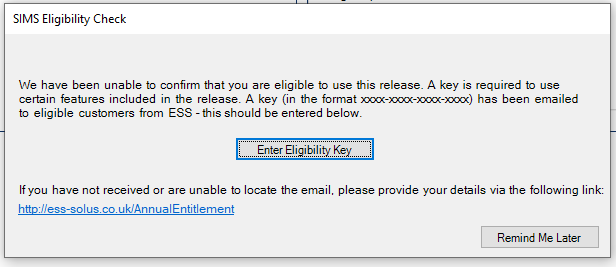
Now when I open SIMS I get the following message pop up. Anyone know what we can and can't do with the "unlicensed SIMS"? (I'm assuming ESS are disabling things client side rather than server side.)
-
We've had similar which was down to the Smart Ink overlay glitching out on Smart E70 screens. Force stopping ink from task manager (and letting it restart normally at next reboot) seemed to fix it for us. If you mean one of the old SB600 style projector screens with the sensors in the pen trays (like the pic below), try cleaning the pen tray sensors and make sure there's something in every tray. As I recall, the SB600 used light sensors to tell if a pen was in the tray or "being used" so as long as whatever you use completely covers the sensor it should work.
-
If you're using Office 365 have a look at attaching a Form to a approval Power Automate flow, it might be able to do what you want.
- 2 replies
-
- 1
-
-
- admin
- collaboration
- (and 2 more)
-
We moved to Bromcom and use Bromcom finance module. Actually moving was a massive faff as very little could be "imported" across, but now it's up and running finance team seem happy enough with it.
-
https://episodecalendar.com/ shows eps1-10 dropping on November 5th, with ep10 listed as "mid-season finally".
-
Anyone watching the long awaited second series of Blood & Treasure on P+?
-
I found the following table a while back showing what you can and can't do on Smart Basic. By the sound of it, this would still track. [TABLE=class: x_MsoNormalTable, width: 693] [TR] [TD]Feature [/TD] [TD]With a subscription to SMART Learning Suite [/TD] [TD]With the basic version of SMART Notebook [/TD] [/TR] [TR] [TD]Activities [/TD] [TD]Use game-based activity templates to create interactive activities. Type of activities include matching, fill-in-the-blanks, label reveal, sorting, and more. Learn more about activities. These activities help students memorize concepts and facts, identify objects, learn vocabulary definitions, and more. Activites can be played as a class or students can connect to the activities using their devices and play them in small groups or individually. [/TD] [TD]If the file has existing activities, the content is maintained but cannot be edited. New activities cannot be created. Existing activities can be played as a class at the SMART Board. Only activities which require student devices (such as Monster Quiz) can be played individually on student devices. [/TD] [/TR] [TR] [TD]Formative assessments [/TD] [TD]Use the response 2 wizard to create actionable question sets. Focusing on formative assessments, this feature supports the need for educators to effectively assess students in order to guide learning. Students can complete assessments using their own devices. Learn more about assessments. [/TD] [TD]If the file has existing assessments, the content is maintained but cannot be edited. New assessments cannot be created. [/TD] [/TR] [TR] [TD]Video Search add-on [/TD] [TD]Use the Video search add-on in SMART Notebook to search for YouTube and other online videos or paste a link and add videos into pages. [/TD] [TD]If the file has existing videos, you can play them but you cannot search for or add new videos. [/TD] [/TR] [TR] [TD]Image Web Search add-on [/TD] [TD]Search and add images directly from Bing into your lesson. Only royalty-free, age-appropriate image results will turn up. [/TD] [TD]If the file has existing images, they still appear, but you cannot search for and add new images using this add-on. [/TD] [/TR] [TR] [TD]Concept Mapping add-on [/TD] [TD]Use Concept Mapping to quickly create concept maps that encourage dynamic participation from students. You can use ink gestures along with traditional interactions to build concept maps. Learn more about concept mapping. [/TD] [TD]If the file has existing concept maps, these are maintained. New concept maps cannot be created. [/TD] [/TR] [TR] [TD]Lesson Recorder add-on [/TD] [TD]Using SMART Recorder, you can record your actions on your interactive product. If you connect a microphone to your computer, you can record your voice as well. After you create a recording, you can play the recording on any computer using Windows Media Player (Windows operating systems) or QuickTime software (macOS operating system software). Learn more about recording lessons. [/TD] [TD]Any existing recordings will play, but you cannot create new recordings. [/TD] [/TR] [TR] [TD]SMART Blocks add-on [/TD] [TD]SMART Blocks is an add-on that enables you to perform math activities with your class by writing numbers on the page, and then connecting them to a SMART Block. You can choose from seven different equation types to work with. Learn more about using SMART Blocks. [/TD] [TD]If the file has existing SMART Blocks, you can run them. You cannot add new SMART Blocks. [/TD] [/TR] [TR] [TD]kapp add-on [/TD] [TD]Save notes taken on a SMART kapp whiteboard directly into the SMART Notebook page. You can take your kapp notes and and erase, resize, convert-to-text or graph them within your Notebook lesson. Use the timeline feature to replay the work students have done and observe their decision-making and how their ideas evolved. [/TD] [TD]Won’t open. [/TD] [/TR] [TR] [TD]Maestro [/TD] [TD]The Maestro add-on connects SMART Notebook software and the SMART Notebook app for iPad enabling you to remotely control and interact with lessons from the SMART Notebook app on your iPad. Learn more from the SMART Notebook Maestro quick start guide. [/TD] [TD]Won’t open. [/TD] [/TR] [TR] [TD]Screen View [/TD] [TD]When presenting lessons you can use the following views: Full Screen view expands the page area to fill the interactive screen by hiding the title bar, toolbar, taskbar and sidebar. Transparent Background view enables you to see the desktop and windows behind the SMART Notebook software window and continue to interact with the open, transparent page. Dual Page view displays two pages side-by-side. [/TD] [TD]Dual page and transparent background options are not available. [/TD] [/TR] [TR] [TD]Share files to their SMART Account [/TD] [TD]Share files to your SMART Account so you can open them in Lumio by SMART and deliver them on any device to your students. You can also sign in to a SMART Board interactive display with iQ and use the embedded Player app to deliver the lesson at the board. [/TD] [TD]These features are not available. [/TD] [/TR] [TR] [TD]No watermark [/TD] [TD]When you subscribe to SMART Learning Suite, this watermark is removed even if you are not connected to a SMART Board. [/TD] [TD]A SMART watermark appears on each page when the computer is not connected to a SMART Board. [/TD] [/TR] [/TABLE]
-
Do they still have a legacy account under Modules>Setup>System users?
-
Cost of living crisis 2022 - what have you cut back on?
Rob_D replied to Ditto's topic in General Chat
I can't see it happening. Dept of Transport has said licencing too big a management overhead, and even Shapps had apparently changed his mind by lunch time. https://www.theguardian.com/politics/2022/aug/17/grant-shapps-bike-licence-plates-proposal-a-strange-and-pointless-idea -
Cost of living crisis 2022 - what have you cut back on?
Rob_D replied to Ditto's topic in General Chat
Based on what I've seen around my area and from friends, most people aren't getting heat pumps attached to the house. They're getting room-scale AC units that can be wheeled out when it get's really hot and they're working from home. You'd hope that anyone getting whole house AC would do enough research to consider a heat pump/HVAC style system. -
Cost of living crisis 2022 - what have you cut back on?
Rob_D replied to Ditto's topic in General Chat
While I don't see most people getting installed "split units", based on the number of vent hoses I saw stuck out of windows last week, more people than you'd think apparently have single room sized portable units (probably to cover the home office / bedroom). After this summer, and all the warnings of that kind of heat becoming more common, I can see more people doing the same. If you've got solar panels then you could probably get them to cover running the AC given you're only going to be doing it during the height of the summer. -
Cost of living crisis 2022 - what have you cut back on?
Rob_D replied to Ditto's topic in General Chat
If you've got your hob and oven as a single unit (or in the same place) a ducted extractor hood might do a reasonable job of venting the heat. But it would be a pain to retrofit. What you really need is a way to use the heat for water heating. Run a heat transfer loop from the back of oven to the hot water tank or something. -
I'd guess the main reasons are the resilience and flexibility of a cloud hosted system are the main draws for larger schools, while smaller schools probably like the idea of the host provider looking after all the hardware/updates/etc.
-
We didn't go with it in the end, but when we priced up Teams phone licences it came out about the same price as Horizon hosted PBX, and Teams IP handsets are definitely a thing.
-
The first thing I'd check is that the uplink/trunk connection between the two sites is configured to carry the CCTV vlan. (well, after I've double checked I haven't missed something in the switch config, but I assume you've done a like-for-like with a working port)
-
Hi, Can anyone tell me what specific API permissions ParentPay need in Bromcom as I've been unable to find this information in the documentation they've given me and the support rep keeps telling me I need to ask Bromcom for further information on the account creation.
-
Spain bans air conditioning from dropping below 27°C
Rob_D replied to Zoom7000's topic in General Chat
I suppose in temperate climates server room AC is really there to remove the heat generated by the equipment from the room, and it's only in really hot places (or during really hot times of year), when there's potentially a need to take the room "sub-ambient". At a guess, the reason server room ACs are often set so aggressively is stop them idling (and because "that's how it's always been")