Mozil.png.06aa1027e9e6bff1530aabaaa15276d9.png)

jthompson
-
Posts
5,685 -
Joined
-
Last visited
Content Type
Forums
News
20th
EduGeek EDIT Conference
Blogs
Everything posted by jthompson
-

Google Shared Drives Quotas
jthompson replied to timbo343's topic in Internet Related/Filtering/Firewall
It's a fairly new change, but I would have expected any Shared Drives >= 100GB (or whatever the configured limit is for the drive) to be preventing further uploads. Maybe they've added some tolerance in the form of warnings prior to prohibiting further writes. This is the email we had from Google on 7th January. -
GoTo is the absolute worst, so glad to see that there is an HTML5 easter egg. Their downloadable launchers are basically like Russion dolls. I've wasted so many hours trying to get them working for staff, but each package just seems to want to grab yet another package from the internet, signed with a different publisher cert (or none) and rely on unpacking and running from different parts of the user profile, etc. It's like they've a) never heard of corporate environments or b) never actually used their own product.
-
Does image quality of IP cameras deteriorate over time?
jthompson replied to dgsmith's topic in AV and Multimedia Related
Crud and dust accumulation, I suspect. I wonder whether a VBR stream would end up at a lower bitrate over time if the picture has become less optically sharp/focussed or electronic components have begin to wear. -
Refreshing Training Room Virtual Image every night
jthompson replied to password1234's topic in O/S Deployment
You could set your existing VM to have an immutable VHD, assuming you're using VirtualBox. That would mean that writes wouldn't persist between each use of the VM, and you wouldn't need to redploy it each night. -
Google Drive for GCSE Art / Photography Exams
jthompson replied to ThatBoringBloke's topic in How do you do....it?
New Google shared drive named "Art Exam Work" or equivalent. Exam officer is added as a viewer member of the shared drive. Possibly the teacher, too? In the shared drive, create a folder for each candidate user. Individually share each folder with the respective candidate user so that they can collect and prepare their files ahead of the exam. Once files are prepared, remove access to each folder for each user. Create exam accounts in the Google domain for each candidate to use in the exam. Individually share each folder with the respective exam account. Suspend/restore the exam accounts as required for each exam session. Some Apps Script funkiness may help to automate some of that sharing/unsharing. -
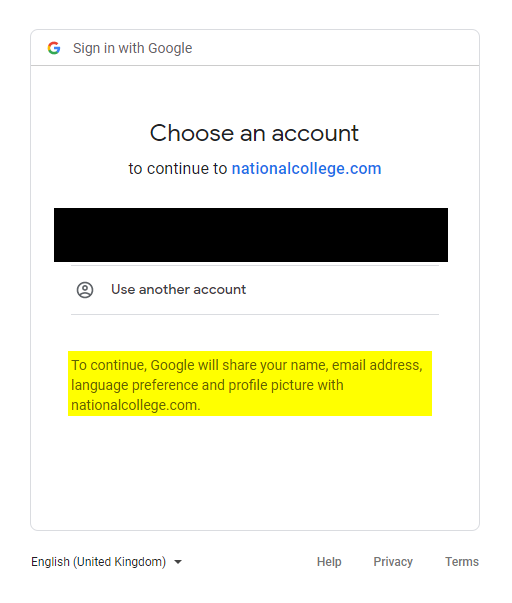
nationalcollege.com has had a facelift recently, and I think the SSO has been reworked slightly, too. Should just be minimal info to effect a sign-in though, I reckon. We SSO into using Google, and since the facelift we now get a Google account picker step. Highlighting is mine to indicate the fields involved, which I would imagine would be equivalent on the M365 side of things.

-
On the Google front, have a look at using AppSheet. It's a really nice make-your-own-app thing, which I believe will also support QR scanning on mobile. Super flexible and good fun to play about with. We're using it to good effect to keep track of little ad-hoc temporary loans of chargers, dongles, extension leads, etc. Our asset management system is GLPI, which includes consumables management. We use that to keep track of replacement projector lamps, etc.
-
SIMS server becomes unresponsive. Fine for a while after reboot.
jthompson replied to TwistedHelixis's topic in MIS Systems
While you're at it, check that you are on the latest service pack (SP3) for SQL 2016. It's not going to have any bearing on your performance issue, but SP2 went EOL last month, so worth checking that your server isn't on an unsupported version. Reindexing the SIMS db and updating table statistics might be worth a go as well. There's a SIMS patch that ESS can provide for doing that, but I think (happy to be corrected) that doing that with an SQL Server maintenance plan will do the same thing. Might be best to request the patch from ESS if you're unsure, as well as ask for any other pointers from them regarding compatibility mode and memory settings (since that will depend mainly on the size of your db). -
If you're planning on setting their passwords by performing a bulk user update via CSV, you could download the members list of a group (i.e. one of your classes) to CSV and use that as the basis for populating a bulk user update CSV. Should just be copy and paste of the usernames, with a bit of wrangling to split names into firstname and lastname. Something else to consider would be to populate your students' 'Department' field in Google to hold their cohort info. That would then allow you to filter your list of student users (in Google Admin > Directory > Users > Student OU) by cohort. You'd be able to do that via the same bulk user update CSV as well.
-
SIMS server becomes unresponsive. Fine for a while after reboot.
jthompson replied to TwistedHelixis's topic in MIS Systems
Would be worth checking the Discover transfer history, though. If it's all working okay, it's unlikely to be your problem. I only mention it because we've had it basically not work but chew up resources for hours on end. -
Cost of living crisis 2022 - what have you cut back on?
jthompson replied to Ditto's topic in General Chat
Ooh. Having just laid new LVT in our bathroom, we might consider this! -
SIMS server becomes unresponsive. Fine for a while after reboot.
jthompson replied to TwistedHelixis's topic in MIS Systems
Do you have SIMS Discover? If so, try disabling the SIMS Discover transfer service for a few days to see if it might be that. -
Recommend me an MFA token for Microsoft 365 please
jthompson replied to tmoon-mint's topic in How do you do....it?
Google's context-aware access doesn't allow you to create a rule equivalent to "Require MFA, except on these IPs/devices". It'll let you stipulate that access is granted if the user has MFA enabled in their account settings, but you can't kind of opt out to MFA under certain conditions. Which is annoying as it means we can't enforce MFA for students (as not 1:1 yet). -
Recommend me an MFA token for Microsoft 365 please
jthompson replied to tmoon-mint's topic in How do you do....it?
I think it's important to provide options for anyone not wanting to use a personal mobile as a 2nd factor device, without also making them feel as though they need to explain their position. Their device, their choice. Note that "limit their access to trusted locations" is not really a thing that you can do with Google accounts, for instance. -
Recommend me an MFA token for Microsoft 365 please
jthompson replied to tmoon-mint's topic in How do you do....it?
Worth mentioning that the cheaper blue-coloured YubiKeys just do FIDO2 stuff, so comparable function to all the other £20ish security keys, whereas the more expensive black ones are the snazzy multi-protocol ones that will allow you to also do OTP. -
Recommend me an MFA token for Microsoft 365 please
jthompson replied to tmoon-mint's topic in How do you do....it?
If it's for a few users only, YubiKeys are a safe bet. FIDO2 keys for passwordless M365 auth, but with the added ability to generate OTP codes as well as a backup option, or for any other systems they might be required to use OTP for. -
That's all well and good, but where can we get these hammers?!!
-
Local profiles here. Where staff work across a number of different computers, they'll be trusting those for MFA just in the first instance, and thereafter will be prompted just for their Google password to resume Chrome sync if not used recently enough. They won't be being prompted for MFA again unless the device is removed from their list of trusted devices in Google Admin, or gets reimaged.
-
It's a good jobs the lights were on at the point the software failed, although I suspect that the lights being stuck in the off state will have precipitated a solution a little more promptly.
-
Shared Google Calendar not appearing on iPad - Google Calendar app.
jthompson replied to Bev's topic in Cloud Services
I know that in the Google Calendar Android app, you have to dig into the user settings to enable the extra shared calendars for syncing. I don't think that they are synced by default. Once enabled for syncing, they're then listed in the hamburger menu so as to be toggled on/off for viewing. It may be the same deal in the iOS app. -
I don't know, these vegetarians. Where will it end? Who remembers proper muffins. Full of meat, not like the wimps we have now.
-
But that's just your clients, isn't it? How are you updating your SIMS server, SIMS database and SIMS file server without SOLUS?
-
Creating and Running exe's for computer science students
jthompson replied to RLR's topic in How do you do....it?
My colleague recently started looking into GitHub Codespaces and GitHub Classroom. Bit of a rabbit warren of "Enterprises", "Organisations", "Teams", etc. so I'm not sure what the verdict was but that may be something to investigate. -
SOLUS 3 for Schools That and all the other technical guides will be available here: SIMS 7 Documentation Centre - Technical page Interesting that people are running without SOLUS 3. What do server and database upgrades look like without it? Being able to easily schedule those to run unattended out of hours is handy.
- 21 replies
-
- 1
-

-
- group policy deployment
- group policy management
- (and 1 more)
-
The official SOLUS 3 deployment guide from ESS is nice and detailed and will give you all the Windows Firewall rules, GPO settings, etc. needed. I'm fairly certain that you won't want to try and get SOLUS 3 working well without using that guide. As already mentioned, SOLUS 3 can be very sensitive to DNS blips.
- 21 replies
-
- 1
-
-
- group policy deployment
- group policy management
- (and 1 more)