clareq
-
Posts
1,791 -
Joined
Content Type
Forums
News
20th
EduGeek EDIT Conference
Blogs
Everything posted by clareq
-

Opening Smart Notebook files from One Drive or Sharepoint
clareq replied to clareq's topic in Educational Software
Yes, IE. Chrome downloads the file when clicked, and then requires clicking on it to open it, but it does open. -
If a teacher tries to open a notebook file directly from OneDrive or sharepoint they get the message "The file C:\Users\%username%\AppData\Local\Temp\Smart Technologies\Smart Notebook\temp files\(random numbers).notebook cannot be opened" If we "show in explorer" the files open without issue. If I navigate to the location indicated I can find the filename and run it successfully. I get the same error when logged on as an administrator, so I doubt it's permission related. Any ideas?
-
From what you are saying, it looks like I used an incorrect username or password for the site, but it let me on anyway, but unable to see anything.
-
is it just me, or is edoocoo one of the most unintuitive websites I've seen? I've logged on, but what now? It isn't a forum, I think it wants to be Facebook, but I just want Eclipse to work!
-
I too would be grateful, thank you
-
I tweeted them on Friday afternoon. My issue, which I opened in October, was fixed by Monday lunchtime.
-
I see your just before Christmas, and raise to Halloween. I've had a call open regarding staff not importing into Eclipse since October.
-
(Another) CC4 to Vanilla thread
clareq replied to foofighterjim's topic in Network and Classroom Management
I did the same a few year ago at my last school. Look at Salamander for user creation. We used Impero for classroom management, and went with SCCM for builds and deployment - you can just use the packages you created for RM. Staff and students are used to the RM shares, so I just used the same drive letters and copied across the data. -
As it's only a few students, I'll try resetting them - thanks.
-
Anyone?
-
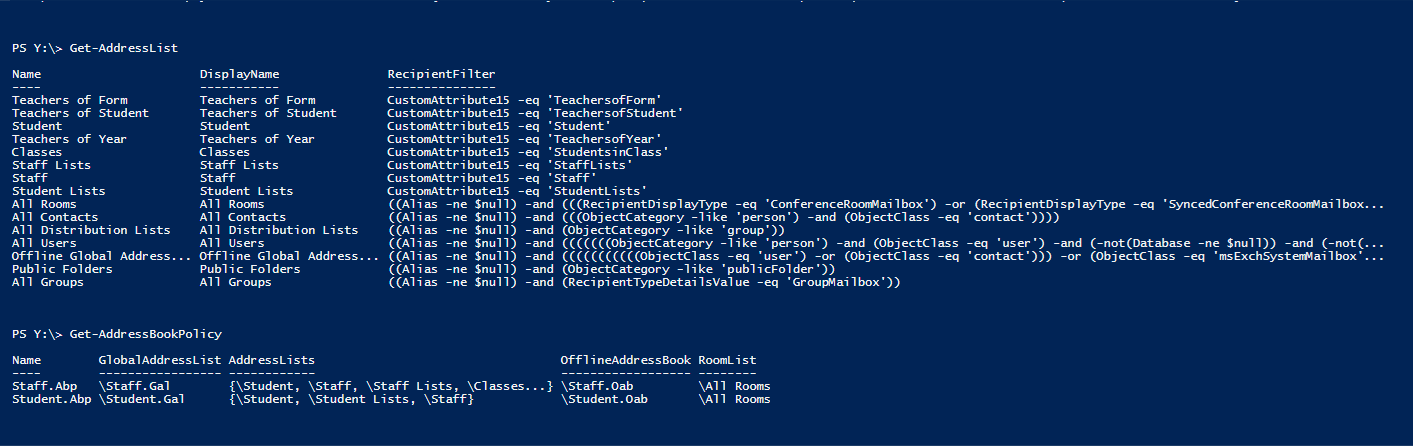
I have successfully created a segmented GAL, so students can no longer see all the mailing lists we don't want them to see. This has worked well in testing, so I've rolled it out to all students and staff. We are now seeing some instances where the new OAB isn't autoupdating. Staff have access to Outlook, and so can go to Send and Receive - send and receive All and the OAB updates. Students only have access to outlook on-line, and some can no longer type a name into the To field and find a staff member's address. If they go into the Directory, and the Staff address list, the staff member is there. Other students see exactly the same in the Directory, but the address autofills for them. How can the affected students update their OAB?
-
No Sophos I'm afraid.
-
I have two clients - one had autocheckpointing on, one had it off. Changing it made no difference I'm afraid. One of the clients was imported from my previous install of Windows 10, where it worked perfectly, and one was created on this install.
-
I have, in the past, used Windows 10 hyper-v manager to create images. I reloaded my machine recently, reloaded hyper-v manager and tried to start a client. Nothing. It hangs at "starting" - I've left it 24hrs, but nothing. I've stripped out hyper-v manager and re-installed it, double checked it's enabled in the BIOS, which is fully updated and still, no clients. It isn't important, just annoying that I can't fix it. Any ideas?
-
Looks like I just needed some patience. All working now.
-
I've set up separate GALs for staff and students, following this guide: https://blogs.technet.microsoft.com/educloud/2013/04/15/alumni-address-book-policy-in-office-365-education/ However, all users are still seeing all users and groups. What have I missed?

-
The bottom two permissions on your screenshot - are you allowing members of the local usergroup those rights? If so, check you haven't got any domain users in the local user group.
-
Can I just add the command to delete the plist to the Deploystudio workflow until I get time to build a new image?
-
Yes, Office is on the image. I think it's time to build a new image! I assume there is no way to "rearm" Office in the same way you can on a PC?
-
The volume licensed version - direct from the iso you linked earlier.
-
I've just checked - the serialiser is run as part of the DeployStudio workflow.
-
All macs were built from the same image. I'm going to try the serialiser recommended by @Arthur
-
We have a suite of Macs, onto which I have installed Office 2016. Users are asked to log-on to Office when they run it, but that's fine, we have a 365 tenancy, and they store their documents on One Drive anyway. However, on a few machines, intermittently, users are told they can only read documents, as they do not have a licence to run Office 2016 on a Mac. Move to another mac and they are fine. Any ideas?
-
I'd suggest you go with the lowest in this poll - it's an indication of how everyone will think.
-
Sharepoint libraries, workflows and item level permissions
clareq replied to clareq's topic in Enterprise Software
Then I'll look further at impersonation steps, though I can't find them yet!