RichCowell
-
Posts
1,661 -
Joined
Content Type
Forums
News
20th
EduGeek EDIT Conference
Blogs
Everything posted by RichCowell
-
If you've got a decent terminal server & wireless connection I can't see why Surface Pro would make much of a difference in the classroom... The only disadvantage that I can see for the classroom environment at the moment is the lack of apps that teachers have been using on their iPads for a while... We're just looking at them for SMT at the moment, until more apps are available, but I don't think it'll take too long... The two members of the SMT who got them when I got mine are loving them so far, one has pretty much given up with his iPad as a result, the other is nearly there... both have mentioned returning their laptops as well as their iPads in favour of the Surface tablets...
-
The Pro version is more like a laptop with a touch screen - it needs to boot up like any PC does, when it's on standby, it doesn't sync mail etc. so you lose the benefits of the tablet...
-

Classroom control Ranger, Netsupport, Impero
RichCowell replied to itgeek's topic in Network and Classroom Management
+1 for Impero, we've used it for a couple of years now, and it's awesome, great support, regular updates, easy to deploy... The feature list is impressive too, far more than just classroom control... It ticked all the boxes I was looking for when I got it, and was cheaper than a lot of the other products individually... Well worth checking out - ask them for a trial... -
Another thing annoying me that I've not found a resolution for yet... Despite ticking the box to Remember my credentials for the published apps from the TS, I keep getting prompted every so often to re-enter them... Most annoying! It's just an RDP file at the end of the day, I never get prompted again on my PC once I've saved the credentials... I guess it could be argued that it's done like that intentionally for security reasons as there's more at stake with the network apps / access to network files etc. but it's still annoying!
-
We're getting a cage fitted... based off the sketch I attached... I'll post photos when it's done...
-
You can use RDP apps like iTapp to connect to the Terminal Server, but they're expensive, and not really ideal as they're awkward unless you've got a keyboard... I don't think there's any way of accessing the published software on the iPads like you can on Surface - they appear as individual icons and open up directly in the software, as opposed to in an RDP session...
-
Took delivery of 3 Microsoft Surface tablets yesterday, two with the Touch Covers, one with the Type Cover... pretty impressed so far (apart from having to have a Hotmail/Live account to set it up (I already had one, but that's not the point... the boss didn't, so I had to create him one first))... I'd already published Outlook, Word, and SIMS on the Terminal Server, so it was pretty easy to get going quickly... The staff iPad users that have seen it so far are already impressed with being able to get the school calendar via Outlook (one of the biggest demands) and SIMS... I was disappointed at not being able to access ActivInspire and SmartNotebook via the table though... I was looking forward to seeing if we could replace IWBs with them... I'll try some other 3rd party IWB solution at some point... (if anyone's got any recommendations, I'd be keen to hear them)... (Edit: ActivInspire and SmartNotebook are accessibles as an Apps - I hadn't added Domain Admins to the permissions on the TS... I believe both packages are changing so they won't work unless they detect their respective hardware connected to the PC though, so will need to look into another option anyway... ) I've never been an Apple fan, and even less of a iOS fan, so I never got into the whole iPad craze, so really looking forward to seeing more apps come available for RT... Especially something that matches AirServer/AirPlay so teachers can control their PCs via the tablets... Does anyone have any recommendations of Educational Apps that are already out there? Or software that I can install & publish from the Terminal Server that might work well on a tablet? Some annoyances... Can't change the IE Homepage (There's a Google search app available in the market place, and I've published FireFox on the TS) Can't reduce the size of the icons on the Start screen
-
I used this for a few years before getting Impero... (http://www.imperosoftware.com/) It was okay, but if you needed to change things in a hurry (e.g. before an Open Evening, remembering at the last minute that the computers were needed past the scheduled shut down time) it wasn't the most reliable... It was fairly reliable other than that though... I've not bothered with it since getting Impero...
-
[ms office - 2013] New Office 2013 Themes? Uninstalled...
RichCowell posted a topic in Office Software
Finally decided to give Office 2013 a whirl... it lasted about 10 minutes... The theme options are awful... if the Dark Grey option really was dark (i.e. similar to the Black of Office 2010), I'm sure I would have kept it... It started giving me a headache and making my eyes water after about 1 minute, there's no way I could cope working with that... and there's no way I'd subject the staff & pupils here to that torture! I know there are posts on the M$ sites about it, but thought I'd rant here too... I really hope they introduce more themes in an update soon... -
I'll bear that in mind... it'll be switched off when it's happening - it's all external groups using the hall for sports... our kids would never dream of doing anything like that (glad I work where I do! lol), and the lens is changeable, so we may have to look into that...
-
That's exactly the kind of thing I was thinking about... however, ours isn't a short-throw projector, and is mounted suspended from the ceiling... so I've given up thinking of something for this... I think Willott's idea of using the tracks is the best so far... I hope that helps others looking though )
-
That's pretty good... the screen we're projecting onto is 5m x 3.75m, so a bit too small really... I have suggested removing the screen and just painting the wall white so if it moves slightly, it won't be quite as noticeable...
-
Good idea... I'll put it to the powers-that-be! Thanks )
-
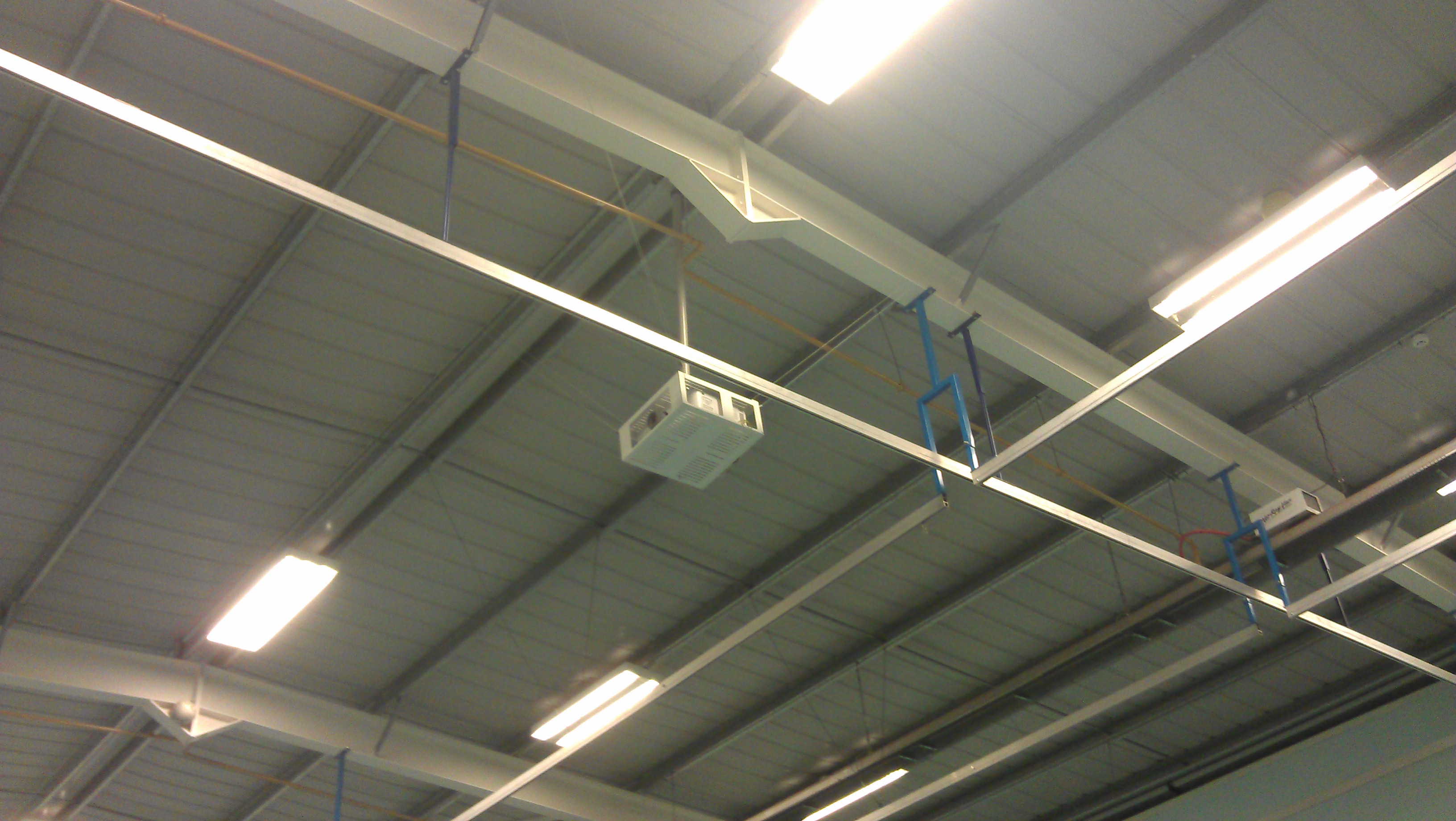
Went across to have a look before, and realised my perfect solution wasn't quite as perfect... there's no where really to fix the cage to, and there's a track along side it for netting... See photo... Back to the drawing board...

-
A good thought, and they do look pretty impressive... sadly there's no room above the ceiling, it's just the roof... also it's too low down so the lift would have to be massive lol... there's no such thing as a bad idea though! :-p
-
No, that's what we've got already... I've tried to sketch what I'm thinking of... No mocking!! I've never claimed to be an artist lol...
-
It does have a security cage, to protect it from damage / theft... but that doesn't stop it moving on the pole... I'm talking about a separate (probably wire) cage with a space between that and the projector... I know what I mean, I'm just not describing it very well lol...
-
It's done through an external lettings company, and there were a few users over the half term break... we will be charging them for some of the preventative measures we implement though...
-
Not a problem... I'll get onto the company that installed it too...
-
Do you have any photos of what you mentioned? I'd like to be able to show something to the powers-that-be and say this is what we need...
-
Good Morning All! We've recently had a projector fitted in the sports hall here... I'm sure you've already guessed where this is going... When the hall's used in the evenings/weekends, the little toe-rags are obviously booting balls at it as hard as they can to try to move/damage it... We got a secure enclosure for it, and there are guide wires securing it in place, but they're obviously not doing the trick... I'm thinking a cage built around it but not touching it at all would be the obvious solution, but it's at quite a height, so seems a bit of a H&S nightmare... If you've got a projector in your sports hall, or are aware of other more suitable/effective methods of ensuring it's not moved... Rick
-
Good Morning All! Seems like ages since I've had to ask a question here... We've recently upgraded our Exchange Server, and moved from 2007 to 2010 in the process... Now when using Outlook in school, the Outlook Anywhere "Connect to Microsoft Exchange using HTTP" keeps activating, and although it's getting all the correct data and is working, it'd be good to disable it permanently locally... If anyone can point me in the right direction, I'd be extremely grateful ) Rick
-
You can set categories to assign to specific users, but I think all admins can see everyone else's tickets... We only use it for IT, so it's never been a problem... (I seem to have broken Spiceworks since trying the SSO instructions, so hoping that new update isn't too far off lol)
-
I've been using Home - Liberum Help Desk as mentioned above for several years now, and it's a pretty good, free, helpdesk... I've been looking at Spiceworks over the last few days too though, as it does a LOT more than Liberum... I've read a few things about getting SSO to work, so going to look into it more before giving up... Fingers crossed!!
-
Google Apps - Free for Education - Limited to 10 Users?
RichCowell replied to RichCowell's topic in How do you do....it?
Thanks for that... I'll be patient! lol