Valyyn
-
Posts
309 -
Joined
Content Type
Forums
News
20th
EduGeek EDIT Conference
Blogs
Everything posted by Valyyn
-
This is my speciality! When I started here four years ago, our wallpaper was just a static: http://i.imgur.com/Zfwkbgqt.jpg I changed it to: http://i.imgur.com/xAnF9FSt.jpg and then I spend my lunchbreaks themeing it for different events throughout the year: Art Exhibition: http://i.imgur.com/4a31H4St.jpg Music Dept's evening concert: http://i.imgur.com/nF4L5sFt.jpg Halloween: http://i.imgur.com/b9sbWTMt.jpg Summer holiday: http://i.imgur.com/z0mVGvqt.jpg Christmas: http://i.imgur.com/MUIJQVat.jpg etc. I won't post them all, but these are some of my faves Good fun, a chance to improve my Photoshop and the kids love it
-
Fingers crossed it will be of some help
-
Ah yeah, definitely not expected behaviour - I added our admin team on to Google at the start of the week and to save them all changing their passwords, I visited each one individually and had them "change" their passwords to the same thing through AD U+C right click -> Reset password. As mjk says, I believe having "user must change password on next login" ticked does break it (although it will update when they do log in and change it). Edit: Just saw your post about the tick box, so ignore that part! Do you have more than one DC? When we first did it, we have two DCs which share the load of being the "logon server" and I'd only installed the GAPS service on one of them. Everyone who was assigned the other DC didn't get their Google passwords changed. There's a really good troubleshooting tool you can use to look at the logs. Do you know about it, or do you want me to double-check where I got it from? Edit again: I'll add instructions anyway actually, as it may help someone even if you already know it Download the GAPS Support tool from: https://github.com/google/gaps-support-tool/blob/master/gapstool.exe Copy it to the desktop of one of your DCs and run it. When it finishes, close it and you should have a zip file on your desktop named something like "GAPSTool-report_20150605_151144.zip" Extract all and open it In there should be a folder for each of your DCs. Pick one to start with (ideally the one you're on) and go into it, then the Service2008 folder. There are your log files, with the newest at the bottom. You can see every password change request there, including any errors. If none, check the folder for your other DC too.
-
I'm looking at the same thing at the moment (what a coincidence!) Haven't found a way to do it yet, but we're still looking.
-
Sure: https://support.google.com/a/answer/2622457?hl=en Nope - GADS is a manually run tool to synchronise the actual accounts, so only needs to be run on one DC - it basically gets a list of the users and exports it to Google (to create new ones, lock disabled ones etc)*. GAPS is an always running service which has to intercept password change requests and so does need to be on both. (*There may be a a way to make it automatically run, but I've not tried to be honest - I just click sync when I add a new user).
-
Nope you can do that perfectly fine, as long as the password changes, it doesn't matter whether they do it through Windows or you do it through Active Directory Users & Computers
-
On ours, you have to push F12 to actually launch in to WDS and once there you then have to select an image etc if you have more than one.
-
To be fair GAPS isn't too bad. It's basically just a service that runs and intercepts password change requests and duplicates them to the Google account. Important things to remember are: * It needs to be installed and running on every DC (I only did one of our DCs first time, and everyone who'd authenticated against the second didn't have their Google password changed) * It cannot read current, encrypted passwords, it can only read password changes. So once it was up and running, we set everyone's accounts to require a password change at next logon.
-
You need GAPS as GADS cannot sync passwords from Active Directory: http://i.imgur.com/5QNBAIGm.png Edit: And I have no answer for the original question, but would be very interested in an answer too
-
+1 for CamStudio - free and we use it here
-

Advice needed on laptops - 1st time on here and not sure which forum I need
Valyyn replied to AliB's topic in General Chat
If your internet is up to scratch, I know there are some primaries in our area who got Chromebooks and love them - in fact we are now looking at getting some ourselves after seeing what they do with them. They have these touchscreen ones: http://www.amazon.co.uk/Acer-C720P-11-6-inch-Touchscreen-Chromebook/dp/B00HX9AJ4S -
I use the reminders quite a lot. "When I get to work, remind me to email so-and-so." "When I get home, remind me to check the website." "At 3pm, remind me to go to IT1"
-
If it helps, here's a quick guide I wrote on it a while back, it should still be accurate! http://www.edugeek.net/forums/educational-software/124533-adobe-cs6-image.html#post1063330
-
Thank you for the feedback, it's helpful to know what others are doing We've been given permission for Twitter as a trial to start with. The higher-ups are reluctant to let us be on Facebook though as we cannot stop people from commenting on posts and they do not want people to have to spend time looking out for comments etc. Out of interest, how do people manage comments etc? Do you guys monitor/reply to them, or do the admin team/PR people (if they have them!) do it?
-
Hi all, Wasn't sure where this would be best, so I figured General Chat would cover it. Just wondering how many of your schools have Facebook/Twitter pages/accounts. Who's responsible for maintaining them? Is it anyone in particular's job to monitor social networking and respond to queries etc? We're looking at setting up a FB and Twitter for the school, where all our website News stories are automatically crossposted to both social networks, figuring that if parents follow/like us, then they can see our news in their feeds, without having to go to the effort of manually checking our site etc. Ta for any responses!
-
We're looking into Chromebooks at the moment and just had some trial ones sent to us from XMA. They were touchscreen Acer Chromebook C720s: http://www.amazon.co.uk/Acer-C720-11-6-inch-Chromebook-Silver/dp/B00GX9HSKM/ref=sr_1_1? and I have to say I was very impressed by them.
-
Bumping this up for more ideas! We regularly theme people's desktop wallpapers. Last year we just flipped it upside down. Was very funny, until all the support calls of "My screen is upside down" started coming in... This year I'm debating adding this extension to student's Chromes: https://chrome.google.com/webstore/detail/googlifier/lblbdlideidphhfofbpocigbkkhingfg as long as it automatically turns on, should be a fairly harmless, funny giggle
-
[android tablet] Managing Android devices?
Valyyn replied to Valyyn's topic in Mobile Devices & Tablets
So it was an interesting seminar last night. Long story short, the hardware requirements for the Play for Education are strict, which is why it's just the three tablets at the moments, although quite a few of the coming soon tablets will be supported too, apparently. With regards to the Hudl2, it's the lack of NFC that's holding it back, as PfE uses NFC to configure students devices from the teacher one. The rumoured soon-to-be-announced Hudl3 might have NFC on it though, who knows? We're considering looking at Chromebooks rather than Android now, based on what we saw, but time will tell!- 23 replies
-
- 1
-

-
- android tablet
- hudl
- (and 1 more)
-
Well this is the wall behind my desk at the moment: http://i.imgur.com/45sLHZgs.jpg Plus the obligatory "how to fix any computer" in the doorway: http://i.imgur.com/LereBxOs.jpg The Star Wars posters were donated by the Media teacher who found them in a classroom cupboard. No Empire though!
-
I've signed up to their list and their FB so I know when they do add more
-
MIT App Inventor - A couple of Emulator issues I'm stuck with...
Valyyn replied to IcedBreeze's topic in Educational Software
Ah yeah, that'll probably be it then. Will give it a test today and let you know, thank you -
This is amazing.
-
MIT App Inventor - A couple of Emulator issues I'm stuck with...
Valyyn replied to IcedBreeze's topic in Educational Software
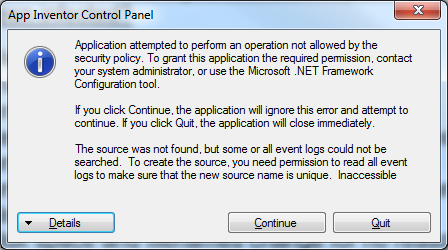
Thank you for this, it looks so much nicer than what I was doing before! One question though, launching the emulator works fine as admin, but as a student I get the below error. Any one got any ideas as to what is causing this? Google gave me some solutions, but they all involved installing the .NET Framework 2.0 Software Development Kit on each machine and manually changing settings or running a tool called caspol (off the top of my head) at logon.
-
[android tablet] Managing Android devices?
Valyyn replied to Valyyn's topic in Mobile Devices & Tablets
I've got LearnPad coming in on the 18th to give a demonstration, quite looking forward to it It's a shame they don't offer test units anymore though. There's a Google for Education Seminar being hosted in two of the primary schools near here next week, where the UK head of Google Education will be answering questions about Play for Education etc. It does sound really good, but it's just a shame they're limiting it to which android tablets you can use. If I can go, maybe I'll ask if there're any plans to open it up in future! -
Woo, was looking forward to these at BETT Email sent!