michaelf
-
Posts
106 -
Joined
-
Last visited
Content Type
Forums
News
20th
EduGeek EDIT Conference
Blogs
Everything posted by michaelf
-
 IT Services Helpdesk Technician (Ref 676) Closing Date for applications:12 noon Wednesday 7th October 2009 Interviews will take place on Monday 19th October 2009 37 hours per week Salary range £17,561 - £20,362 per annum A new position has become vacant within a busy IT Service area for a Helpdesk Technician to log and resolve helpdesk calls and queries at first line level, whilst maintaining a high level of customer service. The post is based at our Kettering campus. Duties will include being the first port of call for all incoming general or helpdesk related queries, providing 1st line technical helpdesk support to all internal and external customers either over the telephone, via remote connection or in person, resolving as many helpdesk calls at this level as possible. You will also log and assign calls to technical staff at the appropriate level, escalating as required and be responsible for user account administration. This role requires that a degree of non-technical administration duties are also carried out. The successful applicant will have demonstrable experience in a busy 1st line helpdesk environment, have intermediate/advance knowledge of MS Office packages, and have excellent communication and customer service skills. You must also demonstrate the ability to multitask and effectively prioritise in a high pressure environment. Further details can be found in the job description. IT Services Helpdesk Technician (Ref 676) - Tresham
 -
Depending in her requirements, what about picking up a 2nd hand or refurbished system from eBay? I've always managed to get a bargain with some careful shopping. I got my current machine from there last April (Dell GX620, Pentium D 3.2GHz 2GB RAM £150)
-
Is this what you're looking for? Rapid Electronics - Brass hexagonal threaded spacers If you're joining VGA leads I believe you'd need the m3 size and probably the 6mm length (but don't quote me on that!)
-
Forgive me If I've overlooked something here but does the projector not have an s-video or composite input that you could connect the device directly to?
-
The site's blocked here but I'll take a look tonight when I get home. Many thanks.
-
Hi there guys. I've been asked to look into the possibility of an IDE switch for use on some of our dual purpose machines. We're after something that can take 2 or 3 IDE drives plugged into it and then a nice switch on the front of the machine to switch between them. I've had a look on Google and have found four products, NickLock, ComBox, Romtec Trios and the Indus IDEX. However, from what I can tell all these companies have gone out of business recently and the products aren't available for purchase anywhere. I'm not looking to actually purchase anything at this point in time as things are still in the consultation phase, but am simply interested to know if such devices are still around. BTW, we have already considered dual boot as a possibility and while we may have to go down this route it's not ideal as students will be formatting the drives as part of their course. We have also considered external HDD caddies, and while these work well we've had a number of cases of damage to the caddies during inserting and removing. As such, ideally we'd want a self contained solution. Many thanks in advance for your help.
-
Tracking Users with event viewer
michaelf replied to JonathanJoy's topic in Windows Server 2000/2003
A second vote for sted's suggestion. We use the same system but to make things more manageable (and to avoid having one huge log file) we have seperate log files for each computer and user and have the script write to both the computer log and the user log at each logon. -
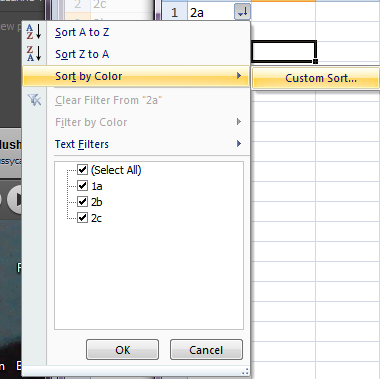
2007 includes the option to do a custom sort from the Auto Filter menu (although its hidden under the Sort By Colour menu). Another idea, what about defining a custom range in the sheet to save you selecting all the data each time?

-
I've tried today using BGInfo in a startup script to set the login screen wallpaper and this works perfectly to set both the wallpaper and the desktop background colour. Many thanks for the suggestion. As for the info on the desktop I read somewhere that the wallpaper was stored at "C:\Documents and Settings\\Local Settings\Application Data\Microsoft". I tried pointing BGInfo to this location in an attempt to replicate the built in functionality to use the same wallpaper while still being able to forca a specific background colour. Unfortunately however, this only worked intermittently and refused to work at all at first login (i.e. before the user had manually set a wallpaper). In the end I've given up and decided that having the logo on the login screen and screensaver is enough and that we can do without it on everyone's desktop so I've reverted to using a simple BGInfo file with no logo in. Many thanks for your help on this one, its so easy to get caught up in a problem and sometimes a second pair of eyes (or several thousand pairs) can make a world of difference.
-
Many thanks for both of your suggestions. I'm already using BGINFO as part of the login script to display the IP address and hostname on the desktop once users are logged in, however I haven't thought to try it in a startup script to change the background at login. I'll give that a try tomorrow and let you know how I get on. However, as for the login script, I want to be able to keep the user's own wallpaper (so they can still have that stunning picture of their dog/child/whatever else) while still specifying a solid background colour to be used behind the text (marketing won't let us use our logo with the default blue colour) but unfortunately these two options seem to be mutually exclusive. My thoughts with this was to change the colour as part of the login script, however it appears that this is set too late for BGinfo to pick it up at logon and it instead waits until the 2nd login to do so.
-
Does anyone know of a way to force windows to re-read the values in the registry, specifically HKEY_CURRENT_USER\Control Panel\Colors and HKEY_USERS\.DEFAULT\Control Panel\Colors? I have written login and startup scripts to update the desktop background colour (at the login screen and on user's desktops) on all our machines but these changes do not seem to take effect until after a reboot or logoff/logon. Normally this wouldn't be a problem but since a lot of our machines use HDGUARD they do not get the new colours at first boot. It also means that users do not get the new colour at first login. I have tried using the RunDll32.exe USER32.DLL,UpdatePerUserSystemParameters ,1 ,True command but this will only update the wallpaper, not the background colour. Any thoughts would be much appreciated as would ideas for alternative methods to change the colour that will take effect immediately.
-
Try AutoStitch: AutoStitch
-
Transition from Office 2003 to 2007
michaelf replied to powdarrmonkey's topic in Educational Software
I've found these quite useful, only for myself though I haven't tried them out on staff yet. Office 2007 Command Reference -
Here we are trialling the OCR National Level 2 qualification in ICT (http://www.ttsonline.net/OnlineCurriculum/LatestCourses/OCRLevel2NationalsinICT/tabid/144/Default.aspx) Although it has only been running since September our IT department are very impressed, firstly due to the large variety of units available and secondly because of the mix and match approach taken allowing more able students to take additional units and reach a higher level of qualification.
-
The idea of having a tablet or laptop setup to sync the registers and then grab that in the event of an emergency seems pretty good since its not reliant on any existing infrastructure. The other idea my boss suggested was rather than printing off a complete register each lesson, simply to print off a list of absentees. This has the advantage of being much shorter than a complete register but can still be compared with a complete class list to see who is supposed to be here.
-
Does anybody have any experience of using these boxes? We have a couple here which have worked fine for some time how. However, recently when i've been getting a password error when trying to project using the the box. I can ping the box and the LevelOne software will see and connect to it fine, but when i click play i get this error. I've tried a factory reset and even a different box but to no avail. Thanks in advance for your help
-
What about something like this? http://www.ebuyer.com/UK/product/91723 I've never used one myself but I've heard they're pretty good.
-
This should do the trick: Alternatively, you could just specify a timeout on the WinWaitActivate command.
-
We too give them local admin rights to their laptops and have done since the beginning. We have very few cases where staff install things that break them and on the whole we feel that this approach is less time consuming than having to install everything for them on the machine.
-
For me, this is the key point. The camera on my Razr isn't brilliant, neither is the video recording. But, its always with me wherever i go incase i need to quickly snap something. Its just handy to always have a camera on you without actually having to carry around yet another device. I wouldn't use it as a replacement for my digital camera with any serious photography but when i'm out and spot a good shot its handy to be able to just take it.
-
Here we only have a single trolley and its allocated to a specific department so they deal with the booking and moving the thing around internally. As far as i know though they do book it out for consecutive lessons, although the fact they never have to move it far makes it easier. We also have site-wide wireless connectivity so its simply a case of turning the laptop on and it works, making things much simpler. Because of this we barely touch the thing.
-
I'll second that, we had a room installed last summer and they're bombproof, i can't remember the last time i had to go into that room to fix something