seawolf
-
Posts
975 -
Joined
-
Last visited
Content Type
Forums
News
20th
EduGeek EDIT Conference
Blogs
Everything posted by seawolf
-
 If anything, I would probably be inclined to make it more restrictive out of school hours for boarders. During the school day they would (should) be supervised by teachers more often than not. After hours there would be much less supervision I would expect. Perhaps open the filtering on a sliding scale if you're so inclined with most restrictive on the youngest students and least restrictive on the oldest.
 -
Cost of implementing 20 photography Macs into Active Directory
seawolf replied to sonofsanta's topic in Mac
1. Yes, Macs on average cost a bit more for an equivalent spec'd machine, but not that much more if you're really comparing like for like (the one case where you can't say "Apples with Apples" ). The build quality is also much higher than most PCs built today (unfortunately), and they hold their value very well in the secondhand market. I've found they also tend to last a bit longer (useful life) than the equivalent PC (I'd say 25% longer). 2. Training - do you really want your skills to become old and irrelevant with the march of time? Take this as an opportunity to increase your knowledge and become the rarely found sysadmin who is competent with both Windows and Mac (I have been an admin for Linux and Solaris systems as well as Windows and Mac in the past 15 years) Windows Server 2012 and Win 8 are different enough from their predecessors that some training is going to be required, whether that's time spent in trial and error and self study or a course. 3. They are a bigger target for theft than a black box PC, which should tell you something in itself (demand is high for them), so use a cable lock on them (Kensington, Tryten, etc,). And you can cable tie the mouse and keyboards in contrast to a previous comment. Just cable tie the mouse to the keyboard cable and the keyboard cable to the cutout in the base where the cables go through. We do this and haven't had a single mouse or keyboard go bye bye in 3 years. The kids can't swap the keys around on the keyboards either like they enjoy doing on the Dells and we only have had one damaged where a student tried this before realising they were just breaking the keyboard. 4. You'll need an entry level Mac Mini to use as a server, or even any good condition used x86 Mac compatible with Mountain Lion to act as a server for Configuration Profiles. In other words, it won't cost much to manage them. There is no need to bind to OD if you use Profiles, only your AD domain. 5. If you have a .local Windows domain performance won't be nearly what it could be, but it will still work. Here we have about a 60/40 split of Mac/Windows and the Macs login faster to the AD domain than the Windows clients (we don't use a .local domain, but used to and it's like night and day). Our Macs are fully integrated and far easier to image, manage, and migrate than the Windows 7 clients. 6. CS5 might run equally well on either platform, but there is a whole gamut of useful graphics design and sound recording software out there that only runs on the Mac. Final Cut and Logic Pro being a couple of examples. Pixelmator, Acorn, and iDraw being a few others. And finally, if you look at the current trajectory of OSX and Windows, then I would rather hitch my wagon to OSX than Windows. I don't like the direction MS is going at all with Win8, whereas I see Apple heading more and more in the right direction with OSX with each and every release, particularly with the upcoming Maverics release.- 52 replies
-
- 1
-

-
- ad integration
- apple
- (and 2 more)
-
I see. You have migrated student network resources to "the cloud" a bit more than most schools, and this approach could work in that case. Two resources I see missing though is access to printing and authentication servers (AD or LDAP). How do you achieve that? Are you using Google Cloud Print and LDAP over SSL?
-
Actually, iFixit recently gave the Mac Mini an 8 out of 10 in the repair/upgrade department - http://www.zdnet.com/new-apple-mac-mini-desktop-computer-is-easy-to-repair-upgrade-says-ifixit-7000006470/ the RAM is easily upgradeable, and both the PSU and drives can be replaced fairly easily. I have personally recently replaced the HDDs on a dozen of the new Mac Minis (with SSDs) and each one only took about 25 minutes. Sure, the CPU can't be replaced, but when was the last time you actually did that unless you're a heavy duty gamer (or had an Intel CPU break)?
-
Absolutely. Even the base model is a pretty powerful machine these days. If you want a bit better performance, just upgrade to a i7 CPU, Fusion drive and install 8GB RAM. And there won't be any problems with using it on a Windows network. Our Macs generally run as well or better on the Wndows network than the Windows computers do (as long as you don't have a .local domain, then performance can suffer). If you need to run Windows only software then just install Windows in Parallels or VMware Fusion (this is where 8GB RAM really shines). I wouldn't bootcamp it unless you intend to run Windows full time and only boot into OSX for iPad sync.
-
And how would you achieve that without having an isolated network, which would preclude access to any network resources (servers, printers, etc.)? That would be good for a guest network or WiFi hotspot use case where only access to the Internet is required, but I can't see how that could be very useful in a school environment? Access to other VLANs can be controlled through the router if there are servers or VLANS that users should not be able to access.
-
-
Our AUP includes sections specifically related to the college having no responsibility or liability for damage caused by malware or loss of data whether or not it is the fault of the college (e.g. we delete a students work from the server accidentally or server crashes and backups are no good). In other words, you use our network with your device - you swim at your own risk. If we deleted your data and you don't have a backup - learn to make backups. Users are about 100x more likely to get malware at home than on our network, and we have never had devices get infected on our network except by students bringing malware from home on USBs, which was sorted within a couple of days with restrictions on students opening or saving any executable files of any type on a USB or any network drives, even zip files (that they were using to run games from within the zip file to get around our restrictions). That little trick has saved sum a LOT of headaches let me tell you.
-
Yes, we do allow students on the WiFi. We have four different SSIDs and four different VLANS (Staff, Year 7, BYOD, Student). The "Student" wifi is for college owned devices used by students. Each VLAN has filtering settings appropriate for the group and has bandwidth shaping as well, so we don't require authentication, but we can track the users anyway because devices must be enrolled so we know the IP address a device has and the user of that device. We don't worry about viruses as most of our WiFi devices are iPads or Macbooks and we have four layers of malware protection (ClamX AV for Macs or Avast! for PCs, iBoss web filter (malware and phishing sites), OpenDNS (only for botnet and malware protection), and firewall gateway AV).
-
Sorry, you're in the UK, you'll need this link instead http://www.supermicro.co.uk/index_home.cfm
-
Holy Cow! Only $2,000 max for the server that runs everything for the whole school for 400 students and staff? If that's all you have, you'd better build it yourself because if you buy one from HP,Dell, etc. you'll be spending a good portion of your budget on the label on the front and the support contract. Use a SuperMicro chassis, Intel xeon board and CPU, 16GB RAM, redundant PSUs, a good SATA HBA and the best HDDs you can afford (Hitachi, WD Re, or Seagate Constellation). I would normally say use SAS drives for a critical server, but a SAS HBA and drives would consume all of your budget. http://www.supermicro.com/products/index.cfm No, you won't have a big company providing support, but you'll know the box inside and out and will be able to easily upgrade and fix it, and will still have the individual warranties for each of the components. Personally, I would consider turning your current server off for a few hours (fake an outage) and then asking your head if they think the server is worth more than $2,000 to them now! Hugely shortsighted!
-
Glad that removing the invalid drive mapping seems to have sorted the issue. For those on a limited budget and a small to moderately-sized network (less than 300 concurrent clients), I'm a big fan of using a FreeNAS server for storage. You can easily build a very decent storage server for between $2,000 to $3,000 (depending on storage requirements) using off-the-shelf components. If you use plenty of RAM (16GB+), enterprise or near enterprise grade SATA drives (think Hitachi, WD Red or Re, seagate Constellation) and a couple of small SSDs (64 to 128GB) for write/read caching you'll get faster and more reliable performance for thousands less than anything from HP, Dell, Synology, etc. and a storage server that supports iSCSI, NFS, SMB/CIFS, AFP, and FTP. Here's a few good articles on the subject if you get a few $$$ in the future to spend on some storage and might be interested in going this route http://anotherschwab.wordpress.com/2010/09/27/poor-mans-san/ http://www.pcworld.com/article/255596/how_to_convert_an_old_pc_into_a_modern_server.html http://doc.freenas.org/index.php/Hardware_Recommendations
-
Don't know where you're at, but over here I would grab a couple of these and wall mount them as was previously suggested. It does save a heap of desk space and is a more flexible solution anyway. http://www.kogan.com/au/buy/extendable-arm-wall-mount-10-22-lcd-tv/
-
Well, they are netbooks... But seriously, The problem is probably due to a WiFi driver compatibility problem with the netbooks and the Ruckus APs with the new firmware. If these are older netbooks that came with XP that is a VERY probable cause. We had a similar problem with older Dell 820s and 830s running Windows 7 where they would just drop the connection even though they were 5m from the Ruckus APs. we finally found a driver that would work, but WiFi still just doesn't work as well with those units. Everything else - no problems ever. Just a note, you should definitely remove the non-existent drive mapping from your login script and I would also never use a DC as a file server. Just not best practice for many reasons. I suppose if you're very limited for servers and budget and scraping together pennies just to keep the hamsters fed and turning the wheel then OK, but if you've got a Ruckus WiFi network then budget shouldn't be the issue so always keep the two separate.
-
Does your AD domain end with .local? If so, there is the sum of your problems. Renaming the domain is the only fix. If you DON'T have a .local domain then double check your DNS is correct. 10.6 also was much worse about this than 10.7 or 10.8 - if you haven't upgraded yet you need to be thinking about it very soon as it will likely help overall performance.
-
Actually, iOS already has a "proper" file system, it is just organised by App (app silos) rather than the traditional desktop, documents, etc. hierarchy and most app data is in private/var/mobile/Library or private/var/mobile/Applications. iOS shares much with OSX under the hood including HFS+ file system and a UNIX architecture. These things are just hidden from users unless you jailbreak or use other tools to view them. However, as Apple seems to be adding more and more higher level functions to iOS over time, it will begin to have more parity with OSX feature-wise even while OSX begins to look in appearance more like iOS. Why not up just provide all of this power to users right from the start? Because just slapping OSX in a phone or tablet wouldn't have done anything to simplify computing for the average person and it would have required greater processing power than was possible for an iPhone size device and battery life would have been non-existent. People seem to forget that everything in life is a compromise. Choosing what can be compromised and what cannot be is never easy.
-
I wouldn't recommend doing that. There is clearly something causing this problem on your network and you need to identify and fix that instead. We run more Macs than Windows clients on our "Windows" network and the Macs are faster at nearly everything, including logging in and connecting to shares. 1. Are you using a .local domain for your Windows network? If so, you should rename your domain to something else. That fixed us for good here. Like night and day. 2. Are you running 10.6 or 10.7/8? If 10.6 all I can see is we've seen dramatic performance improvements in 10.7 and 10.8 on our Windows network. 3. Don't use the magic triangle if you don't need to. We only have our Macs bound to the AD server. With configuration profiles you don't need an OD server. If you use something like Casper you can even apply MCX settings without an OD server as well. The only other comment I would make is that AFP will always work better than SMB for Macs particular for searching. If you are going to use a separate storage device for the Macs than your Windows file servers, I would recommend building a FreeNAS box or buying one from ixsystems. They provide good native AFP support as well as SMB and NFS on top of a ZFS storage system. Very cost effective as well. Don't buy a cheap NAS box, they are mostly rubbish. You can build a really good FreeNAS box out of quality components for between $750-2,000 depending on how much storage and redundancy you need.
-
Which Brand for Servers - HP, IBM, Dell or other
seawolf replied to flyinghaggis's topic in Hardware
Oracle still uses the Sun name for hardware and many of the former Sun Microsystems employees still work for the division. So, that's kind of like saying Jeep or Porsche don't exist anymore because Daimler or Volkswagen bought them. Anyway, I've seen a few instances of bad support here for HP hardware and overall good support for Sun (Oracle), so it looks like depending on where you are in the world any particular company's support may vary. Of course, I have very rarely needed to call support for Sun (Oracle) kit over the past 20 years... -
Which Brand for Servers - HP, IBM, Dell or other
seawolf replied to flyinghaggis's topic in Hardware
Dell have great support, and their lower end stuff is fantastic value. HP support is not always so great, but quality seems to be higher from what I've seen. I personally favour Sun gear though. At one point I had two 14 year old Netra servers still chugging alone doing full time duty in a test environment (software dev testing). We rebooted them at least once a year just because, but never had a single issue with them. The quality control is just higher on them. The x4170s I have in my rack now were partially assembled and tested in the USA before they shipped to Australia, which may be one reason for this. Are they more expensive than Dell or HP? Definitely if you are looking at the low-end. Sun used to make great value x86 servers than Dell or HP when they made the 2200 series before Oracle bought them, but Now, they don't make an entry level low-end server, which is a shame. If you need x86 servers for virtualisation or serious work though the Sun servers such as the X3-2s are fantastic and reliable. -
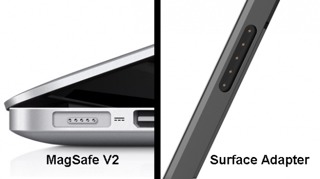
Sorry, I couldn't let that one go. By "steal" you mean like Henry Ford "stealing" the idea for a mass produced car from the guy who invented the wheel? Because I don't remember seeing anything like MagSafe on any electronic device before Apple introduced it their laptops and I used to work for Sanmina-SCI, one of the largest electronics contract manufacturers in the world at the time. Any basis for this other than a two pronged magnetic power plug on a Japanese kettle, which is the only use of a magnetic plug of any kind I can even remotely find reference to? On the other hand, that charge and sync connector on the Microsoft Surface looks a lot like a MagSafe connector. I won't hold it against them though, it's a great design for a charger.

-
I agree. Try finding a highly experienced network,engineer who specialises in Netgear switches. Really, go do it. Good luck. The lack of support will be a big argument. The other argument is that you don't skimp and cheap out on your network. It's the foundation of all of your IT infrastructure. If your network doesn't work optimally, nothing else will work very well either. I would rather have cheap servers than cheap switches.
-
HP gets my vote. Bad experiences with Netgear, stay away from their gear for anything critical.
-
I've found both Apple TVs and AirServer work very well. They are really different solutions though and I'll tell you why. The Apple TV combined with a large TV works great and is an inexpensive solution if all you need to do is AirPlay whatever is on the iPad or MacBook Air/Pro. Unlike some of the comments on here, I find the setup to be straightforward for the Apple TV. But don't try to use them with older projectors or you will have problems. Use them with 55" + TVs or HDMI projectors. You can even show DVDs over AirPlay if you use VLC or MediaPlayerX. The other solution we use us Mac Minis wall mounted attached to IWBs, and running AirServer. This is a different solution as it can also be used as a traditional IWB with all of the IWB software you are used to. It works with older projectors and if a teacher doesn't have their own laptop they can easily just use the Mac Mini for anything they need. But, if a teacher wants to use their own MacBook or iPad with the IWB, they can do that with AirPlay - no fussing about with cables or projector resolutions, etc. using AirServer. We have installed SSDs in all of the Mac Minis for the IWBs, so it's a highly versatile solution with great performance. So, the Apple TV Is a great low-cost solution if all requirements can be met with AirPlay and you are using new TVs or projectors. The AirServer solution works great if you have older projectors/IWBs, but costs more for the dedicated Mac Minis connected to the IWB.
-
Possibly that is the case for support in the UK, I can't say. Not sure what you mean about the expensive on-costs? Other than some initial problems with firmware in the early days in 2009 (fixed soon thereafter) I've had good support and low on-costs for the Oracle kit (I have some 4170s and 4150s as well). You hear horror stories about all vendors, and I've heard some about all of the major vendors, including EMC, HP, Equalogic, Sun/Oracle, and others. I think the Oracle kit is very good, but HP works just fine, and so does IX Systems (FreeNAS) in my own experience and I've heard people rave about the roll your own SAM-SD solutions. I always suggest asking for a loan/demo unit from the vendor solutions you shortlist as meeting the requirements to find out for yourself. I can get a piece of Oracle kit spun up in a heartbeat, a FreeNAS system just a touch longer, and the HP SAN takes me a fair bit longer (I find the UI unintuitive and confusing). Unless someone else will be configuring and supporting the SAN all of the time, It's always important to have something you understand and that isn't just a mysterious black box to you.
-
Of course not. There were a couple of responses that indicated all SSD solutions were the only way to go. As you've stated, that's just not prudent.