Bev
-
Posts
779 -
Joined
Content Type
Forums
News
20th
EduGeek EDIT Conference
Blogs
Everything posted by Bev
-
Airwatch and VPP to Apple schools manager migration
Bev replied to munkey's topic in Mobile Devices & Tablets
You shouldn't have to uninstall all your apps just to change the token. Can you create a new token on school.apple.com, add it to Airwatch, and then transfer licenses from one to the other in school.apple.com? I still have my old VPP token and also a new ASM token setup in Lightspeed. The VPP one has now expired, but I had them both active for a year. -
It's a great forum, it has helped me many times over the years.
-
We are a middle school in North Tyneside.
-
Just to add we used Chromebooks before we got the iPads, they weren't 1-1, we just had a class set. They are very easy to manage, as in once they are setup you never need to think about them again. We mainly used them for Google Docs / Drive etc and they are great for that, but more limited in terms of what else you can do with them. If you can access something from a browser or chrome extension then you can use it on a chromebook, but you can't take photos / make videos etc. - - - Updated - - - We pay a final balance and then the parent owns them as they have been making the payments.
-
Our parents have 3 options, they can lease an ipad, they can provide their own iPad (which we supervise and add to our MDM) or they can opt out and we provide a school iPad. School iPads can't go home. We have very few who opt out. We offer a subsidy to PP students. Lease costs are: iPad (2020 8th Generation) 32GB £14.11 * 36 months iPad (2020 8th Generation) 128GB £17.25 * 36 months iPad Mini 64GB £17.38 * 36 months This includes 3 years insurance and extended warranty. Our school operates for 4 years, so they continue to use the iPad in their 4th year but it is no longer insured in the final year. They were a godsend during lockdown as every child already had a device, and the same type of device, so there were minimal issues with children having access to technology to complete remote work. In order to make it work, and not just be a 'luxury' then teachers have to be on board and change the way they teach so that the iPads become an integral part of the process. We use Jigsaw24 who work with CPU for the insurance and direct debit side of things.
-
A way to deploy Kindle books to iPads?
Bev replied to themightymrp's topic in Mobile Devices & Tablets
If you can buy the book on ibooks it will be much easier to manage using your school.apple.com account and your MDM. You can push it out like an app, the only difference is I don't think you get the license back when the staff member leaves. -
We have a 1-1 iPad leasing scheme, it is more expensice to buy them with accidental damage and warranty as you are paying for 3 years accidental damage cover. If you price that up, it works out a comparable price. Our parents lease the iPads, and they all have the insurance and warranty in place, but any iPads that we own as a school I buy directly and we don't take out insurance on those, opting to take the risk. I will say that of the leased iPads that go home, I send at least 1 a week back to be repaired / replaced due to a broken screen so the insurance has proved worthwhile. I have used both Surface Pros and iPads, and would definitely recommend iPads. They are pretty easy to manage using an MDM, if you buy them through a lease they will be in the DEP program and will pick up the MDM automatically, you can set them to update automatically, push out apps etc. I wouldn't use Word though, if you are going to use iPads, you have to embrace them and use their apps. Either use Pages, or we have fully embraced Google and use Google Docs (app) for most things. The Surface Pros that I used (a few years ago) were very heavy, and expensive, and I had lots of issues with them, and that was just with staff using them. We started with 1 year group, and now have every child and staff members using their own iPad. If you want any more information just let me know.
-
Anyone with JAMF School, do you pay an additional service charge above the cost of the license fee to use it? I have started a trial, and am reasonably committed to it, but have now discovered that in addition to the per iPad cost, there is a service charge to cover training and support which is more than the license fee. Has anyone purchased JAMFSchool without this service charge?
-
I use them both as well, with JAMF I have the policy setup as a timed policy rather than having it detect location and that it working well. It blocks non-school apps M-F 8:30-3pm and it knows when the school holidays are. I have lightspeed setup based on ip address, and I haven't had any complaints from the students that they can't access their apps at home, so I assume it is working as well.
-
The folder gets created with no permissions, it has the owner set to the person who ran sonic-pi, but no other permissions are displayed. That's my username, and not a student, so i haven't hidden it.

-
The error returns for each new student that logs in, however, I have created a GPO to delete the folder on login and that does seem to have fixed it, barring that causing any unforeseen issues.
-
Thank you! It looks like permission on the boost process file. If I delete the folder then it works. Just checking if it works for different students, or if the folder will need deleting each time, but it looks like I'm getting somewhere.
-
I am trying to install sonic-pi on 32 machines in an ict suite, it works great on some and on others it fails with an Critical error, could not boot sonic pi server. It was originally installed using an MSI / group policy if that makes a difference. I've tried all the usual things, made sure there is sufficient space on the hard drive, uninstalled and reinstalled, and always the same error. The portable version won't run either. Any ideas? I'm baffled as 2/3rds of the machines are fine and they are all essentially identical machines. - - - Updated - - - Sonic Pi Boot Error Report ================== System Information ---------------- * Sonic Pi version: 3.2.2 * OS: Windows 10 Version 1809 GUI Log ------- **`C:\Users\bev.stephenson\.sonic-pi\log\gui.log`** ``` [GUI] - Welcome to the Sonic Pi GUI [GUI] - =========================== [GUI] - [GUI] - {a7781240-fa7c-4e84-b3b1-9ac1427ca830} [GUI] - Discovering port numbers... [GUI] - Port entry server-listen-to-gui : 51236 : 51236 [GUI] - Port entry gui-send-to-server : 51236 : 51236 [GUI] - Port entry gui-listen-to-server : 51237 : 51237 [GUI] - Port entry server-send-to-gui : 51237 : 51237 [GUI] - Port entry scsynth : 51238 : 51238 [GUI] - Port entry scsynth-send : 51238 : 51238 [GUI] - Port entry osc-midi-out : 51239 : 51239 [GUI] - Port entry osc-midi-in : 51240 : 51240 [GUI] - Port entry server-osc-cues : 4560 : 4560 [GUI] - Port entry erlang-router : 51241 : 51241 [GUI] - Port entry websocket : 51242 : 51242 [GUI] - Detecting port numbers... [GUI] - GUI listen to server port 51237 [GUI] - port: 51237 [OK] [GUI] - Server listen to gui port 51236 [GUI] - port: 51236 [OK] [GUI] - Server incoming OSC cues port 4560 [GUI] - port: 4560 [OK] [GUI] - Scsynth port 51238 [GUI] - port: 51238 [OK] [GUI] - Server send to GUI port 51237 [GUI] - port: 51237 [OK] [GUI] - GUI send to server port 51236 [GUI] - port: 51236 [OK] [GUI] - Scsynth send port 51238 [GUI] - port: 51238 [OK] [GUI] - Erlang router port 51241 [GUI] - port: 51241 [OK] [GUI] - OSC MIDI out port 51239 [GUI] - port: 51239 [OK] [GUI] - OSC MIDI in port 51240 [GUI] - port: 51240 [OK] [GUI] - Websocket port 51242 [GUI] - port: 51242 [OK] [GUI] - All ports OK [GUI] - launching Sonic Pi Runtime Server: [GUI] - Ruby server pid registered: 799380 [GUI] - hiding main window [GUI] - initialising toolbar icons [GUI] - setting up window structure [GUI] - restoring scope states [GUI] - creating status bar [GUI] - creating info panel [GUI] - creating shortcuts [GUI] - creating tool bar [GUI] - initialising documentation window [GUI] - wait for sync [GUI] - waiting for Sonic Pi Server to boot... [GUI] - starting UDP OSC Server on port 51237... [GUI] - UDP OSC Server ready and listening ............................................................ [GUI] - Critical error! Could not boot Sonic Pi Server. [GUI] - stopping UDP OSC Server... [GUI] - Critical Error. Unable to connect to server.. [GUI] - UDP OSC Server no longer listening ``` Server Errors ------------- **`C:\Users\bev.stephenson\.sonic-pi\log\server-errors.log`** ``` ``` Server Output ------------- **`C:\Users\bev.stephenson\.sonic-pi\log\server-output.log`** ``` Sonic Pi server booting... This is version 3.2.0 running on Ruby 2.7.1. The time is 2020-11-10 09:42:12 +0000 Using primary protocol: udp Detecting port numbers... Listen port: 51236 - OK Scsynth port: 51238 - OK Scsynth send port: 51238 - OK OSC cues port: 4560 - OK Erlang port: 51241 - OK OSC MIDI out port: 51239 - OK OSC MIDI in port: 51240 - OK Websocket port: 51242 - OK Opening UDP Server to listen to GUI on port: 51236 ``` Scsynth Output -------------- **`C:\Users\bev.stephenson\.sonic-pi\log\scsynth.log`** ``` ``` Process Log -------------- **`C:\Users\bev.stephenson\.sonic-pi\log\processes.log`** ``` ssynth.log # Starting SuperCollider 2020-11-10 09:43:38 Exception in World_New: Access is denied. ``` processes log Clearing pids: [] No pids to clear :-) Started [937692] [-] "C:\Program Files\Sonic Pi\app\gui\qt\build\Release\..\..\..\..\..\app\server\native\ruby\bin\ruby.exe" --enable-frozen-string-literal -E utf-8 "C:\Program Files\Sonic Pi\app\gui\qt\build\Release\..\..\..\..\..\app\server\ruby\bin\sonic-pi-server.rb" -u 51235 51236 51237 51237 4560 51240 51238 51239 51241 [-] C:/Users/BEV~1.STE/AppData/Local/Temp/sonic-pi-pids/937692 Started [938168] [-] "C:\Program Files\Sonic Pi\app\server\native\scsynth.exe" -u 51237 -m 131072 -a 1024 -D 0 -R 0 -l 1 -i 16 -o 16 -U "C:/Program Files/Sonic Pi/app/server/native/plugins/" -b 4096 -B 127.0.0.1 [-] C:/Users/BEV~1.STE/AppData/Local/Temp/sonic-pi-pids/938168 Clearing pids: ["937692", "938168"] Clearing [937692] -- command "C:\Program Files\Sonic Pi\app\gui\qt\build\Release\..\..\..\..\..\app\server\native\ruby\bin\ruby.exe" --enable-frozen-string-literal -E utf-8 "C:\Program Files\Sonic Pi\app\gui\qt\build\Release\..\..\..\..\..\app\server\ruby\bin\sonic-pi-server.rb" -u 51235 51236 51237 51237 4560 51240 51238 51239 51241 -- removing C:/Users/BEV~1.STE/AppData/Local/Temp/sonic-pi-pids/937692 -- force killing 937692 -- killed 937692 Clearing [938168] -- command "C:\Program Files\Sonic Pi\app\server\native\scsynth.exe" -u 51237 -m 131072 -a 1024 -D 0 -R 0 -l 1 -i 16 -o 16 -U "C:/Program Files/Sonic Pi/app/server/native/plugins/" -b 4096 -B 127.0.0.1 -- removing C:/Users/BEV~1.STE/AppData/Local/Temp/sonic-pi-pids/938168 -- unable to get ProcTable info for: 938168 -- process: 938168 not running Finished clearing pids Servererrors.log doesn't exist
-
This is an older message, but I have just been struggling with this and thought I would add my experience. We use Google for email etc, but have a need to use Teams for some meetings. I had a few users who could see the calendar within teams, but most could not. they all appeared to have the same settings licenses and apps enabled. We use "Office 365 A1 for faculty" I have discovered that opening the Outlook App within Office365 enables the calendar, and then when you go back into Teams the Calendar is now showing in the menu. You can't actually send an email using Outlook, but opening it seems to set something up which enables the Calendar option, and you do receive emails in there about Teams meetings.
-
I have managed it withGAMADV-XTD, thank you
-
Im going to speak to myself, I have just found GAMADV-XTD, so I will try installing that tomorrow and see if that makes the difference.
-
I am trying to pull together a report of coursework submitted using GAM. I have just installed it today, and can get a list of courses GAM print courses but if I try gam print course-topics gam print course-work gam print coursesubmissions They all return the same error, ERROR: coursesubmissions is not a valid argument for "gam print" I've googled and it looks like it should be a valid command. And suggestions on there I am going wrong?
-
Apple School Manager - limit to number of login codes per day?
Bev replied to Bev's topic in Mobile Devices & Tablets
I know what is supposed to happen in theory, but I get asked every single time. -
I'm using apple school manager a lot this week, it logs me out frequently and to log back in you need a text sent to your phone. Both yesterday and today I have hit a limit of codes I can have per day (8) and can no longer log in. Seems a bit mad??
-
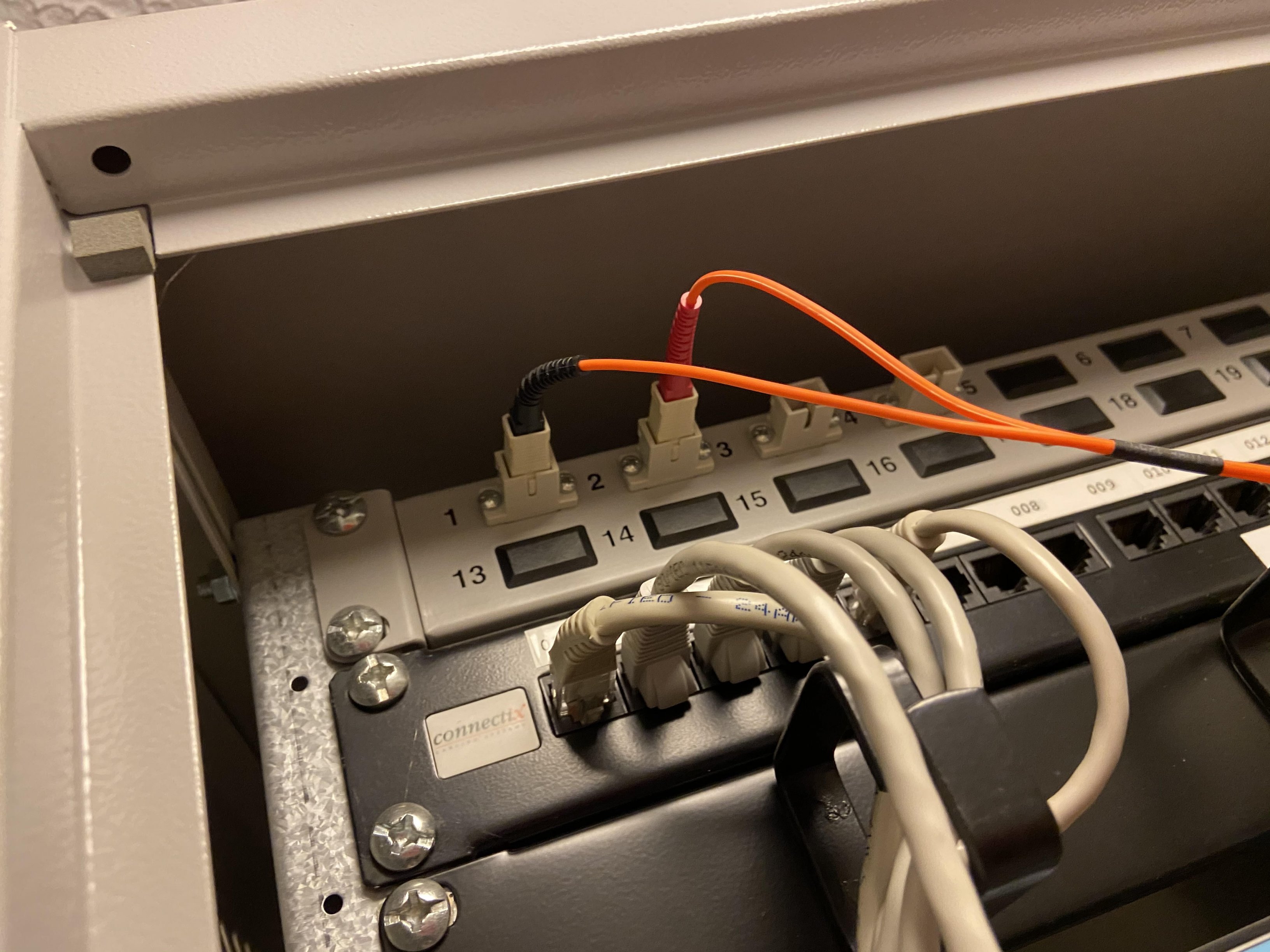
If I reboot the switch, the lights on the fibre come on for about 2 or 3 minutes and then they go off. There is a connection for that time but then it drops when the light goes off.
-
OK, I have found these. I will try reseating everything. thank you for all your help.
-
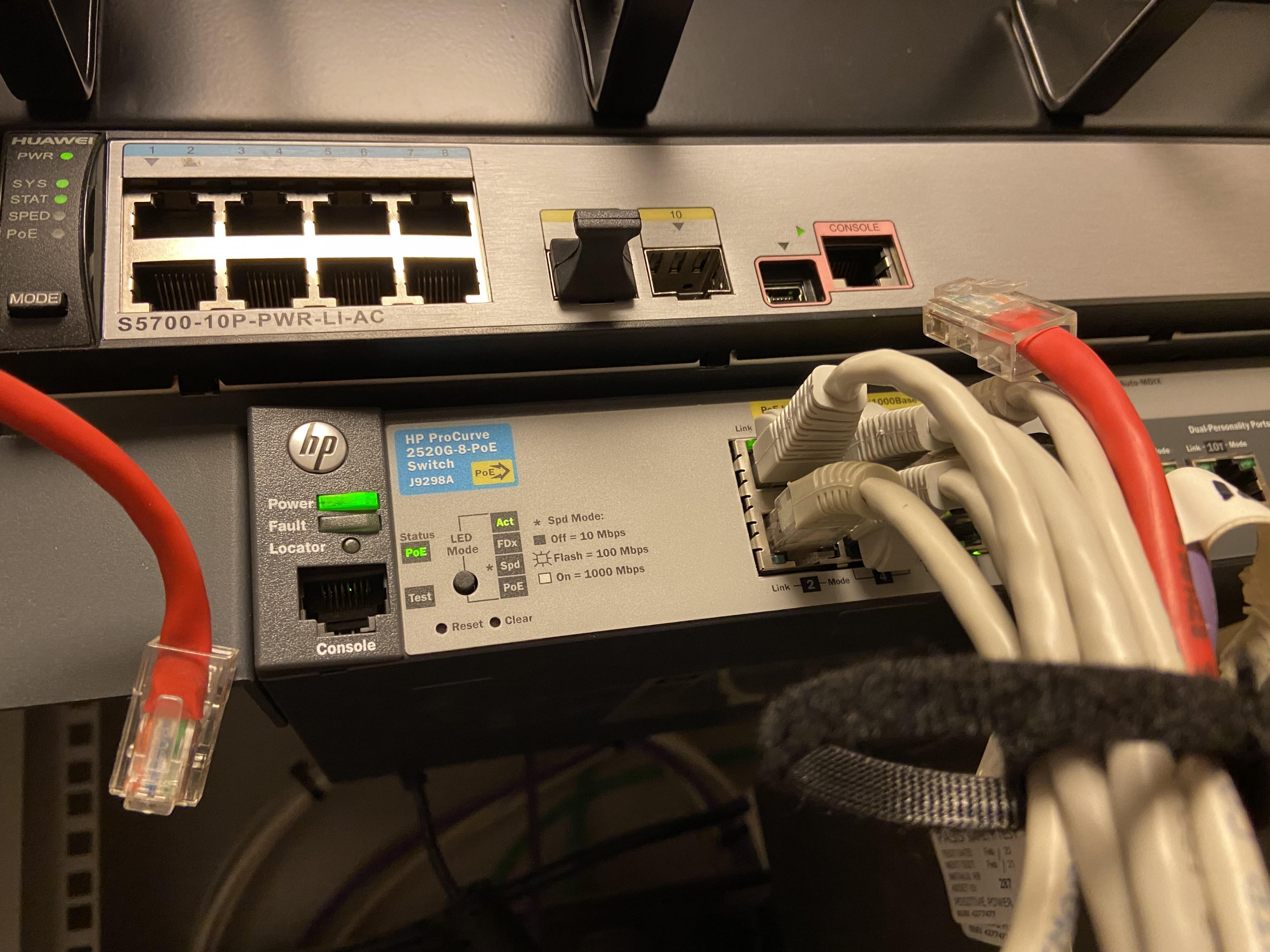
HP ProCurve switch 2520G
-
Is that the little gadget between the fibre and the switch? Is it easy enough to buy a new one, do you need to know what type? Photos of switch
-
We have a portacabin which has a small cabinet in it, this is connected by a fibre back to the main school. The cabinet contains an HP ProCurve switch 2520G, which has the fibre coming in to it. The portacabin has lost all internet, both ethernet and wifi, and I can no longer see the AP on the control panel. I have tried rebooting the switch, and we get a connection for 30 seconds and then it drops again. I assume if we get a brief connection then the fibre is ok? But I'm not a fibre expert. Any suggestions on what to try, I am having issues getting an engineer out in a timely fashion. thanks Bev
-
I am moving away from Lightspeed, and have been trialling Jamf School, which I am pretty happy with, however, I have discovered there is an additional cost for support which makes it more expensive than Jamf Pro for the 400 iPads we have. Has anyone got experience of both Jamf School and Jamf Pro, I am fairly happy with Jamf School but I don't want to make a long term mistake as it's not a small task moving from one MDM to another.


.jpg.282e651f6f71fbb9c0b2da13352e7843.jpg)
.jpg.a25d572bcf908ea406175f76036572de.jpg)