bladedanny
-
Posts
1,528 -
Joined
Content Type
Forums
News
20th
EduGeek EDIT Conference
Blogs
Everything posted by bladedanny
-
 Under the laptop skin section you have the same text from the anodised aluminium section. Ps I want one of the skinned laptops.
 -
We used to play rockband on our 7m wide screen in the hall with six speaker surround sound. That was fun.
-
The scientists must be daft. It's clearly the home of the Sarlacc.
-
12-14 miles round trip depending on which route I take so not too bad.
-
I need that throne
-
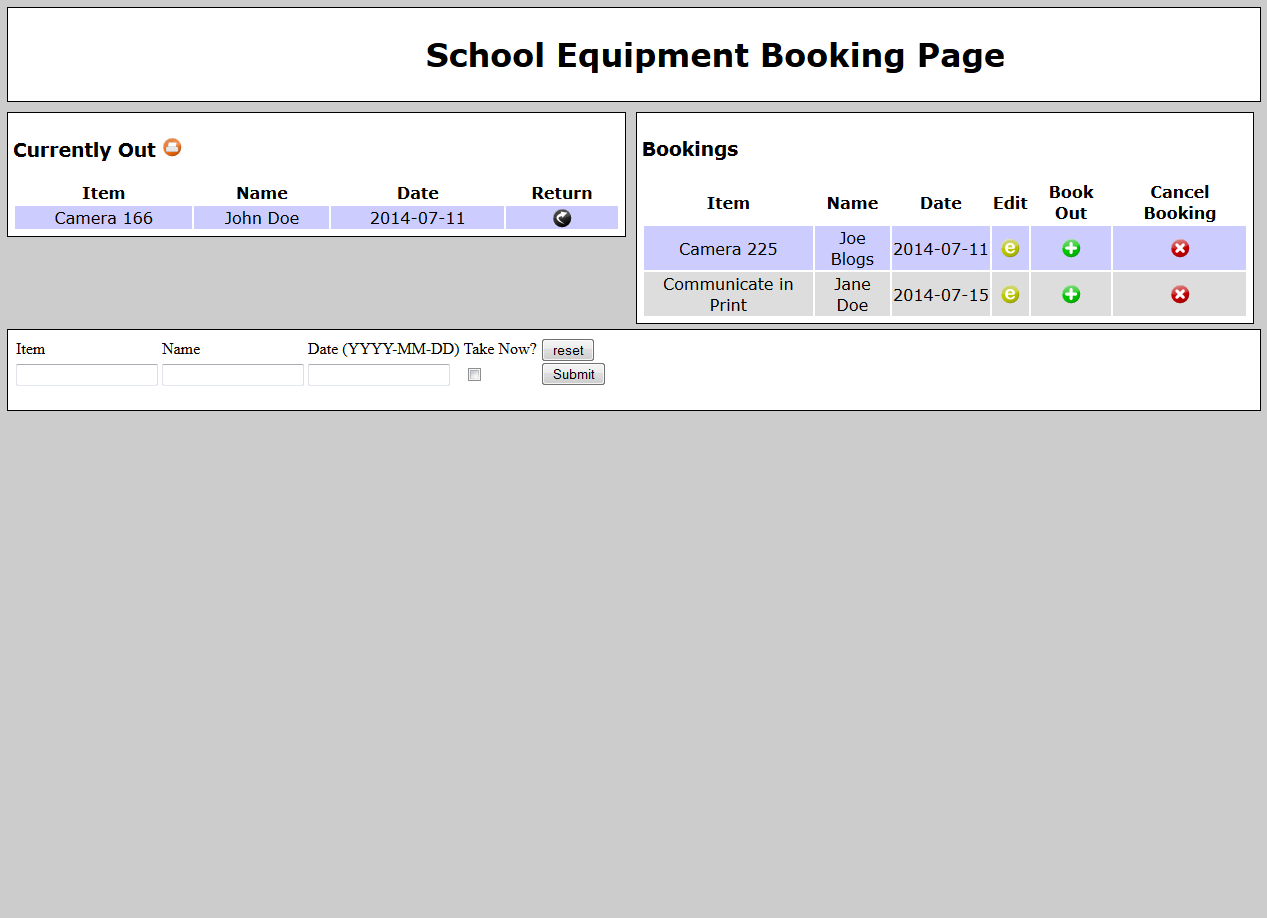
This is how the school works for non IT stuff and as you say can often be the best solution. I used ours mainly for bookings of cameras, staff could use an online booking for that would go straight into the bookings section so I could get a camera ready then easily sign it out with one click.
-
We use a custom made PHP/MySQL page that logs bookings and what's out. It also keeps a log of when stuff was returned. It's a bit of a work in progress but does what we need it to do. It's very basic at the moment, it doesn't have a list of items to take, each thing has to be entered separately but with a bit of work it could.

-
I do, I like the practice.
-
My attempt for the fun of it. drawing.zip
-
Can't see mine been any better than this one.
-
I've toyed with the idea before but never took the plunge. I always wondered what the deal is with licensing in regards to the music and public performance.
-
What's pink and fluffy? Pink Fluff What's green and fluffy? Pink fluff feeling sea sick.
-
Anyone used VeryPC or Centerprise before? Any good?
bladedanny replied to PrimaryTech's topic in Hardware
We've bought several things from @VeryPC before. Can't say we've really had any problems. Service has been top notch and would definitely purchase from them again. -
Papercut and follow me printing on a non-MFP device
bladedanny replied to Sibrows's topic in Hardware
As long as the printer shows up in papercut it should work. In the release station config file there's a section called find-me-printing. You can specify which printer to release on there. ################################################################################ # Find Me Printing Settings ################################################################################ ## ## This option applies to installations using "Find Me Printing" and sets the ## behaviour of jobs released from a virtual queue. See the manual for more ## information on "Find Me Printing". ## ## This setting defines the printer (or list of printers) that the jobs should ## be printed to when released. This is usually the printer(s) in close ## proximity to this release station. ## ## The printer/queue names must include the server name and the backslash must ## be escaped (e.g. server\\printer). The server and printer name should be ## entered the same as they appear in the administration interface. The ## printers will only be considered if they are marked in the administration ## interface as being compatible targets for the virtual queue. ## ## E.g.: server1\\MyPrinter1,server1\\My Printer2 ## ## Default: (none) ## releases-on= servername\\printername -
Papercut and follow me printing on a non-MFP device
bladedanny replied to Sibrows's topic in Hardware
Just the standard release station instructions. All I had to do was in the release station config enable card authentication and add the relevant info to each staff members account. -
Ours are about £0.03 per colour page and £0.003 per mono page. Plus a quarterly rental cost.
-
Papercut and follow me printing on a non-MFP device
bladedanny replied to Sibrows's topic in Hardware
I've done it with an old laptop and a barcode reader. It worked ok, we only had a basic scanner though so staff had to pick it up to scan etc. -
[video] Star Wars Episode 4 : In alphabetical order
bladedanny replied to gmj's topic in Jokes/Interweb Things
Well there you go... I can finally sleep at night. -
In the past I've had various OSs on my machine that differ from the the rest of the network. Now I have the same as everyone else so when I'm doing any training materials or showing staff etc. it's the same on mine as it is for them. If your network clients are windows 7 I'd go with that.
-
Here is a vector of that image.vector.zip
-
Based on this I'd like to change my choice to Earth cuisine.
-
Pizza or Kebab.
-
On the second screenshot, where it says 'change settings' there's 'Change Restriction' tick this and select restricted. This will apply it to all users unless you select a certain group at the top.
-
Set users to 'restricted' under account details. When they run out of money they can't print. You should also be able to change a whole groups at once.
-
I like to use TW Cen MT. Staff always use comic sans because it's got the little a, so has TW Cen MT (amongst others). I thought if I use it enough staff might follow suit... I've been trying for six years now.