Olliedawg
-
Posts
1,359 -
Joined
-
Last visited
Content Type
Forums
News
20th
EduGeek EDIT Conference
Blogs
Everything posted by Olliedawg
-
I'll leave it another hour to ensure policies have replicated across all DC's & then give it a go (fingers crossed)
-
I have just removed printers from the admin_ict policy, ran gpupdate /force & then rebooted + gpresult on my machine. It is still trying to add these printers in via user configuration of admin_ict GPO. The printers are listed as being in these locations on the gpresult, although I can confirm that they are definitely not present in the GPO when I edit the settings. : User config > policies > windows settings > Printer connections : User config > Preferences > Control panel settings > Printers The only printers i have listed to be applied now are are the two new virtual FollowMe queues on our new print server.
-
Thanks for the response, you are correct, the printers were deployed this way previously across multiple GPO's. I will try completely remove them from the policy & see if it makes any difference. I would have thought that leaving them set to "Delete" would have been fine.. Thing is, i'm not sure if they were also applied via Print Mgmt > Deployed printers on the old server. hopefully not, as i do not have access anymore!
-
Decommissioned our old 2008 print server about a month or two ago & I am still seeing group policy attempting to apply the old printers via GPO... ( old printers named \\server-pri1\printer-name ) I cannot see where it is pulling these from. I set the printer paths within the GPO's to "Delete" all of the old printers, which has indeed made them disappear from the printer list that the user see's. Although group policy is still attempting to map them, seemingly from somewhere else? which is increasing login times by around a minute while it waits to time out, not ideal but not too bad either. I've checked default domain policy to be sure - nothing in there to do with printers. If i create a brand new OU, with a New user the printers do not attempt to apply. Have I missed something with removing the old printers/decommissioning the previous print server? Unfortunately I no longer have access to the old print server, so am only able to see what's on group policy.

-
There are 3 advisories reported for exchange online - nothing relating to emails being delayed/missing though. edit : saying that - a student reported to me that they could not access OWA at all this morning
-
I can recommend Dell - My daily workhorse laptop is a Dell! I've been fairly happy with any HP product we have had also.. If you are looking for small form factor, take a look at this - HP EliteDesk 800 G4 Mini 35W – ICT-Direct Good price, windows 11 compatible
-
What kind of printers are they? What exactly is the credential message that pops up? Could it be firewall related?
-
Had to recover some user data from a backup taken during half term. (thank god we had the backups!) I also never want to work with roaming profiles ever again!!
-
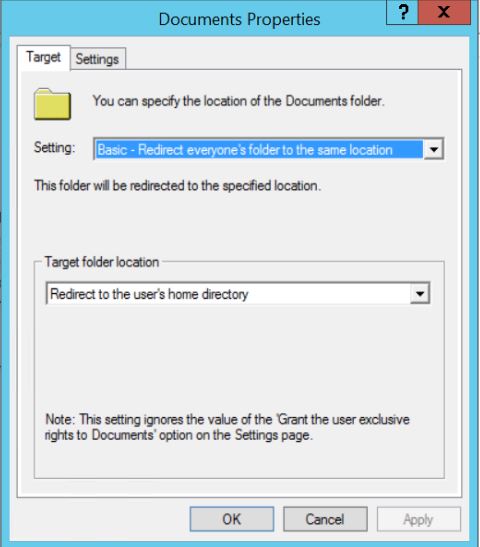
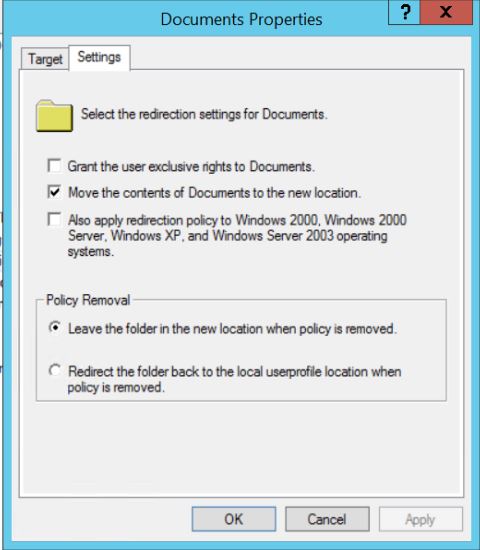
Another strange issue! So folder redirection officially has been enabled on the Staff OU's. Issue I am now facing, is that 4 staff members are reporting their H:\ folder not being found & showing an error stating that the share may have been moved/deleted. These 4 staff members did previously have access to their Home folder before the GPO change, and did keep documents in the share. I have checked on the share myself & their home folders are indeed missing. The home folder location is set in AD properties as so for each user - * \\server\staff$\%username% * Searching for document names on the drive which contains the share brings nothing back. I have also checked Local documents for each user, nothing. Below are screenshots of how the GPO is set up - I see no issue with this at all For one of the users, I created a new home folder and assigned them permissions. This redirected with no issue whatsoever. It's almost like their original Home folders are stuck in limbo somewhere, but I have no idea where to look now!
-
Seems to be working now... why does that setting break it? Doesn't make sense to me, surely you would want the user to have exclusive rights to their own home folder
-
Doh! That does sound fun! 😆 I have not tried setting exclusive rights to disabled - will give it a go tomorrow!
-
Hopping back onto this as its now half term & i have some spare time! Appreciate the responses. Still having the same problem - as in if create a new user, assign permissions to their home folder & place in the test OU which has the folder redirection GPO set up, once the user is logged into (with a local profile, set by leaving profile dialog box blank in AD), the documents folder does not redirect to their home folder. The home folder does indeed map correctly & can be accessed. *edit* attached photo of my GPO settings If I add a user into the OU which has a roaming profile set, the redirection works perfectly. Seems to just be when I remove the profile in AD, which is annoying as I am wanting to move away from roaming profiles.
-
I'm considering bringing this up to my SLT. Microsoft keep giving me more and more reasons.
-
Yes, the mapping works as expected with a home directory - although the "Documents" folder on their profile does not redirect once I change the profile to local. I am new to setting this up, is this normal behaviour for folder redirection?
-
Windows Server 2012 R2 is also EOL on the same date as Office 2019 2025 for Windows 10 22H2 - I am really hoping they extend the support though..
-
Correct, we're also in the process of moving to 2021 now.
-
If Microsoft has no plans to extend support for Windows 10, I will be looking to move to being a Google school also. Going to cost us an absolute fortune to upgrade all of our PC's to be "compatible" with Windows 11 by Oct 2025.
-
Trying to get folder redirection set up for our staff members & move away from roaming profiles (finally..) to speed up login times. My idea will be to have each staff member use a local profile on each machine, with folder redirection set up to redirect "Documents" to their home folder. Testing this with a new test teacher account, in a seperate OU with the staff GPO duplicated & linked to this OU. Folder redirection set up to redirect documents to each users home folder. It works if the roaming profile is left set in AD. If i remove the roaming profile, and leave the profile path blank to force local profile, once logged in on the new local profile the local documents folder does not redirect to their home folder. The home folder is mapped upon sign in, and can be accessed fine by the test account. I can see an error in Event viewer as follows. Is this expected behaviour? I'm fairly new to folder redirection & have never set it up before. Just seems strange that it does not work for the local profile, but does for the old roaming profile. Am I better off using a Mandatory Profile? - - 1085 0 3 0 1 0x8000000000000000 4556 System *COMPUTER NAME* - 1 5139 1 1625 1003 Cannot complete this function. \\*SERVER NAME* Folder Redirection {25537BA6-77A8-11D2-9B6C-0000F8080861}
-
The time has come to renew our leased line/internet connection + upgrade to 1gbps! - which comparison sites do you all use?
-
That’s what I’m afraid of if I do run it on our older machines. Going to upgrade my PC at home to windows 11 also, this has a TPM2.0 but running an unsupported Processor (i5 4460) See how that goes over the next few months. I’m not planning on moving our workstations in school to Windows 11 until next summer at best.
-
Those are some of our newer ones! Well i've got the OS installed, seems to be picking up updates ok & everything seems normal! Nice to know that this is possible with workarounds, but i would rather get the majority on officially supported hardware if possible.
-
I'm going to try it now on a PC which does have TPM 2.0, but a 6th gen intel processor & see how it goes. Windows 11 22H2. Will mention concerns to SLT over the amount of PC's we have that do not officially support Windows 11, hopefully get given the go ahead to replace with some newer PC's.
-
In all honestly I've only properly checked two of our IT rooms, which have the oldest PC's in the school. ~2014 Stone AIO's / ~2014 HP Eliteone 800 G1 AIO's, both of which we brought back to life by fitting more RAM + an SSD into each & have been perfectly fine since. These do not have TPM 2.0. Looks like you also need a minimum of an 8th gen Intel Processor which they definitely don't have.
-
Interesting... If this is the case, I'll fire up a test machine and give it a try. Did you not notice anything at all? I was just looking at our development roadmap & I had included Windows 11 rollout for next summer. Vast majority of our PC's do not have a TPM & it would cost us a hell of a lot of money to replace them all.. So i'm hoping this workaround / the registry change will be ok.
-
Has anybody installed Windows 11 on a machine which does not have a TPM? I know there is a registry hack to bypass the requirement, but curious to know if any of you have done this. If so, do you still receive updates as normal? Notice anything else out of the ordinary? I'm starting to look at the amount of machines we will need to replace in order to be "compatible" with Windows 11...