Olliedawg
-
Posts
1,359 -
Joined
-
Last visited
Content Type
Forums
News
20th
EduGeek EDIT Conference
Blogs
Everything posted by Olliedawg
-
Yep broken again. This is what my home page currently looks like

-
Ours are already set to GMT Standard Time. Everything looks to be set to English UK/GMT. The only thing that isn't is the "regional settings" under "https://<tenant>-my.sharepoint.com/_layouts/15/regionalsetng.aspx", which is set to Locale: English (United States) Timezone: UTC -8 Pacific Time (US and Canada) I tried changing mine to English, and this did change dates in O365. I tried this with another user (our data person), and his still showed US format calendar dates within powerBI. Not sure what else to do in that scenario
-
-
Yea if you refresh, or force refresh CTRL+F5, it works eventually
-
Performance issues (UNDER INVESTIGATION)
-
Did anyone find resolution to this?... It's causing a headache for our PowerBI dashboards when viewed in the web version. All our web apps (in browser) are displaying US date formats, desktop apps are all in UK format. We are using English International version of Windows If i run get-mailboxregionalconfiguration -identity [email protected] It returns this Identity Language DateFormat TimeFormat TimeZone -------- -------- ---------- ---------- -------- Teacher Test en-GB yyyy-MM-dd h:mm tt GMT Standard Time I visited https://<tenant>-my.sharepoint.com/_layouts/15/regionalsetng.aspx Time zone & Region were set to US, I have manually changed these to UK, however no apparent difference yet.
-

MDT Windows 11 - Specific Vostro 5481 Problem
Olliedawg replied to Bankesy's topic in O/S Deployment
You can get driver packs which you can inject into the WinPE via the deployment share. Sometimes required for WinPE to "see" the network card, or storage controllers etc.. Dell Command | Deploy WinPE Driver Packs | Dell UK If you don't already inject drivers into WinPE, you're probably just using the generic ones which Microsoft includes as standard. At what stage in the TS do you get the error? -
MDT Windows 11 - Specific Vostro 5481 Problem
Olliedawg replied to Bankesy's topic in O/S Deployment
I've had similar before & what @garethedmondson mentioned usually fixed it. Out of interest try reset the BIOS to defaults & run the TS again. Have you got all the necessary WinPE Dell Drivers? -
Issues with Trips & Clubs It's worse today
-
Got that one, I've got all the required external DNS entries too. I've got these steps I'm going to try next... 1. Re register the AAD broker Get-AppxPackage -Name "Microsoft.AAD.BrokerPlugin*" | ForEach {Add-AppxPackage -DisableDevelopmentMode -Register "$($_.InstallLocation)\AppxManifest.xml"} 2. Completely uninstall Webview2 (user/computer install) & reinstall the computer install 3. dsregcmd /leave, wait a few minutes, dsregcmd /join (or run connect tool to pull devices into Entra)
-
Just to clarify, which DNS entries do you mean? Our tenant?
-
All lines up ok. I have just completely removed Webview2 from a test machine, reinstalled & now SSO worked on the first login (with no cached profile beforehand..) Going to test that same method on a couple more machines to see if i get the same results.
-
Not sure what else to check now. I've ran through the SSO guides from microsoft, confirmed all required GPO's are in place, confirmed SSO is enabled with the Entra connect tool, rolled over kerberos keys. I ran dsregcmd /status as a test user. Main difference now is that it picks up a PRT first time, but still getting a WAM error WamDefaultSet ERROR 0xd000000d AzureAdPrt YES I asked the guru (chatgpt) and it seems to think that WAM is not present in Windows 10 22H2 Education - I don't believe this is true, surely? We are using the regular Education version, not Education Pro
-
Added any I was missing. I've also rolled over our kerberos keys for the AZUREADSSO account, as they hadn't been done for nearly 2 years. Going to do some testing now & fingers crossed! Is it worth setting up a scheduled task on the DC to roll the keys over every 30 days, as microsoft recommends?
-
I definitely have the reg key one you mentioned, I only have 1 of the other group policy options. I'll give them a try.
-
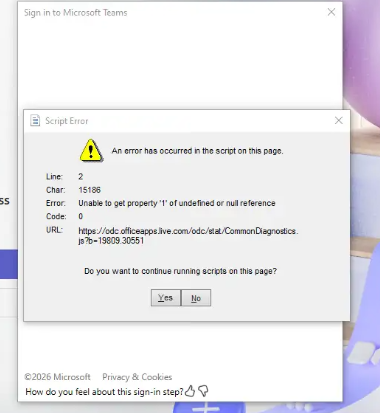
We're having issues with SSO for our student users/devices. We are a hybrid setup, devices + users are managed in AD & then synced into Entra. Sophos firewall, Windows 10 22H2 devices using the ESU licence Upon a first login to a machine, SSO does not work 90% of the time. When this behaviour occurs, the user cannot manually sign in to Teams, OneDrive or Edge, they present authentication and/or scripting errors. Logging out and back in again sometimes fixes it. Below is an example of one of the script errors when trying to log in manually to Teams. On a problem machine, I have ran dsregcmd /status. WamDefaultSet : ERROR (0x80070520) AzureAdPrt : NO From what i've read, if the primary refresh token (prt) is not issued during first sign in, SSO will not work. I have tried setting a logon .bat script which runs dsregcmd /refreshprt, this doesn't seem to help at all. I'm thinking about trying to force remove a problem device using dsregcmd /leave , and then dsregcmd /join to force a fresh register in Entra I've checked firewall logs to make sure nothing Microsoft related is being blocked, I've checked HTTPS inspection to make sure we aren't decrypting content to/from Microsoft domains as I've read this can cause issues too. In event viewer, the following error codes are present under AAD: 1104, 1160, 1085, 1081, 1025. Anyone experienced a similar problem?
-
back up VMs to cloud for offsite-What do you use
Olliedawg replied to sarge's topic in Cloud Services
Peasoup cloud, also buy Veeam licences from them, good pricing -
Shared iPad Devices - Protecting Credentials
Olliedawg replied to Stephen_UK's topic in Mobile Devices & Tablets
As above you need to enrol the iPads as shared devices. You can setup Apple School Manager to sync users from your MIS/365, then they can sign into the iPad using their email address + a password/PIN.. -
Facebook is the primary method here, then instagram
-
The last free version was 23.2.4.2338
-
It's now working! Must have been an incorrect xml the first time
-
Made some slight adjustments, don't think the xml was valid in my previous post. I've got the "start layout" group policy set, this .xml file is placed in \\domain\netlogon\scripts , authenticated users have read access to that folder. <?xml version="1.0" encoding="utf-8"?> <LayoutModificationTemplate xmlns="http://schemas.microsoft.com/Start/2014/LayoutModification" xmlns:defaultlayout="http://schemas.microsoft.com/Start/2014/FullDefaultLayout" xmlns:start="http://schemas.microsoft.com/Start/2014/StartLayout" xmlns:taskbar="http://schemas.microsoft.com/Start/2014/TaskbarLayout" Version="1"> <CustomTaskbarLayoutCollection> <defaultlayout:TaskbarLayout> <taskbar:TaskbarPinList> <taskbar:DesktopApp DesktopApplicationLinkPath="%ALLUSERSPROFILE%\Microsoft\Windows\Start Menu\Programs\Microsoft Edge.lnk"/> <taskbar:DesktopApp DesktopApplicationID="Microsoft.Windows.Explorer"/> <taskbar:DesktopApp DesktopApplicationLinkPath="%ALLUSERSPROFILE%\Microsoft\Windows\Start Menu\Programs\Word.lnk"/> <taskbar:DesktopApp DesktopApplicationLinkPath="%ALLUSERSPROFILE%\Microsoft\Windows\Start Menu\Programs\Excel.lnk"/> <taskbar:DesktopApp DesktopApplicationLinkPath="%ALLUSERSPROFILE%\Microsoft\Windows\Start Menu\Programs\Powerpoint.lnk"/> <taskbar:UWA AppUserModelID="MSTeams_8wekyb3d8bbwe!MSTeams"/> </taskbar:TaskbarPinList> </defaultlayout:TaskbarLayout> </CustomTaskbarLayoutCollection> </LayoutModificationTemplate>
-
Could someone sanity check this for me, cannot for the life of me get it to pin the office apps. Office 2024LTSC for reference <?xml version="1.0" encoding="UTF-8"?> -<LayoutModificationTemplate Version="1" xmlns:taskbar="http://schemas.microsoft.com/Start/2014/TaskbarLayout" xmlns:start="http://schemas.microsoft.com/Start/2014/StartLayout" xmlns:defaultlayout="http://schemas.microsoft.com/Start/2014/FullDefaultLayout" xmlns="http://schemas.microsoft.com/Start/2014/LayoutModification"> -<CustomTaskbarLayoutCollection PinListPlacement="Replace"> -<defaultlayout:TaskbarLayout> -<taskbar:TaskbarPinList> <taskbar:DesktopApp DesktopApplicationLinkPath="%ALLUSERSPROFILE%\Microsoft\Windows\Start Menu\Programs\Microsoft Edge.lnk"/> <taskbar:DesktopApp DesktopApplicationID="Microsoft.Windows.Explorer"/> <taskbar:DesktopApp DesktopApplicationLinkPath="%ALLUSERSPROFILE%\Microsoft\Windows\Start Menu\Programs\Word.lnk"/> <taskbar:DesktopApp DesktopApplicationLinkPath="%ALLUSERSPROFILE%\Microsoft\Windows\Start Menu\Programs\Excel.lnk"/> <taskbar:DesktopApp DesktopApplicationLinkPath="%ALLUSERSPROFILE%\Microsoft\Windows\Start Menu\Programs\Powerpoint.lnk"/> <taskbar:UWA AppUserModelID="MSTeams_8wekyb3d8bbwe!MSTeams"/> </taskbar:TaskbarPinList> </defaultlayout:TaskbarLayout> </CustomTaskbarLayoutCollection> </LayoutModificationTemplate>
-
We don't allow user switching on our student machines as it messes with Senso a bit. Students can lock their machine. Staff we do allow user switching
-
Intune Shared iPad & Conditional Access
Olliedawg replied to Olliedawg's topic in Mobile Devices & Tablets
Appreciate it I’ll give it a go when I’m back at work on Monday. if not I’ll go down the 1:1 route, we have a few spare iPads anyway.