mikkydoos
-
Posts
2,616 -
Joined
-
Last visited
Content Type
Forums
News
20th
EduGeek EDIT Conference
Blogs
Everything posted by mikkydoos
-
https://www.ipadrepairs.co.uk They're really good. I've got 3 out with them this week for lightening port replacement. Collected last Friday, back with me today.
-
A look at MS Storage Spaces Direct may be worth it if you're on a smaller budget. https://docs.microsoft.com/en-us/windows-server/storage/storage-spaces/storage-spaces-direct-overview I don't think the NICs or the disks on that particular NAS would cut it. I'd be looking at at least 10G's and a ton of SSD's for 2000+ users.
-
, and thrice Guess who put the wrong gateway address in his DHCP config ???? Thanks for the help guys, appreciated
-
It's definitely an internal. Smoothwall support aren't accepting calls for anything apart from critical. Typical.

-
Noticed this in the Smoothwall dashboard.... Have I set this up correctly ? Showing as an external interface because I've specified a gateway. Where VLANS is my virtual interface set up under Network/Interfaces. EDIT: .... and I can ping my default VLAN subnet from Smoothwall (using the EXTERNAL NIC as a source) and get a reply from clients on the default VLAN, but not to my VLAN NIC. What do I need to do to add my VLAN NIC to the external NICs config ?
-
I've hit a wall.... Thanks @Dardiner ... got all the auth policies set up and they're good. I think I have a routing issue.... My OP... mainly solved... Now have internet on all VLANs so there's traffic coming back and forth from my clients and Smoothwall. However I still can't get outside other than HTTP on the VLANS. Default VLAN is fine. The gateway address on my client machine for VLAN 20 is x.x.108.1 --> the ip given to VLAN20 on the L3 switch. For the VLAN client to pick up a DHCP address I have set the gateway on my DHCP server to x.x.104.45 --> the ip assigned to the default VLAN (1) on the L3 switch. The client is getting a DHCP IP and an A record is being created. I can ping across VLANs, to the router and to Smoothwall. (Prior to this all the gateway addresses pointed to Smoothwall). ---> Can't ping outside on the DHCP server with that gateway. ---> Can't ping outside on the VLAN client with it's VLAN gateway (x.x.108.1) Switch the gateway back to Smoothwall --> Pings outside. Also, if I turn off the proxy on the client --> no HTTP access... which suggests to me the transparent/unauth proxy isn't configured correctly for the VLAN. Static route is set up on the L3 switch to Smoothwall and I've tried a static route back to the router from Smoothwall. Any suggestions ???
-
@DGardiner No, my L3 stack is acting as router & gateway. Smoothwall just filter/firewall. I'll have a look into that. Presumably I ned to do the same for transparent proxy too.
-
Thank you for the pointers guys. I've got it connecting now. LAN interface on Smoothwall was a basic interface, created my VLANs on another port, plugged in and bingo. Can't ping outside however. 8.8.8.8 returns destination net unreachable.
-
@Davit2005 Just presently testing on VLAN20 Smoothwall static route is.... L3 Switch.... @DGardiner Aaah. Thats helpful... cheers. I'll have a look at that.
-
Hi all, Hope all are good I'm in the process of rejigging our network. New core switches install which means re-setting up and re-doing my VLANs. I've flattened the network to one subnet prior to this so I'm basically starting this from scratch. I'm having a bit of trouble getting internet access on anything but the default VLAN via smoothwall and need a bit of help. Scenario: VLANs are created on each switch 10.x.104.x /22 (Default) 10.x.108.x /22 10.x.112.x /22 etc etc Ports joined to VLAN (untagged) Trunks/VLAN tagging set on uplinks/LAGS from L2 edge switches to L3 core stack DHCP addresses are being issued & can ping between subnets All client gateways point to L3 switch VLAN IPs Static route set up on L3 switch --> next hop == Smoothwall Static route set up on Smoothwall to each VLAN address (Network/Routing/Subnets) Now.... I can't get internet on anything but the default VLAN. The only thing I haven't done is set up link from the L3 switch to Smoothwall as a trunk.... could that be it ? Bit reticent to do it in production hours. What else might I be missing ? P.S... these are fairly middle of the road Cisco SX500 L3 switches. Cheers in advance :)
-

Rebuilding network - Ipad groups on separate VLANS - Possible?
mikkydoos replied to mikkydoos's topic in Wired Networks
That would do it. https://www.cisco.com/c/en/us/support/docs/wireless-mobility/wireless-vlan/71683-dynamicvlan-config.html#backinfo Cheers @Norphy -
Hi all, Hope everyone is safe and well..... Doing a rebuild of the network over easter... New L3 switches, edge switches etc which means reconfiguring our VLANs. Ipads - I want to put pupil and staff and Ipads on different subnets. Anyone know if it is possible to assign multiple subnets on a Ruckus ZoneDirector without having to set up a separate network/SSID for each? Probably not.... but any ideas ?
-
Hi all, Hope all are well..... I'm currently VPN'ing remote Windows clients in using the Smoothwall generated Securepoint SSL VPN app (OpenVPN). It's a terrible piece of software failing or requiring reinstallation often, which right now is a huge faff. Any suggestions out there for an SSL alternative that is configurable for Smoothwall ? Also, any helpful suggestions for Ipad? Cheers in advance :)
-
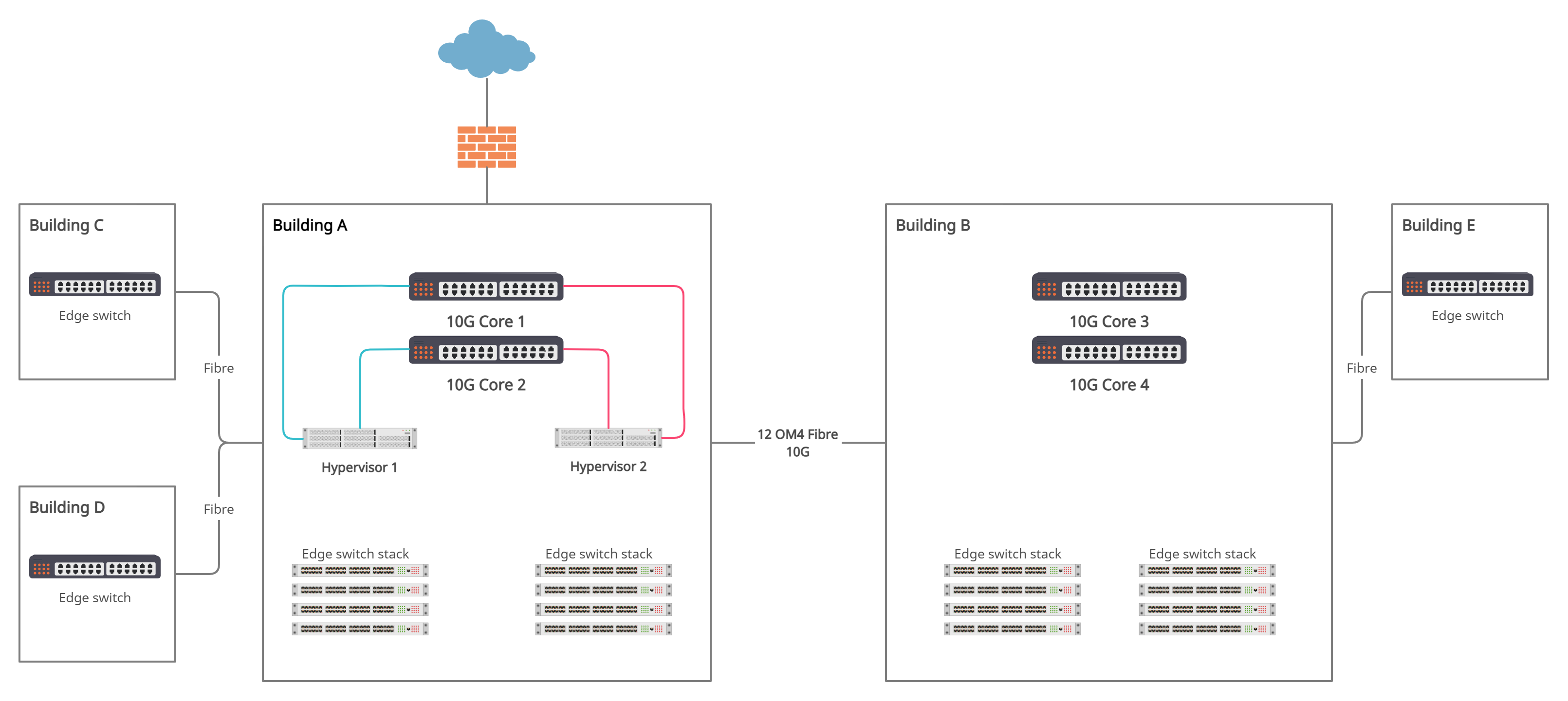
Yes you are correct @Davit2005.. my bad. Also, as long as I have two uplinks to each edge stack, one from each Core, to edge stack no.1 and stack no.X the the lost of any core switch is then negated.
-
.... as in a Mesh ? Y I was thinking of that. I'm pretty sure they can be stacked together. I'm actually looking at two different models of the same range... SX500-24FT and SX50016FT... same switch.. different number of ports. One pair in each building, So to achieve that it would be... Copper from Core 1 (B1) ---> Core 2 (B1) ---> Fibre from Core 2 (B1) ---> Core 3 (B2) ---> Copper from Core 3 (B2) ---> Core 4 (B2) ---> Fibre from Core 4 (B2) ---> Core 1 (B1) Edge switch stacks out from both Cores in each building (2 uplinks) per stack, one from each Core.
-
Hi all, Hope you're safe and well. I'm currently doing a network infrastructure upgrade... core switches, hypervisors and upgrade to 10G backbone between two main buildings. Site consists of two main buildings and a few ancillary buildings all connected via 1G fibre from either main building. Currently have one gigabit core switch (dying) per main building connected via fibre (OM4 x 12 pairs). I'm after some suggestions regarding configuring and cabling for core switch redundancy. Core switches I'll probably purchase will be Cisco SX500 series 10G's..... can't afford more! Before I buy I just want to get some opinions on how to cable this up properly. I'm thinking of stacking two core switches per main building... but I'm a little hesitant on how I should cable up the fibres. I need to maintain connectivity between main buildings should either of the core switches fail. Basic diagram of site and proposed layout...... Edge switches will be stacked to that kind of takes care of them. Would appreciate you guys throwing some opinions at me..... Cheers in advance. Stay safe
-
You could change the sync frequency globally if appropriate... https://docs.microsoft.com/en-us/azure/active-directory/hybrid/how-to-connect-sync-feature-scheduler
-
[tv show] University Challenge, BBC 2, 7:30 pm, 22nd of December 2020
mikkydoos replied to 6Foot2's topic in TV & Movies
Indeed lol. "Give us some easy ones Paxi you bum bag!" "Toxteth O'Grady..... USA" -
Hi all, Help With Technology Grant. The DfE have restored your original device allocation back to pre Oct. --------------------------- Dear colleague, As international stocks of laptops and tablets have increased recently, and the pressure on global supply has eased, we’re pleased to announce that we can restore your original allocation of devices from today. This means the number of laptops and tablets available to order will return to what it was before October half term. We’re making this change for all schools, trusts and local authorities in the coming days. Anyone invited to order from today will be able to get their full allocation as soon as it has been increased. How to see your restored allocation To see your restored allocation, sign in to our service: https://get-help-with-tech.education.gov.uk/start It’s up to you to decide which children get laptops and tablets, and you can distribute them as you see fit. When you can order your full allocation -----------------------------
- 1 reply
-
- 1
-

-
@Koldov When you placed the order, there was an option to add your Apple DEP number (Organisation ID). Your BM is ... erm.. wrong. @stevenramsden's XMA code is correct. You need to add XMA's reseller code to your ASM, not Computacenter, providing they were shipped by XMA that is... ours were. Computacenter aren't the distributors, they're just providing the order portal. If your BM didn't supply the DEP number at checkout, contact Computacenter support quoting your order number. They were pretty quick to respond to me. EDIT: The devices pending notification was in an email from Apple. EDIT2: I sent a begging email to DfE support requesting more devices, quoting our free meals numbers and the total isolating at the time (your heads will be submitting daily figures to the DfE), I ended up getting 4 times our allocation !
-
Ipad location tracking without Apple ID ?
mikkydoos replied to mikkydoos's topic in Mobile Devices & Tablets
Y you can change location settings for the app. Not great. -
Ipad location tracking without Apple ID ?
mikkydoos replied to mikkydoos's topic in Mobile Devices & Tablets
Thanks for the input guys. I completely forgot about lost mode. That's the one When will Apple allow DEP devices to be truly managed. -
Hi all, Hope all are good I'm looking for a decent app to location track Ipads without an Apple ID/Find My Ipad enabled. Does anyone have good experiences/recommendations with any freebie apps? We're using Mosyle MDM but I don't think you can force location on..... unless I'm missing something. Cheers in advance
-
Thanks @stevenramsden That looks like the one (hopefully). Appreciate that. Nice one.
-
Hello all, Long time no post.... hope all are safe and well :) Wonder if anyone has this info they could share.... I've recently received an allocation of Ipads from the DfE Help With Technology scheme. Looks like they've been supplied by XMA. I need their reseller ID for Apple School Manager to DEP enroll. ---------------------------------- Devices Pending The devices submitted by XMA LIMITED on your behalf on November 27, 2020 at 11:09:44 AM GMT will not be available for enrollment in Apple School Manager until you add them as a reseller. -------------------------------------- Anyone got their reseller ID ? Trying to call them is 'not working' Cheers in advance.