dloudon96
-
Posts
202 -
Joined
-
Last visited
Content Type
Forums
News
20th
EduGeek EDIT Conference
Blogs
Everything posted by dloudon96
-
Managed to get it sorted, sort of... removed Smart Ink, from the machines and that's sorted it. Although staff now can't annotate on PPT, which some aren't happy about. We're using Smart Notebook 11, with Smart Ink. Anyone know where I can get hold of the USB drivers for the board?
-
Hi, The problem we have is, staff use Microsoft PowerPoint, and Word, to write on using the SmartBoards, they annotate the students work. If it was disabled, would this then cause issues for Word and PowerPoint, in that they couldn't write on the board? Thanks, Dan
-
Ahh, interesting, I don't suppose by any chance you know the KB number(s) you uninstalled do you? Thanks, Dan
-
Hello, Please can you let me know which update you installed? I'm having issues at one of my sites, but it's all across the trust with Office 2013/16, it's driving me mad!! Thanks, Dan
-
Thanks, managed to get it working.
-
Hi All, We appear to be having an issue with Microsoft Office 2013 and 2016, it's taking ages to open for a couple of users. We have Smart Ink installed, as well as smart notebook, it just seems to stick on opening any Microsoft Office application. Latest updates have been done, it's not all machines though which is what I'm finding odd. Any chance of some pointers, it's starting to affect Teaching and Learning. Thanks, Dan
-
Managed to get it working in the end, changed the Ethernet setting on the router to FE - instead of GBE, and that allowed it to work, I'm using a cat6 cable though, so it should've worked with GBE. Ahh well. Thanks anyway for your help all. Thanks, Dan
-
Hopefully I think I've found the problem, on the new Sky Q Hub, there's a setting for Ethernet, which had the option for fast Ethernet, or gigabit Ethernet, I've changed it to fast Ethernet for now. That's seemed to fix it on the server 2008 server. I'm going to upgrade it to server 2016 again, and see if that works.
-
I don't have a switch at home, it just goes directly into the router. Which worked before we got SKY.
-
I don't think it has, don't even think it's possible to turn ping off, I've turned the router off and back on again.
-
Yeah, I've done that, even before I've installed any roles, I should still be able to set the IP and even ping the router, shouldn't i? But I can't even do that. I'm just rolling back to server 2008 R2, to see if that does the same? Do you think something on sky router could be blocking it?
-
So... the server has a static IP, with the address above, I've turned off DHCP on the router, I'm still getting the same error, can't get online.
-
I've attached an image, any idea which one it'll be?

-
Any tips on how do to this? I've had it working fine when I was with Virgin Media, but since moving to sky, it's not picking up an IP... even if I set a static IP, I know it works, I've formatted it twice and even installed server on my laptop, but that's still the same thing, it's got the yellow exclamation mark on the network adapter, but when I do the 'troubleshoot', it says about the default gateway.. I can't ping the router, I just get request timed out :/
-
My IP settings are: IP- 192.168.0.60 (reserved) SM- 255.255.255.0 DG - 192.168.0.1 PDNS- 90.207.238.97 ADNS- 192.168.0.1 To be honest, I've always struggled to understand DNS settings on the server side of things, but I've always set them as 127.0.0.01, or since moving to SKY, I've used their DNS server. Not sure if this is correct
-
I've done that, although I should still be able to get online even by setting a static IP?
-
Hello, I've installed server 2016 at home from a fresh install on my HP ProLiant Gen 8 Microserver, at home. It worked fine when we were with Virgin Media, as in, I could use it to get online and DHCP,DNS and Active Directory was setup etc. I've done a fresh install yesterday, and my server just keeps getting a 169 address, even if I assign one manually, it won't allow me online. I've setup DHCP/DNS/LDAP, but still nothing is working properly. I've even installed server 2016 on my laptop too, just to see if it was the server, but still the same. I've just moved to Sky Broadband over the last week or two, all my other devices are working fine, it's just the server/server OS, that's not working. Can anyone point my in the right direction? I'm at my whitts end, I've turned IPv6 off on the new Sky Q Hub, as I thought that might be effecting it, but still nothing. For the DNS settings on the server, what am I supposed to be setting? Thanks, Dan
-
Hello, Yes, that's correct... I've downloaded the image with the FOG Service disabled, it's still disabled in the Services, if i then run the SetupComplete.cmd from the folder C:\Windows\Setup\script manually, the service starts. It's as though the command file isn't being read by the last restart. At least I feel like I'm getting somewhere now, rather than going round in circles pulling my hair out. Thank you for your help so far David, I really do appreciate it! Thanks, Dan
-
Nope, it's just Windows 7 Enterprise, X64 bit which has been downloaded from the Volume License Service Centre. Is this right... The service has been stopped and then disabled... Thanks, Dan
-
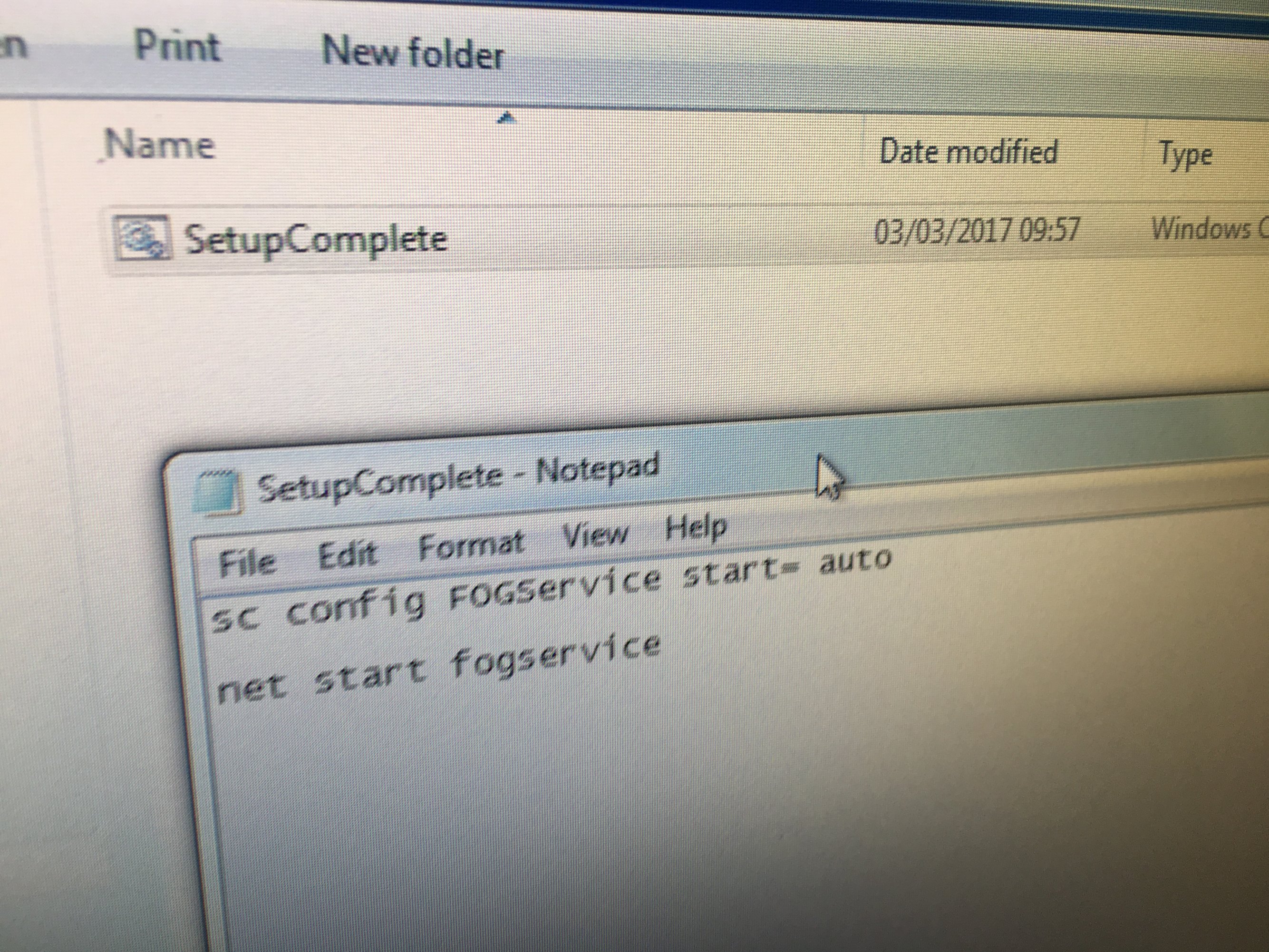
Hello, Thanks for the reply, I've copied the below into the script folder sc config FOGService start= auto net start fogservice I've also went into the Services and stopped and disabled the 'FOGService' service. I've done a test sysprep and it works, however, the FOGService is still disabled, is this right? Ideally, I'd want it to re-enable so that it would enable automatically and then re-name, and join the domain. Thanks, Dan
-
As daft as it sounds, try and install version 1.2.0, and then once that works, install 1.3.4 over the top, and it should work. I've sent you a PM back Jamie, I'll have a look tonight and help you get it working. Thanks, Dan
-
Hello, Thank you!! I think you are right with what you're saying, so far so good, I've downloaded a fresh image, before sysprep, and that's downloaded as it should. I've removed the FOG client, and sysprep'd it, uploaded it, and then downloaded it from the FOG server and it's worked fine... My next question is, where do I add the line that you've said in the previous post ': sc config fogservice start= auto and net start fogservice'? Please can you let me know exactly how I type it too? is it with the colon? Does that go into the unattend.xml file? Thank you for your help so far...
-
It's strange though as it works when it's not uploaded to FOG, yet as soon as it's uploaded to fog and it downloads the image etc, that's when it fails.
-
setuperr.txt Please see the attached. I managed to get into the log file located under the C:\windows\system 32\sysprep\panther\... Can anyone spot anything. It does have the file which says 'Sysprep_sucsedded.tag'. Thanks, Dan
-
If anyone else is looking at this post and has any other ideas... I've ran the sysprep with the unattend.xml file that Arthur edited for me, it worked fine, ran thorough the config as it should, missed all the other rubbish about setting up the machine etc, and went straight to the desktop... So i've re-captured the image but this time done it via FOG, and just uploaded the image, now it's downloaded the image, and failed. Does anyone have any ideas as to why it's failing?? Thanks, Dan