JordanT91
-
Posts
490 -
Joined
-
Last visited
Content Type
Forums
News
20th
EduGeek EDIT Conference
Blogs
Everything posted by JordanT91
-
You'll struggle to find anything that can record longer than 30 minutes. It would technically qualify as a video recorder then and manufacturers would have to pay more in tax. I've heard you can put custom firmware onto certain cameras to get around this though you may cause the camera to overheat.
-
SharePoint Picture Libraries Slow to Load
JordanT91 replied to davewilliamsict's topic in Windows Server 2012
If photos (and probably all large files) are loading slow it will usually be either the SQL database or the network connection causing the bottleneck. What sort of server is Sharepoint and the database on? What's the CPU, RAM and network card/s usage? What sort of connection does the server have to the switch? Typically how many users are accessing Sharepoint at one time? How big are the files that are slow to load? All of things need to be considered because there's just so many things that could make it 'slow'. There's some settings that can be checked both in the SQL Management Studio and also the Sharepoint configuration but first I would consider the answers to the above questions and see if that helps you. In my opinion, the only good reason to use Sharepoint is for collaboration or as an intranet. Our staff here prefer it because it's easier for them use to a web interface rather than a Windows Explorer file structure. If you're not using the web interface you may as well just use a proper file server for storage. Sharepoint introduces an extra layer of unnecessary work. Permissions will come from AD so there's little difference between file server permissions and Sharepoint permissions. Because everything is located in a database it adds extra time and work for the server to query for a given file and to extract it for the user. Backups become more complicated as well.- 3 replies
-
- 1
-

-
- servers
- sharepoint
- (and 1 more)
-
SharePoint Picture Libraries Slow to Load
JordanT91 replied to davewilliamsict's topic in Windows Server 2012
Use a proper file server? Out of interest, what's the reason for only using Windows explorer (I'm assuming davwwwroot)? You may as well just use a normal file server. -
I prefer Chrome but IE works better with Sharepoint 2010 and our County Outlook Web App site. Even using IETab with Chrome doesn't work very well. I've started installing Chrome as and when needed and I've been telling staff to only use it for Youtube.
-
Unfortunately not.
-
I've removed Youtube from the compatibility list (it was only there for testing) and checked all the settings you mentioned but they were already ticked. I'm still getting the red bar saying I need Flash.
-
Yep. I've also discovered it's not just Youtube, Education City is unusable as well. Flash is the very latest version so my bet is on IE11 being the culprit.
-
I've started encountering this problem on Windows 7 IE11. A red banner tells you to download the latest version of Flash when trying to play a video on Youtube. Adding Youtube to the compatibility list and the other method of reregistering the Flash .ocx file located at C:\Windows\System32\Macromed\Flash then restarting doesn't seem to work. Changing the ActiveX filtering setting doesn't make a difference. I'm at a loss, I've had to install Chrome on whiteboard laptops so teachers can use Youtube but this isn't a permanent solution. I may have to speed up the upgrade to Windows 10, that'll be a nightmare with the staff here...
-
I don't even know how that happened, it showed up on the recent threads bit at the top!
-
We use Nikon Coolpix L31 now. We have on average two cameras per class so about 30 in total. They are relatively cheap and have a 2 year warranty, which is just as well because I have to send about 5 back to Nikon every year because the lens motors keep breaking. The turnaround is fast (within a week) and postage is free. They use AA batteries, of which I have a large stash of high capacity rechargeable. They aren't so great with movement, and this isn't helped by teachers and TAs who don't half-press the button to focus first. Other than them, we have a Nikon D800 with a Sigma telephoto lens which cost us around £3000 in total. Nobody gets a hold of it without my or the headteacher's say-so. We also have two Sony camcorders that are quite new but I can't remember the model number. They were about £130 each.
-
I used to play Ingress. I wish I had my Fitbit then!
-
It's 10.15am and so far today I've done 1295 steps. I don't think I've ever hit the magic 10000 in the two weeks I've had my Fitbit. I've ran out of excuses for getting up and going for a walk now. I go up and down about 30 flights of stairs every day though.
-
If you can, it might be worth getting a fancy new system with lots of sounds. Schools should have at least a fire alarm tone, but if possible also a bomb alarm, shelter alarm and a lockdown alarm. Our system is quite old and is only capable of a fire alarm so we use that for a bomb alarm as well. We have just put procedures in place for shelter and lockdown but basically it involves the use of whistles and airhorns. On the subject of differentiating between the fire alarm and lesson change bell, usually the lesson change sound is beep beep beep beep etc. for about 5 seconds wheres the fire alarm is a constant tone.
-
I've used them for a couple of custom laptops for relatives, they were identical to the ones Very PC use (Clevo?).
-
We have recently purchased two of these: Humanware - Prodigi Connect 12 with distance viewing - English - Low Vision Aids for Macular Degeneration We use them in assemblies as well.
-
[wanted] [WANTED] In desperate need of spare desktops!
JordanT91 replied to NB9457's topic in Classified Adverts
My advice would be to sit down with the people who set your budget and outline exactly what needs to be purchased, but give them 3 options: enough to scrape by for another year, enough to replace what ideally should be replaced and thirdly a complete hardware upgrade to last at least 5 years. Give them a good idea of costs for each of these three options. Explain that hardware is starting to break and that you have no spares. Explain that computers have a life expectancy. If you are still using XP, tell them about the risks. Diplomatically explain that you can't be held responsible for any issues that arise due to not having the money to upgrade. And leave it with them. If they still decide to not give you any money, continue to do your job to the best of your ability with the resources you have. When equipment starts breaking and you can't replace it, staff will start to blame you (at first). Explain the situation as diplomatically as you can. When teachers start complaining loudly to SLT, that's when you're more likely to get the funds you need. It's all well and good asking for handouts, and nobody here would ever hold it against you, but at the end of the day if the school can't afford you give you at least an adequate budget to provide an IT service then there's something wrong somewhere and the school needs to realise this and deal with it. Filling the budget gap with handouts is not sustainable and will just mask the problem. If you miraculously get a load of old PCs from other schools every year they are going to think there isn't an issue and nothing will ever change. In the short term it's the kids that will suffer the most but in my opinion you should remove equipment when it breaks and don't replace/fix it unless you have the funds. It's the only way things will change. -
Never mind, I found it by going into Company of Heroes 2 and seeing what bundles it's part of.
-
Have you got a link? I can't find any bundle.
-
Bonded NICs for Hyper-V Virtual Switch?
JordanT91 replied to Miscbrah's topic in Windows Server 2012
I can't remember the exact way but if you go to Server Manager, Local Server then NIC Teaming you can set it all up in there. The NICs then present themselves as a teamed interface that Hyper-V can use. No Powershell required! -
I'm after a bit of advice regarding servers, hopefully this section of the forum is okay for that. Currently we have: Dell T420 - E5-2430 x 2, 64GB RAM, This is currently only running as a domain controller until I find the time to properly decommission it and make it a Hyper-V host. It was previously the only server but all other roles have been taken off it and virtualised. Dell T320 - E5-2430 x 1, 64GB RAM, 4 x 600GB 15K SAS HDDs, 4 x 600GB SATA HDDs This is currently used as a HyperV host for DHCP, print, SCCM, AV, Spiceworks, Veeam, DC2 and file servers (exclusive use of the SATA HDDs). Dell PowerEdge something - Xeon X3470, 16GB RAM, 1 x 2TB SATA HDD (Purchased in 2011 not by me, it's been a source of nervousness for two years!) Currently used for SharePoint 2010 Foundation. Stores our most critical pupil and staff data. The idea is to have both the T320 and T420 as Hyper-V hosts with the VMs shared across the two, leaving enough capacity for one to handle everything if one breaks. This will happen in the Summer. The PowerEdge is well out of warranty and the disk could break any day now. Something needs to happen with SharePoint but I don't know what. I have been given a decent sum (£6-7k) of money to take care of SharePoint. I could buy a new server and use it just for SharePoint (upgraded to 2013), or I could virtualise it and run it alongside all the other VMs on one of the hosts. My understanding is that this is possible but it would be better to have it on a physical server with dedicated processors and disks. I can buy another Dell tower with 8 400GB SSDs in RAID 10, 2 x E5-2640 and 64GB RAM and 5 year warranty for well under £7000 and that's the way I'm leaning at the moment. This will handle anything we can throw at SharePoint very well for the next 5 years. I've read that SharePoint Foundation's future is currently up in the air and the MS may not bring out a new version. Foundation does pretty much everything we need and it's free but it took a long time to get SharePoint heavily ingrained in school so there'd be a lot of reluctance to move away from it even though I can't stand it. Has anyone got any advice or comment?
-
Dead. He was asking for too much money apparently.
-
If you go to Relationship Summary, Contacts you should be able to get a good idea who your reseller is. You'll probably have your organisation as a few contacts, then there'll be a channel partner and then 'Indirect' which may be your reseller.
-
My interpretation is the same as yours. From https://static.spiceworks.com/attachments/post/0013/0245/WindowsServer2012VirtualTech_VLBrief.pdf: "For example, if you have one Windows Server 2012 Standard license assigned to a server, you may run one instance of Windows Server 2012 Standard in the physical OSE and two instances of Windows Server 2012 Standard virtualOSEs on the server at the same time."
-
FTE in the UK, AFAIK, is 200 hours per annum. So in a school, barring maybe lunchtime supervisors, everyone would have to be counted as long as they use Microsoft products.
-
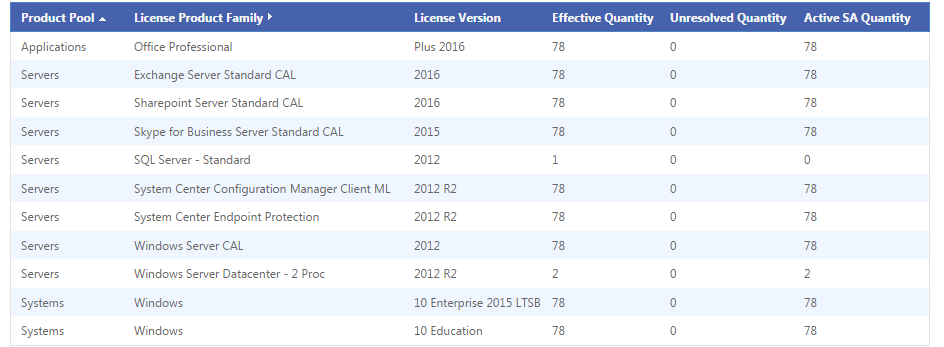
We might be able to help you a bit if you show us your license summary. You can compare it to mine: There's a good chance you will have EES. You say your school consists of approximately 80 staff, 520 kids, 1 physical DC, 2 VMs on 1 host one being SIMS the other Exchange 2010, ~110 PCs, ~30 laptops. You firstly need to work out how many Full Time Equivalent employees your school has. "The FTE calculation is easily produced by simply determining how many staff you have that work over 200 hours per annum and have access to (i.e. use) computers in your school, this gives your FTE value. You would not include staff such as caretakers or gardeners (unless they use IT in their work)." As you can see, my FTE count is 78. It doesn't matter how many desktops, laptops or pupils you have, it's all based on FTE count. You would get Office and Windows desktop licences based on this. Servers are a different matter, and it can get a bit confusing. I have 2 licenses for Datacenter, meaning I am covered for two hosts with unlimited amount of VMs on each. Someone more knowledgeable about licensing will probably be able to help more but I think you would need a standard Server license for your physical DC and a standard license for your host. The Standard license covers you for up to two VMs, so if you think you may need more you will need a Datacenter license. Then there's CALs, of which you get some included in EES (again based on FTE) but other than that I know very little about them. Upload a screenshot of your license summary and we'll see what we can work out for you.