cheekycharly
-
Posts
302 -
Joined
-
Last visited
Content Type
Forums
News
20th
EduGeek EDIT Conference
Blogs
Everything posted by cheekycharly
-
Had a look at them and my current supplier is offering them cheaper still so guess I will go that route. Apple Ipad 10.2" £332.80
-
Hi all, are there cheaper ways to get an IPad i.e. an Apple Insider Education program or a re-seller? I am pricing them up for a new school build and have them noted down at the retail price on the website currently. Thanks folks.
-
Cheers gaz350b. I had only found out what BETT is yesterday and its a bit late now. It looks to have been the ideal opportunity to test some screens. Good job there a great community on this forum who can aid and assist with the required info.
-
I'm thinking I wont need A3 as our school laptops get different users every lesson and reading A3 you can only install office 5times so its not really built for shared devices. We have Office on LTSC and that is installed on the base laptop so I figure all we need is Enterprise Mobility + Security E3 to give us the extra Azure and Intune features and we should be fine. Kids then should be able to logon to a customized desktop and still access the locally installed applications.
-
Mako sounds a great way of doing it to be fair. I didnt know you could have the best of both worlds/ I will look into how I implement both of those ways in our portal. I guess when students and staff use the system under the school IP address they don't get bugged by any 2FA messages?
-
Hey Mako so what I wrote above is the correct way of doing it at a school then is it? Only allowing the IP of the school to get access to the tenant.
-
REK20 thanks for a great first post. I have followed the link and checked it is saying disabled. I have no way of knowing if they are going to try auto-enabling it like they say they will. Once we are using our tenant a little more later this year I plan on turning on conditional access so it can only be accessed behind the school IP's.
-
Hi all I have received this email twice so far today... [TABLE=width: 100%, align: center] [TR] [TD][TABLE=width: 100%] [TR] [TD]Protect your organisation, with Azure AD security defaults There are over 300 million fraudulent attempts to sign in to our cloud services every day. All it takes is one compromised credential or one legacy application to cause a data breach. One of the best things you can do to prevent these attacks is to turn on multifactor authentication, which can block over 99.9 percent of account compromise attacks. Enable security defaults to adopt security best practices, such as requiring multifactor authentication and disabling insecure protocols. Security defaults will ensure that your security settings stay up-to-date until you decide to manage them yourself. There is no additional cost. Starting the week of March 22, 2023, we’ll make it easier for you to enable security defaults by presenting you with a message when you sign in to your Azure Active Directory (Azure AD) account through your web browser.If you don’t take action per the message, security defaults will be enabled after 14 days. If you’d like to get started, you can enable security defaults today.[/TD] [TD][/TD] [/TR] [/TABLE] [/TD] [/TR] [/TABLE] [TABLE=width: 100%, align: center] [TR] [TD][TABLE=width: 100%] [TR] [TD]When you enable security defaults: · You as a Global Administrator will be asked to register for multifactor authentication using the Microsoft Authenticator app and your phone number. · Everyone else in your organisation will be asked to register with the Microsoft Authenticator app for multifactor authentication. If you have other questions, read our documentation. If you need more support, create a support request in the Azure portal. Anyone else getting it? Not a chance I want MFA turned on as the kids aren't allowed phones and it states they will force the policy in 14days.[/TD] [TD][/TD] [/TR] [/TABLE] [/TD] [/TR] [/TABLE]
-
So I spoke with our sister school and they bought ActivPanel Titanium AP7_B70 for £2500 each inc the VAT and bought 8. I cant see the older 7 series for that price anywhere but I did see the invoice. Anyone used CTouch? I was recommended these by a guy I know from a local acadamy.
-
So to follow up on this I went in the end with PeaSoup who provided me next level service and even Teams video calls to help out with a few failed backups. As soon as I bought it I noticed on the EDUGEEK page a banner stating 1year free PeaSoup. If anyone is on the fence about their backup services then don't be. Fantastic service at a human level where you don't feel they are too big of a company to find you the right person to talk to. If anyone has any questions regarding them and the service give me a shout.
-
New Domain Register as a fully separate school O365 account?
cheekycharly replied to cheekycharly's topic in Cloud Services
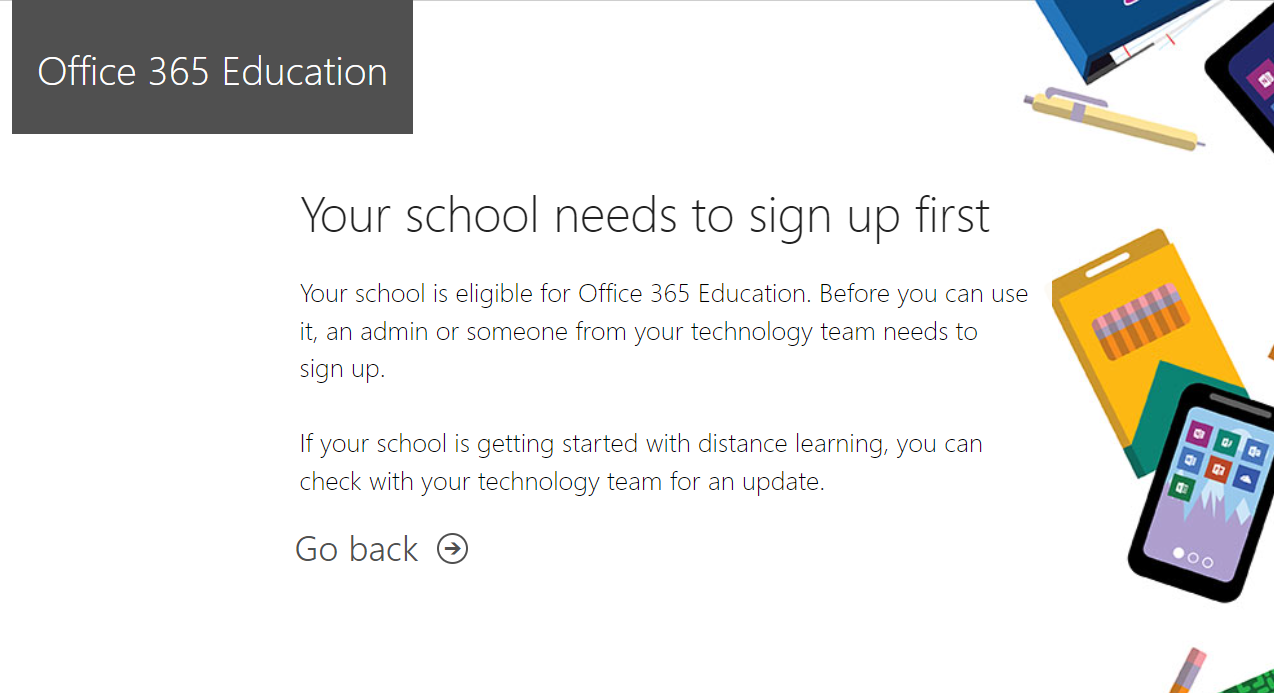
Heard nothing back from Microsoft education so thought I would try the sign up process again today and got a denied message this time. Enroll your school now button takes you back to the first page. Anyone know who I can reach out to as all routes seem to lead to nowhere when trying to get this setup.
-
New Domain Register as a fully separate school O365 account?
cheekycharly replied to cheekycharly's topic in Cloud Services
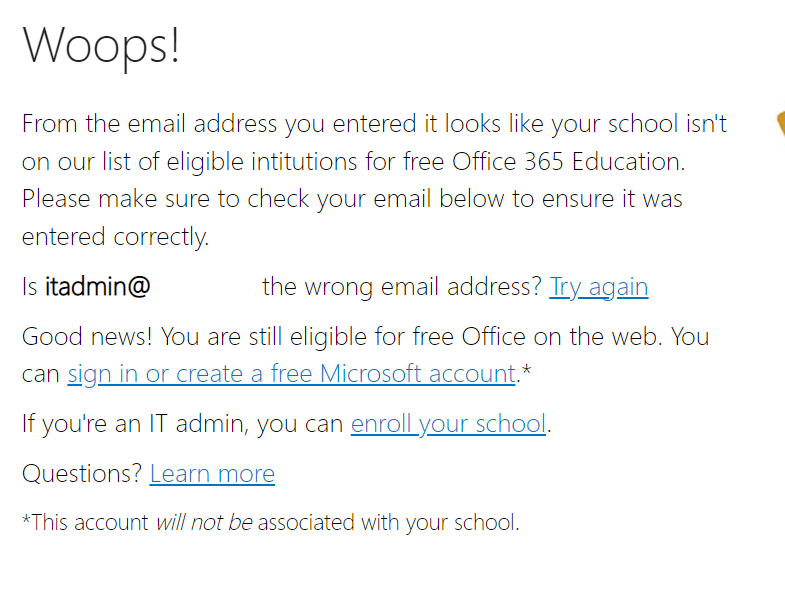
Removed all the users Aliases and removed the domain. Went to the sign up page which seemed to recognize that the domain was not linked anymore and allowed me to put in an email address at the new domain name and send a verification code to my mobile but then I get the following message... When you click Go Back your back at the start of the signup process. Any thoughts or ideas guys?
-
New Domain Register as a fully separate school O365 account?
cheekycharly replied to cheekycharly's topic in Cloud Services
In reply to one of the above questions there is no current MSP's on the old account that has a ridiculously long @ address. This is why im looking to change it as I am in talks with SoftCat to become our MSP and I would rather link them up to a tenant that isn't going to change from now. Will be moving up to A3 licenses on the account soon and Enterprise Mobility + Security and using this new shorter domain name as an Azure AD Login for pupils to log on with. -
New Domain Register as a fully separate school O365 account?
cheekycharly replied to cheekycharly's topic in Cloud Services
Cheers, I think I will just bin it off later today / tomorrow morning and use the above link to setup a fresh new tenant under the new correct naming. All should look correct doing it that way rather than living off the old one. -
New Domain Register as a fully separate school O365 account?
cheekycharly replied to cheekycharly's topic in Cloud Services
Cheers guys I had already added the other domain under the original tennant to test setup but to be fair I can just remove that and its relevant DNS records. Does anyone know where I setup a school based 365 or is it just a normal 365 and your license supplier gives you access to A1 for education and links it on? Cheers -
Hi all, we currently have an O365 admin portal which is rarely touched and was setup by county for us and has a domain name that we don't use. Rather than me add in the new domain and try default everything to the new domain name including Sharepoint which is tricky I wondered if I could set this new domain up for the school as a separate account that will become the master over the next twelve months. So first off how to I sign up for O365 as a school and get the default Student A1 licensing implemented if possible. Thanks in advance as always.
-
Thats all good to hear. Did they fint them or did you get a local installer.
-
Budget on them wont be an issue so I would rather look at the top known brands. I have seen all the other brands listed and looked at their very affordable prices but I would prefer the support you would get from a Promethian / SMART system.
-
Thanks for the information that was the exact sort of thing I was looking to find out. I will take my laptop with my when I visit this new site next week and have a play with connecting my laptop up and see if any issues arise. Not sure what model screens they have yet but I will update once I know. Totally agree though the staff wont be bothered about a built in OS and its just something else to go wrong & likewise a pause button and HDMI connection is all they will be looking for.
-
Cant see that happening.
-
Arranging to go and see a site that just had Promethean's rolled out across it.
-
The use of the screens inbuilt Android system is almost null/void to me and is more a PITA as the Android version will one day be way out of date and a security risk if it gets connected to the network. Staff currently have knackerd old projectors that are utterly garbage and must be 10-15 years old. A change to a screen would be a step up no matter brand and facilities.
-
Why is there such a vast difference in the two products. I know historically I have seen/skirted over the use of SMART Notebook and found it very simple to use. Usage is mostly screen shared staff laptop likely by HDMI with the ability to write on the screen and highlight words and circle round in the same manner. Enough sound to not have an external speaker rig setup.
-
Hi guys, its a real simple one this for you but who is the preferred system these days. Years ago SMART was classed as the top line and Promethian always made a similar product at better pricing. Been looking at the following Interactive Displays and wondered your thoughts... SMART Board MX275-V3 75" SMART Board MX275-V3 75" interactive display with iQ and SMART Notebook® (goeducation.co.uk) Promethean AP7E-B70 4K 70" Promethean AP7E-B70 4K 70" ActivPanel Titanium Touchscreen with USB-C inc. Bracket (goeducation.co.uk) There isn't enough difference in price for me to take a preference so I am hoping some of you will know from experience.
-
I have just sent an email to the head with 4 categories where its Top End, Mid Level, Budget Friendly & Other I have put a couple of hours into reading about them now as I knew nothing and collated all the good information you guys here on EduGeek have given me. The ones that seem to get the worst reviews are the pens where you Start/Stop, saw soo many 1star negative style reviews on these that I don't think they are novice friendly and easy to forget you are not recording.