cheekycharly
-
Posts
302 -
Joined
-
Last visited
Content Type
Forums
News
20th
EduGeek EDIT Conference
Blogs
Everything posted by cheekycharly
-
Ditto this method. Pay for staff licensing and students are free.
-
Intune Remove Taskbar Applications From Student Logins
cheekycharly posted a topic in Cloud Services
Hey folks anyone know how I can remove these three from Windows 11 Enterprise using MS Intune?
-
The Deployment Guy - New YouTube Channel
cheekycharly replied to craigcamacho's topic in Cloud Services
Love your videos mate - Avid follower and subscriber. Keep up the good work as I also am riding an Intune learning curve. -
Intune and Microsoft Store - How do you manage it?
cheekycharly replied to cheekycharly's topic in Cloud Services
Thanks all above, I have stuck a block in place on pupil logins and set company portal to push out as an app. Only downside i have is that if a staff member logged onto the laptop there's a period of time where the policy hasn't changed for them. That's Intune though... -
Hi all as per the title how are you all managing your M$ store via Intune. Currently in my test rig if I log on as a student and want WhatsApp I can just download it which I obviously don't want. A good on the top brings up a mixed bag of ways to manage it so thought I'd ask you lot first. Cheers
-
The link you sent says 5% odd Surface Go and when you scroll down it says Surface 3 Go £799.99 £799.99 - 5% = £759.99
-
I scheduled a video chat with a Microsoft onboarding team member around six months ago, however it ultimately turned out to be a sales call and was fruitless. They wanted to know how many were teachers, so one of them said during the call, "I'm just looking at your tenant now and can see how many members you have in the tenant." I won't lie; I was astonished because I hadn't provided them the information about my tenant; they must have discovered it by looking up my name and the company name.
-
I feel more and more lucky everyday with my 60 pupils and 40 staff.
-
I thought all you did was go into 365 Admin side and turn this off? no?
-
How do MS know if you have applied a student license against a staff members name?
-
Thanks for that. Looking at the base price it is £799.99 and they would give you £39.99 off it. Doesn't really feel much of a discount for the "Services".
-
Do offers ever come up for education for the Surface books? I literally hate IPAD's and would rather we used Surface Books but the cost is a killer.
-
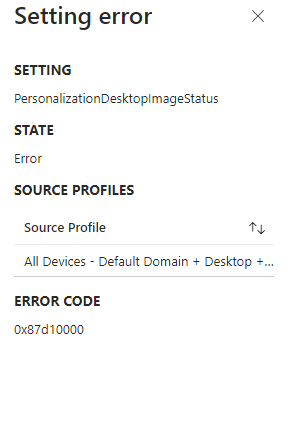
Hi folks, never had a problem with this policy but just wiped a batch of laptops and now when they pick the policy up they all show errors even though the policies have applied and work. See screenshot... Anyone know how I can drill down and find out why this is suddenly false reporting? Also I haven't added any other policies recently that would conflict. Thanks in advance!
-
Intune Remove solitaire and casual games and Xbox Applications
cheekycharly replied to cheekycharly's topic in Cloud Services
Ok managed to find Xbox using its ID number but cannot find a way to get rid of the damn *Solitare & Casual Games Solitaire & Casual Games Microsoft.MicrosoftSolitaireCollection_8wekyb3d8bbwe!App -
Intune Remove solitaire and casual games and Xbox Applications
cheekycharly replied to cheekycharly's topic in Cloud Services
I have had a look at this method and I can apply it that way for Xbox Game Bar it appears but I cannot find the other two apps, * Xbox *Solitare & Casual Games -
Hi Folks as per the title does anybody know what I need to do in an Intune setup with Windows 11 machine to remove the following apps for all profiles... Solitaire and casual games Xbox Xbox Game Bar Thanks, CC
-
Same for me that SayLHP. Since giving the pupils the ability to install additional apps I have found "0" are bothered about trying to add other apps.
-
Documentation Requirements For Schools
cheekycharly replied to cheekycharly's topic in How do you do....it?
I have made a Cyber Response plan back when I joined the team here around December and recently created a Cyber Security Resilience Strategy which talks more about the preventative measures. -
Documentation Requirements For Schools
cheekycharly replied to cheekycharly's topic in How do you do....it?
Couldn't see anything on that long list regarding Cyber or E Safety? -
Hi guys, as I am fairly new to the Education sector I am wondering if any of you know exactly what documentation I want to ensure we have in place for Example a Cyber Response Plan and E-Safety Policy. Really appreciate any answers as it will help me identify any gaps that need filling. Thanks in advance all! CC
-
Yes I dont personally use AutoPilot as we have a small netowrk so I just fire the machine up give it the name I.E. W11-"SERIALNUMBER" connect to the wifi and join the work/school domain. After this I just leave it logged in downloading its software / policies which can take a while but im usually busy on with the next machines to worry about the time its taking.
-
Intune Start Menu W11 All Apps Button Vanishing!
cheekycharly replied to cheekycharly's topic in How do you do....it?
It was something in the pre config Education policies. I stopped Staff and Pupil General Education Policy applying and the issue went. I have since stopped using all the EDU templates and setup what I require myself. Looking at it further there was loads of stuff in them templates that we didn't need like Chrome config when we don't use Chrome. Policy applies quicker now there is less as well. -
Intune Start Menu W11 All Apps Button Vanishing!
cheekycharly replied to cheekycharly's topic in How do you do....it?
Sorted this myself in the end. Thanks for flooding me with sympathy and good answers -
A fresh logon on mine takes roughly 30-40seconds and then for the apps to all fire up in the tray and one drive to configure after boot about 30seconds more. Log on / off after this and its about 8-10seconds then 15-20seconds loading the apps in the tray. I5 Laptops with 8GB Ram and all rubbish removed. Broadband line is a crappy FTTC 40Mbps line with about 10Mbps up.
-
Intune Start Menu W11 All Apps Button Vanishing!
cheekycharly posted a topic in How do you do....it?
Hi all, I have an issue where when I provision a new Windows 11 device and logon after a while some policy kicks in and removes the start menu "All Apps" button. I have been going through policies for a few days now trying to find the culprit but cannot find it. I want to simply have a custom start menu layout which I have achieved but still maintaining the all apps button. See attached photo of a basic start menu without the custom menu applied still losing the "All Apps" button.