hallb15
-
Posts
2,013 -
Joined
Content Type
Forums
News
20th
EduGeek EDIT Conference
Blogs
Everything posted by hallb15
-
Got it - yes that's the simplest way to do it. I was trying to get as much of this automated as possible so was hoping to have one large ticker with a different message for each day pre-loaded. Nevermind, my apprentice can have the job of updating it each morning until I figure something else out.
-
There are scripts that you can use to create the iTunes accounts so its not so time consuming. Apple Configurator and a decent MDM like Meraki to push out apps are the way forward. @Joanne wrote a good guide here: http://www.edugeek.net/forums/how-do-you-do/143645-ipad-setup-idiots-guide.html @Garacesh wrote one for Configurator 2 here: http://www.edugeek.net/forums/mac/160767-how-i-got-configurator-2-profile-manager-working-ish-kludgy.html
-
Welcome to all the newbies - but especially those in Yorkshire!
-

Socktober 2015. FREE SOCKS for all entrants. Win an i7 NUC from VeryPC
hallb15 replied to VeryPC's topic in Our Advertisers
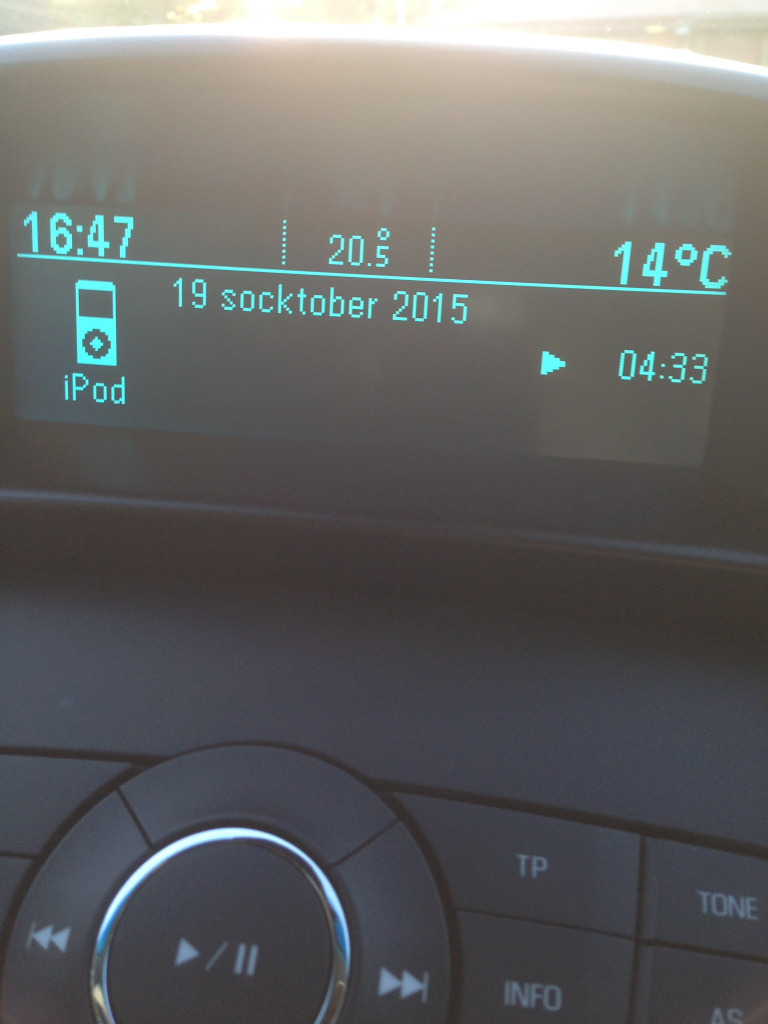
Look what happened when I plugged my phone into the car after work last night..
-
How are you achieving the ticker with the welcome message? I've sussed out most things but I just can't get the ticker to show anything - RSS or dataset, its not playing ball. I'm sure its something obvious, just not obvious to me!
-
Socktober 2015. FREE SOCKS for all entrants. Win an i7 NUC from VeryPC
hallb15 replied to VeryPC's topic in Our Advertisers
-
Socktober 2015. FREE SOCKS for all entrants. Win an i7 NUC from VeryPC
hallb15 replied to VeryPC's topic in Our Advertisers
I'm still waiting for the video to download via mobile internet as youtube has decided the video can't be shown in restricted mode, again! -
Socktober 2015. FREE SOCKS for all entrants. Win an i7 NUC from VeryPC
hallb15 replied to VeryPC's topic in Our Advertisers
TeamColin. That is all. -
Socktober 2015. FREE SOCKS for all entrants. Win an i7 NUC from VeryPC
hallb15 replied to VeryPC's topic in Our Advertisers
I miss the bring me the box chants - still got the T-Shirt though There must be a Crystal Maze style challenge that you could do - can you channel Richard O'Brien @VeryPC Al? Whatever the challenge, you should use the Crystal Maze theme tune in the background! https://www.youtube.com/watch?v=efX5LGXZRtE -
Socktober 2015. FREE SOCKS for all entrants. Win an i7 NUC from VeryPC
hallb15 replied to VeryPC's topic in Our Advertisers
and X-13 is back! -
Socktober 2015. FREE SOCKS for all entrants. Win an i7 NUC from VeryPC
hallb15 replied to VeryPC's topic in Our Advertisers
#teamcolin all the way! -
If you've got 4/5 years out of an Acer then you are doing well! If you only use it at work, shouldn't work provide you with a laptop?
-
Socktober 2015. FREE SOCKS for all entrants. Win an i7 NUC from VeryPC
hallb15 replied to VeryPC's topic in Our Advertisers
Bah! Today's video is not available in restricted more - where's the consistency? -
Ah, that old trick when you need one more network point, but only have 1 cable available. I think there are probably a few of these left here from a previous 'person' who thought this was a good way to separate admin and curriculum networks...
-
Socktober 2015. FREE SOCKS for all entrants. Win an i7 NUC from VeryPC
hallb15 replied to VeryPC's topic in Our Advertisers
Yay! The video works today! :) Congrats to the winner... -
A couple of months ago I did some investigating into why a particular classroom PC was dropping the network connection and generally behaving rather strangely. Whilst following the CAT5 cable above the false ceiling, I moved one of the tiles and this fell out!
-
Same here - my office houses most of the network hardware. The BDC is in the site manager's office so between us we'd know pretty quickly if something was going on...
-
I've seen similar - there seems to be no end of cowboys who are willing to do a poor job and charge a fortune for it, just because its in a school and they think they can get away with it. Glad no-one was hurt.
-
Socktober 2015. FREE SOCKS for all entrants. Win an i7 NUC from VeryPC
hallb15 replied to VeryPC's topic in Our Advertisers
Is that the other Colin? -
+1 for Inventry.
-
Socktober 2015. FREE SOCKS for all entrants. Win an i7 NUC from VeryPC
hallb15 replied to VeryPC's topic in Our Advertisers
Is that a dog? Looks like a lamb on the thumbnail... My second favourite Colin: Veggie on a Mission: Colin - CBeebies - BBC -
I've just stumbled into this issue. There was a patch which allowed notebook 11.4 to run on Mavericks, but according to SMART you have to have at least 14.2 to run it on Yosemite. I found an article which suggested copying a Ruby 1.8 folder from a mac running Mavericks. Running SMART Notebook 11.4 on OS X Yosemite | Luke Arms I haven't had chance to test it as this is a staff member's own MacBook pro and I don't know enough about rolling back to previous versions of OSX to attempt it right now.
-
Socktober 2015. FREE SOCKS for all entrants. Win an i7 NUC from VeryPC
hallb15 replied to VeryPC's topic in Our Advertisers
Today's Socktober video works fine. But the one from @Gonk doesn't. Yes, that screengrab could explain things... Must find somewhere with decent mobile signal and watch it NOW! -
Socktober 2015. FREE SOCKS for all entrants. Win an i7 NUC from VeryPC
hallb15 replied to VeryPC's topic in Our Advertisers
This video is unavailable in Restricted Mode. I am so frustrated. -
Socktober 2015. FREE SOCKS for all entrants. Win an i7 NUC from VeryPC
hallb15 replied to VeryPC's topic in Our Advertisers
aaaaagh - Spoilers!!!