Garacesh
-
Posts
16,316 -
Joined
-
Last visited
Content Type
Forums
News
20th
EduGeek EDIT Conference
Blogs
Everything posted by Garacesh
-
Well, mostly 'cause I didn't know that existed But that isn't working either. Edit: Huh. Replace works, but Update doesn't.. I thought Update was supposed to be 'Create it if it doesn't exist, replace it if it does'?

-
Trying to copy Google Chrome's master_preferences file because their GPO's have no way to suppress the first-run window ("skip_first_run_ui": true, "show_welcome_page": false,) I've tried using XCOPY, COPY and ROBOCOPY, as well as using but they all just assume that the file is a folder because there's no extension. master~1 doesn't work either. I guess I could copy master_preferences.txt, then delete master_preferences, then rename master_preferences.txt but I'd rather not do that if there's a 'proper' way to do it.
-
... that's 'cause most Korean games are P2W MMO's.
-
I think it's mostly because of the care and dedication that goes into building and maintaining a gaming PC. It takes time. It takes effort. It's not just 'a tool' that doesn't need to look good. A custom-built PC can be a reflection of personality. That might sound a little bit poncey but let me ask: How do you decide what furniture to buy? It's the same sort of thing. Unless you're locking it away in a cupboard never to see the light of day, then it's going to be out. And if it's going to be out, and it's going to always be visible, you might a well give it a bit of visual flair. Better a lit-up box than one of those dull beige cases we all used back in the early 2000's, right?
-
These days I recommend 12GB RAM for budget-y builds. 8 just sometimes isn't enough. People complain about unmatched pairs but if you do 2x4 and 2x2 it's fine, and motherboards are smart enough to work with that without causing any problems (just make sure they're the same clock speed!) Also if you want to save cash don't buy RAM with LED's on it That's a premium.
-
That's what I'm using and it does 1440p 144Hz with no problems at all. Yeah, but awful cooling so it's a 1070 that's constantly thermal throttled 1070's are still pretty good, but it's the extra cost. All depends on your budget.
-
I'd say drop down to a 1060 if you're on a budget.
-
We've used both Office 365 and G-Suite, and whilst we've only just got G-Suite sorted I think it'll end up being the 'clear winner' over 365 because the feedback we've had so far is that Classroom completely trumps OneNote. G Suite for Education is free and gives you (I think) 10,000 licensed accounts. You can set up an Active Directory sync to do most of the work for you, and if you want to do more fanciful things like importing SIMS data into Google Classroom, you'll need a third-party to do that for you (we've just started using SalamanderSoft and the results are very positive) Worth mentioning that if you were considering going down the Chromebook route, G Suite does not give you Chromebook licenses for free. You gotta buy those per-device. But they are transferable at no cost for when the kids wreck a chromebook and you end up replacing it. If you don't have either 365 or Google setup, my personal recommendation would be to go down the Google route. It doesn't take too long to set up (LDAP queries are a pain if you're not familiar with them already, but they're easy enough to figure out with something like an LDAP browser). The one thing Google is missing that 365 has is the ability to administer other users' drives and emails. With 365 you can basically just impersonate any user you like. With Google you have to use Vault and run reports and it's probably better from a DPA standpoint but it's a bit more hassle than just being able to go in and have a snoop*. But that's manageable once you figure out how Vault works. * Obviously this scenario presumes you have probable cause to snoop, like you've found pirated files in their network homefolder and want to check that they aren't storing any in their Drive, you're not just snooping for no reason.
-
Winds were pretty crazy strong round my streets.. And then there was some pillock letting off fireworks
-
Hang on, wait, what? Did that actually happen? Edit: Apparently so. How daft do you have to be to much about with sodding mustard gas?!
-
Nice clear blue skies my end now. Bye-bye Ophelia o/
-
The BBC would agree with the first point The second one, probably not so much.
-
Yep, midday and we're overcast-orange here too, Manchester way. I wouldn't know enough about meteorology to confirm or deny @AJWhite1970's assertion.
-
Ooh.. Ooh.. I got this one. (Again, edit shenanigans so it's not emailed to people) Flick the first switch. Wait five minutes. Turn the switch off. Turn the second switch on. Go inside. The first switch controls the lightbulb that is now off, but hot. The second switch controls the lightbulb that is switched on. The third switch controls the lightbulb that is switched off and cold.
-
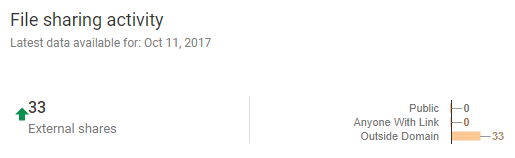
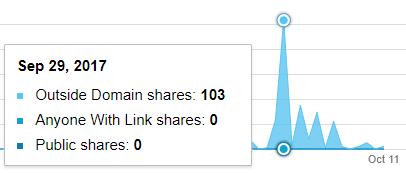
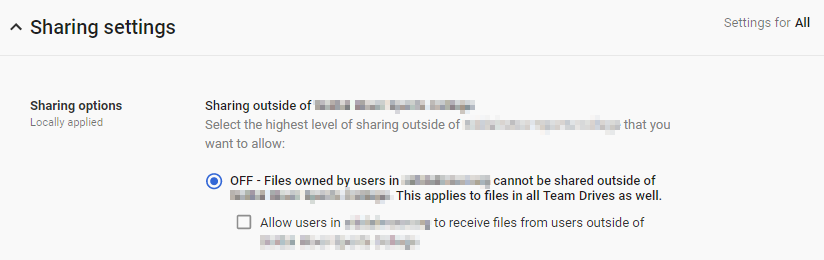
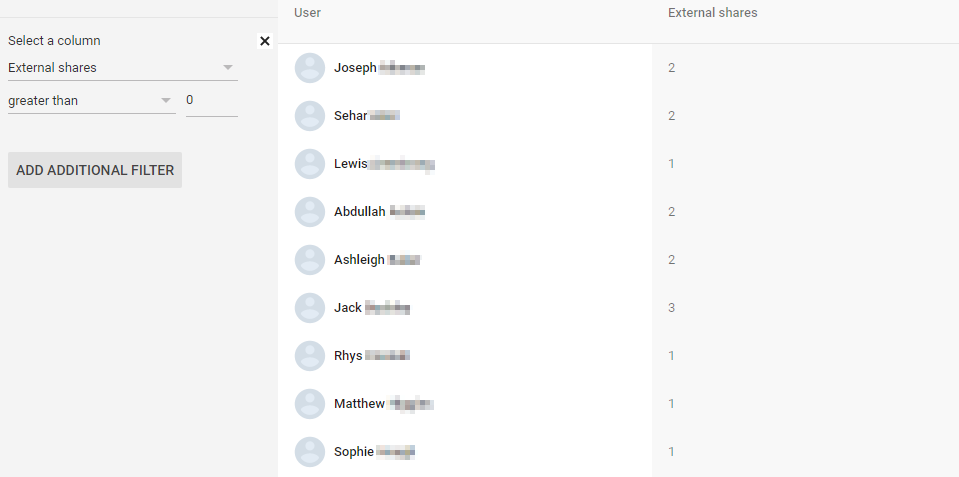
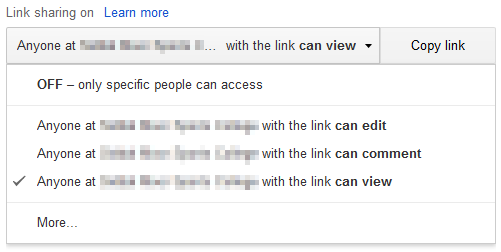
 Solution has been found Leaving this here in case someone else digs it up in the future. The issue is to do with sharing files with groups that weren't created by the admin. Even though these groups had our domain address (e.g. Y8a1_Smart_board_Game_Systems_and_Control_Electronics_teachers_16a1ae92@ourdomain.gtld) they still show up as external shares. To quote the response I got from support: So the issue is to do with sharing files in Google Classroom. For some reason they still count as 'external'. Original post So we've started pushing forward with G Suite and looking at the File Sharing Activity in Reports drops me this highlight: This says there's been 33 external shares this week, and looking back at the graphs there's supposedly been considerably more. I've checked the Drive settings, and it's definitely set to internal only for the entire domain. I've double-checked and the permissions are definitely being inherited by all users. Yet in the reporting list, I can see users have shared files externally, apparently.. One teacher and my test account. And if I jump back to the dates where there were more, there are kids names showing up. So my suspicion is it's possibly a couple of things.. Maybe it's to do with choosing to share a file via a link. That might count as external sharing. But that shouldn't be able to happen. The only options in that menu are for sharing within the organisation. My other thought is maybe it's to do with passing work back and forth in Classroom, but I'm not really sure. Anybody had this one before?
-
I got all 3, but I will admit it took me a minute to catch the third one. That one's easy (Highlight.. Also made this as an edit so people wouldn't get it in their plaintext emails) Put one ball on the scale to find out how much it weighs. Keep track of this ball. Put all the balls on the scale. If the weight on the scales is less than ((the first weight) x 7) the first ball is the heavier one. If it's more, remove balls one by one until the scale drops its weight more than the weight of first ball - the ball you just removed is the heavier one. I'm an idiot that didn't clock on to 'traditional balance scales'. Correct answer below. Original wrong answer left up for the lulz You put 3 balls on each side, with one left over. If the scales don't tip, the one left over is the heavy ball. If the scales do tip, you do the same with that pile of 3 balls: one ball on each side, one left over. If the scale tips again, the tipped side is heavy. If the scales don't tip, the one left over is heavy.
-
OK, so for WDS applications, step one is a bit of a pain, not because it's difficult, but just because it's annoying you have to do it. WDS will copy/move files to its own DeploymentShare$\Applications folder, so you have to make it somewhere else eg in the drive root or a network share. Download the latest irfanview installer (we're using iview444_x64_setup.exe but it's probably outdated by now) and stick that in a folder somewhere. Now you load up the deployment configurator there's a list of categories at the side, Applications, Operating Systems, Out-of-Box Drivers etc. If you right-click on applications, you get the option to add a new one (or make a folder, it'll be useful to use folders if you find yourself adding a lot of applications). Click 'New Application'. For the type of application you want Application with source files Give the application a name (eg Irfanview) and optional publisher/version/etc. Browse and find the directory that you created with the installer in it. If you've made this file locally on your WDS server, tick the 'move the files to the..' box. Specify the name of the directory, usually the autocompleted one will do just fine. for the command line, you want something like .\InstallIrfanview.bat Next, next, finish. Done! The final step is to actually create the batch file that installs it. You might just be able to have WDS call the command line instead of the batch file but in my experience this can be a bit hit-and-miss when you're using additional switches and I didn't have the luxury of time to test it. So find the newly-created folder in Deploymentshare\Applications and open it. Create a new batch file and give it the same name you specified earlier (eg InstallIrfanview.bat) Paste in the command: START /WAIT "Irfanview Setup" "\\your-server\DeploymentShareName$\Applications\Irfanview 4.44 x64\iview444_x64_setup.exe" /silent /group=1 /allusers=1 /assoc=1 (obviously modifying for location, filename, etcetera) Now to explain this a little bit: START calls the exe, fair enough WAIT means that the command line calling it won't exit its sequence until the exe it calls has exited. This means your WDS will wait for irfanview to install before moving on to the next step. We do this so we don't get msiexec clashes. The "Irfanview Setup" bit is a pain. You don't need it for START /WAIT.. You do need it for START /WAIT with additional switches, because if you feed it more than one value it'll take the file location as the process name. Realistically this is just a string and can be any value, it doesn't really matter. Exe location is obvious /silent isn't important, but noninteractive is. There's no switch for that, so we just use silent. /group=1 and /allusers=1, group=1 = All users, 0 = Current user. Further command line switches are documented here, just CTRL+F the page for /group and you'll find it. /assoc=1 sets the file association. Now I do want to make a point of is that this probably isn't the 'normal' way of doing it. It's a bit convoluted, I'll admit, but we were in a bit of a rush when I had to put this together and it's just stuck with me because once you get the hang of it it's really easy, I can test it without having to run a whole image, and I can edit the batch files to modify the install if I need to without having to update the deployment share (maybe I don't have to anyway, I'm no WDS pro. I dunno) The biggest benefit though is that if something goes wrong, the batch file makes it incredibly easy to re-run on its own. Not a problem with irfanview. Very much a problem with Solidworks or MS Office. Like I said earlier, you might get away with whacking the command straight into WDS. If you want to try that, instead of .\InstallIrfanview.bat (I think) you'd want just iview444_x64_setup.exe /silent /group=1 /allusers=1 /assoc=1. If you're not pressed for time I'd say give it a whirl, see if you can cut out the middleman as it were. Edit: oops. More info Now everything above makes it an optional application. You should get an 'Applications' screen whilst you're imaging it and you can tick it if you want it. If you want the software to be mandatory, right-click on the entry in the application list, and click Properties. Tick 'Hide this application in the deployment wizard' Then navigate to Task Sequences, find your task sequence, right-click, properties. Change to the Task Sequence tab. Before the 'Install Applications' step, add a new 'Install Application' (Add, General) task and find irfanview. Click OK. That makes it hidden from the deployment wizard, but now there's a step that forces it to get installed anyway.
-
I don't, it's kinda just second nature by now, but tomorrow I'll happily do you a step-by-step bunch of screenshots to walk you through it.
-
Nuh-uh. Never. Not in a million years. Zombie viruses spread via contaminated body fluids. You do not want to be putting yourself in a situation where you're getting zombie blood on you, potentially inside an open wound, or your eye. Haven't seen the show so can't comment on the rest of it, but always keep your distance in a zombie apocalypse. Boom-booms, whilst making a lot of noise, still keep you safer than stabby-stabs that put you at risk of getting infected. What? Fully-fledged zombie survival plan? Me? Never!
-
Narp. Demo mode is pulling player.vimeo.com/video/183644273 Pretty sure our public IP hasn't changed. Will investigate to double-check then fire an email to their support, I guess.
-
Does your redirect only kick in once a user has logged in, or should it work on all pages (like your Samples)? If the latter, it's not working for us. It's back to being Vimeo and Youtube.
-
Well, personally, I think Saturday night drunk PUBG was a roaring success @ZeroHour @Mewdewgooboofoo @failnator @DalekSec @bald_pig
-
That's what the NBv4/Pex board is for. The LED's aren't directly linked to the battery.
-
This is a discussion that comes up a lot in gaming circles and it's one I pay particular attention to. The caveat is that you're guaranteed to get something out of them. It's the same reason those 20p-turn-a-dial-get-a-toy vending machines aren't gambling. Same reason companies like LootCrate et al aren't gambling either. Gambling, it seems, operates on a boolean Lose Stake/Win More basis. With companies like Valve it's on shakier ground because there's a possibility that the item you have does have an actual monetary value (with Steam Market being a thing). That's why they had that genocide of CS:GO/DOTA 2 gambling websites a while back. I think that's a factor of why a lot of games have no function to trade between players (the other factor being it drives more gambling sales.) With no way to off-load the items you 'unbox' they get to argue that their digital unlocks have no market value and that pushes them a little further away from the idea that it falls under gambling. As far as I'm concerned it is unequivocally gambling, and these games are often marketed at teens that have A) Poor impulse control and B) Addictive personalities. Plus it takes a big fat deuce on anyone that has actually suffered a gambling addiction in the past because it's locking them out of most big-release games. It's just shady as all hell, tbh. Though even if ESRB et al got their head out of their asses and called in gambling and slapped an 18+ sticker on the box I don't think that would change much. Grand Theft Auto taught us all that game ratings mean zip.
-
Always worth pointing in mind* that games with gambling added in are balanced around that gambling being an available option. Yes you can earn the stuff with in-game dosh just from playing but the game is still balanced around trying to make you want to open your wallet again. You probably won't ever be explicitly asked to pay (maybe the occasional 'We're having a sale!' popup, though). But the pace of the game is crafted in such a way that the things you want are harder to earn simply because they want to push you towards the gambling side of it. Earning CR will have been nerfed to that 'sweet spot' where it's just slow enough that you might earn that car from races, but you're tempted to outright buy CR to get those engine parts you need. * Pointing in mind? Bearing in mind, or pointing out, not both.