burgemaster
-
Posts
1,005 -
Joined
Content Type
Forums
News
20th
EduGeek EDIT Conference
Blogs
Everything posted by burgemaster
-
Have you run a RSOP for a staff member? as the default domain policy is probably also enforced I guess that would be enforced before the later enforced staff policy?
-
catalist control center installed, there is now an option to manually set the output resultion which i guess is different to the screen res. All working Thanks !!
-
We have setup a 1080p 42" LCD tv on the staff room wall that runs an intranet based webpage 24/7 In the office when setting up the screen the computer resolution was set to "1920x1080" and it worked great with the correct res on the TV screen, the but now we have installed the TV and we have cabled in a 10m VGA cable. Now for some reason we have lots more resolution options and when 1920x1080 is selected the display only show this as "1280x1024" and the screen scrolls left and right when you reach the edge of the screen, as though it is showing only part of the 1920x1080 size picture? It seems such a simple problem but we cant seem to get the screen to switch to 1920x1080 ??? Is there something simple we are missing like turning on one before the other? We have removed and updated the drivers but still the same problem? Thanks in advance
-
They do need access to these shares, I will look at NTFS security changes, are you saying that staff can also do this on your network? Thanks for your reply. They do need access to folders with these shares, they might be applications etc. but I do NOT want them to browse through them all. Cheers mate, I looked at this, not sure what effect it would have as their desktops are part of their roaming profile. That will sort the shortucts, but as cybernerd said they might be able to just create shortcut in Word and view the share that way.... Can they do this on your network? I have hidden all the folders in the P: Applications share and Netlogon, not an ideal solution.. Will look at NTFS permissions.
-
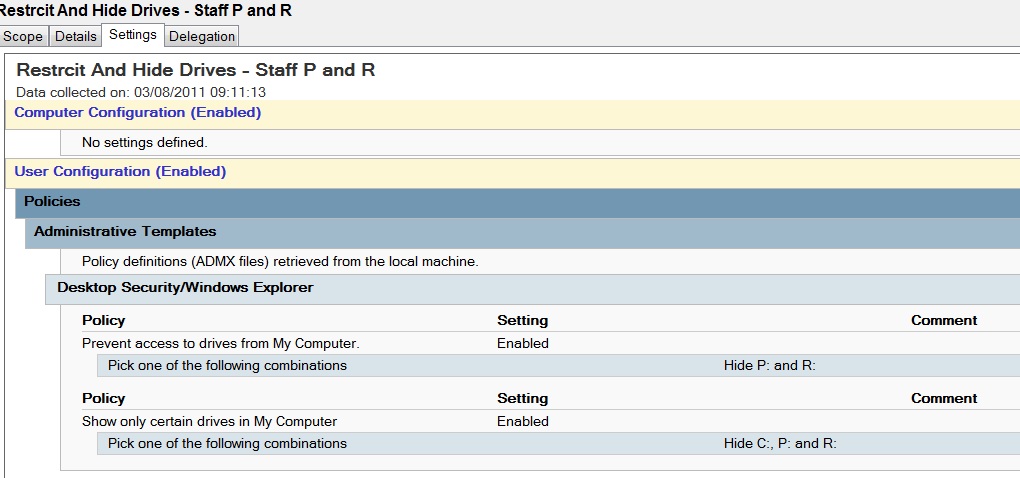
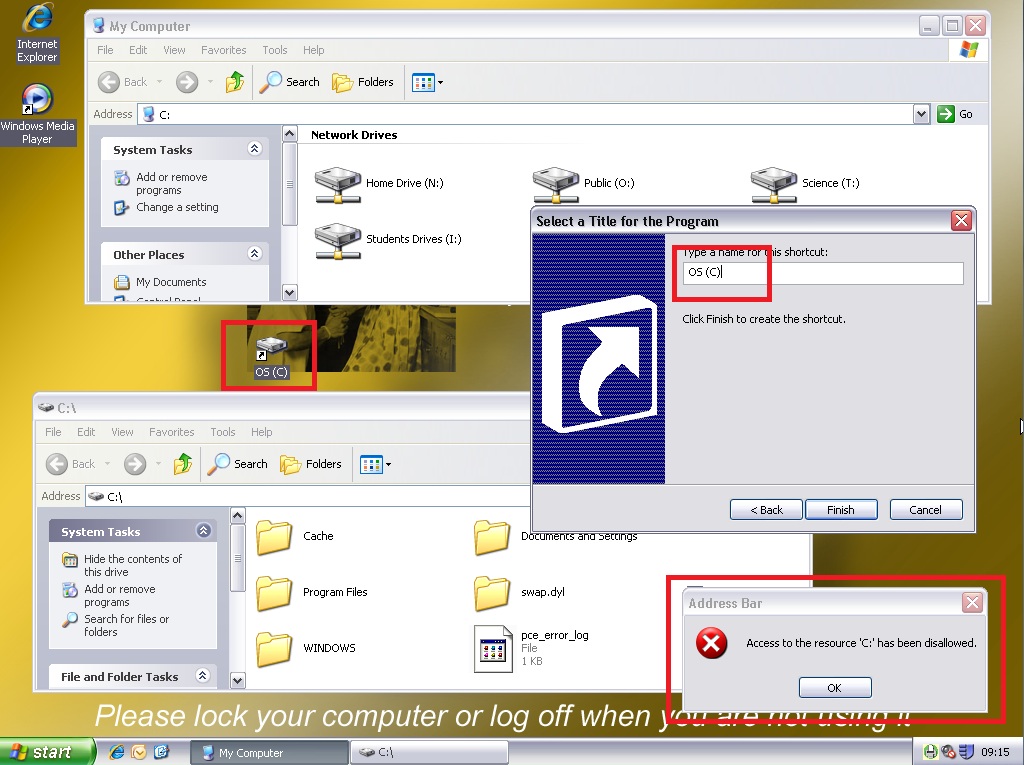
Thanks for the replies, I dont think I am explaining the loophole clearly... See screenshots.. C drive and hidden network shares (R & P) and restricted and do not allow access using GP. As you can see from the GP screenshot1. They do not ever show in my computer and deny access (screenshot2) If you try and browse to C or P or R you are not allowed (see screenshot2) "Acess to the resources XXX has been disallowed" BUT there is a loophole.. If staff who have a roaming desktop right click and create shortcut, they can then open that shortcut and get into these dissallowed and hidden areas. (Screenshot2) You can see that opening the shortcut has given access to the C drive. If they knew the names of the other hidden shares they could also browse any of these that they have permissions to. Run is also disabled from the start menu. Students currently cannot do this as they have a fixed desktop. Can anyone else please test on there system? I am hoping that there is a way that when they open a shortcut they have made to, eg. "\\dc1\netlogon" they get the "Acess to the resources XXX has been disallowed" (screenshot2) Many thanks in advance.

-
Hi dave, This happens on both xp/vista/w7 but in w7 the shortcut needs to be run as admin...... I did play with list contents permission but it seems to cause all sorts of problems with the not so well coded educational apps. I have hidden everything in netlogon but still there must be a way to stop this.
-
Hi dave, We have the C drive hidden and restricted. We also have fsrm running on home drives. Students have a shared read only desktop but staff have a roaming desktop. This is the only place I've seen where it's possible to create shortened but I would like to stop it everywhere incase I have missed somewhere. Can someone please try and create a shortcut to C:\ and see if they are stopped creating it or stopped browsing it after ?? If so how please!!
-
Thanks for the replys, Run is already disbaled. If they try and type in the address they are not allowed, but for some reason creating a shortcut to it works? We have an applications share that is hidden, the start menu links to it for certain applications, I dont want the students to be able to create a shortcut to it in the "Music" room and use applications that are meant for ICT lessons. Does anyone please know how to disbale shortcut method please?
-
Hi all, Just seen that users can create shortcuts to network locations, e.g. on their desktop, right click, new shortcut and "\\dc1\netlogon". They can then browse this folder in explorer. Also if they knew the path they could browse to a new hidden mapped drive that I have setup for them, "\\server\resourses$". They need read permissions on this folder but tese files are only to be opened from the intranet. Just also see that they can also create a shortcut to "C:\" if they like??? Have I missed a big step in security here? Thanks in advance!
-
Script / Macro Request - Match row A to Row B - Or other solution?
burgemaster replied to burgemaster's topic in Scripts
Thanks Steve21, Now all AD accounts are now matched to our MIS system. Each account has the Student ID in the "EmployeeId" field and are in the correct house Security Group Thanks again! -
Hi. It works for our staff. If you are on about the list of 5 recently loaded application on the left of the start menu? Will look for you in the settings tomorrow
-
Script / Macro Request - Match row A to Row B - Or other solution?
burgemaster replied to burgemaster's topic in Scripts
Sorry, eg. MIS has the names, bob & james. But in AD we have names bob,james, david and Tom..... Bob and James get matched but David and Tom probably left and we didnt remove their accounts from AD. Could these names not on the MIS list get flagged up? ALSO: For anyone else using this, you need to as well as editing the "Loop Until", also need to change the F$ value in row G -
Script / Macro Request - Match row A to Row B - Or other solution?
burgemaster replied to burgemaster's topic in Scripts
Steve thats worked really well! I am going through year by year and so far it has incorrectly matched about 5 per year. These were also acceptable as sometimes the Ad name was C.Jones instead of Chris etc. Really gratefull for this, it will hopefully save me hours of work. One last thing if this is very easy to add, I have a perfectly matched list over on the right hand side. But I have more AD accounts than MIS account, I cant see which of the names it didnt match up. Is there a way that any names from E that are not from column N could be highlighted or something? So I can then delete them from AD? If not or any hassle dont worry!! Many thanks for all your help on this. Really gratefull -
Script / Macro Request - Match row A to Row B - Or other solution?
burgemaster replied to burgemaster's topic in Scripts
Steve thats awesome ! 100% there! Could I please ask where or on what page i would replace/paste in the complete long list of 800 students? Also would it fail if there were names in the AD list that werent in the MIS list? (maybe they have left and us not deleted the account) So gratefull! -
Script / Macro Request - Match row A to Row B - Or other solution?
burgemaster replied to burgemaster's topic in Scripts
Wow that certainly looks like what we need The end product we would want the correct MIS name on the same line as the AD username. The aim would for me to have the correct house next to the correct AD name as then UMRA can import it and make the changes. Thanks in advance!! -
Script / Macro Request - Match row A to Row B - Or other solution?
burgemaster replied to burgemaster's topic in Scripts
Thanks for your time!! Please see attached example with fake students.... If I can match them all up I can then use UMRA to automatically do all the AD shizzle. Sample_Students.xls -
Hi all, We have all 900 students in 4 houses.... each house has a security group and each students has been added to the group where needed. BUT.. They have now decided that we now only need 3 houses and all students have been rehoused into 3 on the MIS system. We now need to somehow link an exported list from our MIS system (with the new list of Names and Houses) to an exported list from AD. Unfortunely the names on the MIS system do not always match the names in AD.. e.g. John.Bloggs vs Jonothan.Bloggs. Does anyone please know how I can match up two lists in Excel to the best fit. Maybe with a % score of how well they matched? so we could then manually check the lower % matches? Otherwise we are going to have to go through 800 students adding them to security groups ! Thanks in advance eg. AD MIS HOUSE 08Jon.bloggs | Jonathon Bloggs | Sebright
-
Windows Movie Maker Live on Windows 7 MSI
burgemaster replied to djgreek's topic in Educational Software
You need 3 Packages deployed in this order: 1) WindowsLiveSync.msi (1.4meg) 2) PhotoLibrary.msi (18.3meg) 3) MovieMaker.msi (6.6meg) Good luck. -
We had a powercut this weekend. All 9 of the Win 7 revos were effected. 3 were at the login and had "trust relationship" problems, and the other 6 were frozen mid system repair! This is doing this auotmatically and I plan to use that command to stop it! Thanks "Tricks"
-
A Common problem we have here: Teacher sends a class of students a DOCX file to work on via email..... The students go into their email and open the file and begin working on it..... The end of the lesson they hit save.... Next week... Document has been lost as it was saved to the temp folder. Does anyone know if it is possible for the temp attachment opening location can be moved to thier home drive? I know the teachers just have to say "Right open it then Save As.." but they dont. Been looking at OutlookSecureTempFolder in HKEY_CURRENT_USER\Software\Microsoft\Office\12.0\Outlook\Security Anyone already sorted this before I carry on?
-
Do you guys "share" your staff / Student home drives?
burgemaster replied to burgemaster's topic in General Chat
Confirmed: File Server Resource Manager (with server 2003 R2) does not correctly display the "home drive" Quota but instead shows the whole drive quota, unless each home directory is shared and the quota applied that share. -
Do you guys "share" your staff / Student home drives?
burgemaster replied to burgemaster's topic in General Chat
Im about to give up and ditch FSRM quota limits and put the quota limit back on the drive as before Need Plextor !!! Cant find a GP to show quota instead of drive space... Started over from scratch..... Created a brand new home for test user: share H:\test\test_user, gave everyone full control permissions on all shares and folders, then set the quota to 100mb Again it appears at 1tb in the drive properties but DOES apply the quota.... H:\Test_Staff <- works H:\staff_drives\test_staff <- doesnt work My only thought is that ive just noticed it is running Windows UDS Server 2003 SP2 and not R2... -
Do you guys "share" your staff / Student home drives?
burgemaster replied to burgemaster's topic in General Chat
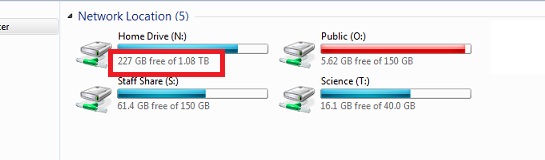
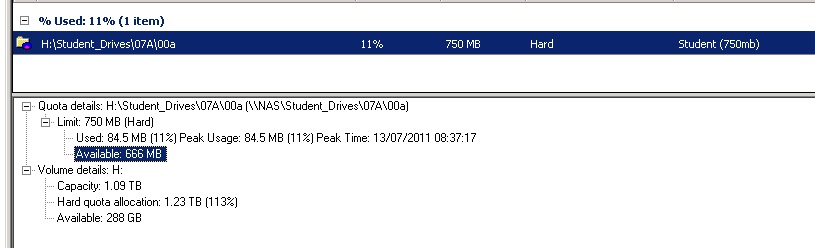
Thanks Ben, so it could be fixable Would you mind comparing settings please? Here is our setup (not working): Staff: "G:\Staff_Drives\" <-- staff drives is shared. Inside are all the staff members folders. Students: "H:\Student_Drives\ year of entry \" <-- Student drives folder is shared, Inside are all the student folders. They have an N: (home drive). in AD this is mapped as: \\server\student_drives\ "year of entry to school" \username I setup a quota for each individual "year group" eg. "\\server\student_drives\07" and checked the "auto apply template" button Currently the quota shows as the WHOLE disk size (1tb) instead of their quota limit of 750meg. When you say works correctly, ours works and restrict them to the allocated quota, but do you also mean the visual quota size are also correct when they check?
-
Do you guys "share" your staff / Student home drives?
burgemaster replied to burgemaster's topic in General Chat
Why disk space is incorrectly reported on folders where File Server Resource Manager quotas are enabled - The Storage Team at Microsoft - File Cabinet Blog - Site Home - TechNet Blogs It says at the bottom: For Windows XP clients, the workaround is to have the quota on the root of the share (like in case 1). This has been fixed for SMB 2.0 and will not be a problem when clients running Windows Vista access servers running Windows Server "Longhorn." So the other option is to upgrade our NAS server to server 2k8 -
Do you guys "share" your staff / Student home drives?
burgemaster replied to burgemaster's topic in General Chat
Thanks, we have the above setup currently also, there is one share called "Staff_Drives"..... BUT I am trying to setup quotas using FSRM (File Server Resource Manager) and it look like each home drive requires a share for it to work correctly on 2003 r2.... "\\server\home" works, but "\\server\homedrives\home" doesnt work.... http://www.edugeek.net/forums/how-do-you-do/79062-disk-quotas.html#post705757