Boredguy
-
Posts
4,110 -
Joined
-
Last visited
Content Type
Forums
News
20th
EduGeek EDIT Conference
Blogs
Everything posted by Boredguy
-
Likewise we've a site that has had to migrate to FMS connected, even though we stopped using it in Sept 25 and its just there as part of the financial fall back if data needs to be looked up for the next couple of years. No need for it to be updated but cause we have a support contract to access it, migration has had to occur just in case we need it.
-

Walter Koenig, actor best known as Chekov on Star Trek, dies aged 90
Boredguy replied to 6Foot2's topic in General Chat
He has passed beyond the rim -
Well in theory, after half term is over PPG will roll out the new SNG login method which is the SSO for our own 365/Google tenancies to allow the CA rules
-
only been using them for the past 25 years
-
@db12 to get my Unifi Servers/Cloudkeys/NVR's to be accessible via the Site Manager from offsite, we had to configure them on our firewall to have a public IP, and to have the correct ports open for it to function. Main one was UDP Port 3478, but there is a list at Required Ports Reference – Ubiquiti Help Center for what you need open inbound/outbound
-
After using it for the past 5 years, think our users have gotten used to the term "Assignment" since for us it's normally a class based assignment they have to complete more so that us using it for homeworks
-
Thing is, if you use RM as an ISP, you often can't use another DNS as the firewall is normally configured to block them (and they already have the pDNS configured on their side) If you have access to the managed firewall you can open up alternative DNS, but if your using their web filtering provision, then that might break.
-
We have the MIS Sync running happily from the SIMS Server for several sites (though I have it on a dedicated box that also has all the other MIS Sync Tools to keep the load off the SIMS box itself), but would be checking the permissions. Maybe set the Program files (x86)\ParentPay folder that holds the MIS Sync to allow everyone to write (same with the ParentPay folder in the Users\Appdata\Local) and then launch it and see if the values stay saved.
-
Blocking students sending to All staff email - HELP
Boredguy replied to maxrebo's topic in How do you do....it?
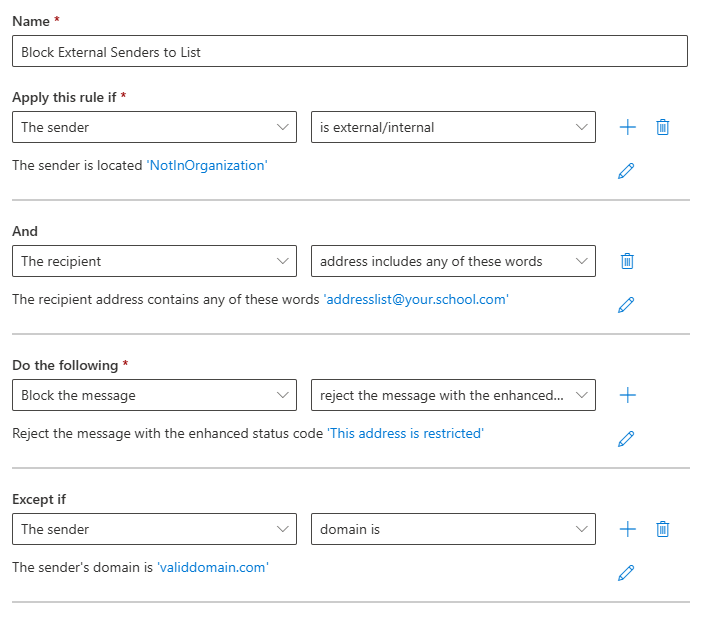
Well an out the box method could be a mail rule. Example A MSP did something similar at one of our sites to block students from e-mailing the staff list instead of just using the extended attribute as it wasn't a mail enabled security group in AD but just a cloud distribution list.
-
UniFi cameras are our go to for any system at our sites now as the system is easy to use and can happily work with a lot of our existing third party cameras in place (such as Hikvision/HiLook) with just a few tweaks to the camera's configuration if Onvif isn't already running. Just depends on what size NVR you want. We're using the 1st Gen NVR Pro's with the 7 drive bays fully loaded, and we have around 54 cameras on 1 unit and 48Tb of storage to give us around 28 days footage capacity.
-
You say it has the SIMS user details of the user correct, but the initial login details for ParentPay itself are correct aren't they and you can manually login to the website with them?
-
I have a batch file that calls C:\Progra~2\ParentPay\MISSync.exe /sims /quiet Within the MISSync Tools->Settings I've got it configured to sent a notification e-mail so each morning and afternoon I know it's run when the e-mail arrives
-
Bromcom - multiple tabs/windows for different schools
Boredguy replied to synaesthesia's topic in MIS Systems
Not really, as I also run Canva, BBC and even SNG in different browser profiles at once -
Bromcom - multiple tabs/windows for different schools
Boredguy replied to synaesthesia's topic in MIS Systems
He didn't say you can't have different browser profiles, as the information is designed to run in separate blocks which is why we can be in multiple Google/365 Tenant Admin consoles at once with with the different profiles (just not all within the same profile instance) I'd try signing in to your Virtual school in a Guest browser profile and see what happens, but should be no different that you logging in on a separate computer -
I do have a SharePoint retention policy configured, but it's only applied to a single site and we use Power automate to ensure newly created content has it applied as its for our CCTV exports we only want to keep for a specific duration.
-
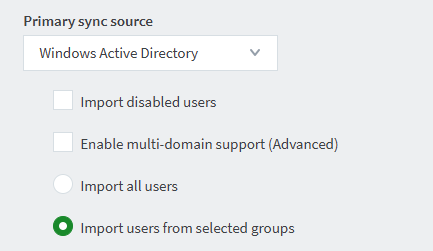
A Sync will search everything on your OU, but typically only creates users for AD Groups you have selected that should be imported into Papercut. I have our Students, Teaching Staff and Non-Teaching staff AD groups as the main ones, but also selected all the departmental AD Groups so that they can be associated with "Accounts" for departmental billing purpose
-
About same length of time here, but we're moving away from Sage in the next couple of months so no doubt it will be a slower platform still...
- 1 reply
-
- 1
-

-
Cheers updating that to point to the SWGfL updateproxy has resolved it... strange the support provider hasn't got back to us yet so going to close that call with them
-
Well if its any help, tracked it down on our setup as being cause SIMS is giving a 407 error as it can't authenticate through the RM User based filtering (Get the same with Powershell so have to tell it to pick up the browser credentials at times). If you go transparent or a non userbased filter it likely works which is why the suggestion from RM to point to one of their different proxys likely worked fine
-
Do you have a unifi switch/router/gateway that supports Layer 3 routing. I know I can't do it on my setup as we only have the option for third party router as we don't have a Unifi Gateway/Router
-
Thats because Lesson Monitor doesn't exist within SNG yet. I still have out office based staff using SIMS.Net, and it's only the teachers using SNG for registers
-
Tips Don't start using it as if it's SIMS.Net. Treat it the same as any other new platform you've been asked to use, as it is designed more for Teachers so information isn't where you'd expect it to be as an office based role.
-
Button to Contact Support in 365 Admin Centre greyed out :(
Boredguy replied to kennysarmy's topic in Cloud Services
If your trying to search e-mails and it's not working, by chance is it within Outlook Legacy? -
CPOMS Sync and Support response times
Boredguy replied to Alastairb25's topic in Educational Software
We had a sync issue at the start of term so our DSL managed to get hold of CPOMS and found out it hadn't syncronised since last July so they managed to get a manual sync request done. Also know one of our other sites had a sync issue end of last week (still didn't have any Y7's on 2 days after they had been enrolled) but weren't able to get a manual sync done. At least with Groupcall if you have a login you can see when the last sync with CPOMS was in your dashboard and give you some understanding on where the issue is (especially if other services syncing with Group call are up to date) -
One of our sites reported similar issues yesterday and raise an issue with our support provider. Not heard what the outcome was have noticed a few issues about it since the Summer release came out back in July which forced linked docs to go to Sims Next Gen storage by default (never mind the fact the onsite doc storage has hardly uploaded content yet making it a real case of pot luck for where a document might be)