Koldov
-
Posts
5,084 -
Joined
-
Last visited
Content Type
Forums
News
20th
EduGeek EDIT Conference
Blogs
Everything posted by Koldov
-
 Sorry, can't help with any practical advice. Interesting clause... I wonder how that's proven? Test case imminent...? I would imagine neither the parents or the child knew about these incidents being recorded until the SAR (although it may be distressing now to know your misdemeanours have been recorded somewhere official) and potential harm being what exactly...? Do these reports on the safeguarding platform follow them from school to school, will it put them on 'the radar' of the next school? Are they like a criminal record.... will it stop them getting a job in the future...? /s Isn't this a 'safeguarding trumps all' type of scenario and all 'concerns' should be recorded? I mean (bear with the extreme example)... child A says to teacher X, that child B is bullying child C (neither child B or C will talk about it), so not recorded, as hearsay. child A says to teacher Y, that child B is bullying child C (neither child B or C will talk about it), so not recorded, as hearsay. child A says to teacher Z, that child B is bullying child C (neither child B or C will talk about it), so not recorded, as hearsay. child B stabs child C... No reports, no flags, no escalation, no intervention... why didn't the school see it coming, why wasn't anything done about it...? Have you reached out to MyConcern...? I would certainly hope they wouldn't wash their hands of it and say how it's used is up to the end-user... it's possible, but I would think they might be well versed in what the GDPR stance is with what can and cannot be held on their platform?
 -
https://www.edugeek.net/forums/topic/214635-google-reviews/#comment-1930869 https://www.edugeek.net/forums/topic/221514-google-to-remove-existing-reviews-and-ratings-for-schools-in-the-uk-and-ireland/#comment-1988238 Haven't done this myself, but reading these threads at the time, it seemed to suggest it would be automatic for schools/education establishments. But it may be as @PotNoodleTech says, once you have claimed your 'business' you can then make sure it is identified as a school and then the reviews will be disabled
-
Firstly are either of those statements true...? Secondly, I could imagine that as a very broad rule of thumb you might associate 75’ Interactive touchscreen in a classroom rather than a projector as being an indicator of 'future proofing' and 'investment in IT' and therefore be part of an inspection, so it isn't impossible. Lastly, I think OFSTED publish their inspection criteria... it shouldn't be difficult to find any mention of it, if you were so inclined.
-
Personally I would ask for a far more detailed explanation of what they found, before I start trying to mess around with any settings. NLA enforced by GPO or whatever is fine, but from my research "NLA is available on Windows operating systems starting from Windows Vista and Windows Server 2008" and "Remote Desktop Protocol (RDP) 6.0" and "Network Level Authentication (NLA) is typically enabled by default on Windows Server 2012 and later, as well as newer versions of Windows 10 and Windows 11 for Remote Desktop connections". I started when we had Server 2008 (and maybe one old 2003), but they were both upgraded to 2012R2 not long after I started. I don't know what RDP sessions used to look like (so I don't know what they looked like before NLA), but I have always had to authenticate with username and password before the connection is established and I thought that was the point of NLA. On my network opening an RDP session brings up a dialogue/prompt where I select the computer and enter credentials, possibly before NLA you would connect to the computer desktop and then enter credentials. Before this I guess you established a connection to the desktop and then typed in a username and password, this is what I thought NLA stopped, so when you say "allowing access to the rdp session without NLA (still need to login though)" what do you mean exactly...? Somehow (and I don't know now) I just checked my two physical hosts and both of them do NOT have the tick in 'Settings > System > Remote Desktop > Advanced Settings > Require computers to use NLA... and neither have the Registry entry (or they do but it is 0)... and yet both require me to sign on with credentials. The trouble is without being more specific about why they believe NLA is not working and how they proved it, you can't test. I only have 1 RD enabled user in my network and only 1 IP that is allowed to connect to anything, so it's difficult to test. You can try this... https://digi.ninja/blog/rdp_show_login_page.php EDIT: Also, where is your GPO? As I noticed my hosts (apparently) didn't have NLA enabled, I've created one at the root of my Domain as I guess every computer and server should have it.
-
Thanks, now to get the OH to run around downstairs turning everything on and off in case one of them is switched live! 🙄
-
TL;DR - How do I test cables in the loft that have been cut off, without potentially killing myself... I spent the half-term in my loft (literally everyday, morning till afternoon up until 5 p.m. Sunday), removing all the insulation. We recently moved into an old 1950s bungalow that has apparently had a severe mouse infestation for many years (very old lady lived there on her own before us and probably never went into the loft). Anyway, after 2 changes of hooded coveralls (including gloves and masks), 3 dead mice, an Indiana Jones style labyrinth of cobwebs, 30 bin bags and numerous vacuum cleaner empties later it is now clear... Just to set the scene a little further, the dead mice had decomposed mostly onto the loft floor (which is the ceiling of the room below obviously) and most of the insulation I lifted had mouse poo falling out like chocolate sprinkles... also we had the old original 1950s roof replaced a couple of months ago and the resulting mess from the dust, moss and the bitumen membrane that disintegrated in the roofer's hands meant it was all covered in a thick layer of filth.... so it had to be done! During the insulation removal I found various electrical cables that had been cut and a few of them I can't trace where they go after going through the ceiling and into the wall of the room below... Do I just hope they were disconnected from the source? Can I use a basic multimeter to probe the live and neutral wires? I guess the default answer will be call an electrician, which would be the sensible/safest way, but I'd rather not pay those kind of rates for 3 or 4 cables if they're going to do something I could (albeit probably with a more expensive multimeter)...
-
I guess they passed though, as they demonstrably proved the 'adverse impacts of AI' ... and I guess as students they could claim in some respects they are 'marginalized and discriminated against'...?
-
Actually I'm surprised with all the Gulf of Mexico shenanigans that there aren't any plans to change it to the 'American' language... Back to the topic though, I'm OK with Windows 10 LTSC and have been since the start so I might go for the Windows 11 version, what am I missing out on (apart from regular updates that potentially break all the things)?

-
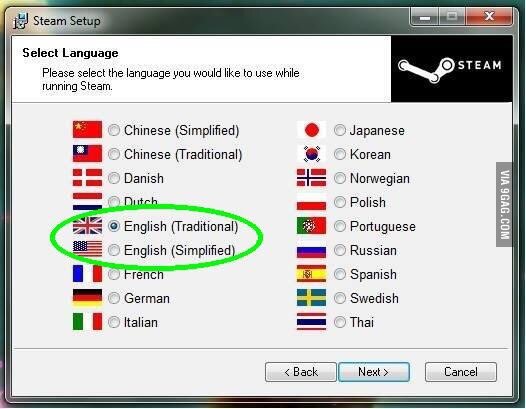
I don't know... I think I'm OK with it... Because the English spoken in England is obviously the only correct version and so should be the version spoken 'internationally'...? To me it's more to do with the fact that the download of the U.S. version (in typical American fashion) represents itself as 'English' without indicating it is the U.S. version and so somehow portrays itself as the primary English language version. Which seems to indicate that if you speak 'English', that this is the version to use... However, I think this would be a much more appropriate way to describe them... 😉
-
You mean a bit like the 'DfE Technology in Schools Survey for 2025 (England Only)' where we had to put our school, on the promise that information won't be recorded... But honestly as I said, if 'other schools can do it', what rationale can you put other than SLT won't budget for it?
-
Sure, I get what you mean and honestly yes, in some ways I'd like that, but in reality.... no. My HT has had some Ofsted connections and I see the blank look on their face the moment I start any conversation that includes even one technical word! For many other reasons too.... I'd be worried you'd be basically seen as stabbing your SLT in the back for alleging some sort of mishandling of the budget. You'd end up with another reason that would put you on a adversarial tack, because (as some posts on here claim) other schools can do it... and if your school can't... whose fault is that? Plus the absolute core of Ofsted, is not IT related, they have enough to observe and sort through (Results, T&L, Safeguarding, behaviour, etc.) there's just too much. As it is, many schools complain they don't have enough time to really get the 'feel' of the school (and as mentioned, a budget review option never made it into the inspection). I think we've had 3 or 4 since I've been here and not once have I seen an inspector. To even remotely suggest they will need to be interested in the IT provision is a nice fantasy, it won't happen, it would be a massive change for them (I'm sure they've got enough going on at the moment) and unless you could quite literally point to a poor Wi-Fi signal in a building and say 'this is why our SATS results were below the national average, this is why we can't follow the KCSIE guidelines, this is why we can't control behaviour' it won't matter that your switches are 15 years old.
-
FTFY... I was going to say 'Tuesday' but I guess Thursday works as well... 🤣 If it checks at 07:00, I guess any time after that and before the first person logs in would do it. 🤔
-
So you want ex-teachers to be able to look at your network and determine if it needs upgrading? Based on what knowledge?
-
I feel so lucky working in the KS2 age range... Generally they're old enough not to stick biscuits in the CD drives, snot (or other bodily fluids) all over the keyboard/mouse/screen/chair and most of them do what the teacher tells them, most of the time (there are exceptions of course). But, they're not quite old enough to try 'hacking' anything, slashing cables, stealing components etc. Although I still make sure most things are screwed in or cable tied down... in 14+ years I've only replaced one or two mice and I'd say that was general wear and tear, nothing malicious... Although I once worked (very briefly) for a nursery and apart from having little toddlers with full nappies and snot dripping down their faces lumbering towards me wanting to watch what I was doing (a little too closely), I saw a mop bucket in the hall labelled 'For Bodily Fluids Only'.... I didn't stay long... Anyway, for the OP, it's not your job to manage what goes on in the classroom, you just have to deal with the aftermath... You can make sure you record it and report to SLT and inform them they can sort it out one of two ways... The 'hard' way, be a little more forceful with the teachers and their classroom management skills, billing departments for damage (or not replace damaged items) etc. Or the easy way, just let it carry on and pay for new keyboards/mice every few weeks out of their already limited budget (although as said the cost compared to a lot of other expenditures may seem too minimal to worry them)... I'm pretty sure they'll choose the 'easy' way (even though they know they should choose the 'hard' way)... Here it seems that the smooth continuation of T&L comes above all else (which I guess is right),... teacher (or student) breaks a laptop/projector/visualise/interactive board, etc. Just get a new one ASAP... no repercussions... just seems like they don't want to upset the teachers, I came from the private sector (aka a real job) and some of the stuff I see even from the staff that is ignored, would have been verbal/written warning worthy in a business. I mean teachers are told to do a certain thing, they don't do it... nothing happens...
-
I think GPOs themselves are normally cached on the device. I would choose another setting to determine if the policies are being applied or not (see * below). Google AI overview: "Yes, Group Policy settings are cached on client devices, so they will remain in effect through reboots even if the device cannot access a Domain Controller (DC). However, if new GPOs are published or updated on the DC, they won't be applied to the client device until the DC can communicate with it again. Here's a more detailed explanation: Caching: Group Policy settings are downloaded and stored on client machines. This allows them to remain effective even when disconnected from the network or unable to reach a DC. Persistence: These cached settings remain in effect until the client device is able to reconnect to the DC, at which point it will re-evaluate and apply any updated or new GPOs. Limited Functionality: While the cached settings remain, they are not dynamically updated. If the GPO changes on the DC, the client device will not automatically reflect those changes until it reconnects. Reboot Requirement: Some GPO settings, like security policies, may require a reboot for them to take effect, even when the client is connected to the DC" *Although iirc things like icons are read from a share each boot and that's possibly where the issue lies. I had a problem with desktop icons not being displayed though and I resorted to copying them to a folder on each machine's C:\ drive. I can't remember if it was just a delay in reading the share or a permission issue and although it adds a layer of complexity having to remember to add the icon every time a new shortcut is made, it doesn't happen that often and when the icon doesn't appear, I then remember why... 🙄 Is there any other complexity in your set-up (redirected desktops etc.)?
-
School Closure / School merger - what happens to SIMS data?
Koldov replied to PotNoodleTech's topic in MIS Systems
I guess it's the LEA who are closing the school, so surely the onus is on the LEA to preserve the data for that school, it can't just disappear... I presume historic data on current pupils would have to be sent to the 'new' school somehow, but I don't deal with data or admissions, so not sure what the transfer CTF files hold. Although as it's SIMS I'm guessing you will need to find other ways to output any other previous historic data as you can't keep it in the SIMS database (unless the LEA have a SIMS contract?). Give it time (I'm not sure how much time you have), as there must be someone on here that has been through this... -
Well, I decided on an ASDA PAYG bundle for £4 in the end and ordered the SIM last night, I'm hoping I'm not paying £4 for a SIM and then have to top-up... There's no data, but I'm hopefully only using it for a couple of days. I looked at a lot of SIMs on Amazon for around £0.50, but I guess they need some kind of top-up and the reviews were mixed. Annoyingly I had to create an account with ASDA and pay by card, even though the first checkout screen clearly states PayPal, the payment screen had no options except card!
-
Yeah, that link was in my 3rd or 4th post. So if you run repadmin /replsummary or repadmin /showreps your errors have gone (if so, leave it an hour or so or until tomorrow and run them again)? Then check if your laptops are still having issues applying GPOs. EDIT: The dcdiag /c /v and the repadmin /showobjmeta were to look for errors, if there are none now it probably isn't worth it.
-
Your errors appear to be in the DomainDNSZones, but specifically: "Error 8606 in the DC=DomainDnsZones context, along with the "Insufficient attributes were given to create an object" message, indicates that a source domain controller is attempting to replicate changes to a deleted object that has been garbage-collected on a destination domain controller. This typically happens when an object is created, deleted, and then garbage-collected before the changes replicate to all domain controllers" So, I guess whilst one DC was down, maybe something in AD got created/deleted and the other DC is still trying to replicate it? Good article on repadmin (easier to understand than the MS stuff)... Especially: "3. Error 8606: Insufficient attributes were given to create an object This error occurs when attributes required for replication are missing. You can use repadmin /showobjmeta to inspect the metadata for the affected object and determine which attributes are causing the failure." So try repadmin /showobjmeta dc01 "<GUID=d111021f-068c-4d2c-bbce-c5d32fa9639c>" on yours
-
I didn't see the answers to these... Did you run that original code on both DCs? Although, I didn't really see anything in that output you posted, only the Domain/Forest level of 2012R2. What Server OS are you running? A couple of internet search results seem to suggest running full DCDIAG on both: dcdiag /c /v It will be long so just go through it and see if anything jumps out. Also, do you notice if the laptops log on to one DC they are fine, but if they log on to the other it fails to apply the GPOs? Use this in CMD (non admin): echo %logonserver% More info on the downfalls of restoring DCs: https://community.spiceworks.com/t/active-directory-problems/512067 Honestly I'm at the end of anything I even remotely understand and risk giving you bad info or making it worse as I'm just searching the internet now... It may be you'll have to find out which DC is in error and if it's the PDC, seize the roles and demote it. But... as it appears to have been some sort of error made by your consultant, I guess they need to come and fix it (and quickly if it's affecting prod... I mean T&L).
-
Honestly, from my limited knowledge/understanding... that looks OK... From the MS article: "One way to detect a USN rollback is to use the Windows Server version of Repadmin.exe to run the repadmin /showutdvec command. This version of Repadmin.exe displays the up-to-dateness vector USN for all domain controllers that replicate a common naming context. To detect a USN rollback, compare the output of the repadmin /showutdvec command on the domain controller with the output of the same command on the domain controller's replication partners. If the direct replication partners have a higher USN number for the domain controller than the domain controller has for itself, and the repadmin /showreps command does not report replication errors between direct replication partners, you have compelling evidence of a USN rollback." DC01 has a higher USN number for itself (or the same as replication just happened) than DC02 has for it DC02 has a higher USN number for itself than DC02 has for it So maybe this doesn't show a USN rollback situation. I would expect the output to identify if any domain controller has a lower USN recorded for itself than its replication partner does, but in your case: DC01 = 38198459 and DC02 thinks DC01 is the same. DC02 = 37740830 and DC01 thinks DC02 = 37740814, so a bit behind, but crucially it's not higher. For example I think if DC01 had a USN = 38198459, but DC02 thought DC01 had a USN = 38198461 you would see DC01 had been rolled back. In regedit (on both DCs) HKLM\System\CurrentControlSet\Services\NTDS\Parameters Do either have a key that says “DSA Not Writable” with a value of “4”. Also can you run repadmin /showreps on both. EDIT: Also see if the Netlogon service is paused on either DC
-
I've signed up to SKY mobile for a cheap VIP deal, but I am already with SKY mobile (long story)... 🙄 Anyway, I need to port out from SKY to another provider and then port back in. Does anyone know of a PAYG SIM (preferably free) that I can activate without needing to top-up, port into, use for a couple of days (I won't be making any calls) and then port out of back to SKY...? Seems to be a common thing, but I've read operators are getting annoyed and started charging minimum top-ups before allowing you to get a PAC!
-
Quite the baptism of fire then... it would have been helpful to know about the migration and I don't know what your set-up is or your job role, but I think your consultant should have involved you. So, forget everything I posted... @psydii has probably hit the nail on the head as it now seems obvious that given the dates coinciding there's been some issue relating to the migration. I'm certainly no expert, but have a basic understanding as I changed our set-up and put everything in Hyper-V quite a few years ago now and I do remember reading up a lot on DCs, authoritative restores, PDCs and 'the roles' especially to be very careful on which was moved when and how long the PDC (DC1) could be off before the replication partner (DC2) decided to go it alone and take over, I'm guessing DC2 was moved first as it was expendable but maybe there was an issue when DC1 was moved and it was off too long? Or the back-up/saved version/snapshot that was moved wasn't Active Directory-aware? "If a Primary Domain Controller (PDC) is offline for a prolonged period, a replication partner, typically another domain controller, will assume the PDC's role and continue managing the domain's Active Directory. This transition ensures the ongoing functionality of the network, although certain operations, like password changes, might be temporarily affected." If DC2 then raised it's USN above the recorded value on DC1 it would not recognise it and any AD changes won't be replicated (it's far more complicated, but something like that anyway)but... "Because these destination domain controllers believe they're up to date, no replication errors are reported in Directory Service event logs or by monitoring and diagnostic tools." To check, you can run the following commands on both DCs at the same time (obviously change the {* *} information): repadmin /showutdvec {*domain-controller*} dc={*domain*},dc={*com*} I ran it this morning and it shows the following (there will be more info, but pick out the lines with your DCs). In this example: DC01 knows that the DC01 USN = 3164738 @ 09:59 but... DC02 thinks that the DC01 USN = 3164737 @ 09:58 (because 1 change has happened and they haven't replicated in the last minute) DC02 knows that the DC02 USN = 3657260 @ 09:59 but... DC01 thinks that the DC02 USN = 3657256 @ 09:58 (because 4 changes have happened and they haven't replicated in the last minute)
-
Did you run that code on both DCs? I have trouble remembering yesterday, but did anything happen 55 days ago that might have changed the replication? Also, didn't really see anything in that output, only the Domain/Forest level of 2012R2. What Server OS are you running? *I cannot condone/advise you do any of the following* A couple of internet search results seem to suggest running full DCDIAG: dcdiag /c /v This will be large as it is all tests and verbose output. It showed there was a machine that was identified. The solution in one was to edit the registry to change the Strict Replication Consistency key to enable loose replication consistency. Obviously that comes with the usual warnings and doesn't actually fix the problem... https://community.spiceworks.com/t/error-8606-ad-replication/768737/14#:~:text=Jul 2020-,Okay%2C I’m not sure if I fixed the problem or just temporarily got rid of it and it will appear again. After running,-the command dcdiag This is from the same link as the above post from @psydii I believe, as it's MS it's a tough read and way over my head, but talks more about loose replication and it's issues... tombstone life and using LoL (Lingering Object Liquidator). https://learn.microsoft.com/en-us/troubleshoot/windows-server/active-directory/replication-error-8606#:~:text=If the destination domain controller was configured to use loose replication consistency%2C the object would have been "reanimated" on the destination domain controller's copy of the directory As does this article: https://techcommunity.microsoft.com/discussions/microsoft-entra/resolution-of-active-directory-replication-error-8606-1988/2754291#:~:text=intentionally deleted. Resolution-,Resolution,-For our need And this: https://akhpark.wordpress.com/2014/07/03/active-directory-server-wont-replicate-if-one-of-the-server-was-offline-for-a-long-time/ Again, a warning of using any of this without proper research and understanding (and good backups).
-
FFS! That would have been good to know a few years ago... How come nobody ever advises that option?