Koldov
-
Posts
5,084 -
Joined
-
Last visited
Content Type
Forums
News
20th
EduGeek EDIT Conference
Blogs
Everything posted by Koldov
-
Quick internet search says OU* is irrelevant. https://www.reddit.com/r/sysadmin/comments/yyp1s6/krbtgt_user_was_moved_into_another_ou_issues/ *Depending on if you have anything that looks for an account in a specific OU, like a password change script.
-
Isn't it supposed to be disabled...? Mine is! BTW it's in Domain > Users
-
When I started (many years ago), apparently the 3rd party that previously supported the school used 'changeme' as the generic first time password given out to new users for them to change when they first signed in. Quite a few years later I had to do some work on the P.E. teacher's laptop. I needed to see the issue they were having when they were logged in, but they were taking a lesson outside... so I just asked them for their password. Guess what it was... EDIT: Bearing in mind there was no prevent reuse or strong password enforcement...
-
Approved...

-
As for the OP... I found this: https://community.spiceworks.com/t/users-not-prompted-to-change-expired-password/512836/4 From what I seen the password expiry will run from the last time they changed it, so if they change it at 11:00, it will expire at 11:00 in 30 (60, 90) days. I wondered if there was a way to reset it overnight, so they have to change it before they log-on...? However, someone also mentions 'cached credentials' and being able to log-on even though their password has expired. Also keep in mind if they use cached credentials to login it wont prompt the password change. If they are logging in before the network connects, say on a laptop that has just turned on, it will log them in even though their password is expired. Furthermore, Windows 7 & Windows 10 allows users to login to the notebook even if their password expire as there is a cached password. It seems that of all the security policies, Microsoft have seem to forget the “force users to change expired password if they are in the Domain network”.
-
Don't know if it's changed recently, but Ping Castle used to have a section with a warning about all the users whose passwords were set to 'never expire'... I ignored it, but I think some sectors still enforce it. I know LGfL make me change mine every x days, it also stops me reusing any previous password and lots of other limitations that always make it a ball-ache.. EDIT: Just worked out I have had to conjure up well over 30 completely unique passwords since we started with LGfL...
-
I think my problem here is that given the exponential rise of Arbor in the last couple of years and the fact that most people here must be on GMail or O365... nobody else seems to have this issue...
-
Little bit of research... smtp.from refers to the MAIL FROM command in the Simple Mail Transfer Protocol (SMTP). It's used to specify the sender's email address during an email transaction, essentially telling the mail server where to send bounce messages if the email cannot be delivered. This address is part of the email envelope, not the message header itself https://serverfault.com/questions/518119/legitimate-reasons-smtp-mail-from-will-not-match-from-header-in-data
-
In the ' ARC-Authentication Results' and the basic 'Authentication Results' there is the line: smtp.mailfrom="bounces+12345678-0ca2-username=schoolname.co.uk@em1234.arbor-education.com" Is Google picking up the smtp.mailfrom ...? This is obviously different to the basic 'from' in the header... and although the username is in the other sections I mentioned, this is the only place I can see 'from' and the 'username' together. EDIT: Just to say that it is actually the user's name and the School's name...
-
Yeah, I guess they have each school ring-fenced and set up to be individual obviously, so everything is kept 'per school' but even so, I don't think it would matter, as I can't get my head around why this seems specifically 'user' based detection and not 'domain' based detection though as it didn't send the email into my other quarantine which I created for the other domain spoofing settings. That's what I don't understand, if it was triggering anything based on the domain/school name (in the 'from') it would be sent to my domain based spoofing quarantine, as that's the setting it would have used...? EDIT: Searching the header in MXToolbox, the username is found in the following sections: Delivered-To ARC-Authentication-Results Return-Path Received-SPF Authentication-Results To So, something in here is triggering Google... It is definitely not in the 'From' section... this is as expected 'nameofschool <[email protected]>'
-
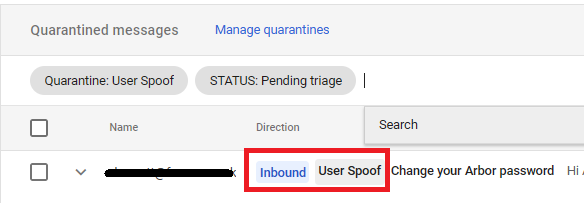
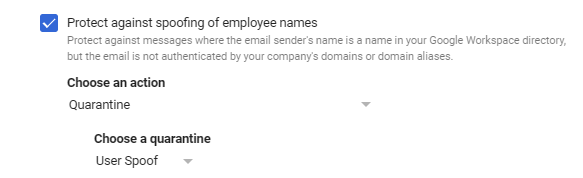
Just an update and further apologies to @MYK-IT for hijacking the thread... 😬 This morning I tried resetting another user's Arbor password. As predicted it ended up in my newly created 'User Spoof' quarantine... The only setting I have that directs emails to this quarantine, is the following: Apps > Google Workspace > Settings for Gmail > Safety > Spoofing and Authentication So, in this setting where it specifies the 'email sender's name' isn't actually the 'from' as I think from the header, this is 'Name of My School <[email protected]>' I'm confused... why does it think the email sender's name is in our Google Workspace Directory...?
-
Don't forget the copper strands are rolled together on the thighs of virgins and they are sheathed in a covering of the finest mesh made from the golden wing feathers of an Angel to protect from the Devil of interference...
-
I used the MX Toolbox Analyze Headers which is where I saw it passed all the usual tests. DMARC Compliant SPF Alignment SPF Authenticated DKIM Alignment DKIM Authenticated So the usual Arbor troubleshooting doesn't really apply as it's focused on those being the reasons it might fail to be sent/delivered or end up in spam/quarantine. That's when I started digging deeper and as you say it is sent from an external server, but possibly 'spoofing' (a user in) our domain. I guess there's something GMail doesn't like about that, but it appears to be Safety Configuration setting that is on or off and I can't find a way around it as the other places I know to put allow rules (spam, phishing and malware) don't trigger early enough in the chain. I need to find a way to tell GMail to allow it right at the top of the chain before it checks the Safety Configuration Settings I guess... We don't have many rules set other than any that were default, most of the ones I've set are trying to allow things through! I did try turning off Protect against domain spoofing based on similar domain names and Protect against inbound emails spoofing your domain, but neither of these allowed the emails through. EDIT: I've created more quarantines and been through the 'Safety' settings and I've set Domain Spoofing and User Spoofing to their own individual ones. I'll try to reset a different user's password again and see which one it ends up in and hopefully that will determine what Google thinks the problem is.
-
Our bursar needed some financial information the day after I switched our SIMS server off... We weren't quite out of contract, but I had shut down the VM and disabled its network as we had already migrated. Anyway, I wasn't going to fire it up and attach it to the network and I'd already started removing all the client installs and SOLUS entries. I did however allow them to use my computer after I used RDP to the host and used a Hyper-V Virtual Machine Connection to the SIMS VM as it had SIMS and FMS client software on. Afterwards I deleted the SIMS server VM.... Honest... I did...
-

All Teaching Staff Getting Laptops - Anyone got an expectations form ?
Koldov replied to mattysmith80's topic in Hardware
As said in a previous post, it's whatever suits the environment best, the teaching styles and the rooms. There are benefits and drawbacks to both options depending on how they are being used. This is definitely more about how things are generally managed, what resources are needed and what platforms are being used. All our teachers have laptops and have done since I started here over 15 years ago. IIRC there were classroom computers, but they were old and failing even then and were in awkward places. Each time (yearly) some of the teachers moved rooms, they wanted their desk in a different place etc. Of course you could tell them they can't... but when has that ever gone down well and been backed by the SLT...? We are a small school and use local file servers, so no SharePoint/OneDrive/GoogleDrive etc. They only have one device, so no profile issues or syncing issues with browsers or files. We're also on LTSC, so no apps to worry about. They all know how to attach a laptop to an interactive screen, projector, speakers, visualiser etc. Generally teachers take their classes in the same room all day but every laptop is set-up the same and each room's IT is set-up the same, so even if they go to a different class it all just plugs in the same. Laptop damage happens, but judging by posts on here, it is very minimal. they can take them home if they want to work in the evening, or over the holidays... in a different room for their PPA, that's up to them. -
In the header there is this line: From: Name of My School <[email protected]> I'm not well versed in the deciphering of email headers, but I know the 'from' can be altered, I also get a bit stuck when talking about header-from, envelope-from, etc... which I found out when trying to create a rule! Maybe I'm over complicating things... Anyway I did add arbor-education.com to an approved senders list to bypass the spam filters, but maybe I have the terminology wrong in the rule? I also think this is quarantined by the Security Settings configuration so doesn't even get that far... Authentication-Results: mx.google.com; DKIM passes - @arbor-education.com SPF passes - smtp.mailfrom="bounces+1234567-123b-USERNAME=SCHOOLDOMAIN@em1234.arbor-education.com"; DMARC passes - arbor-education.com In the SPF pass it mentions the users name and removing the GMail security configuration setting about spoofing users allows the mail through, so although compelling evidence to me, I might be completely off-track...
-
Latest cracker from ESS (albeit Reading Cloud)... My librarian logged on to Junior Librarian today and received the following message (which I've since found as a Reading Cloud Knowledge Base article dated June 20, 2025): "Junior Librarian is on the move! Junior Librarian has a new home! Junior Librarian will be moving to a new URL and joining Reading Cloud" It gives a 'junior.readingcloud.net' URL which when clicked gives you the helpful message... "The site you are trying to access does not exist. Please check your URL." OK, so not live yet... Then it says: "What you need to do Firstly, make sure you are using the best URL to access your library , bookmarks or favourites might need to be updated" Here it gives you a link to 'Best URL to use to access Junior Librarian' Which is in fact a link to an old Reading Cloud knowledgebase article telling you how to modify the old Microlibrarian.net link for your school... Finally it says 'before we go live with the change towards the end of June ensure your proxy and firewall has been updated either just add the exception *.readingcloud.net on port 80/443 or explicitly allowing https://junior.readingcloud.net. ' Towards the end of June... So, I'm supposed to telepathically determine what day in the next week all this is going to happen? When I have to update all the shortcuts on the teachers laptops... if we going to lose access to the old site immediately... will it look different... are there any training documents... are they porting over all the information (books/users)...? I'm presuming yes on that last one, but a solid switch over date would be nice...
-
So, it might not help the OP or anyone else as it seems I'm the only one with this problem according to the lack of posts on here, or internet search hits (Arbor does have it as a known problem and have troubleshooting guides on their support pages, even though I've followed them and it hasn't helped). Well, it looks like the fact that the email got through once means that even with the security settings back on, the password reset emails consistently get through for this user now. I found one more thread that might explain it and mentions the added 'x-gm-autoquarantine: 1' entry into the header. https://www.reddit.com/r/gsuite/comments/108c7vi/how_do_i_whitelist_emailsdomains_that_go_into_the/ "If they are getting quarantined as a result of safety settings (they will have x-gm-autoquarantine or something similar in the header) only way to bypass it is to have the recipient (user) add the sender to their contact." https://www.youtube.com/watch?v=ICCwDiEuzjU In the video he uses GAM I think, to add a domain wide contact. This allows the message to get through quarantine, or alternatively get into the inbox rather than spam and with no warning message and even after removing that contact it allows the message through. I'm not sure that will work in my scenario though as each email is sent to an individual, using an individual email address 'spoof' (I think... unless I can wildcard it somehow... or whitelist the domain, but it's not a big enough issue to warrant any more time). I can only presume some sort of 'intelligent' filtering of these emails is happening and once allowed through, they become 'known' to the system and then appear to bypass the spoof filtering.
-
Do you think that any sort of O365/M365 'spoofing' protection actually stops the email being sent at all? There is a section in the header that says: google.com: domain of bounces+54321-824b-MYNAME=OURDOMAIN.co.uk@em1234.arbor-education.com It would make sense if somewhere along the line, some sort of 'protection' is kicking in. O365 might intercept the mail earlier and stop it even entering the chain...? The 'X-Gm-Auto-Quarantined: 1' line in the header appears to have been inserted, it obviously doesn't appear in the mails that get through, so when and where was it added? It's the only thing that jumps out between a bad header and a good one.
-
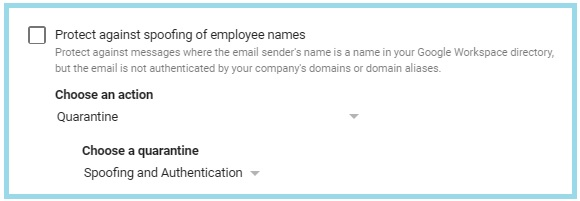
Well OK, so with all my GMail security settings back on I tried a password reset this morning and the email just sailed through and landed in my inbox! Tried again and the same, email received, no problem! W... T... F... Here's the kicker.... With their permission, I tried to reset another user's password.... email went straight to quarantine! Turned off the 'Protect against spoofing of employee names' and their email went through! Going to turn it back on.... and see if now their email goes straight through every time as well....
-
OK, so did a little testing (probably not advised and certainly not with any 'scientific' methodology)... Might not help the OP, but maybe O365 has similar security features, or someone else might find it useful. For our quarantined email the 'Matched Rule' was 'Spoofing and Authentication'. I have read previously that this will not have any 'Rule Description' given as it is deemed by Google that (from the link in my other post) "when you have these safety rules enabled, it will not show in the matched rules because they are actually not rules but are considered as configuration." So, I went in to the 'Google Admin console > Apps > Google Workspace > GMail > Safety > Spoofing and authentication' and turned off each setting in turn and then tried to reset my Arbor password each time... Strangely enough, the setting that seemed to work was 'Protect against spoofing of employee names' once that was unticked, the email came straight through to my inbox! I'm guessing maybe Arbor uses your username/domain to send an email to you, but from their servers...? I think I reached my limit of Arbor password reset requests, because now it just gives me blank box with an exclamation mark (very helpful)... I swapped browsers from Chrome to Edge and it gave me a couple more tries, but now I'm completely locked out, so I'll double check my findings tomorrow if there's a timer... Then hopefully someone can tell me what that means and how to get around it, without turning this setting off...
-
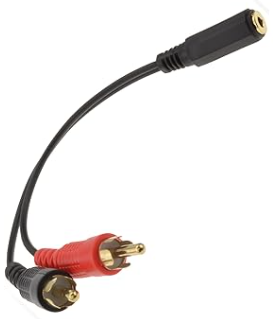
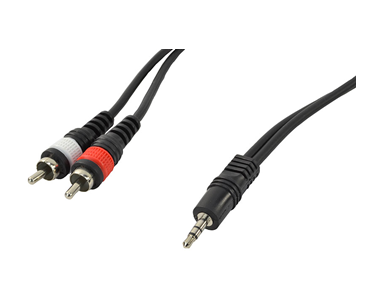
I'm not entering a competition unless you require my name, school details, email address and telephone number... and promise not to contact me with endless spam marketing... But yes, looks like RCA phono at that end (probably old, possibly DIY) to put stereo down 'one' cable, don't know if it's 3.5mm or 1/4 inch female at the other (headphone socket?). EDIT: Headphone jack... Yeah, can't believe someone hasn't put an L and R in Tippex on them, but really for 99% of the time it wouldn't matter...
-
I've just sent myself a password reset email and it's gone into quarantine... Thing is, I've looked through the header and can't see anything wrong, everything seems to pass. I put the header in MX Toolbox and everything is OK.... DMARC, SPF, DKIM all show green. The only thing I can think of is that the header contains the following line: "X-Gm-Auto-Quarantined: 1" SMTP Header Tag I haven't found much information about that, but I saw this post in the Google Cloud Community forum: "Google Support confirmed that the SMTP header "X-Gm-Auto-Quarantined: 1" was inserted by the sending server, forcing a quarantine no matter what" https://www.googlecloudcommunity.com/gc/Workspace-Q-A/quot-X-Gm-Auto-Quarantined-1-quot-SMTP-Header-Tag/m-p/542409
-
Is your DMARC policy set to 'reject'?
-
Had this quite a bit a while ago when we started with Arbor and contacted support, but didn't really get any resolution. Haven't had any issues for a while but I presume this is because now we're up and running everybody remembers their password... so I haven't bothered looking into it any further. I found we were receiving the emails but they were all being quarantined (GMail) as is our current DMARC policy, so I could just release them. We set up everything they asked to the best of my ability with regards to DNS (DMARC, DKIM, SPF, TXT), I even put a rule in GMail to allow them (at least what I thought was). None of it worked, but that could be my fault as I'm not really confident in any of that stuff... We added CNAME and added Domain Keys to our DNS, something to do with Sendgrid emails, but I noticed the password reset emails were coming from a different/additional server to the ones we'd allowed there. I was told it was "logged as Known Problem (number 989983). This means that we can link together any other schools that report this issue which helps the Engineering team to prioritise their work"